Most mobile teams do not have a test pyramid. They have a test funnel.
A handful of unit tests written when the project was new. Almost nothing at the API layer. And a UI suite that grows every time a bug reaches production, until it takes ninety minutes to run and half the failures are the suite’s fault, not the app’s.
The fix is not writing more tests. It is deciding which layer each test belongs to, and being willing to move the ones that are in the wrong place.
Disclosure: Kobiton is a real-device testing cloud, so we have a stake in the top layer of this pyramid. The framework below applies whatever infrastructure you run on, and most of the work it recommends is moving tests away from that layer.
The classic pyramid was written for the wrong platform
Mike Cohn introduced the test pyramid in 2009: a wide base of fast unit tests, a narrower middle of service tests, and a thin tip of slow end-to-end tests. It has held up well for backend and web work, and Martin Fowler’s summary remains the clearest statement of why.
Mobile puts pressure on it in one specific place.
On the web, a bug that only appears in one browser is unusual. On mobile, a bug that only appears on one device is normal. Your app runs on hardware you do not control, across OS versions users refuse to update, on screens with cutouts and folds, with a camera and a fingerprint sensor and a payment sheet in the middle of your checkout flow. None of that behaviour exists below the UI layer. You cannot unit test a Face ID prompt.
So the mobile pyramid keeps the same shape, but the tip does real work. It is not a formality you run before release. It is the only layer that can answer certain questions at all.
That gives you two jobs instead of one. Push every test as low as it will go, and then be deliberate about the small set that has to stay at the top.
What belongs at each layer
Unit tests: your logic, with no device involved
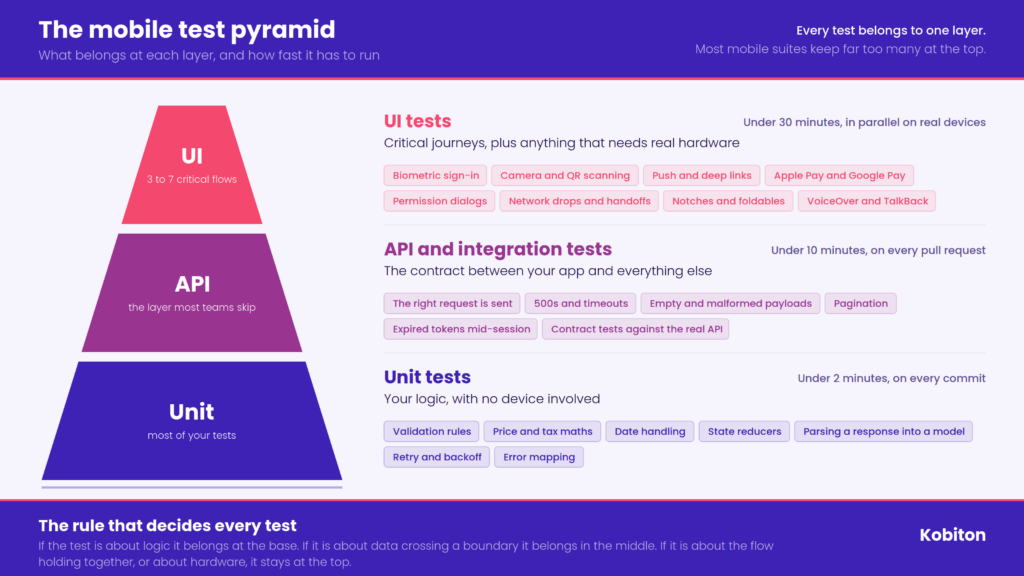
This is anything that can be answered without launching the app. Validation rules. Price and tax calculations. Date handling. State reducers. Parsing a response into a model. Retry and backoff logic. Error mapping.
These run on the JVM or a simulator in milliseconds, they do not flake, and they fail with a message that points at a line number. If a test can live here, it should live here. There is no argument for testing a currency rounding rule through a checkout screen.
A good signal you are under-invested at this layer: your UI tests contain assertions about numbers. When a UI test checks that the total reads $47.83, the real subject is the pricing logic, and it is being tested through five screens of indirection.
API and integration tests: the contract between your app and everything else
This layer covers what happens when your code talks to something else. Does the app send the right request? Does it handle a 500, a timeout, an empty list, a paginated response, an expired token. Does the backend still return the fields the app expects after last week’s deploy.
Two kinds of tests live here, and teams usually run only one.
The first is the app against a fake or mocked backend. You control the responses, so you can test the ugly cases that are impossible to trigger against a real server. Empty states, malformed payloads, the session expiring mid-request.
The second is contract testing against the real API. This catches the failure mode that costs mobile teams the most: the backend changed, the app did not, and nobody found out until the release build hit a device. Mobile is worse than web here because you cannot hotfix. A broken build sits in the app store review while users churn.
This middle layer is the one most mobile suites are missing entirely, and it is the cheapest place to add coverage.
UI tests: critical journeys, plus everything that needs real hardware
Two categories belong at the top. Nothing else does.
Critical user journeys. The three to seven flows that, if broken, mean you pull the release. Sign in. Search and add to cart. Complete a purchase. Transfer funds. Whatever your app exists to do. These are worth the cost of running end to end because they are the flows that generate revenue and support tickets.
Anything that depends on the device itself. This is the category the classic pyramid has no advice about, because it does not exist on the web:
- Biometric sign-in with Face ID or fingerprint
- Camera, QR and barcode scanning, document capture
- Push notifications and deep links, including cold-start behaviour
- Apple Pay and Google Pay sheets
- Permission dialogs, which differ by OS version and by manufacturer
- Network transitions: wifi to cellular, degraded signal, going offline mid-transaction
- Screen sizes, notches, and foldables
- Screen readers, meaning VoiceOver on iOS and TalkBack on Android
- Battery, memory, and thermal behaviour under real load
None of these can be pushed down a layer. Mock them and you have tested your mock. Run them on an emulator and you have tested a simulation of hardware that behaves differently from the phone in your user’s hand.
The rule that decides every test
When you are unsure where a test belongs, ask one question: what is this test actually about?
If the answer is logic, it goes in the unit layer. If it is about data crossing a boundary, it goes in the API layer. If it is about the flow holding together, or about hardware, it goes at the top.
The test that checks “the error banner appears when login fails” is usually two tests wearing one coat. The mapping from a 401 to an error message is a unit test. The banner rendering is a UI concern. Split them and you get faster feedback plus a failure message that tells you which half broke.
Why your top layer got fat
Almost every inverted suite, sometimes called the ice cream cone, got there the same way. A bug reached production. Someone said “add a test so this never happens again.” A UI test was added, because that is the layer where the bug was seen. Repeat for two years.
The bug was seen at the UI layer. That does not mean it lived there. Most production bugs that get patched with a new end-to-end test could have been caught by a unit test written in a tenth of the time and run in a thousandth of it.
Two other habits do the same damage. Teams automate their manual regression checklist one for one, which converts a document written for humans into a suite written for a machine that is much slower at reading screens. And teams with no API layer end up testing backend behaviour through the app, because it is the only place they have tests at all.
Stop counting tests, start counting minutes
Percentage targets get quoted a lot. Seventy, twenty, ten. They are a reasonable starting point and a poor operating metric, because a hundred unit tests and a hundred UI tests are not the same hundred.
Use feedback time instead. Set a budget for each layer and hold it:
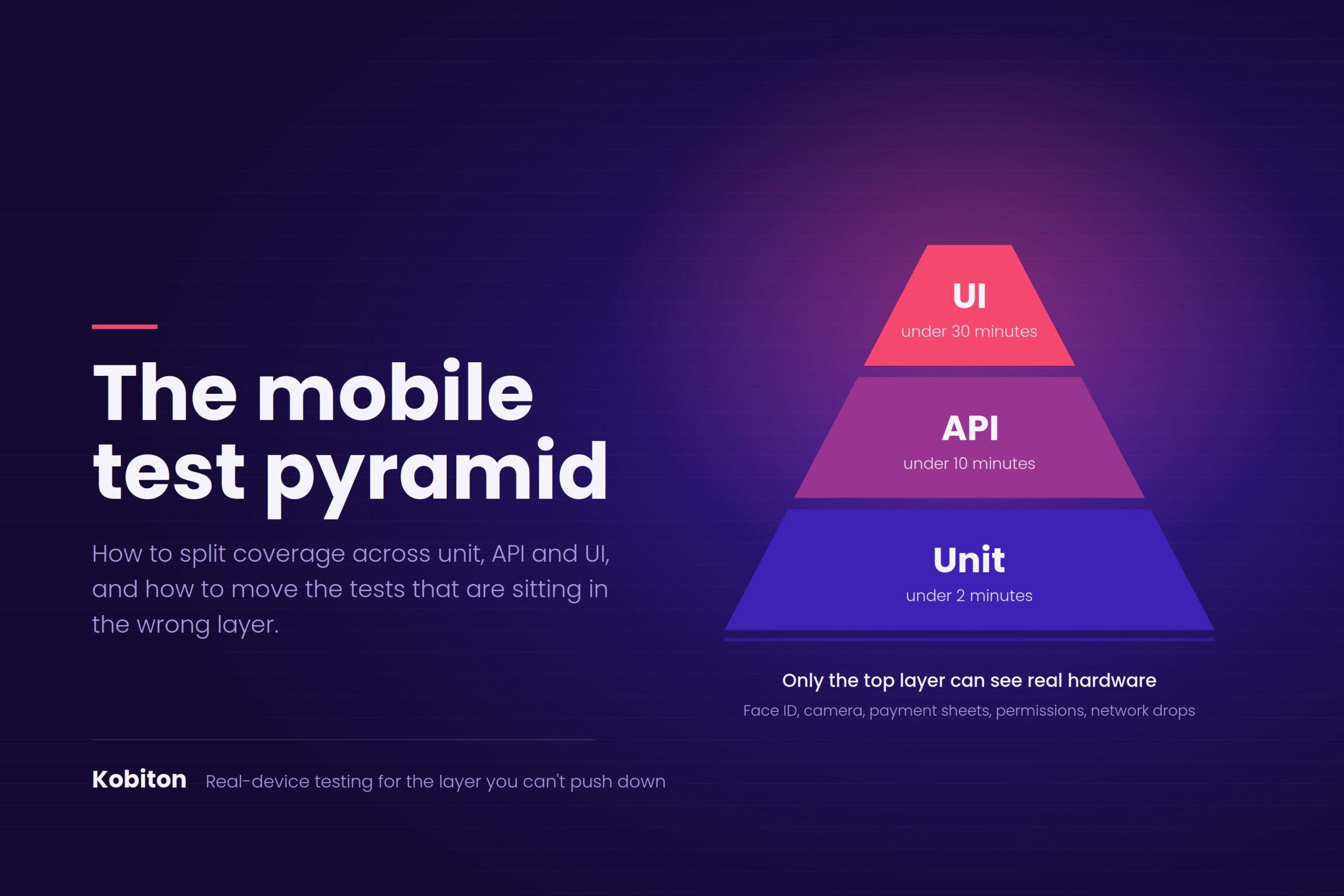
- Unit tests: under two minutes, running on every commit. If they take longer, they are not unit tests.
- API and integration tests: under ten minutes, running on every pull request.
- UI tests: under thirty minutes for the critical set, running on every pull request, in parallel across real devices. The full device matrix runs nightly.
If a layer breaks its budget, the answer is to move tests down, not to buy patience. A UI suite that takes ninety minutes will be skipped, and a skipped suite has zero coverage regardless of what the dashboard says.
How to rebalance a suite you already have
You do not need to start over. Four passes will get most teams into shape.
1. Inventory what your UI tests assert. Read them and write down the actual subject of each one. Not the test name. The assertion.
2. Tag each one device-dependent or not. Use the list above. Be strict. “It’s easier to test here” does not make it device-dependent.
3. Move everything that is not device-dependent and not a critical journey. Most of it becomes a unit test. Some becomes an API test. A surprising amount turns out to be duplicated three times over and can just be deleted.
4. Run what is left on real devices, in parallel. The tests that survive are the ones that need real hardware. Running them on emulators defeats the entire exercise. Running them one device at a time makes the suite too slow to keep.
Expect the fourth step to be the one that stalls. It is a hardware problem, not a testing problem, and it is where most rebalancing efforts stop.
Where Kobiton fits
The top layer is the expensive one, and it is expensive for a reason you cannot engineer around: it needs real phones, in quantity, kept charged and updated.
Kobiton gives your team real iOS and Android devices in the cloud, on-prem, or in your own managed device lab, so the tests that survive the rebalance can actually run. Your existing Appium tests point at a different endpoint and run in parallel across the devices your users carry.
The device-dependent list above is also where Kobiton does work most platforms cannot. You can test biometric sign-in, inject audio and camera input for scanning flows, run Apple Pay and Google Pay inside a session, and check accessibility with automated VoiceOver and TalkBack validations. When a test fails, Session Explorer replays the run with device logs, network payloads, and system metrics, so you find out whether the app broke or the test did.
And when a UI change breaks a locator, self-healing keeps the test running instead of handing your team another maintenance ticket. That matters most at the top of the pyramid, where maintenance cost is what drives teams to stop running the suite.
Ready to see how fast your critical journeys could run on real devices? Start testing for free or book a demo.
Frequently asked questions
What is the mobile test pyramid?
It is a way of splitting mobile test coverage across three layers: a wide base of unit tests that check logic without a device, a middle layer of API and integration tests that check how the app talks to your backend, and a narrow top layer of UI tests that check critical user journeys and anything that depends on real hardware.
What is the right ratio of unit to API to UI tests?
Seventy, twenty, ten is a fair starting point, but feedback time is the better target. Keep unit tests under two minutes, API tests under ten, and your critical UI set under thirty minutes running in parallel on real devices.
Why can’t mobile UI tests be reduced as far as web ones?
Because device behaviour only exists at that layer. Biometrics, camera, push notifications, payment sheets, permission dialogs, and network transitions cannot be tested below the UI, and they cannot be tested accurately on an emulator.
How do I know if my mobile test suite is inverted?
Check whether your UI tests assert things like calculated totals, validation messages, or error mapping. Those are unit tests running in the slowest possible place. If most of your suite runtime is UI and most of your failures are flaky, the pyramid is upside down.
Related reading
- How to triage Appium locator failures in ten minutes — for when half your failures are the suite’s fault
- Appium Tutorial with Java: Setup to First Test — building the layers below the top
- How to Use Appium Inspector — finding the locators your critical journeys depend on