Mobile game testing differs greatly from testing a standard mobile app.
A standard mobile app usually asks whether a user can complete a task: sign in, search, check out, submit a form, or update a setting. A mobile game has to answer those questions too, but it also has to answer harder ones such as: Does the game respond when the player acts? Does the input feel fair? Does the tutorial make sense? Can the player read the screen? Does performance hold during long sessions?
A mobile game can pass a basic functional test and still fail the player. The app opens. The menu loads. The button works. But if the frame rate drops so low that the player cannot tell whether the game froze, attacks do not land near their targets, important UI is cut off, or the device overheats during a session, the experience has still broken.
Android’s Android Performance Tuner documentation frames performance in user-experience terms, showing frame rate and loading-time performance from actual user devices in the real world. That matters for mobile games because performance is not only a technical metric. Frame rate, loading time, fidelity, responsiveness, and device conditions shape how the game feels to the player.
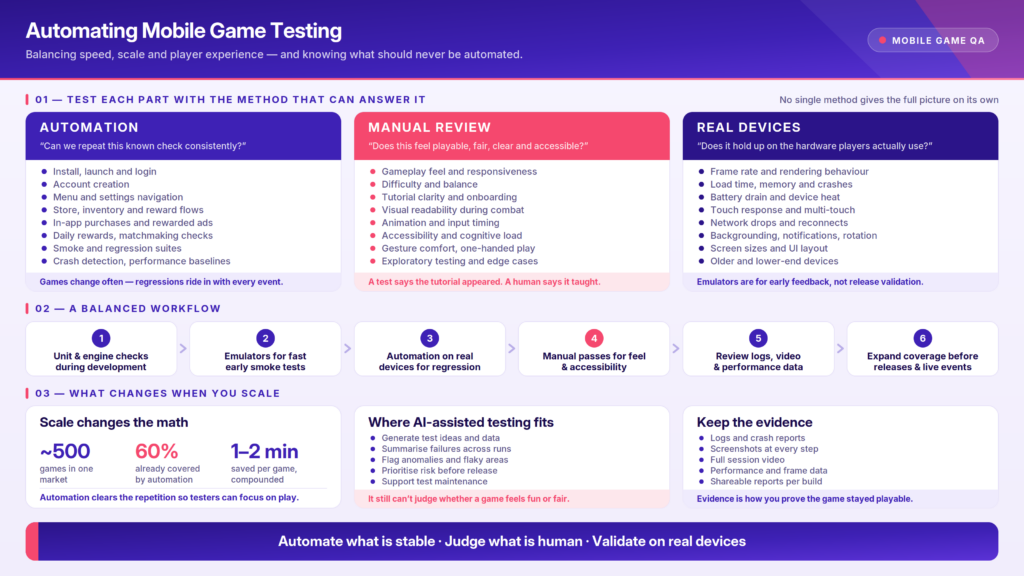
That is why automating mobile game testing requires a balanced strategy. Automation is useful for stable and repeatable checks such as install, launch, login, menus, settings, purchases, smoke tests, regression paths, and performance baselines. Human review is still needed for gameplay judgment, accessibility, visual clarity, difficulty, player frustration, and whether the game feels playable. Real devices are needed when performance, touch behavior, network conditions, battery, heat, and hardware shape the experience.
In mobile game testing, the decision does not rest between automation and manual testing categorically. The true mission is to test each part of the game with the method that can answer its question honestly.
What mobile game automation can do well
Automation works best when the test has a stable path and a clear expected result.
For mobile games, good automation candidates often include:
- app install and launch
- login and account creation
- menu navigation
- settings changes
- tutorial start and completion checks
- store, inventory, or reward flows
- in-app purchase validation
- ad loading or rewarded-ad checks
- daily login rewards
- basic matchmaking or connection checks
- smoke tests for critical paths
- regression checks after new builds
- crash detection
- app launch time, memory usage, and other performance metrics
These checks matter because games change often. New content, balance changes, monetization updates, SDK changes, engine updates, and seasonal events can all introduce regressions. Automation helps teams repeat important checks across builds without asking testers to manually replay the same stable paths every time.
Automation can also help with game-specific interaction when the input is structured enough to repeat. Game automation often works by simulating input, such as cursor movement, clicks, pressing, typing, scrolling, and drag-and-drop. Some test scenarios can also coordinate repeated interactions across devices or players, which is useful for structured multiplayer or cross-platform scenarios.
That does not mean every player interaction should be automated. Touch gestures, multi-touch behavior, controller input, timing, motion, and player decision-making can all complicate automation. The best automation targets are stable, repeatable, important, and easy to evaluate.
Where gameplay needs human judgment
Some parts of mobile game testing require human judgment. Purely technical testing falls short of meeting game testing needs because games are designed to be played, not merely executed.
Manual testing is especially important for:
- gameplay feel
- difficulty and balance
- tutorial clarity
- visual readability
- animation timing
- player frustration or confusion
- accessibility review
- gesture comfort
- controller or touch input feel
- unexpected player behavior
- exploratory testing
- edge cases in progression or game state
- whether the experience feels fun, fair, and understandable
A scripted test can confirm that a tutorial screen appears. A human tester can tell whether the tutorial actually teaches the player what to do.
A test can confirm that a button is present. A human can tell whether the button is readable during combat, reachable during one-handed play, or confusing when the screen is crowded.
A performance metric can show frame rate drops. A human can tell whether those drops make the game feel sluggish, unfair, or frustrating.
These are not soft concerns; they affect whether players keep playing. A game that feels unfair, confusing, inaccessible, or uncomfortable can cause a player to lose trust even when the underlying systems technically work.
Accessibility and player experience need human review
Another major benefit of manual testing is when assessing its accessibility. Mobile game accessibility should not be treated as just a checklist. It affects whether players can inhabit the game world, understand what is happening within it, respond in time, and continue playing.
Automation can help flag common accessibility risks, such as missing labels, contrast problems, small touch targets, or UI elements that may be difficult to inspect. But mobile games often create accessibility challenges through motion, timing, visual effects, sound cues, input complexity, and cognitive load.
A game may technically load and complete a flow while still being difficult to understand, visually overwhelming, or uncomfortable to play. That kind of issue requires human review.
Teams should manually test whether players can understand instructions, recover from mistakes, read important information, use touch controls comfortably, and complete core gameplay with relevant accessibility settings enabled. Cognitive and physical disabilities, as well as age, all affect the way a player interacts with a game.
How gameplay feels depends on device behavior
In mobile games, hardware is part of the experience.
The screen affects readability and control placement. The GPU affects rendering. CPU and memory limits affect stability. Battery and heat affect sustained performance. Touch responsiveness affects whether input feels immediate. Network changes affect multiplayer, rewards, reconnects, and session continuity.
A small delay in a standard app may be annoying. A small delay in a game can make an input feel unfair, a jump feel mistimed, or a combat encounter feel broken.
Real devices are especially important for testing:
- frame rate and rendering behavior
- app launch and loading performance
- memory usage and crashes
- battery drain and device temperature
- touch responsiveness and gesture handling
- orientation changes
- network interruptions
- push notifications and app backgrounding
- screen size and UI layout
- accessibility settings
- older or lower-end devices
- device-specific rendering issues
In one mobile gaming customer conversation, the team discussed multi-touch support for testing mobile titles remotely. The customer described a need for developers to interact with mobile games through gestures such as four-finger taps, while also recognizing that remote interaction is not identical to holding the physical device.
That distinction matters. Some tests need reliable remote interaction. Others still require hands-on review because touch feel, latency, and control response affect the player experience.
Emulators and simulators can support early testing, but real devices show how the game behaves when a human player interacts with it.
Mobile game testing gets harder at scale
Mobile game testing becomes more complex as the number of games, markets, builds, devices, and player scenarios grows.
A team testing one game on a few devices can rely more heavily on manual review. A team supporting hundreds of games, frequent releases, multiple markets, and regression coverage needs a more scalable strategy.
A gaming customer conversation showed the scale problem clearly. The team described nearly 500 games in one market, with automation already covering about 60 percent of them and plans to expand automation into regression testing. Even saving a minute or two per game would create meaningful time savings at that scale. For teams managing many games, markets, and devices, automation is not about replacing gameplay review. It is about reducing the repeated work that slows release cycles.
That is where automation becomes valuable. It helps teams repeat stable checks, run regression suites, collect results, and expand coverage without asking testers to manually repeat every known path.
However, scale does not circumvent the need for human review. In fact, it makes human review even more important. Automation can reduce repetitive work so testers have more time to evaluate gameplay feel, edge cases, accessibility, visual clarity, and player experience.
Enterprise testing conversations also show that gaming creates infrastructure questions, not only test-script questions. Teams exploring mobile and console game testing often need labs, device access, and scalable infrastructure so testing can run across the platforms and devices that matter to their users.
Game automation also needs usable reporting. Unreal Engine’s Automation Test Report Server documentation describes a distributed testing problem: test results need to be shared in a way that teams and external testers can access, review, and compare. That same principle applies to mobile game testing at scale. Running automated tests is only part of the workflow. Teams also need logs, screenshots, videos, performance data, and reports that help them understand what happened across devices and builds.
How to build a balanced mobile game testing strategy
A practical mobile game testing strategy uses automation, manual testing, and real devices together.
Use automation for repeatable checks. These are the tests that should run often and produce clear results, such as launch, login, menus, purchases, settings, crash detection, and regression flows.
Use manual testing for player experience. These are the areas where human judgment matters, such as gameplay feel, tutorial clarity, difficulty, accessibility, visual readability, and exploratory behavior.
Use real devices for device-dependent behavior. These are the tests that depend on actual hardware, performance, touch input, battery, network behavior, OS differences, and device-specific conditions.
A simple workflow might look like this:
- Run unit tests and engine-level checks during development.
- Use emulators or simulators for early smoke testing and fast feedback.
- Run stable automation on real devices for regression and compatibility coverage.
- Use manual testers for gameplay feel, accessibility, exploratory testing, and edge cases.
- Review logs, videos, screenshots, performance data, and crash reports after each run.
- Expand real-device coverage before major releases, live events, SDK changes, or monetization updates.
Automating every part of the game testing process should not be seen as the ultimate goal. The true aim is to automate repeatable work so testers are free to spend more time on the parts of the game that require their human judgment.
Decide how to test each part of the game
So now that we have an idea of how each type of testing works, what does all this information look like in practice?
Use this guide to decide whether a mobile game test belongs in automation, manual review, real-device validation, or some combination of all three.
Automate it, test it by hand, or put it on a real device?
Answer six questions about a single test and get a recommendation, plus how often to run it. Works for one flow at a time — a login check and a boss-fight frame rate check are two different decisions.
No verdict yet
Answer all six questions and the recommendation appears here, with the reasoning behind it.
How Kobiton supports balanced mobile game testing
Mobile game testing needs more than one testing method. Teams need a way to run repeatable checks, investigate gameplay issues, review performance, and validate behavior across the devices players actually use.
Kobiton supports that kind of balanced strategy by combining real-device access, manual testing, automated execution, session artifacts, and performance data in one platform.
For repeatable checks, teams can run automated tests across real iOS and Android devices. For judgment-heavy testing, testers can interact with devices manually and review gameplay behavior directly. After a session, teams can inspect artifacts such as logs, screenshots, videos, and performance data to understand what happened during the test.
That matters for mobile games because scale is not only about running more tests. It is about keeping enough evidence to understand whether the game remained playable across builds, devices, markets, and player conditions.
For mobile game teams, that combination helps connect repeatable automation, real-device evidence, and human gameplay review into one testing workflow.
Where AI-assisted testing fits
AI-assisted testing can support mobile game testing, but it should stay inside the same balanced strategy.
AI can help generate test ideas, summarize failures, identify anomalies, prioritize risk, and support test maintenance. It may help teams understand large result sets, find unstable areas, or decide which tests need human review. Basically, AI can help with some of the administrative tasks that a human might find cumbersome, difficult to discern, or, frankly, boring.
For games, AI is most useful when it reduces repetitive work or helps testers interpret evidence. It does not serve a team well when it is treated as the final judge of playability. It cannot fully decide whether a game feels responsive, fair, readable, accessible, or enjoyable. People are still necessary to evaluate the player experience.
Final takeaway
Automating mobile game testing is not about choosing one perfect testing method. Automation, manual testing, and real-device validation each respond to a different part of the equation. Think of it more as a three-part system:
Automation answers, “Can we repeat this known check consistently?”
Manual testing answers, “Does this experience feel playable, fair, clear, and accessible?”
Real-device testing answers, “Does the game hold up under the hardware, performance, network, and device conditions players actually use?”
No single method gives the full picture on its own.
A mobile game can pass an automated test and still feel broken to the player. A manual session can reveal gameplay problems that should later become automated regression checks. A real device can expose performance, input, battery, heat, accessibility, or rendering issues that virtual environments may not catch.
The strongest mobile game testing strategies are situational. They use automation where the path is stable, manual testing where judgment matters, and real devices where the result depends on actual mobile conditions.
FAQ
Can mobile game testing be fully automated?
No. Mobile game testing can be partially automated, but it should not depend on automation alone. Automation works well for stable, repeatable checks such as install, launch, login, settings, purchases, smoke tests, regression tests, and basic performance metrics. Human testers are still needed to evaluate gameplay feel, difficulty, accessibility, visual clarity, player behavior, and whether the game feels fair and playable.
What parts of mobile game testing should teams automate?
Teams should automate tests that follow a stable path and have a clear expected result. Good candidates include app launch, login, account creation, menu navigation, settings changes, store flows, in-app purchases, reward claims, daily login rewards, tutorial completion checks, crash detection, and regression tests for stable gameplay systems.
What parts of mobile game testing should stay manual?
Manual testing is best for areas that require human judgment. These include gameplay feel, control responsiveness, tutorial clarity, difficulty balance, visual readability, accessibility, motion comfort, player frustration, exploratory behavior, and edge cases that depend on timing, perception, or player choice.
Why is mobile game automation harder than standard mobile app automation?
Mobile games are harder to automate because they often depend on real-time rendering, dynamic movement, custom UI layers, physics, animations, timing, rapid input, and non-linear player behavior. A standard mobile app usually follows a clearer task path, while a game may change constantly based on player action, game state, network behavior, or device performance.
How should teams decide whether to automate a mobile game test?
Teams should ask whether the test is stable, repeatable, and easy to evaluate. If the expected result is clear, automation may be a good fit. If the test depends on feel, timing, difficulty, visual clarity, accessibility, or player judgment, manual testing should remain part of the process.
Why do real devices matter for mobile game testing?
Real devices matter because mobile games depend heavily on hardware and device conditions. GPU performance, CPU limits, memory pressure, battery behavior, heat, touch responsiveness, screen size, refresh rate, network changes, and operating system interruptions can all affect gameplay. These conditions are difficult to fully judge in a virtual environment.
Can emulators or simulators be used for mobile game testing?
Yes. Emulators and simulators are useful for early testing, debugging, basic UI checks, and fast feedback during development. They can help teams catch issues before moving to broader device coverage. However, teams should use real devices for performance, touch behavior, accessibility review, device-specific issues, and release validation.
What is a balanced approach to mobile game testing?
A balanced approach combines automation, manual testing, and real-device validation. Automation handles repeatable checks. Manual testing evaluates gameplay quality and player experience. Real devices show how the game behaves under actual hardware, network, performance, and accessibility conditions.
How can automation help mobile game teams test at scale?
Automation helps teams repeat stable checks across builds, devices, markets, and game versions. This is especially useful for teams managing many games, frequent releases, regression suites, live events, monetization flows, or device coverage requirements. Automation reduces repetitive work so testers can spend more time on judgment-heavy testing.
How does AI-assisted testing fit into mobile game testing?
AI-assisted testing can help generate test ideas, summarize failures, identify anomalies, prioritize risks, or support test maintenance. It can reduce repetitive work, but it still needs human review. AI cannot fully judge whether a game feels responsive, fair, readable, accessible, or enjoyable to play.
What should teams test manually before releasing a mobile game?
Before release, teams should manually review core gameplay, controls, difficulty, tutorials, onboarding, accessibility, visual readability, monetization flows, progression, long-session performance, interruptions, and recovery from errors. These areas often affect player trust and cannot be fully validated by automation alone.
What is the best mobile game testing strategy?
The best mobile game testing strategy uses automation for repeatable checks, manual testing for player experience, and real devices for hardware and performance validation. The goal is not to automate everything. The goal is to automate what is stable so testers can focus on the parts of the game that require human judgment.
Related reading
- Mobile Game Accessibility Testing: Can Every Player Enter the World?
- Manual vs Automated Mobile Testing: When to Use Each
- Emulators, Simulators, and Real Devices: A Detailed Comparison
- AI Mobile Testing Still Needs Real Devices
- Kobiton mobile gaming solutions
- Kobiton real device testing