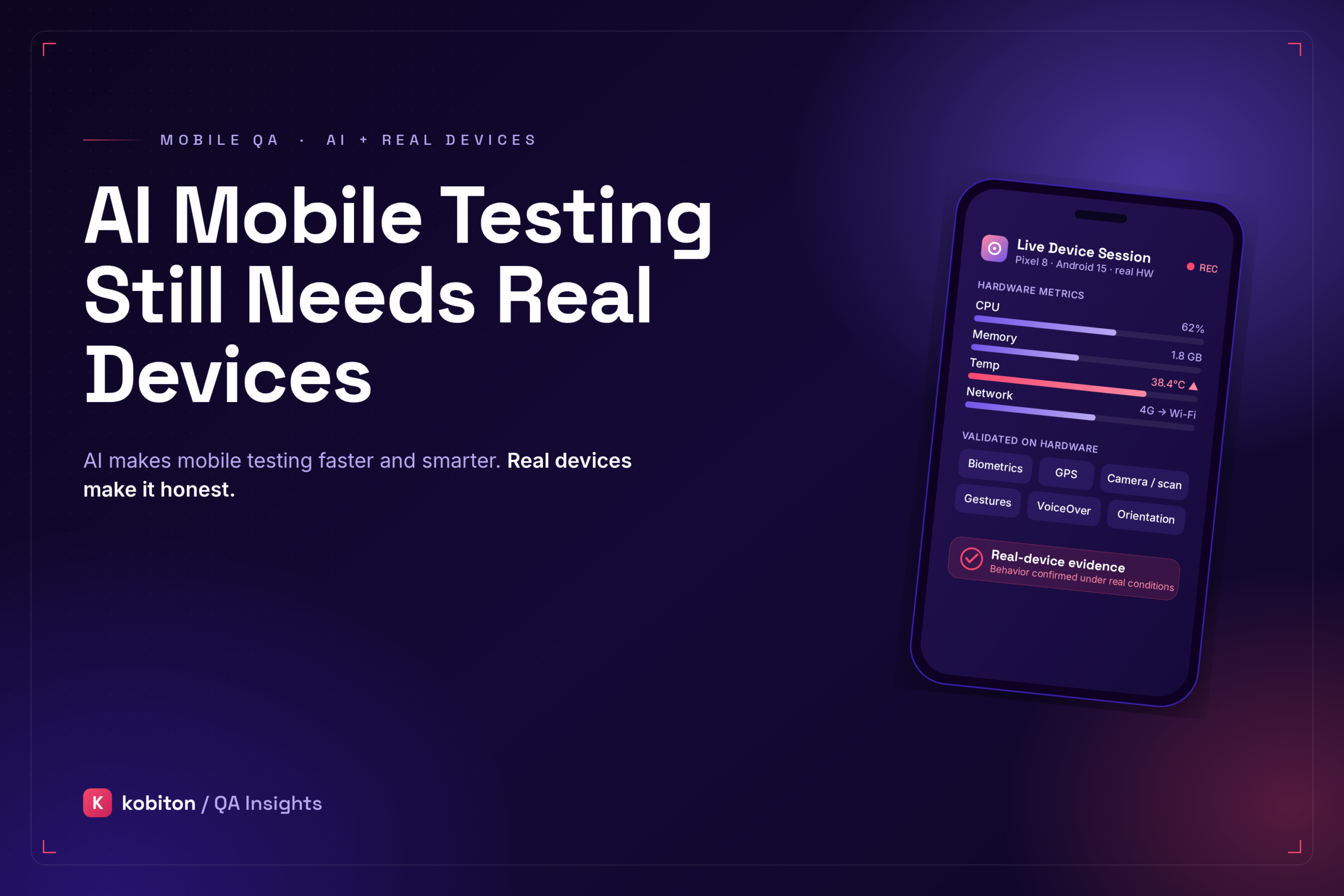
AI mobile testing uses artificial intelligence to help teams create tests, maintain automation, analyze failures, prioritize risk, summarize results, or remediate blockers during test execution. It can make mobile testing faster and easier to scale, especially when teams are dealing with large regression suites or repeatable user flows.
But AI mobile testing still needs real devices. Mobile apps run through hardware, operating systems, sensors, networks, permissions, accessibility settings, and performance conditions that cannot be fully judged from generated tests or simulated environments alone.
Emulators, simulators, automation, and AI-assisted workflows all have a place in a healthy mobile testing strategy. They can help teams move faster and catch many issues earlier. Real-device testing answers a different question: does the app actually work under the conditions users experience?
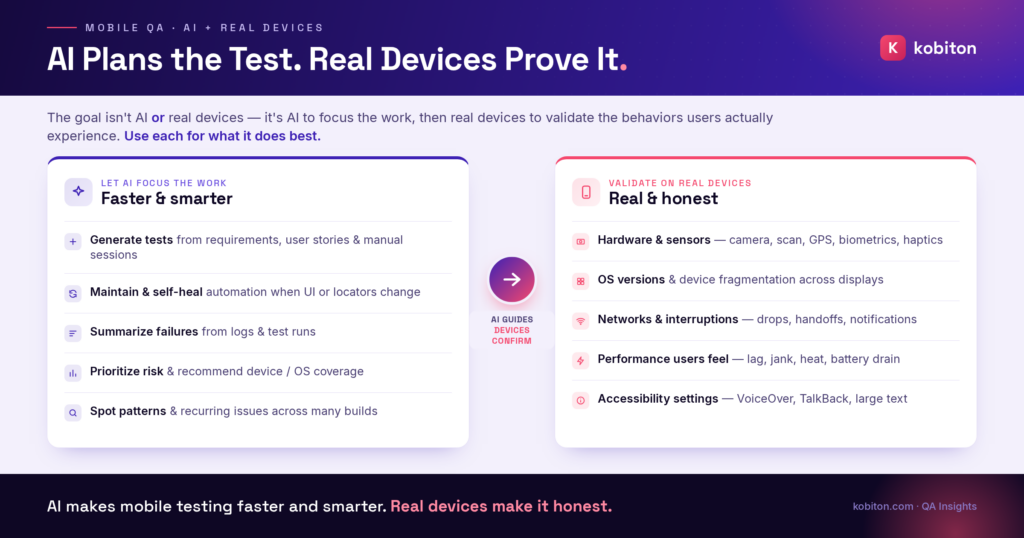
That is why the goal is not to choose between AI and real devices. The goal is to use AI to focus testing work, then use real devices to validate the mobile behaviors that matter most.
This distinction is not just theoretical. Firebase Test Lab recommends testing significant UI and functionality updates on physical devices because physical-device testing helps validate stability and performance across popular devices and covers app functionality that depends on physical device features that virtual devices may not fully simulate.
AI is smart, but it does not have a device in its hand
AI is changing mobile testing.
It can help teams generate test cases, analyze logs, summarize failures, prioritize risk, identify patterns, and reduce some of the maintenance burden that comes with test automation. AI can also help testers move faster by turning manual sessions into repeatable scripts, suggesting coverage gaps, and helping teams focus on the areas most likely to affect users.
That matters, especially for teams trying to release mobile apps faster without letting quality slip. But users do not experience mobile apps inside a model. They experience them through screens, speakers, sensors, operating systems, gestures, network conditions, battery levels, device settings, and physical hardware.
Where AI mobile testing fits in the workflow
AI is useful when mobile testing involves repetitive work, large amounts of data, pattern recognition, or test maintenance.
For example, AI can help teams:
- generate test cases from requirements, user stories, or manual sessions
- create baseline automation scripts for repeatable flows
- summarize failures from logs or test sessions
- identify high-risk workflows and recurring failure patterns
- support self-healing automation when locators or UI elements change
- prioritize device, OS, and regression coverage based on risk
These are meaningful improvements. AI can reduce the blank-page problem, speed up test planning, and help teams keep automation suites more useful as mobile apps evolve.
Real-life examples where AI still needs real-device validation
Customer conversations show why AI mobile testing works best when it stays connected to real-device evidence and human review. Kobiton’s AI-assisted testing workflows are designed around this kind of human-in-the-loop review: AI can help move a test forward, but testers still review blockers, remediation choices, device coverage, and run validity.
In one health insurance customer conversation, Kobiton demonstrated an AI-assisted test workflow where automated runs could surface blockers that needed tester review. When the same flow appeared differently across devices, the AI could ask for help selecting the right element before moving forward. That human-in-the-loop step matters: AI can reduce repetitive work and learn from remediation, but the tester still decides whether the run is valid and whether the correction reflects the intended user flow.
In another conversation, a retail QA leader described a common testing tradeoff. Most consumer-app automation ran on emulators because many functional bugs appeared in both emulator and real-device environments. But the team also acknowledged that some issues only appear on real devices, especially when hardware interactions enter the picture. For associate-facing apps, where Bluetooth and device-dependent behavior mattered more, real-device testing became harder to dismiss.
A third customer conversation with an automotive team showed the same point from a hardware perspective. During a live device session, the team reviewed CPU, memory, network, battery, and temperature metrics, then discussed app features that depend on real hardware behavior, including biometrics, barcode scanning, image injection, GPS location, and device orientation. Those are not abstract test concerns. They are mobile behaviors that have to be validated against hardware, operating system behavior, app logs, and session evidence.
Together, these examples show the practical boundary. AI can help create, prioritize, and analyze tests. Real devices show whether the app behaves correctly under the conditions users actually experience.
AI-powered validations work best with real behavior
AI can improve several types of mobile test validation, especially when teams need to review quality across many builds, screens, and devices.
AI can support visual testing by detecting layout shifts, missing elements, overlapping content, color changes, and unexpected UI differences. It can support accessibility testing by helping flag contrast issues, missing labels, touch target problems, and screen reader-related risks. It can support performance testing by identifying unusual slowdowns, memory patterns, device temperature changes, or degraded responsiveness. It can also help security review by surfacing suspicious patterns, risky data handling, or findings that need deeper investigation.
These validations are valuable because mobile quality is rarely just pass or fail. A mobile app can work correctly and still deliver a poor experience if it is slow, hard to read, visually broken, inaccessible, insecure, or unstable under real conditions.
AI can flag a visual difference, a performance anomaly, an accessibility warning, or a possible security concern. Testers still need to decide what the finding means in context: whether the change was intentional, whether users would feel the slowdown, whether assistive technology changes the flow, or whether the security signal needs deeper investigation.
That is why AI-generated insights become more useful when they come from real behavior. A manual session or automated test can produce evidence about visual quality, accessibility, performance, stability, and security. AI can help analyze that evidence and surface issues testers may not have been explicitly looking for, but the session, device, and environment still matter.
Why mobile testing is different
Mobile testing is difficult because mobile apps do not run in one predictable environment.
They run across many devices, operating systems, screen sizes, chipsets, memory limits, batteries, network conditions, sensors, orientations, and user settings. They also have to handle real-world interruptions such as calls, notifications, low battery states, permission prompts, app switching, and connectivity changes.
That complexity is why mobile testing cannot be treated like a purely abstract software problem.
An app may pass a scripted check and still behave poorly on a specific device. A flow may work on one OS version and fail on another. A screen may look fine in one resolution and become crowded or clipped on a smaller display. A gesture may feel responsive on a newer device but lag on older hardware.
Android Developers frames automated testing as faster, more repeatable, and useful for catching regressions earlier, especially across screen sizes and form factors. That supports the practical middle ground: automate where automation is strong, then validate the mobile behaviors that still depend on device reality.
Device fragmentation still matters
Device fragmentation is one of the clearest reasons AI mobile testing still needs real devices.
Different devices can vary across several categories:
- Display behavior: screen size, resolution, refresh rate, orientation, brightness, and rendering.
- Hardware behavior: processor performance, memory, battery, camera, biometrics, haptics, and sensors.
- Platform behavior: operating system version, manufacturer settings, browser or WebView behavior, permissions, and accessibility settings.
AI can help teams prioritize which devices to test. That is useful. Not every team can test every possible device and OS combination every time.
But prioritization is not the same as validation.
If AI recommends a smaller device set based on user data, bug history, or risk, teams still need to run tests on those actual devices. A recommendation does not prove the app works. It only helps decide where to look first.
One customer conversation with a credit union showed why device coverage planning matters. After a platform change with stricter security behavior, the team noted that better analysis of actual user devices and operating systems could have helped anticipate user impact. That is exactly where AI can be useful, not as proof, but as guidance. AI can help analyze signals and recommend where to focus coverage, but teams still need accurate device and user data to decide what to validate.
What real devices reveal that AI cannot fully judge
Real hardware exposes real behavior
Some mobile issues only appear when the app interacts with physical hardware.
Real hardware is especially important for flows that depend on:
- Device inputs: camera upload, barcode scanning, image capture, biometrics, GPS, accelerometer, gyroscope, and haptics.
- Device conditions: battery drain, temperature changes, memory pressure, and CPU load.
- Device-specific behavior: audio output, display rendering, manufacturer settings, and OS-level differences.
If the app depends on real hardware, the test should include real hardware.
Networks and interruptions need real-world validation
Mobile users are not always on perfect Wi-Fi.
Mobile users move through unstable conditions: weak signal, Wi-Fi and cellular handoffs, push notifications, permission prompts, low battery states, app switching, expired sessions, and delayed returns to the app.
These conditions can affect mobile app behavior in ways that are difficult to predict from a clean test environment.
Teams should test how the app behaves when:
- the network slows down or drops
- the device switches between Wi-Fi and cellular data
- a push notification or permission prompt interrupts the flow
- the user backgrounds and reopens the app
- the session expires or sync is interrupted
- the battery is low or the app resumes after a delay
AI can help design these scenarios and identify which ones are most likely to matter. Real-device testing shows whether the app can survive them.
Performance cannot be judged from logic alone
AI can help teams identify performance risk, analyze trends, and flag unusual behavior. But mobile performance is not just a number in a dashboard.
Performance is something users feel.
Slow loading, laggy gestures, delayed animations, dropped frames, overheating, battery drain, and memory issues can all damage the user experience. Performance problems change the meaning of a mobile task. A slow checkout flow can cost a sale. A delayed banking screen can make a user question whether a transfer worked. A healthcare app that stalls at the wrong moment can block access to information someone needs quickly.
In live real-device sessions, metrics such as CPU, memory, battery, network activity, and temperature can help teams connect performance changes to the exact steps taken during a test.
Accessibility settings need device-level testing
AI can support accessibility testing by generating test ideas, identifying risk areas, summarizing findings, and helping teams maintain repeatable checks. But mobile accessibility still needs real devices and assistive technologies.
An automated check may confirm that the screen contains the expected labels, controls, and structure. Real-device review still has to answer the harder question: can someone complete the flow with VoiceOver, TalkBack, larger text, reduced motion, or another accessibility setting enabled?
Teams should validate mobile experiences with real assistive technology and device settings, including VoiceOver, TalkBack, larger text, reduced motion, captions, voice control, switch access, different screen sizes, and real task flows.
AI can help organize accessibility testing. It cannot experience the app as a person using accessibility settings or assistive technology.
Visual testing still needs context
AI-powered visual testing can help teams detect layout changes, missing elements, unexpected pop-ups, overlapping content, color shifts, and other visual differences across builds.
That is valuable, especially when testing across many screens and devices.
But visual differences still need context. Some changes are intentional. Some are harmless. Some are serious only on certain devices or in certain flows. Some visual defects become accessibility issues. Others affect brand trust or usability.
Real-device testing adds another layer by showing how the app actually renders across displays, orientations, resolutions, and device conditions.
This is also where human review protects teams from treating every difference as a defect.
AI should guide real-device testing, not replace it
The best use of AI in mobile testing is not to remove real devices from the process. It is to make real-device testing smarter.
AI can help teams answer practical coverage questions:
- Which workflows changed recently?
- Which features have the highest user impact?
- Which devices or OS versions are most likely to expose risk?
- Which failures look related?
- Which automated scripts may need updates?
- Which results need human review?
That kind of support helps teams use real-device testing time more effectively.
Instead of running every test everywhere with no clear priority, teams can use AI to focus on the devices, flows, and conditions most likely to affect users.
Real-device coverage planner
Use this planner to decide which devices, operating systems, hardware features, network conditions, accessibility settings, and high-risk workflows should be included in real-device validation after AI-assisted or automated testing.
AI can help recommend where to focus coverage, but a recommendation is not proof. Real-device testing shows whether the app works under the conditions users actually experience.
Final takeaway
AI mobile testing is powerful, but it still needs real devices.
Use AI to plan tests, generate scripts, prioritize risk, summarize results, reduce maintenance, and focus coverage. Use real devices to validate hardware behavior, OS differences, network changes, gestures, performance, sensors, accessibility settings, interruptions, and real user conditions.
The future of mobile testing is not AI instead of devices. It is AI helping teams test better on the devices people actually use.
AI can make mobile testing faster and smarter. Real devices make it honest.
FAQ
What is AI mobile testing?
AI mobile testing uses artificial intelligence to support mobile testing tasks such as test generation, automation maintenance, failure analysis, risk prioritization, result summaries, and blocker remediation. It can help teams move faster, but it still requires human review and validation against real mobile behavior.
Why does AI mobile testing still need real devices?
AI mobile testing still needs real devices because mobile quality depends on hardware, operating systems, sensors, network conditions, permissions, accessibility settings, performance, and device-specific behavior. AI can help create or prioritize tests, but real devices show whether the app actually works under the conditions users experience.
Can emulators replace real-device testing?
Emulators are useful for early validation, automated checks, and broad functional testing, but they cannot fully replace real-device testing. Some issues only appear on physical devices, especially when the app depends on sensors, biometrics, camera behavior, Bluetooth, performance, battery, temperature, accessibility settings, or vendor-specific OS behavior.
What should teams validate on real devices?
Teams should validate high-risk user journeys, performance-sensitive flows, authentication, payments, camera or barcode scanning, GPS, biometrics, push notifications, accessibility behavior, network changes, and device-specific UI behavior on real devices. Teams should also include the devices and OS versions most relevant to their actual users.
How can AI help with real-device testing?
AI can help teams generate tests, summarize failures, identify patterns, recommend device coverage, prioritize risky flows, and reduce repetitive test maintenance. It can also help testers move faster through large test suites, but the results still need to be reviewed and validated on real devices when release confidence depends on actual mobile behavior.
How should teams choose devices for mobile testing?
Teams should choose devices based on user data, supported OS versions, high-risk workflows, market or region, accessibility needs, and hardware-dependent features. A small smoke suite may only need a few priority devices, while major releases or high-risk changes may require a broader matrix across devices, OS versions, network conditions, and accessibility configurations.