A game should not lock players out of its world
Mobile game accessibility testing evaluates whether players can see, hear, control, understand, and complete a mobile game experience across different devices, settings, abilities, and play conditions. It includes technical checks such as text size, contrast, touch targets, captions, and labels, but it also has to account for gameplay, timing, motion, feedback, difficulty, and whether players can actually participate.
A game can be beautiful, polished, and technically stable, but still be difficult or impossible for some players to enjoy.
The text may be too small to read. The colors may be too similar to distinguish. The controls may depend on fast, precise gestures. The audio cues may carry important information without captions or visual alternatives. Motion effects may make the experience uncomfortable. A tutorial may explain the mechanics visually, but not clearly enough for someone using different settings, input methods, or assistive tools.
Mobile game accessibility testing is about access and challenge
Game accessibility is not about removing challenge. It is about making sure players can access the game well enough to experience the challenge.
Accessible Player Experiences [APX] separates this idea into two broad categories: Access and Challenge. Access comes first. Players need to give input to the game and receive information back from it before they can play at all. Challenge comes after that, when players engage with the mechanics, timing, strategy, memory, emotion, and decision-making the game asks of them.
That distinction matters for mobile games. A player should not lose because the button is too small to activate, the text is unreadable, the screen relies only on color, the audio cue has no alternative, or the game does not support the input method they need. Those are access barriers. They prevent the player from entering the experience before the intended challenge can even begin.
Making a game more accessible does not mean the game needs to be easier. The goal is to make the intended experience easier to access for more players.
Why accessibility matters in mobile games
Accessibility matters in every app, but games create a particular kind of relationship with users.
Players are not only completing tasks. They are learning systems, reacting quickly, following stories, navigating menus, reading dialogue, interpreting visual cues, listening for signals, and building skill over time.
Games also create emotional investment. Players may spend hours building a character, collecting items, learning combat patterns, solving puzzles, or exploring a world. If accessibility barriers get in the way, the player may not just miss a feature. They may be shut out of the experience.
That matters ethically, and it matters practically. More accessible games can welcome more players. Readable text, adjustable controls, clear cues, captions, reduced motion, and flexible settings can improve the experience for players with disabilities, aging players, players with temporary injuries, and players using different devices or environments. Mobile game accessibility testing helps teams find those barriers before players encounter them.
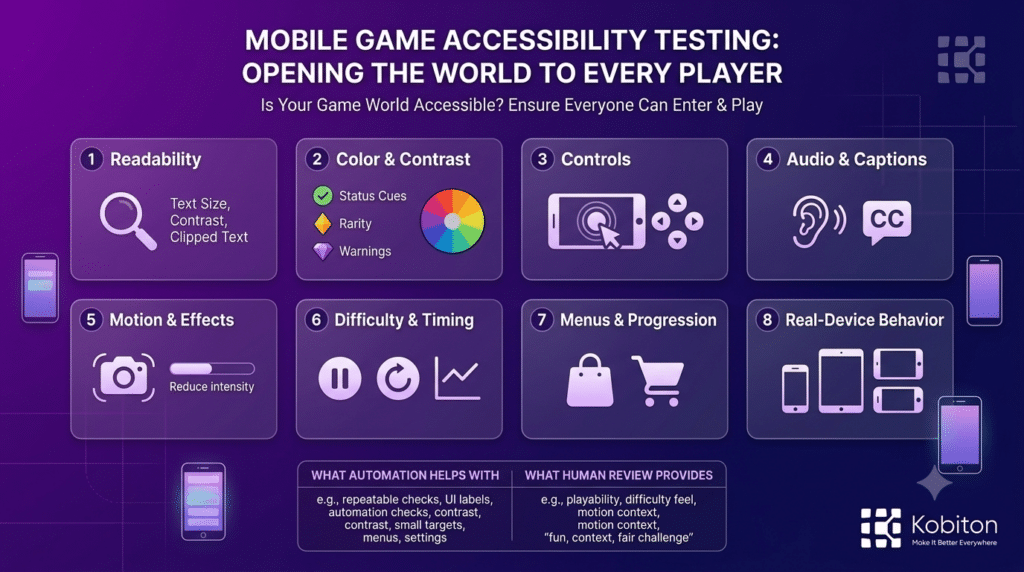
Mobile game accessibility is not simply a question of whether the user can read text on the screen.
Mobile games also depend heavily on visual design, motion, timing, sound, and interaction. Lighting, contrast, camera movement, texture density, animation speed, hit feedback, and input timing can all affect whether a player understands what is happening and can respond. Those choices are part of the game experience, which is why mobile game accessibility testing has to evaluate more than whether UI elements exist on a screen.
That creates accessibility questions beyond a standard app flow:
- Can the player read important text on different screen sizes?
- Can the player understand the game without relying on color alone?
- Are audio cues supported by captions, icons, vibration, or visual feedback?
- Can the player use the controls without precise or rapid gestures?
- Can the player reduce motion or visual effects when needed?
- Can tutorial instructions be understood without perfect vision, hearing, or motor control?
- Can the player pause, recover, or retry without penalty?
- Can menus, inventory screens, stores, and settings be navigated clearly?
- Does the game remain usable across real devices and orientations?
These questions are about playability, not just test compliance.
Accessibility can also create better design. When teams add flexible controls, clearer cues, readable interfaces, and multiple ways to understand information, they often improve the experience for more players, not only the players they originally had in mind.
Key areas to test
Readability
Mobile screens are small, and games often use stylized fonts, decorative UI, dialogue boxes, item descriptions, stat screens, and tutorial text.
Test whether players can read critical information across screen sizes, resolutions, brightness levels, and text settings. Pay attention to clipped text, crowded menus, low contrast, and fonts that look good in a static mockup but become difficult to read during actual play.
Color and contrast
Games often use color to communicate status, rarity, danger, team identity, puzzle state, enemy type, or progression.
Color should not be the only way important information is communicated. Use icons, shapes, labels, patterns, text, or motion alternatives where possible. If players cannot distinguish two similar colors, they should still be able to understand what the game is asking them to do.
WCAG 2.2 includes success criteria for use of color, contrast minimum, and non-text contrast, which are especially relevant for HUDs, menus, warnings, rarity indicators, puzzle states, and gameplay cues.
Controls and touch targets
Mobile game controls can be more demanding than standard app controls. Fast taps, swipes, holds, drags, multi-touch gestures, and virtual joysticks can create barriers for players with limited mobility, tremors, one-handed play needs, fatigue, or alternate device setups.
Test whether controls are reachable, responsive, adjustable, and forgiving. Consider whether a player can use something other than a fingertip to interact with the screen, whether controls can be repositioned, and whether the game allows different input styles.
W3C mobile guidance notes that keyboard access remains important on mobile, including external keyboards and alternate input methods. For games, that same idea extends into controller support, remapping, touch alternatives, and Bluetooth-connected input.
Audio cues and captions
Sound often carries gameplay information: footsteps, warnings, attacks, timers, dialogue, environmental cues, and reward feedback.
If audio matters, players need alternatives. Test captions, visual indicators, vibration, subtitles, volume controls, and whether important cues are understandable without sound.
WCAG 2.2 also includes audio control guidance for audio that plays automatically, which is relevant when game audio can interfere with a player’s ability to understand or control the experience.
Motion and visual effects
Camera shake, flashing effects, rapid transitions, parallax, zoom, blur, and screen movement can be uncomfortable or disorienting for some players.
Test whether players can reduce motion, disable flashing effects, pause animations, or continue playing without visual overload.
Xbox Accessibility Guideline 118 addresses photosensitivity and recommends reducing or avoiding flashing, high-contrast spatial patterns, and visual effects that may trigger seizures, migraines, or other adverse reactions.
Difficulty, timing, and recovery
Menus make up a large part of the game experience, but gameplay mechanics must also be considered.
Test whether players can adjust difficulty, retry without excessive penalty, pause when needed, skip or replay tutorials, and recover from mistakes. A game can remain challenging without being unnecessarily punishing.
Menus, inventory, store, and progression
Many accessibility problems appear outside active gameplay.
Test menus, inventory screens, shop flows, reward claims, settings, achievements, tutorials, and onboarding. These areas are often easier to automate or structure, but they still need accessibility review.
An inventory screen, for example, may seem like a supporting system until a player cannot store an item, read a description, compare equipment, or recover from a confusing interaction. The world of the game depends on these surrounding systems more than teams sometimes realize.
What automated checks can catch
Automated accessibility checks can help mobile game teams find common technical issues earlier, especially in stable areas such as login, menus, settings, inventory, store flows, onboarding, and progression screens.
Kobiton accessibility validation, for example, can help teams review issues such as touch target size, color contrast, and content labeling from recorded mobile sessions. Those checks are useful for mobile games because small controls, low-contrast UI, and missing or unclear labels can prevent players from navigating menus, reading game information, or using assistive technology effectively.
These checks matter because many game systems live outside active gameplay. A player may need to adjust settings, claim rewards, read inventory details, compare equipment, accept permissions, purchase content, or recover from an error before they can continue playing.
But automated checks are only one layer of mobile game accessibility testing. Games also need review for timing, motion, audio cues, controller or touch input, cognitive load, difficulty, and whether players can complete real gameplay tasks on real devices.
Why real devices matter
Mobile game accessibility testing should happen on real devices because players experience games through real screens, speakers, haptics, touch surfaces, operating system settings, and device conditions.
A control layout may feel comfortable on one device and cramped on another. Text may look readable on a large screen and tiny on a smaller one. Color and contrast can appear differently across displays. Performance issues can make timing-based interactions harder. Notifications, orientation changes, heat, and battery conditions can also affect the experience.
Device choice can be part of accessibility too. Some players choose devices because of screen size, weight, touch responsiveness, mounting options, or compatibility with the way they interact with technology. A game that works well on one device may create barriers on another.
Accessibility features often benefit more than one group of players. Larger text helps players with low vision, but it can also reduce eye strain. Clearer contrast supports players with color vision differences, but it also helps anyone playing in bright light. Flexible controls help players with mobility differences, but they can also make long sessions more comfortable. Real-device testing helps teams understand how accessibility holds up where play actually happens.
Customer examples show why game testing needs context
Customer conversations with mobile game teams show why accessibility testing cannot be separated from real gameplay, real devices, and the way games are built.
In one conversation with a mobile game team, performance and capture overhead came up as a practical concern. The team discussed whether high-frame-rate gameplay, logs, video capture, encoding, and parallel sessions could all run without introducing device-level limitations. That matters for accessibility because performance is not only a technical metric. Dropped frames, latency, overheating, or low-quality video evidence can affect how teams evaluate timing, readability, motion, and player experience.
Another mobile game team described a custom testing approach built around command scripts, replay files, and LLM-generated tests. Appium acted more like scaffolding while the game client handled much of the actual test behavior. That is a useful reminder for mobile game accessibility testing: games may not expose clean page objects or predictable UI flows the way traditional apps do. Testing has to account for engine behavior, replay systems, graphics quality, input handling, and what the player actually experiences during play.
A large game studio customer also described how game testing can combine manual gameplay, replay files, low-level device commands, and deep performance diagnostics across chipsets. The team noted that 30 FPS may be acceptable for basic validation, while some QA scenarios may require higher frame rates depending on what is being tested. That distinction matters for accessibility because a setup that is adequate for basic UI validation may not be sufficient for evaluating motion, timing, visual clarity, or gameplay feel.
These examples point to the same conclusion: mobile game accessibility testing has to evaluate the game as a playable experience, not only as a set of screens.
What automation cannot fully validate
Automation can support mobile game accessibility testing, but it cannot fully judge whether a game is playable.
A scanner can flag a small touch target, but it cannot tell whether the control layout feels usable during combat, racing, exploration, or time-sensitive play. A tool can detect contrast issues, but it may not know whether visual effects, lighting, motion, or background detail make important information hard to understand. Automated checks can find missing labels, but they cannot decide whether a player understands what to do next.
Games also ask players to react, remember, interpret, explore, recover, and adapt. That is why human review still matters. A game can pass a functional test and still create barriers through unclear feedback, overwhelming motion, unforgiving timing, inaccessible controls, or difficulty settings that do not give players enough flexibility.
Use automation for repeatable checks. Use human review for playability, context, and feel.
Can every player enter the world?
Use this accessibility test planner to review whether players can see, hear, control, understand, stay in, and recover within a mobile game experience.
The goal is not to remove challenge from the game. The goal is to identify barriers that prevent players from accessing the intended challenge in the first place.
Final takeaway
Mobile game accessibility testing is about making play possible for more players.
A game may pass functional testing and still create barriers through unreadable text, unclear cues, unforgiving controls, overwhelming motion, inaccessible challenge, or device-specific behavior.
The goal is not to make every game easy. The goal is to make sure players can access the information, controls, feedback, and flexibility they need to experience the game.
Games invite players into worlds. Accessibility testing helps make sure more players can enter, understand, and stay there.
Games are made for people, not machines. Human-focused design should stay at the center of mobile game testing, because the world inside the app only comes alive when players can actually play.
FAQ
What is mobile game accessibility testing?
Mobile game accessibility testing evaluates whether players can see, hear, control, understand, and complete a mobile game experience across different devices, abilities, settings, and play conditions. It includes technical checks such as contrast, touch targets, captions, and labels, but it also includes human review of gameplay, timing, motion, difficulty, input, and player experience.
How is mobile game accessibility different from mobile app accessibility?
Mobile apps usually focus on task completion, while mobile games also involve challenge, timing, feedback, motion, audio cues, visual effects, and player skill. A game can be technically functional but still inaccessible if players cannot understand the challenge, control the action, respond in time, or recover from mistakes.
Does accessibility make games easier?
No. Accessibility does not have to remove challenge from a game. It gives players more ways to access the intended challenge, such as remappable controls, captions, readable UI, adjustable timing, difficulty options, reduced motion, or clearer feedback.
What should mobile game teams test for accessibility?
Teams should test readability, color and contrast, controls, touch targets, captions, audio alternatives, motion effects, photosensitivity, difficulty options, tutorials, menus, inventory, store flows, recovery paths, and real-device behavior. Testing should include both automated checks and human review of actual gameplay.
Can automated testing catch mobile game accessibility issues?
Automated testing can catch some accessibility issues, especially in stable UI areas such as menus, settings, stores, inventory, and onboarding. It can help flag small touch targets, contrast problems, missing labels, and some layout issues. But automation cannot fully judge playability, cognitive load, timing, motion comfort, control feel, or whether the player can complete the intended experience.
Do teams need to rebuild a game to make it accessible?
Not always. Some accessibility improvements can be added through settings, UI adjustments, captions, control options, clearer instructions, difficulty tuning, and better testing coverage. However, accessibility is easier and more effective when teams consider it early in design and development instead of treating it as a final-stage fix.
Where can teams learn more about game accessibility?
Teams can start with WCAG 2.2, W3C mobile accessibility guidance, Xbox Accessibility Guidelines, Accessible Player Experiences, Game Accessibility Guidelines, and the IGDA Game Accessibility SIG. These resources can help teams understand both technical accessibility requirements and game-specific accessibility patterns.
Related reading
Mobile Accessibility Testing: What Automation Still Misses
Should Mobile QA Teams Trust AI Testing Tools?
Mobile Game Testing Is Not Just Mobile App Testing With Better Graphics
AI Mobile Testing Still Needs Real Devices