Jun 22, 2026
Will AI Replace Mobile Testers? An Honest Answer for QA
David Hand
Read More
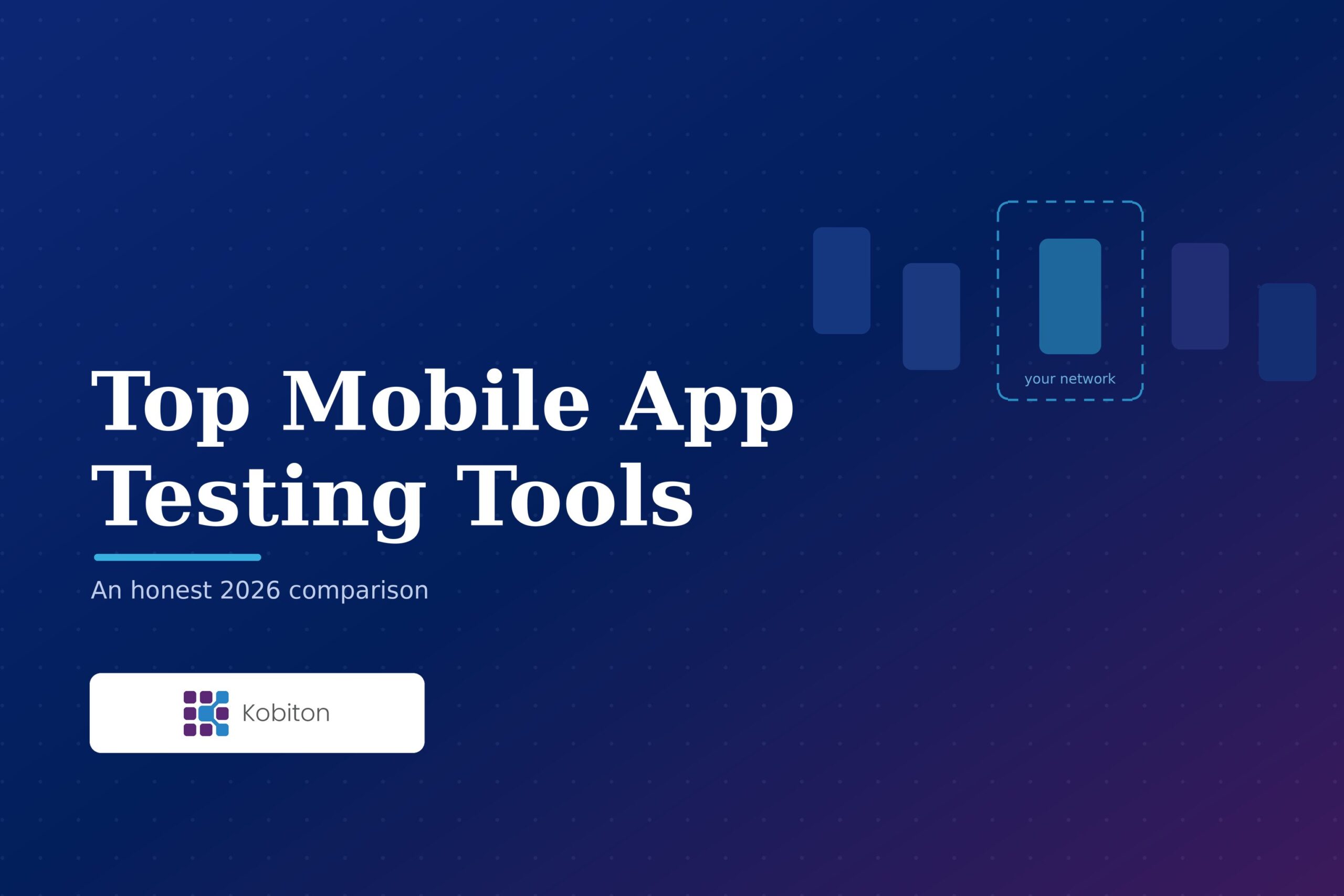
Every list of mobile app testing tools you have read this week contains the same six or eight products, the same feature grid, and the same conclusion: they are all excellent, book a demo. You still have no idea which one fits your team. That is not the list’s fault, exactly. It is what happens when tools get ranked in the abstract, where there is no best tool, only the best fit for constraints only you know.
Which is also why the conflict of interest is worth stating up front. Nobody paid for placement here, and we sell one of these tools. Factor that in, then check us the direct way: read the limits paragraph on our own product and see whether it is as blunt as the other five.
Here is a concrete example. A tooling owner at a healthcare and pharmacy distribution group described his organization as one company to the outside world and roughly ten businesses internally, with no central testing standard. His words for how the enterprise function operates: “We give you the what, where, when and why, and you do the how.” In practice that means Playwright and Selenium across JavaScript and Python, a few teams on C#, and TypeScript arriving with Cypress. A tool excellent at one framework is not a candidate for him at any price.
So this comparison is organized around the seven things that actually vary: real device access, framework support, AI and codeless authoring, CI/CD fit, deployment model, pricing transparency, and what each one is genuinely best and worst at. If you came here searching for the best mobile app testing tools and want a shortlist rather than an essay, start with the widget below.
Five short questions. No email, no signup. It will send you to a competitor whenever a competitor fits better.
The picker needs JavaScript to run. The full comparison below covers all six tools and the same guidance in prose.
The widget asks a few short questions and picks the two or three tools that fit, with the reason for each and what you give up by choosing it. It asks about the things where your answer actually changes the shortlist: what you automate with, whether your flows need real hardware, who authors tests and whether you want AI help, where your app and test data are allowed to run, and how your team buys. The rest of the comparison below covers the axes where the answer is much the same whoever you pick.
Two things about how it behaves. It recommends a competitor whenever a competitor fits better, and for the most common answers it does exactly that. It also says when tools are genuinely tied, or when five fit and the decision is price and support, because a recommender that always produces one confident winner is one you should not trust twice.
One caveat worth stating plainly: this compares features. Real selection also turns on support, customer success, the people behind the product, professional services, price, roadmap, user experience, and latency, none of which a five-question tool can weigh for you. Use the shortlist to narrow the field, then judge the rest yourself.
There is no email gate. If you would rather read than click, the scenario guide below covers the same ground in prose.
Before you compare named products, it helps to know that “mobile testing tools” is not one category. The term covers at least five different kinds of tool that solve different parts of the problem, and a lot of confused evaluations come from comparing things that were never meant to be substitutes. Here is the landscape, and where the six platforms in this comparison fit inside it.
| Category | What it is | Examples | In short |
| Free and native frameworks | Open-source or platform-native libraries you write tests in | Appium, Espresso, XCUITest, Maestro | Free license, you run it |
| AI-native tools | An AI agent generates and runs the tests as the core product | Drizz, QA.tech | Fast authoring, verify the output |
| Low-code and codeless platforms | Record-and-playback or natural-language authoring for non-coders | Testsigma, Katalon | Automation without scripting |
| Real-device clouds and platforms | Hosted real devices plus authoring, execution, and reporting | The six here: BrowserStack, HeadSpin, Kobiton, Perfecto, Sauce Labs, TestMu AI | Hardware at scale, in one place |
| Managed and crowd testing services | People who run the testing for you, on their devices | Applause, Testlio | Coverage you cannot staff |
These categories overlap more every year. The platforms here increasingly embed AI authoring and codeless features, and most of them run the open-source frameworks rather than replacing them. The two options that genuinely change your shortlist get a closer look below: when a free framework is enough, and where the new AI-native tools fit. For outsourced testing, see our mobile app testing companies guide. For hosting and infrastructure choices, see our cloud mobile app testing guide.
Emulators are fast, cheap, and fine for logic. They cannot prove anything hardware-dependent. Biometric prompts, eSIM activation routing through system settings, camera and sensor behavior, Bluetooth pairing, thermal and battery effects under load: these run on real handsets or they do not get tested. Most teams need both, and the ratio is a budget decision, not a philosophical one.
Deciding to test on real devices raises the obvious next question: which ones. You cannot cover every handset, so build a defensible short list from your own data rather than a device-market chart. Start from your production analytics: pull the device, OS version, and screen-size breakdown for your actual users, which usually points to fewer devices than you expect. Use traffic to prioritize the list, not to set a hard cutoff. Then add the cases that stress important flows regardless of traffic: your oldest supported OS version, a low-memory device, and any form factor you support such as tablets or foldables. Refresh it every quarter and after each major iOS and Android release, because your user base and the device market both move.
Teams arrive with a stack and will not change it to suit a vendor. That is the most common reason a promising tool gets eliminated in week one. This axis has largely settled: all six run Appium, and all six run the native frameworks, Espresso for Android and XCUITest for iOS. They differ at the edges, and the edges are where evaluations break.
The standards are documented publicly: Appium, Espresso, XCUITest, and Selenium, Playwright, or Cypress for web layers beside a mobile suite. A platform that generates or executes standard framework code leaves you owning something if you leave. One producing only proprietary artifacts does not.
Worth saying plainly, because most vendor pages will not: for some teams the right answer is a free framework and no platform at all. Appium, Espresso, XCUITest, and Maestro cost nothing to license, and if you have the engineering capacity they can carry you a long way. The catch is the part that is not the license.
What none of them give you by themselves is real devices at scale, enterprise access controls, and a place to run and triage. That is the line where teams move up to the platform tier, or run the framework on top of one. The short version: a framework is how you write the test, a platform or hosted service is where you run it and everything around it, and many teams use both.
Be skeptical of this column, and not for the reason you expect. As of August 2026 the capabilities are widespread rather than distinguishing: natural language authoring, test generation from tickets or requirements documents, and self-healing locators appear across all six, though scope and maturity vary and some remain beta or narrower than the marketing suggests. Any list telling you one of these tools has AI while the others do not is out of date. Compare what each one actually ships, not whether the category is ticked.
Two questions are worth asking instead. The first is cost. The same healthcare tooling owner, who is enthusiastic about AI and building on it deliberately, described internal teams proposing to drop several purchased tools and do everything with an AI coding agent to save money. His response was arithmetic, not ideology: “If you increase all this token usage, how are you really saving?” Consumption-priced AI moves cost, it does not remove it. Ask any vendor with metered AI what a realistic month costs at your volume.
The second question is newer and almost nobody asks it: where does the AI actually run? Every AI feature here calls a model over an API, and what varies is whose network that model sits in. For plenty of buyers that is irrelevant. For a bank, an insurer, or a defense supplier it decides whether the feature can be switched on at all. It is really a deployment question, not an AI one, so it is answered in the deployment section below, where the six tools separate more sharply than they do anywhere else in this comparison.
There is a second shift a feature comparison hides. Alongside the platforms adding AI authoring, a wave of standalone AI-native tools has arrived, where an agent generating and running the tests is the whole product rather than a feature on a device cloud. They differ more than the marketing suggests, so judge them on what they actually do. Drizz drives tests from vision rather than element locators, so the usual brittle-selector worry does not apply the same way. QA.tech is the opposite kind of caveat: as of October 2026 its docs list execution on cloud emulators and simulators, with physical-device support marked coming soon, so check whether it covers the hardware cases you care about before you commit.
Whatever you trial, the honest read is the one the rest of this post uses: an AI tool can author a first draft fast, but someone still has to know what the test should prove. Judge it on how much maintenance the output costs three weeks later, not how fast it wrote the first one.
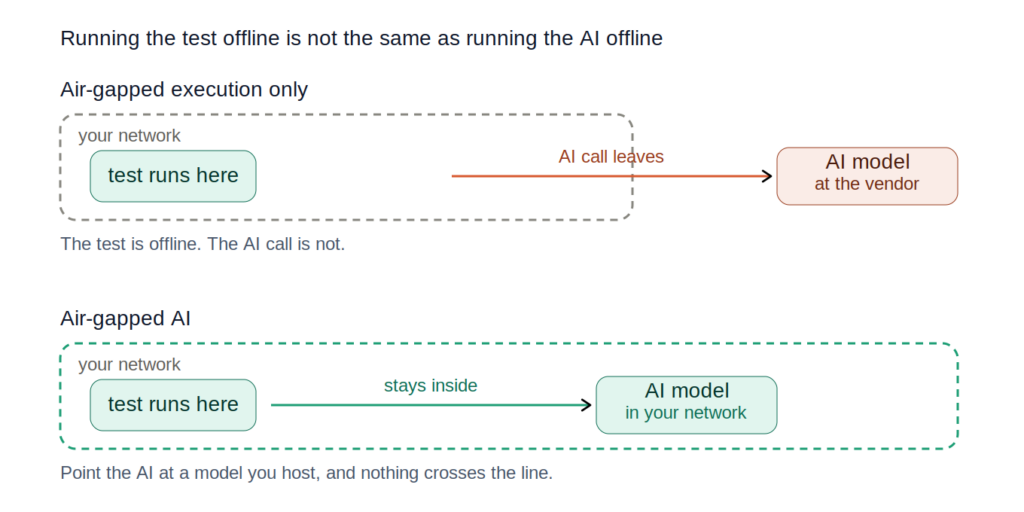
The test can run offline. Whether the AI call does is a separate question.
This axis rarely decides anything, and it is worth saying so plainly. All six integrate with the pipelines teams actually use, Jenkins, GitLab, GitHub Actions, Azure DevOps, so “has a Jenkins plugin” separates nobody. What varies is whether the tool exposes enough for you to rebuild the glue you already have: API and CLI access, machine-readable results, artifact retention, parallel session control. That is the real test, and it does not show up on a feature grid.
A QA automation lead at a major US airline described theirs: Appium and Cucumber suites triggered through their pipeline tool, one pipeline for iOS and one for Android, a hook polling both every sixty seconds until they finish, then collecting artifacts and screenshots into a combined HTML report posted to the team’s chat channel. Their support team runs the smoke suite off that five times a day.
So make them prove it: rebuild a piece of that glue during the trial, on your pipeline, not on a demo.
For many buyers this is a preference. For others it is the first gate, and it closes before features are discussed. A QA lead at a national mobile network operator put it in one line: “Security does not allow us to use cloud solutions.” Their automation already ran on their own servers, devices connected by USB, and no feature comparison would have changed that.
First, the vocabulary, because vendors use these words loosely and the differences are the whole decision. Public cloud means shared devices: a pool of handsets used across the vendor’s whole customer base, and you take whatever is free. Private devices means handsets reserved for you, though they can still sit inside the vendor’s cloud. On premise means the devices and the platform run behind your firewall. Hybrid looks like on premise but is not: your devices sit in your building while the control plane, the part that actually runs things, stays in the vendor’s cloud and your devices call out to it. Air-gapped is the strict one: the whole platform in your environment, no required connection to the vendor at all, including for updates and support. The gap between hybrid and true on premise is where most confusion lives, and it is the gap vendors are least precise about.
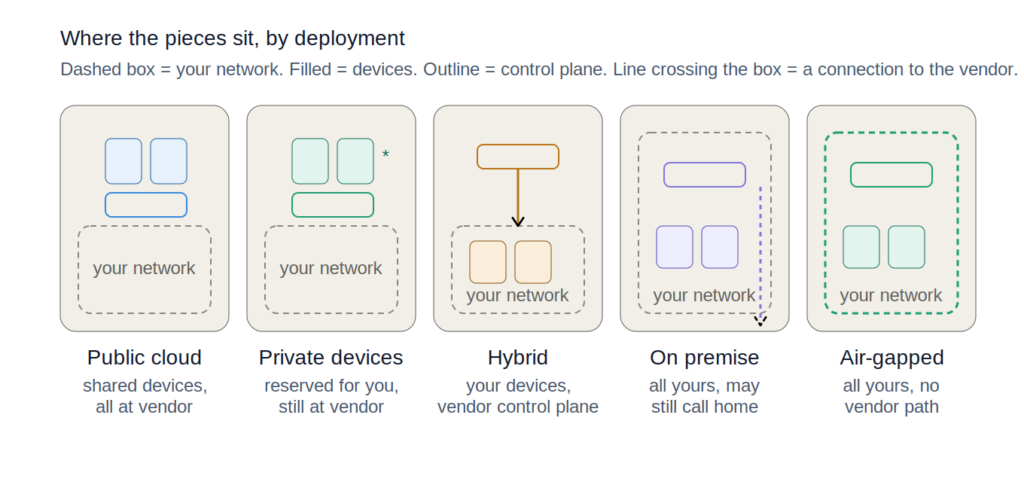
The five postures, and which components sit inside your network in each.
Two things have changed here recently, and most comparisons have not caught up with either.
Air-gapped test execution is more common than the category’s reputation suggests. As of August 2026, three of the six tools reviewed here run tests with no live connection to the vendor: Kobiton, TestMu AI, and HeadSpin. TestMu AI in particular is still widely described as cloud-only and is not.
But air-gapped execution and air-gapped AI are different things, and this is where the field separates. Running a test offline is one problem. Running an AI feature offline is harder, because the AI has to reach a model. The certainty varies by vendor, so it is worth separating. TestMu AI documents its agents as requiring its own APIs, backed by Azure OpenAI, an endpoint outside your network: that one is confirmed. BrowserStack, Sauce Labs, and Perfecto run their AI in their clouds. HeadSpin is the open case: their ACE page documents support for dedicated and on-premise VPC deployments and does not document ACE for the air-gapped tier, so what we can say is that HeadSpin has not published whether ACE runs air-gapped, not that it does not.
The distinction is not whether an API call happens, because one always does. It is whose network the model sits in. Ask every vendor on your shortlist directly, and get it in writing.
Expect quote-only. Self-serve tiers exist, but across these six, real devices at enterprise scale are sold through a sales process.
The complaint is rarely the price. It is how the price is carved up. A test manager at a global building-materials producer running two platforms was told automation was one license, “if you want to use an AI feature, a different license,” and accessibility another again. When he priced dedicated devices, the quote was high enough that he decided he would rather buy handsets outright and hand them around the company. He wanted one tool covering all teams and projects. Ask early how a vendor counts: users, concurrent sessions, devices, features, or some mix. That shape drives your bill in year three more than the headline rate does.
Every product below gets both, because a strengths list without a limits list is a brochure. When you read a vendor’s own material, the useful signal is whether they will name a customer they are wrong for. Most will not. The limits paragraphs below are the part worth reading, ours included.
Verified as of August 2026. Deployment models and AI features change quickly here, so confirm anything decision-critical with the vendor before you sign.
| Tool | Real device access | Frameworks beyond Appium | AI and codeless | Deployment | Best for |
|---|---|---|---|---|---|
| BrowserStack | 130+ device models, shared and dedicated | Espresso, XCUITest, Flutter, Detox, Maestro | Agent suite: generation, low-code authoring, self-healing, accessibility, visual review. Cloud | Public cloud for mobile app testing; a self-hosted grid exists for desktop browser automation only | Breadth and speed to start |
| HeadSpin | SIM-enabled devices across 50+ countries on real carrier networks | Espresso, XCUITest, XCTest, UI Automator, EarlGrey, Selenium | ACE generates Appium and Selenium code from plain English, executes, self-heals; plus regression intelligence | Four models including a genuine air-gapped tier, which ships a customer-toggleable vendor VPN for updates and support | Real-network performance and experience data |
| Kobiton | Public and private pools | XCUITest and Espresso, plus custom frameworks over virtualized USB; Selenium, client libraries in six languages | Scriptless, Appium script generation, self-healing, natural language selectors; AI can point at a model endpoint you host | Cloud, on premise, or air-gapped, with no vendor access path required | Real device depth under a data control constraint |
| Perfecto | Enterprise cloud, shared or dedicated devices | Espresso, XCUITest, Selenium, Quantum | GenAI authoring, scriptless, self-healing object identification. Cloud | Hybrid: devices can sit on your premises, but the control plane stays hosted by Perfecto and devices must reach it. Cannot air-gap | Regulated industry feature depth |
| Sauce Labs | Real devices, public cloud plus private devices, emulators offered separately | Espresso, XCUITest, Robotium, Selenium, Cypress, Playwright, Puppeteer | Sauce AI plus self-healing, visual, and accessibility agents. Cloud | Public cloud, with private devices inside it | Enterprise scale and procurement maturity |
| TestMu AI (formerly LambdaTest) | Real device and browser cloud | Espresso, XCUITest, Detox, Playwright, Selenium, Cypress, Puppeteer | KaneAI agentic authoring, generally available since September 2025. AI agents require TestMu APIs | Self-hosted and air-gapped execution supported; AI features still require connectivity | AI-first authoring at scale |
There are no device counts in this table, deliberately. Every vendor publishes one and none of them mean the same thing. One counts physical handsets, another device models, another device and browser combinations. Twenty thousand devices across a hundred and thirty models and ten thousand devices are not comparable figures, and lining them up manufactures a ranking out of marketing copy. What matters is whether the models you need are available, dedicated or shared, and how fast you get one.
The deployment column needs the same care, because vendors use “on premise” for three architectures that are not the same purchase: your devices with their control plane, which is hybrid; your whole platform with a vendor tunnel; and your whole platform with no vendor path at all. One public-sector team runs devices in its own facility under a government restriction while the portal it logs into stays in a vendor cloud. A grid ticks that as on premise. It is hybrid.
Listed alphabetically. Any other order would be a ranking, and a ranking is what this post exists to avoid.
Best at framework coverage and getting a team productive fast. It supports the most frameworks across web and mobile of any tool here, adding Flutter, Detox, and Maestro to the usual four, which matters if your app is React Native or Flutter rather than fully native. Onboarding is genuinely good.
It also publishes something more useful than most vendor material: a plain statement that its AI is built for web and mobile and is not the right fit for SAP, Oracle, or mainframe stacks, alongside recommendations for tools that are. Vendors rarely name where their own product does not apply, let alone point you elsewhere.
What you give up: mobile app testing is cloud only. There is a self-hosted option, but it covers desktop browser automation, not mobile app testing, so if you found that page and assumed it solved a mobile data-residency problem, it does not. Self-healing sits in higher tiers rather than the base product, so price the plan you would actually use. And the company’s own 2026 research puts fully autonomous AI testing at a small minority of teams, a useful corrective to how the whole category, this vendor included, markets agents.
Best at measuring real-device performance on live carrier networks: latency, regression detection, and how the app actually behaves on a real network in a specific city, which the other tools here are not built to do. The strength is data science on real devices in real locations, SIM-enabled across more than fifty countries: how the app behaves on an actual carrier network in an actual city, where the regressions are, and what the experience looks like under conditions you cannot reproduce in a lab.
On authoring, HeadSpin markets ACE, which takes a scenario written in plain English, generates executable Appium and Selenium code, runs it on real devices, and self-heals when the interface changes. That is the same agentic pattern the cloud-native platforms ship, not a lesser version of it.
It also offers four deployment models including a genuine air-gapped tier. That is real and it deserves credit.
What you give up: the air-gapped tier ships a vendor VPN tunnel for upgrades and support. You can toggle it off, and for most buyers that is fine, but it is a path back to the vendor that exists by design, so if your requirement is no vendor path at all, that distinction is the whole conversation. Their own material is not consistent here either: the deployment page separates the tiers cleanly while their air-gapped blog describes the toggleable tunnel in the same breath as air-gapping. Get the tier named in writing. Packaging and pricing are also less publicly documented than the alternatives, so expect a longer discovery conversation.
Our product, held to the same standard as the rest. Best at running real devices under a hard data-control constraint, and at giving you framework and deployment options most tools make you choose between. Automation runs on Appium, XCUITest, Espresso, and Maestro. virtualUSB is what makes the last one work the way you would want: you tether Kobiton’s remote private devices to your workstation and run native frameworks against them exactly as you would with a real phone plugged in at your desk. The CLI then lets you run those same frameworks through your CI/CD pipeline, which is the part that gives Maestro and custom frameworks a real edge here rather than just support on paper. Kobiton also ships client libraries in six languages. Scriptless automation turns a manual session into a repeatable test, Appium script generation converts it into standard Java, Python, or NodeJS you own outright, and self-healing repairs broken locators.
On the deployment question above: we run fully on premise and air-gapped with no vendor access path required. That is not a data-sheet checkbox. It runs in production today in environments as demanding as a regulated bank and a government agency with strict data-sovereignty requirements: the full platform, self-contained, no vendor connection. We anonymize customers throughout this post and we are not making an exception here, so if production air-gapped references matter to your evaluation, ask for them. Ask us, and ask everyone else on your shortlist.
Separately, and this one is a capability rather than a customer story: our Appium AI points at a configurable, OpenAI-compatible model endpoint, documented with a self-hosted option. Host that model inside your own network and the AI call terminates there, which means the AI runs in your environment rather than ours. That is an architectural property, not a special mode. Those are two different questions: whether the platform can run with no connection, and whether the AI can.
Worth separating that from a similar-sounding thing, because most of this field ships it and it answers a different question. Connecting your AI agent to a testing platform, usually over the Model Context Protocol, runs the opposite way: your agent calls their cloud. We ship an MCP server too, and it is genuinely useful for agentic workflows. It just does not change where the platform’s own AI model runs, which is the question a security team is actually asking.
Those are two capabilities, not a better and a worse one. MCP connects an agent to the platform. A configurable model endpoint decides whose network the inference happens in. Of the six, as of 2026 we are the only one that publicly documents a configurable, self-hosted model endpoint, and the only one whose published answer to “where does the model live” is “wherever you put it.” HeadSpin comes closest, and the gap is worth stating precisely: their ACE page documents support for dedicated and on-prem VPC deployments, VPC being their cloud-connected tier, and does not document ACE for their air-gapped tier. So the tier their AI is documented for is the connected one.
You can buy the on-prem story as hardware. The Kobiton Mobile Lab is a self-contained device cart, crated and commissioned on site, that puts devices, portal, and data inside your network. The device-lab line behind it came in when we acquired Mobile Labs in 2020, which is where the on-premise hardware expertise came from. It is sold consultatively rather than off a price list. The closest analog elsewhere is HeadSpin’s PBox, and it is a real air-gapped appliance, not just a line on a datasheet. The difference is narrower than we would like: their air-gapped tier ships a toggleable vendor tunnel back to HeadSpin, and ours needs no vendor path at all.
What you give up: our public device cloud is smaller than the largest clouds here, and if your priority is the widest device matrix on day one, one of those is the better answer. We are not marketing an end-to-end agentic authoring agent on the scale of the most AI-forward vendor here, so if that is the capability you want to test-drive, test-drive it there. Running on premise means you run a device lab, with the hardware refresh, provisioning, and code signing that implies. And iOS 17 and later devices need an initial out-of-band preparation on an internet-connected Mac to collect Apple’s Developer Disk Image before the device runs offline, and it may need revalidating. That is a requirement of Apple’s signing model for on-device iOS automation rather than a Kobiton-specific limitation, but it is still a step you plan for, and it does not break the operational air gap.
Best at the feature depth regulated enterprises actually ask for, with one important exception noted below. Geolocation control, network virtualization, and biometric testing are first-class rather than bolted on, and the platform has a long track record in financial services where those are requirements rather than conveniences. Regulated does not automatically mean isolated, and Perfecto is built for the compliance-heavy majority rather than the isolation-required minority. On authoring, as of August 2026 it offers plain-language GenAI test creation, a scriptless option, AI root cause analysis, and self-healing object identification.
What you give up: read the deployment story carefully, because it is the most commonly misunderstood in this comparison. Perfecto can put devices on your premises. What it cannot do is put the control plane there, which by the vocabulary above makes it hybrid rather than on premise, whatever the label on the datasheet says. The cloud manager stays hosted by Perfecto, and your on-premise devices have to reach it, which means external connectivity to a control plane Perfecto hosts. So “on-prem devices” is true and “air-gapped” is not, and if you saw the first and assumed the second, that assumption will not survive a security review. The platform is also built and packaged for large regulated enterprises, so a small team buying its first automation platform will find both the product and the buying process heavier than it needs.
Best at enterprise scale and at surviving procurement. Real devices with emulators offered separately rather than mixed into the fleet, broad framework support spanning Appium, Espresso, XCUITest, Selenium, Cypress, Playwright, and Puppeteer, and the security documentation that gets you through a long procurement review without a stall. As of August 2026 Sauce AI covers no-code authoring from natural-language prompts, with a model turning test goals into runnable flows, alongside self-healing, visual review, and accessibility agents, plus separate MCP and IDE plugin support.
What you give up: cost climbs at scale, worth modelling against your real parallel session volume rather than a starting tier, because concurrency is where this kind of bill grows fastest.
Test execution is cloud, with no on-premise path, so a hard data control requirement removes it regardless of how well it scores elsewhere. Two things make that easy to miss. Sauce documents a “Private Cloud” that applies to app distribution rather than real device testing, so it does not answer a data-residency question about where your tests run. And older comparison articles still list Sauce as offering on-premise testing, which was true once and is not now. Their private and dedicated device options are real, and they are dedicated capacity inside the Sauce cloud rather than capacity inside yours.
Best at AI-first authoring across a very large cloud, and the most commonly mis-described tool in this category. The company rebranded from LambdaTest in January 2026. KaneAI, generally available since September 2025, is built as an agentic tester that plans, writes, runs, and updates tests from natural language across web, native mobile, API, visual, and accessibility layers, generating scenarios from tickets, requirements documents, spreadsheets, or screenshots.
The mis-description worth correcting: TestMu AI is not cloud-only. Its enterprise documentation describes self-hosted deployment aimed explicitly at highly regulated and air-gapped environments, and test execution can run with no live vendor connection. Most comparisons, including an earlier version of this one, get that wrong.
What you give up: the AI is the part that does not come with you. KaneAI and the surrounding agents require connectivity to TestMu’s APIs, backed by Azure OpenAI, so in an air-gapped deployment you get the execution platform without the capability the platform is named for. That is a coherent trade and it may be the right one, but it needs to be a decision rather than a surprise. Agentic authoring is also the newest capability in this comparison, so verify throughput and reliability during a trial rather than accepting them.
Most of this comparison is about functional testing: does the app do what it should across the devices your users carry. Some of these tools go further. HeadSpin leans into performance, and a few capture device-level metrics during a session. If one of those three needs is what sent you looking for a tool, here is what to compare.
| Testing type | What to compare | Where to run it |
| Performance | Launch time, frame rate and jank, memory pressure, battery drain, behavior on real networks | Real devices, where the numbers are true. HeadSpin is the strongest of the six here. |
| Security | Static and dynamic analysis, data-at-rest checks, certificate pinning, insecure storage | Usually a separate class of tool, for example MobSF for static and dynamic analysis. Few device platforms scan for this natively, so plan it as its own track. |
| Accessibility | Automated checks for labels, contrast, and touch-target size, plus real screen-reader navigation under VoiceOver and TalkBack | Run automated checks anywhere. TalkBack runs on Android emulators; VoiceOver testing needs a physical iOS device. Confirm the full experience on real hardware. |
On accessibility specifically, look for a tool that does more than a static layout scan. The useful split is automated validation of labels, contrast, and target sizes on every build, plus manual screen-reader sessions where a human navigates the app the way a VoiceOver or TalkBack user would. A tool that supports both on real devices is doing the job; a layout checker alone is not.
Feature grids compare what vendors want compared. Evaluations turn on something narrower.
A QA lead at a ride-hailing and logistics platform explained why they stopped considering an open-source build, and it was not capability: “maintenance, flakiness and all that sort of stuff” was what they refused to keep spending time on. Asked what success looked like, he named three criteria in order: lack of flakiness, self-healing, and AI generation. Then a fourth that never appears on a feature grid: how fast the team can find out why a test failed and fix it.
That is the pattern. The stack is a given. Maintenance is the actual problem. Someone on the team cannot write code and still needs to contribute. The pipeline already exists with glue attached. And the licensing shape has annoyed the buyer somewhere before, which is why the question of how you count licenses lands harder than vendors expect.
Run the evaluation accordingly. Write five scenarios from your own app, including the ugly one with the biometric prompt or the flow through system settings. Give the same five to every vendor. Fix a window, a week or two, and hold it. Measure time to first running test, how many reruns pass cleanly, and how fast someone diagnoses a failure without vendor help. That last number predicts your next two years better than any capability list.
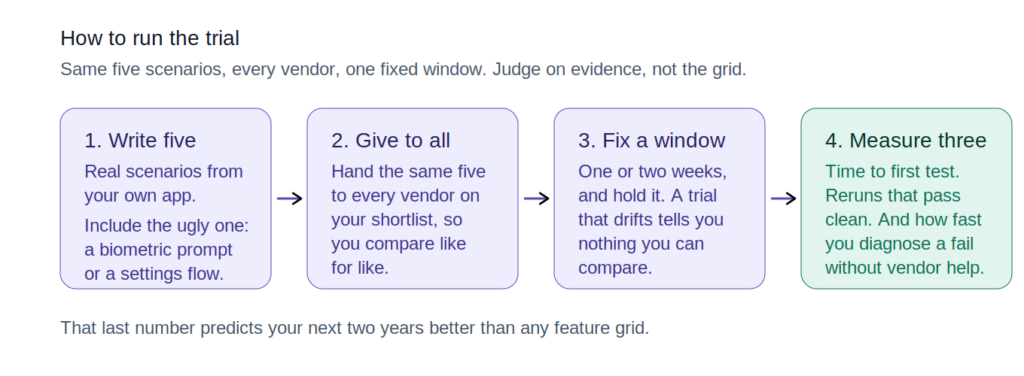
The trial method, and the three numbers worth measuring.
Small team, modern stack, shipping fast. Any of the three cloud-native platforms here is a reasonable starting point, and the decision comes down to price and support. Do not overthink it.
Enterprise, fragmented multi-language stack, no central standard. Framework and language breadth outranks everything else. Shortlist on that, then narrow on CI and cost.
Flaky suites and maintenance are the actual problem. Self-healing and diagnosis speed matter more than authoring features. Test both under load, and make failure triage part of the trial rather than an afterthought.
Non-coders need to author tests. Codeless and natural-language authoring lead. All six have real answers; compare what the output looks like six months on, when someone has to maintain it.
Hardware-dependent flows: biometrics, eSIM, sensors, peripherals. Real device depth decides it, and emulator coverage is not a substitute. This narrows the field quickly.
Tests must run with no vendor connection. Three of the six: Kobiton, TestMu AI, and HeadSpin. Then ask whether the AI comes with you, because for two of those three it does not.
Your security team has to approve where the AI runs. The narrowest requirement here and the one with fewest answers. Ask each vendor where the model is hosted and whether you can host it yourself, in writing, before you shortlist.
Pick two or three, run your five scenarios, and decide on evidence rather than a grid.
BrowserStack, HeadSpin, Kobiton, Perfecto, Sauce Labs, and TestMu AI, which many teams still know as LambdaTest. Which one is right depends on your stack, device needs, and data constraints, which is why this post is organized around those rather than a ranking.
Both, in a ratio that depends on your app. Emulators are cheap and fine for logic. Anything touching hardware, including biometrics, eSIM, cameras, sensors, and peripherals, needs real handsets.
Useful, and no longer a differentiator. As of August 2026 every serious product here does natural language authoring, generation, and self-healing. Evaluate the cost model, the maintainability of the output, and where the model runs, not whether the feature exists.
Real devices at scale are sold through a sales process almost everywhere here. Ask how the vendor counts, by user, concurrent session, device, or feature, because that shape drives your cost far more than the starting rate.
More than most comparisons suggest. As of August 2026 Kobiton, TestMu AI, and HeadSpin all support air-gapped test execution, but they differ on what comes with it: Kobiton requires no vendor access path, HeadSpin’s air-gapped tier ships a toggleable vendor VPN, and TestMu AI’s agents still need connectivity. Perfecto is hybrid: it places devices on your premises but keeps its control plane hosted. BrowserStack’s self-hosted option covers desktop browsers rather than mobile. Get the architecture named in writing, and make the vendor say which of on premise, hybrid, or air-gapped they mean.
A free framework can be enough if you have the engineering capacity to run it. Pay for a platform when managed real devices, execution, and reporting cost less than doing it yourself; the frameworks section above has the fuller breakdown.
There is no fixed number: derive the list from your own production analytics, covering the models that carry most of your real usage plus your oldest supported OS and a low-memory device. The real-devices section above has the full method.