What Cloud Mobile App Testing Is, and Why “The Cloud” Is Not One Thing
Cloud mobile app testing means running your tests on real phones and tablets you reach over a network, instead of on the handsets in your mobile app testing team’s desk drawer. The devices live in a rack somewhere, you reach them through a browser or a test script, and every tester on the team gets the same real hardware at once, wherever they sit, instead of passing a shared drawer of phones between desks.
This makes mobile cloud testing a practical way for distributed teams to access real devices without maintaining a physical lab.
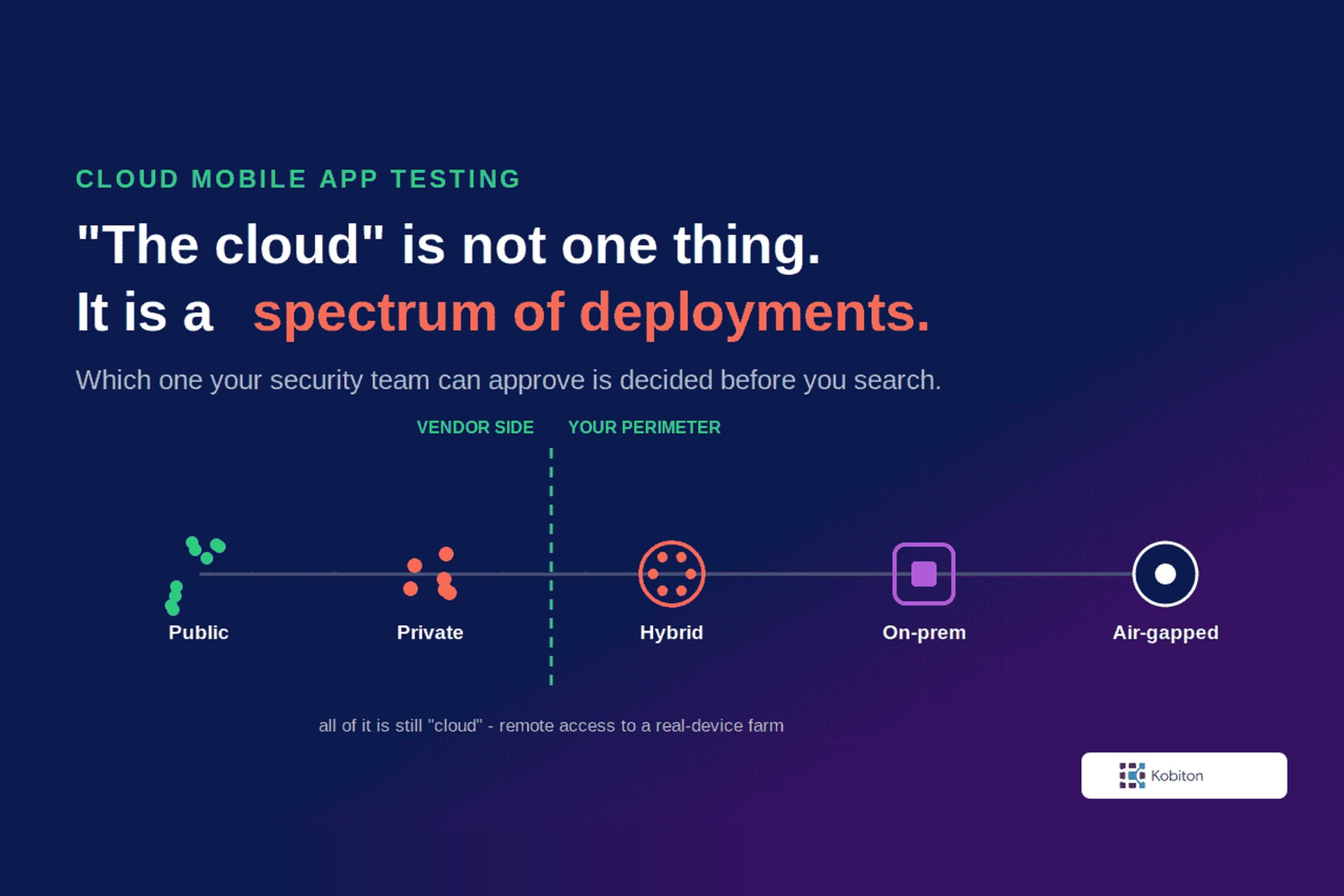
That much is common ground. What gets skipped is that “the cloud” covers six different architectures, and the one your security team will approve may not be the one you are being sold.
The distinction decides whether your tool clears vendor review, whether your app can reach the systems it talks to, and who is on the hook when a device fails. It also gets decided above you. A QA lead picks the tool. Information security, enterprise architecture, or a vendor risk function picks the deployment, and comes back to it on a cycle.
Start with the buyer most people assume does not exist. An enterprise architecture lead at a retail bank, running a formal vendor assessment, was asked whether they wanted cloud or on-premises. They wanted cloud, “where we have the most flexibility and agility.” Not because compliance was absent, but because their offshore testing team could not reach the application at all.
This is not an argument against the cloud. It is a map of what the word covers, and how to work out which version you can use.
Why teams move mobile testing to a device cloud
Before the deployment question is which-model, it is whether-at-all. Most teams reach mobile cloud testing because an owned lab stops keeping up. The device and OS matrix grows every release, procurement is slow, and a drawer of handsets cannot be shared across a team that sits in more than one place.
| What slows an in-house lab down | What a device cloud changes |
|---|---|
| You buy and maintain each model you want to cover | You reach hundreds of models and OS versions without owning them |
| New devices mean procurement, racking, provisioning | Devices are available without a purchase cycle, subject to inventory |
| Your team owns cables, batteries, refresh, and signing | A vendor-hosted option absorbs most of that upkeep |
| Access is limited by location and unit count | Every tester reaches the same devices remotely |
| Parallel runs are capped by the units you own | You scale out within your plan and inventory |
One caveat so this reads straight: a team-owned lab can be reached remotely too, so this is not cloud versus not-cloud. It is in-house upkeep versus a hosted pool. For the full real device cloud versus on-premise comparison, see our guide to real device cloud vs on-premise testing.
Where the Portal Runs, Where the Devices Sit: The Two Variables Behind Mobile Cloud Testing
Start with a definition, because everything after rests on it. In casual use “cloud” means someone else’s servers, off-site, which is why “on-premise cloud” sounds like a contradiction. But an on-premise cloud is not a contradiction, and the standard says so. NIST’s own definition of cloud computing lists a private cloud as one provisioned for a single organization that may exist on or off premises. What separates the models is the deployment shape, not the address: who the devices are pooled for, and where they sit, reached remotely through a browser, an IDE, or an automation framework. Define it that way and public, private, hybrid and on-premise stop being rival categories. They become points on one spectrum. Your own devices, in your own building, pooled for your team and reached remotely, are a private cloud.
Two questions set the primary structure, and two finer ones split it the rest of the way.
Where does the portal run?
The portal is the control plane: the web interface you log into, the API your CI pipeline calls, where session video and logs are stored. It can run in the vendor’s cloud, in your own cloud account, or on a server inside your building.
Where do the devices sit?
The phones themselves are either in the vendor’s facility or in yours.
Those two answers are not locked together, and that is what trips people up. Consider a public sector team. A government restriction requires the device hardware on their own premises; the portal they log into runs in the vendor’s cloud. Ask a checkbox grid where that lands and it says “on-premises.” It is not. It is a hybrid, and calling it on-prem misrepresents how it works.
This is why a flat list of deployment options fails. Vendors and buyers routinely use “on-prem” to mean different things, because they are answering different halves of the question.
The Three Cloud Mobile Testing Models Buyers Choose Between
Vendor conversations tend to happen in a three-word vocabulary. If you learn nothing else from this post, learn these three, because they are what you ask for. These are the words you will hear in a vendor conversation, not universal technical categories, so a given vendor may draw the lines slightly differently.
Public cloud
The shared pool. A shared portal, and devices in the vendor’s device cloud that any customer can pick up whenever they are free. Fastest to start, cheapest per device, widest coverage.
Private cloud
Devices reserved for your team alone. This is the one buyers most often get wrong, because it arrives in two tiers.
Standard gives you dedicated devices reached through the same shared portal everyone else uses. They sit in their own section of the interface, held for you around the clock, and the public pool stays one click away when you want breadth.
Dedicated adds portal isolation on top: your own single-tenant instance, its own address and its own database, optionally running in your own cloud account.
The devices are exclusively yours either way. What the second tier buys is isolation of the portal, not exclusivity of the hardware, and that distinction is worth straightening out before a vendor quotes you for one while you were picturing the other.
On-premises
Everything behind your firewall, portal and devices both. Air-gapped is its fully disconnected form, where no internet path exists at all.
And one bridge between them. Hybrid is private cloud with the devices moved to your premises: your phones on your network, the portal still vendor-hosted. It carries the same standard and dedicated portal split, which is why it reads as a variation on private rather than a fourth thing to ask a vendor for.
Which one you land on is rarely a one-time decision. A wealth-management firm runs a vendor resiliency and risk review on their mobile app testing platform, and it is a standing cycle: “It’s every two years.” The conversation covers data center topology, a hot and cold facility arrangement, and whether their device pool should be split across two locations so a power outage at one does not take testing down. The review was routine and the rating moderate. That is the point. A function above QA comes back to this on a schedule, so your answer has to survive the next review, not just this one.
Inside the Three: The Six Deployment Models, Mapped
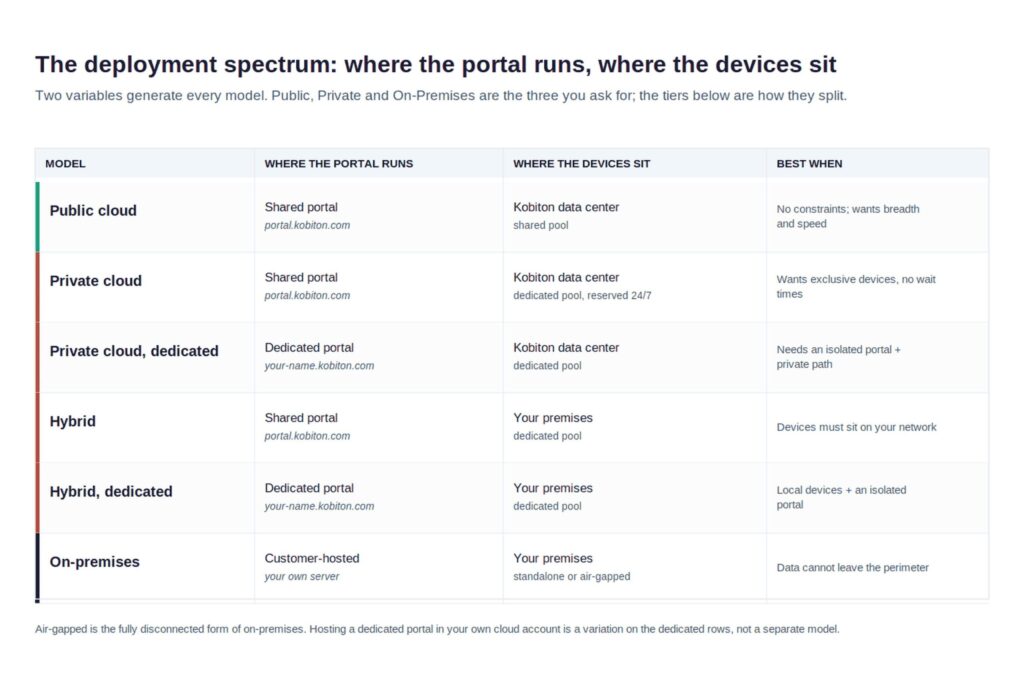
Underneath the buyer-facing three sit six technical models. The two questions above set the frame; two finer splits produce the six, namely whether the portal is shared or dedicated to you, and whether the devices sit in the vendor facility or on your premises. This is where the mobile device cloud testing tradeoffs live.
Public cloud
A shared portal and a shared device pool, both in the vendor’s cloud, reached through a browser. Typically the fastest to start, the cheapest per device, and the widest range of models and OS versions, because stocking a long tail of hardware spreads across every customer.
One mechanism explains nearly everything about it. As most platforms define it, a public cloud device is shared among all public cloud customers, and the platform cleans up tenant data and isolates sessions so the next tenant gets a clean phone, by uninstalling the app and clearing data, sometimes a full reset. That session isolation is the product, not a limitation bolted onto it, and it is why the constraints two sections below are constraints at all. You cannot leave a certificate, a mobile device management (MDM) enrollment, a persistent eSIM or a custom build on a device about to be cleaned up and handed to someone else.
Private cloud, standard
The tier most teams actually need, and the one most comparisons skip. Your devices are reserved for you around the clock in the vendor’s data center, but you reach them through the same shared portal as everyone else, where they appear in their own section of the interface. The public pool stays one click away, so you can take a dedicated device when the state matters and a shared one when you only want breadth.
What you are buying here is less exclusivity than persistence. As most platforms define it, private devices belong to your organization alone and you decide whether they wipe between sessions or hold their state, with granular control over how they are configured.
That one change unlocks most of the list below. The certificate stays installed, the MDM enrollment holds, the eSIM persists, the custom build stays flashed.
Private cloud, dedicated
The same dedicated devices, plus an isolated portal: a single-tenant instance with its own address, its own database, and optionally the whole thing running inside your own cloud account. Single-tenancy is also what opens a private network path to your internal systems.
The devices are exclusively yours in both tiers. The second one isolates the interface, the logs and the session data as well, which is what a vendor risk review usually turns out to be asking about.
Persistence unlocks workflows a shared pool cannot offer at all. Tethering is the clearest: remote USB presents a device to your local machine as though it were plugged in, so you can attach Xcode or Android Studio to a handset in the rack, or point a framework like Maestro at it. Kobiton’s implementation is called virtualUSB. That is a development loop rather than a test-execution one, and rarely what teams think they are buying. You pay for all of it, and still depend on the vendor’s facility for the hardware.
Hybrid, standard
Private cloud with the devices moved to your side. The portal stays vendor-hosted and shared; the phones sit in your building, typically on a device cart, talking outbound over 443. This solves the internal-systems problem almost by accident: the devices are on your network and reach staging the way a laptop does. It also puts hardware you already bought back to work. What you take on is the physical side, and that is a real job. A later section prices it.
Hybrid, dedicated
The same arrangement with an isolated portal. Your devices on your premises, pointing at your own single-tenant instance rather than the shared one. This is the combination regulated buyers tend to land on when the devices have to be local and the interface has to be theirs, and it is the answer that most often gets missed because it looks like two separate asks.
On-premises
Portal and devices both behind your firewall, on a local Linux server with a local Kubernetes cluster and Mac hosts for the iOS side. Nothing leaves the perimeter. You control device configuration, enrollment and passcode policy outright. In exchange you own the operations: servers, upgrade cycle, hardware refresh, and the people to run all three.
Air-gapped is its fully disconnected form. No inbound or outbound internet, AI features served by a model inside your own network, licensing through offline files. That is the answer where policy prohibits an internet path outright rather than merely restricting it. Highest isolation available, highest cost to operate. It is a real deployment, not a slide: air-gapped installations run in production as of Q3 2026 in environments as demanding as a regulated bank and a government agency.
Hosting a dedicated portal in your own cloud account is not a seventh model. It is a variation on the dedicated tiers, which is why the map works where a flat list does not.
When Cloud-Based Mobile App Testing Is the Right Answer
For many teams reading this, the public cloud is the correct answer and the rest of this post is background reading. No hedge attached.
If your test data is synthetic, your app does not depend on internal-only systems, and no regulation dictates where your testing infrastructure sits, cloud mobile app testing gives you what an owned lab cannot. A shared pool carries device and OS combinations you would never justify buying. And nothing sits between wanting to test on a new flagship and testing on it: no procurement cycle, no rack, no hardware refresh, no ticket queue.
Access is the reason that shows up most in the evaluations I have run. That retail bank’s constraint was not that the cloud was forbidden. Their testers were spread across onshore and offshore teams, they had almost no device lab, and buying handsets meant a purchase order and months of waiting. A hosted pool put every tester in front of the same devices immediately. In their own words, “security is not driving, even regulator is also not driving.” Documented standards had to be satisfied, which was easier than it sounds once they confirmed the test environment held no production or customer data, which is a property to establish rather than assume, since builds, logs, network captures and copied datasets can all carry it.
Even teams with a strong security posture want the public pool for part of the job. A privacy-focused consumer telecom team wanted hosted devices for breadth while keeping other testing closer to home, and was explicit that on-premises was not a requirement they would walk over: “I don’t know that on Prem was a deal breaker.”
Worth saying plainly before the constraints that follow: almost none of them apply to all of your testing. The teams below that cannot use a shared pool for carrier behavior or managed devices still use one for everything else. A constraint scopes the public cloud out of part of the job, not out of the building.
Emulators and simulators are fine for fast dev loops and broad functional checks, but they do not reproduce a real modem, a real battery and its heat, a physical SIM, biometrics, or a manufacturer’s own build of the OS. So confirm whether a ‘cloud’ is renting you real devices or emulators before you compare prices. For the full real-device-versus-emulator breakdown, see our real device cloud guide.
Two cautions apply even when a shared pool is the right answer. Shared infrastructure means shared capacity, so timing-sensitive results can wobble under other tenants’ load. For performance-sensitive runs, ask how capacity is provisioned and whether other workloads can affect it, and compare repeated runs under the same conditions rather than trusting a single number. And a test environment is not the user’s environment, so validate the flows that matter against representative network conditions and regions.
When It Is Not: The Constraints That Rule Public Cloud Out
Five situations rule out the shared public pool. Each is a different team hitting the same mechanism from a different side.
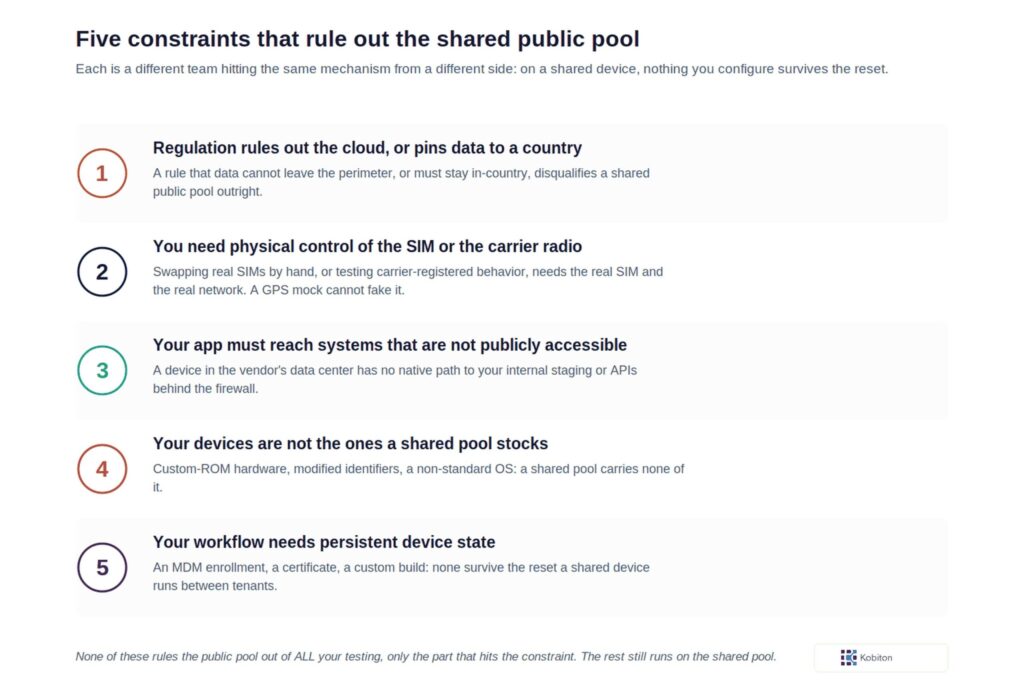
Regulation prohibits the cloud, or pins your data to a country. A national mobile network operator was asked what drove their on-premises requirement: “security does not allow us to use cloud solutions.” That is the company’s rule, not the QA team’s preference. Residency rules bite the same way without banning the cloud outright. A prospect under a national financial regulator needed devices and data to stay inside its home country. EU customers under GDPR face requirements on transferring personal data out of the region, which a hosted setup has to satisfy.
You need physical control of the SIM, or of the carrier radio. That same operator swaps thirty to forty SIM cards between devices by hand: “we also need to change SIM card physically on the devices.” The detail that settles it is about radio, not rules. GPS location, the SIM’s home-carrier identity, and the network the handset is actually registered on are three different things, and mocking GPS changes only the first. Carrier-dependent behavior tracks the SIM and the live network registration, which a GPS mock cannot rewrite, so it has to be exercised on real hardware with the real SIM.
Your app needs to reach systems that are not publicly accessible. A media distribution company runs staging inside its own AWS account, reachable only across a site-to-site VPN. Some vendors offer tunneling or proxy options on shared pools, so it is worth asking what your vendor supports before ruling it out. The cleanest path is putting the devices where the systems already are, which points at hybrid or on-prem.
Your devices are not the ones a shared pool stocks. That privacy-focused consumer telecom team tests on custom-ROM Nothing Phone (3) hardware that rotates its IMEI and IMSI at the operating-system level and needs a persistent eSIM. Their government-side work runs a custom OS on Samsung Tactical hardware with modified identifiers. No shared pool carries that. A different telecom, one barred from the cloud by national regulation, hit the same wall from the other side, with its cybersecurity regulation ruling out hosted testing entirely, plus HarmonyOS coverage and a real SIM for USSD, SMS, voice and data.
Your workflow needs persistent device state: an MDM enrollment, a certificate, a custom signing configuration, or a build that has to survive between sessions. On many public pools pre-session setup is restricted or unavailable, and it varies by provider and device tier, so confirm it per vendor. The through-line is the reset: on a shared device, nothing you install is guaranteed to survive it.
Managed devices are the clearest case. A device that has to join your management platform, carry your policies and stay enrolled cannot come from a pool that resets it between tenants, and enrollment has its own rhythm: a wealth-management firm designing a resilient two-site topology found that “if devices are inactive for a certain amount of time, the MDM retires them,” which shapes how a standby pool can be built at all. Those are exactly the scenarios a dedicated deployment serves and a shared pool structurally cannot, because the devices are yours, they persist, and you decide what stays on them.
What Deployment Control Actually Costs You
Deployment control is what lets a regulated team use a device cloud at all: data that never leaves the perimeter, devices you configure and keep, a security posture a shared pool cannot offer. It is worth being clear-eyed about what running it involves, because going in prepared is what makes it work.
Here is the other half of the trade. Telling you when to take control without telling you what it costs would be worth very little.
The device and code-signing lifecycle
This cost applies where your team owns the hardware, on-premises or hybrid. Where the vendor hosts the devices, app re-signing is typically handled for you, which is part of what you are paying the hosted model to absorb.
When you own the devices, iOS signing and provisioning become yours to run. Device registration and provisioning profiles sit on a renewal schedule, and that is a standing responsibility to staff rather than a one-time setup task.
You own the hardware upkeep
The physical side comes with the devices. Cables, hubs, batteries, and the occasional hardware issue are yours to manage rather than the vendor’s, and teams that run their own lab plan for that as part of operating it.
Updates arrive later
Platform releases reach hosted customers first and roll out to standalone installations afterward. That is a trade rather than a defect: you exchange currency for control. Know it before you sign, particularly if a roadmap feature is part of why you are buying. It is the standing condition of running your own mobile testing labs, where every upgrade is scheduled work rather than something that simply appears.
None of these is a reason not to go private. They are the reason to go in with an owner named. The privacy-focused consumer telecom team’s assessment was blunt:
On-premises is more secure and less stressful compared to some of the public cloud stuff, and price is not usually the main approval sticking point.
Both are true. Running it yourself asks more of you week to week, and it is calmer at every review that follows. That is a well-trodden path, walked deliberately by teams who know what they took on.
The 2026 Wrinkle: AI Testing Features Carry Their Own Deployment Question
As of Q3 2026, most testing platforms now ship AI features, and many of them work by sending your application context to a model hosted somewhere you do not control. That is a deployment decision wearing a feature’s clothing.
Spend a procurement cycle establishing where your test data may live, and an AI feature that quietly ships screen content to a third-party inference endpoint reopens the question you just closed. Ask where the model runs before you ask what it does. The answer belongs in the same security review as everything else in this post.
There is a version that fits a constrained environment. Kobiton’s Appium AI can be pointed at an OpenAI-compatible endpoint hosted inside the customer’s own network, which keeps inference on your side of the boundary. That is a product capability, and it is a separate claim from the air-gapped production deployments mentioned earlier. Keep the two apart when you evaluate any vendor. What the software can do and where it is proven in production are different questions.
How to Choose Your Cloud Mobile App Testing Deployment
Work through these in order. The first one that returns a hard constraint decides more than the four after it.
- Can your test data leave your perimeter, and can it leave the country? If no, you are choosing on-premises, and whether it is air-gapped is the remaining question. If yes, keep going, and note that a test environment holding no customer data often answers this more easily than teams assume.
- Does your app need to reach internal-only systems? If yes, the devices need to sit on your network. That points at hybrid or on-prem, not at a shared pool.
- Do you need physical SIM swaps, persistent eSIM, MDM-enrolled devices, App Store access, or hardware the pool does not stock? Any yes here rules out the shared pool for that portion of your testing, though not necessarily for all of it.
- Who will own the hardware, the certificates, and the upgrade window? If the honest answer is nobody, choose a model where the vendor owns them. A lab with no owner degrades fast.
- Will this be re-reviewed, and by whom? If a vendor risk function revisits it on a cycle, choose something that survives the next review, not just this one.
Then take that vocabulary into the vendor conversation. Ask for public cloud, private cloud, or an on-premises deployment by name, and if it is private, say whether you need the dedicated portal tier. Then ask where the portal runs and where the devices sit. Those two questions tell you more about a mobile cloud testing platform than a feature matrix will.
How a cloud test session actually works
Once you have a deployment, a cloud test run is the same shape whether the devices sit in a public pool, a private tier, or your own building:
1. Upload an installable build to the platform.
2. Pick an available device and OS from the pool or your reserved set.
3. Open a manual session, or point your automated tests at the device.
4. Reproduce the flow and review failures with the captured evidence: session video, step screenshots, and device logs.
5. End the session and let the cleanup policy reset the device for the next tenant.
When you are deciding whether a build is ready to ship, turn that into a short set of device-testing gates. These are device checks, not full launch approval, so treat them alongside the rest of your release process.
| Device-testing gate | Passes when |
|---|---|
| Build stability | The build installs and launches cleanly across the matrix, with no startup crashes |
| Functional | Every release-critical journey passes, and no release-blocking defect is open |
| Device coverage | The priority device and OS set is green, not just the one device a developer used |
| Performance | Launch time, memory, and responsiveness sit inside agreed limits on representative hardware |
| Regression | Required fixes stay fixed, and remaining regressions are triaged and accepted under your release policy |
For the full pre-launch checklist and how each gate is run, see our pre-launch mobile testing checklist.
Cloud Mobile App Testing FAQ
What is cloud mobile app testing?
Running tests on real mobile devices you reach over a network rather than on hardware at your desk, through a browser or an automation script.
What is the difference between cloud and on-premises mobile app testing?
Where the control plane and the devices live. Used loosely, cloud is shorthand for the hosted end of the spectrum, where the vendor runs one or both; on-premises means both sit behind your firewall. Between them sits a range of options, including deployments where the devices are yours and the interface is hosted.
Are cloud testing devices real devices or emulators?
Both are sold as cloud testing. Emulators cannot reproduce real modem behavior, battery conditions, SIM handling, or manufacturer OS customizations. Confirm which you are getting before you compare prices.
Is cloud mobile app testing secure enough for regulated industries?
Frequently yes, and many regulated teams prefer it. Test environments often hold no customer data, which changes the risk conversation. Where it fails is a rule prohibiting data leaving a perimeter or a country, in which case a single-tenant or on-premises deployment is the route.
Can cloud mobile app testing reach internal-only systems?
Not natively from a shared public pool, because the device sits on the vendor’s network. A secure tunnel or proxy can bridge it, and vendors offer these. Deployments where the devices sit on your network handle it without that step, which is a common reason teams choose hybrid.
What does running your own device lab actually cost?
Beyond hardware: code-signing certificates on a renewal cycle, MDM enrollment lifecycle, physical maintenance, and a release cadence trailing the hosted one. Budget for an owner, not just equipment.
How many real devices do I need to test on?
There is no fixed number, and a market-share figure is not the same as your users. Use your own app analytics to see which models and OS versions your users actually run, cover the most-used first, then extend for revenue and risk. Let a shared pool carry the long tail you would never justify buying.
How do I know my app is ready to release using a device cloud?
Run it through the device-testing gates above: build stability, every release-critical journey passing with no release-blocking defect open, a green result across your priority device and OS set, performance within limits, and regressions triaged under your release policy. These are device checks, so treat them as part of your wider release process, not the whole of it.
The Real Question Is Not Which Vendor
The market sells cloud mobile app testing as though it were one product with a price tag. It is a spectrum of architectures, and where you land is decided by what your organization permits, not by which feature list scores highest.
So the useful question is not which vendor to shortlist. It is which deployment model your security and architecture functions can actually approve, and what you are prepared to own in exchange for the control you gain. Answer that first and the vendor conversation gets a lot shorter.
If you want a structured read on where your mobile app testing practice stands before that conversation, the Mobile Maturity Assessment covers automation coverage, security and CI/CD integration, and produces an action plan. Kobiton offers all six models above, which is the vantage point this map was written from.
