A single bad performance moment can cost you a user forever. When an app freezes during a flash sale, buffers in the middle of a live stream, or times out at checkout, people don’t file a bug report they uninstall and move on. In a market with millions of competing apps, the switching cost for your users is almost zero.
Load testing is how you make sure that moment never happens. It tells you, before your users do, whether your app can stay fast and stable when traffic surges. This guide walks through everything you need to know about mobile app load testing: what it is, how it differs from web load testing, the types and metrics that matter, a step-by-step process, the leading tools, and the practices that separate reliable apps from the ones that crumble under pressure.
What Is Mobile App Load Testing?
Mobile app load testing is a form of performance testing that measures how an application behaves when many users access it simultaneously, under both normal and peak conditions. The core idea is simple: simulate realistic user demand, then watch whether response times, error rates, and throughput hold steady or start to deteriorate.
A well-designed load test answers questions that matter to the business:
- Can the app serve thousands of concurrent users without slowing down?
- At what point does performance begin to degrade?
- Where are the bottlenecks—the app server, the database, the network, a third-party API?
- Does the system meet the response-time targets your users expect?
Load testing is a subset of performance testing. Where performance testing broadly evaluates speed, scalability, stability, and reliability across many conditions, load testing zeroes in on one question: how does the system hold up as the workload climbs toward expected and peak levels?
How Mobile Load Testing Differs from Web Load Testing
The objective of load testing mobile apps and web applications is the same: to confirm the system performs reliably under expected traffic. But mobile introduces variables that desktop web testing can largely ignore, and overlooking them is one of the most common mistakes teams make.
Network variability. Mobile users aren’t sitting on a stable office connection. They move between 3G, 4G, 5G, and patchy Wi-Fi, often within a single session. A test that only runs over fast Wi-Fi tells you almost nothing about how the app feels on a congested cellular network. Realistic mobile load testing emulates these conditions, throttling bandwidth and adding latency to mimic the real world.
Device fragmentation. The Android and iOS ecosystems span thousands of device models, screen sizes, chipsets, and OS versions. An app that runs smoothly on a flagship phone may stutter on a mid-range device with less memory. Client-side performance—CPU usage, memory consumption, battery drain, and rendering speed—has to be validated across this diversity, ideally on real devices rather than emulators alone.
API and backend dependency. Almost every mobile app leans heavily on backend APIs. Because the app’s responsiveness is tightly coupled to API performance, load testing has to account for how those endpoints behave when request volume spikes. Slow or failing APIs surface in the app as spinners, timeouts, and crashes.
In short, mobile load testing has to consider three layers at once: the client (device), the network, and the backend. A complete strategy measures all three.
Load Testing vs. Stress Testing vs. Performance Testing
These terms are often used interchangeably, but they describe different things. Getting them straight helps you choose the right test for the right question.
| Concept | What it measures | Load level |
| Performance testing | The umbrella discipline—overall speed, scalability, stability, and reliability under varied conditions | Many (normal, peak, sustained, extreme) |
| Load testing | How the system behaves under expected and peak user loads | Expected to peak |
| Stress testing | The system’s breaking point and how gracefully it fails and recovers | Beyond capacity |
Load testing verifies your app handles the traffic you expect. Stress testing deliberately pushes past those limits to find where—and how—things break, and whether safeguards like auto-scaling or failover kick in. Both are valuable; they simply answer different questions.
Types of Load Testing
“Load testing” is really a family of techniques, each focused on a different traffic pattern. A mature testing program uses several of them.
Baseline load testing. Measures performance under normal, expected traffic to establish a reference point. Future tests compare against this baseline to catch regressions and validate improvements.
Stress testing. Pushes the system beyond its normal limits to find the breaking point and observe failure and recovery behavior. Essential for understanding the true ceiling of your infrastructure.
Spike testing. Introduces sudden, sharp surges in traffic—think a flash sale, a marketing push, or a viral moment—to see how quickly the system reacts and whether it stays stable.
Soak (endurance) testing. Applies a steady, moderate load over an extended period to uncover problems that only appear over time, such as memory leaks, resource exhaustion, or gradual slowdowns. Well-suited to apps that run long sessions or process continuously.
Volume (flood) testing. Hits the system with a large amount of data in a short window. Commonly used for e-commerce and ticket-booking apps that process heavy data bursts.
Concurrency testing. Simulates many users acting simultaneously to expose issues like race conditions, database deadlocks, thread contention, and session-handling errors.
Distributed load testing. Generates traffic from multiple machines or geographic locations at once, producing a realistic, scalable test that reveals regional latency and load-balancing problems—valuable for globally distributed apps.
Key Components of a Load Test
Behind every effective load test sits a handful of building blocks:
- Test plan — a document defining scope, objectives, resources, schedule, and procedures.
- Load generation tools — software that simulates many virtual users at once (for example, JMeter, LoadRunner, or Gatling).
- Test scripts — automated sequences that replicate real user actions like logging in, browsing, and completing transactions.
- Metrics collection — the mechanism for capturing response times, throughput, error rates, and resource usage.
- Monitoring tools — systems such as Grafana, Elastic APM, AWS CloudWatch, or Azure Monitor that track servers, databases, and network components during the run.
- Analysis and reporting — the process of turning raw data into clear, actionable findings for stakeholders.
Key Metrics to Track
A load test is only as useful as the metrics you collect. These are the numbers that define success or failure:
- Response time — the time between a user’s request and the system’s response. The headline indicator of perceived speed.
- Peak response time — the longest response time recorded during the test. Spikes here often point to hidden bottlenecks.
- Throughput — the volume of data or requests the system processes in a given period, typically expressed in requests or transactions per second.
- Transactions per second (TPS) — the number of successful transactions completed each second; a direct read on capacity.
- Requests per second — how many requests the system handles per second, reflecting its ability to manage concurrent activity.
- Concurrent users — how many users the system supports simultaneously without degrading.
- Error rate — the percentage of requests that fail. Rising error rates signal stability problems under load.
- Network latency — the delay in data transfer between client and server, a major factor in mobile response times.
- Resource utilization — CPU, memory, and bandwidth consumption, which reveal where the system is straining and where capacity is being wasted.
For mobile specifically, pair these server-side metrics with client-side ones captured on real devices: app launch time, frame rendering, memory footprint, and battery impact.
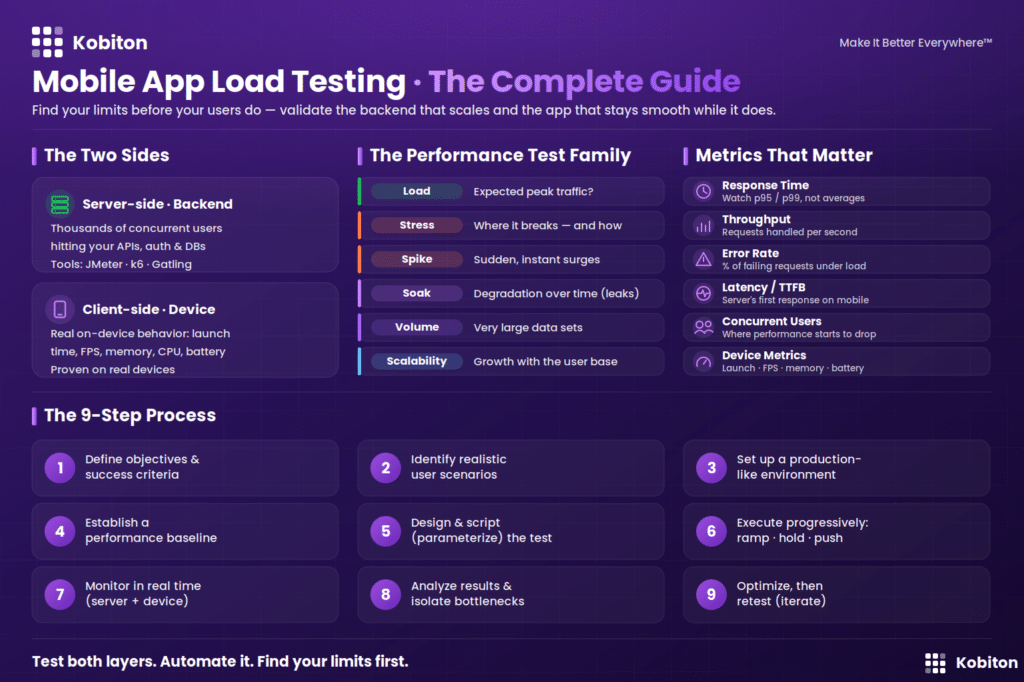
The Mobile App Load Testing Process
Successful load testing is methodical. Most teams follow four phases, which map to the practical steps below.
1. Planning Phase
Define the scope, objectives, and requirements. Establish your target KPIs—response time, throughput, resource utilization—and determine the expected and peak user loads you need to simulate. Review your non-functional requirements (acceptable response times, expected number of users, the number of steps in a typical journey). If those figures don’t exist yet, gather them from business stakeholders. Capture everything in a detailed test plan so every stakeholder shares the same goals.
2. Design Phase
Build realistic scenarios that mirror how users actually behave—logging in, browsing, searching, transacting. Write the test scripts, choose your load generation tools, and configure a test environment that closely mirrors production. The closer the environment is to the real thing, the more trustworthy your results. For mobile, this is also where you define the network conditions and device types you’ll emulate.
3. Execution Phase
Run the load generators to produce concurrent traffic according to your plan. Monitor performance in real time, capturing response times, error rates, and resource usage as the load climbs. This phase shows how the application behaves across the full range of conditions you designed for.
4. Review Phase
Analyze the collected data to pinpoint bottlenecks and stability issues. Generate reports that summarize findings and recommend fixes—code optimization, hardware upgrades, configuration changes. Implement the improvements, then re-test to confirm they worked. Document the entire process and share it with stakeholders so the lessons carry forward.
A condensed step-by-step view of the same flow: define goals → set load parameters → choose tools → create scenarios → run the test → analyze results → optimize the system → retest and validate.
How to Calculate the Right Load
Two simple principles keep your test realistic.
Little’s Law for sizing virtual users. Performance engineers estimate the number of concurrent virtual users with a straightforward formula:
Virtual Users = (Use Cases per Hour × Session Time in seconds) ÷ 3600
This grounds your test in real traffic expectations rather than guesswork, and it’s worth modeling both today’s load and projected future growth.
The 80/20 rule for scenarios. You don’t need to script every possible interaction. Typically about 20% of use cases generate roughly 80% of the total transaction load. Identify those high-impact journeys first and prioritize them—it gives you most of the insight for a fraction of the effort.
Mobile App Load Testing Tools
There’s no shortage of tools, and no single one covers every scenario perfectly. The right choice depends on your stack, budget, team skills, and whether you need protocol-level or real-browser/real-device testing.
| Tool | Type | Best for | Watch-outs |
| Apache JMeter | Open-source | Versatile protocol-level load testing (HTTP, HTTPS, FTP, JDBC); CI/CD integration via Jenkins | Steep learning curve; not a real browser, so it can’t execute client-side JavaScript; large-scale tests need heavy configuration |
| LoadRunner | Commercial | Enterprise testing across many protocols and environments; deep result analysis | Cost and complexity for smaller teams |
| BlazeMeter | Cloud-based | Scalable, JMeter-compatible cloud testing with network emulation (3G/4G/Wi-Fi) and real-time reporting | Commercial pricing for larger loads |
| Gatling | Open-source | Code-based test definitions (Scala) that version and automate well in CI/CD | Requires coding skills; protocol-based only; large geo-distributed tests need the enterprise edition |
| k6 | Open-source | Developer-friendly scripting; runs locally or in the cloud | Protocol-level focus |
| MonkeyRunner | Open-source | Scripting control of Android devices; more functional/regression oriented | Low-level API with no UI; scripts generally can’t be reused across devices |
| LoadView | Cloud-based | Real-browser testing, point-and-click script recording, geo-distributed load injection | Commercial |
| Firebase Performance Monitoring | Monitoring | Tracking real-time app performance across devices and networks in production | Monitoring, not load generation |
A practical pattern many mobile teams adopt: use a protocol tool like JMeter or a cloud platform like BlazeMeter to load the backend, monitoring infrastructure with Grafana or a cloud monitor, while validating the client experience on real devices.
How to Run a Mobile App Load Test (Practical Walkthrough)
Here’s a representative workflow using JMeter to record mobile traffic and a cloud platform to scale the run, a common approach for HTTP-based mobile apps.
1. Configure the recording proxy. In JMeter, add the HTTP(S) Test Script Recorder to your Test Plan and set a listening port (for example, 8089). JMeter records traffic through its own proxy.
2. Find your computer’s IP address. You’ll point the mobile device at this address. On Windows, you can retrieve it from the command line; macOS and Linux have their own equivalents.
3. Route the device through the proxy. On the mobile device’s Wi-Fi settings, set the proxy to manual and enter your computer’s IP and the JMeter port. Note that Android natively supports only HTTP proxying—HTTPS traffic requires an additional proxying tool.
4. Record a real user session. Open the app and use it exactly as a real user would: log in, scroll, search, tap links, complete a transaction. JMeter captures every action as a script.
5. Stop and clean up the recording. End the recording session, restore the device’s network settings, and refine the generated script (add think-time delays, parameterize inputs, and so on) so it behaves like genuine traffic.
6. Scale the test in the cloud. Upload the script to a platform like BlazeMeter, configure the number of concurrent users and test duration, and enable network emulation to simulate 3G, 4G, or Wi-Fi conditions. Choose the geographic regions to inject load from so response times reflect your real user base.
7. Run and analyze. Execute the test, watch real-time dashboards for response times and throughput, and review the full report afterward—response times, error rates, sessions, and waterfall breakdowns. Save the results to benchmark future runs after you make changes.
Automating Load Testing in CI/CD
Load testing shouldn’t be a one-off event before a big launch. Built into your pipeline, it becomes a continuous safeguard.
- Record once, reuse often. Capture realistic user journeys with a tool like JMeter or BlazeMeter and turn them into repeatable scripts.
- Wire it into the pipeline. Trigger load tests automatically in your CI/CD workflow—after major code changes or before each release—so performance regressions are caught before they reach production.
- Test across conditions. Run scripts across multiple device types and network profiles to confirm the app holds up everywhere your users are.
Continuous load testing catches slow creep early, before a small regression becomes a production outage.
Common Challenges (and How to Handle Them)
Load testing is powerful, but it isn’t effortless. Knowing the pitfalls in advance helps you plan around them.
- Realistic test environments are hard to build. Differences in hardware, configuration, and network between test and production skew results. Mitigation: mirror production as closely as possible, including data volumes and network conditions.
- It can be expensive. Simulating large user volumes demands tools, infrastructure, and skilled people. Mitigation: use cloud-based, pay-for-what-you-use platforms and prioritize high-impact scenarios with the 80/20 rule.
- Simulating real users is difficult. People behave unpredictably, and that variability is tough to script. Mitigation: base scenarios on historical analytics and real usage data.
- Bottlenecks are hard to isolate. Problems can originate in code, queries, the network, or hardware. Mitigation: monitor every layer simultaneously so you can trace cause to effect.
- Time pressure cuts testing short. Tight deadlines lead to incomplete coverage. Mitigation: automate and run continuously rather than cramming testing into a release window.
- No tool does everything. Each has strengths and gaps. Mitigation: combine tools—one for load generation, another for frontend, another for monitoring.
- False positives mislead teams. Bad configuration or unrealistic scenarios produce results you can’t trust. Mitigation: validate and calibrate scripts before concluding.
Best Practices for Mobile App Load Testing
- Start early. Integrate load testing from the beginning of the development cycle so bottlenecks surface before they become critical.
- Set clear, measurable objectives. Define concrete targets—for example, “support 200,000 concurrent users with response times under one second.”
- Build realistic scenarios. Model genuine user behavior using analytics and historical data, including peak-time patterns.
- Prepare a detailed test plan. Document scope, expected load, transaction types, and the metrics you’ll collect so everyone is aligned.
- Test across diverse conditions. Cover multiple devices, OS versions, and network types (3G, 4G, 5G, Wi-Fi) for true mobile coverage.
- Increase load gradually. Ramp up in stages to see exactly where performance starts to bend.
- Monitor the full stack in real time. Track response times and resource usage across client, network, and backend as the test runs.
- Replicate production. Test in an environment as close to the real one as possible for trustworthy results.
- Go beyond peak. Include stress and spike testing to confirm the app survives unexpected surges.
- Analyze, optimize, and re-test. Turn findings into fixes, then verify the fixes under load.
- Document and share findings. Preserve what you learn so it informs future releases.
- Make it continuous. Bake load testing into your regular development and deployment cycle.
Real-World Use Cases
Load testing earns its keep in scenarios like these:
- E-commerce before a major sale. Confirm checkout and catalog browsing survive a Black Friday-style surge—where users arrive in greater numbers and stay longer than usual.
- Banking and fintech apps. Verify the app handles thousands of simultaneous transactions—transfers, payments, balance checks—without errors.
- Streaming and OTT platforms. Simulate thousands of users streaming the same content to catch buffering, lag, and playback failures.
- Online ticketing surges. Stress-test sudden, concentrated demand when a popular event goes on sale.
- Real-time collaboration tools. Check responsiveness when many users edit, comment, and upload in a shared workspace at once.
- Capacity planning. Decide how much infrastructure a new app actually needs—avoiding both costly over-provisioning and dangerous under-provisioning.
- Third-party content. Understand how embedded, external services behave under normal and peak load, since you don’t control their performance.
Google’s research underscores the stakes: more than half of mobile users abandon a page that takes longer than three seconds to load. Speed isn’t a nice-to-have—it’s directly tied to retention and revenue.
How Kobiton Fits Into Your Load Testing Strategy
Most load testing tools excel at hammering the backend with virtual users. But on mobile, the user’s actual experience plays out on a physical device—and that’s the layer those tools can’t fully see. A backend can pass every server-side benchmark while the app still feels sluggish on a real mid-range Android phone over a weak cellular signal.
This is where Kobiton complements your load testing approach. By running tests on a cloud of real iOS and Android devices, Kobiton lets you validate the client-side half of the performance equation—how the app actually launches, renders, and responds, and how it consumes CPU, memory, and battery across the device and OS combinations your users carry. Pairing real-device validation with backend load generation gives you the complete picture: the server holds up, and the experience stays fast on the devices that matter.
The practical play is to load-test your infrastructure with a tool like JMeter or BlazeMeter, monitor it across the stack, and use real-device testing to confirm the experience your users actually get—then automate all of it in your CI/CD pipeline so quality holds with every release.
Conclusion
Mobile app load testing is what stands between a smooth launch and a public failure. Simulating real-world demand before your users do, it reveals the crashes, slowdowns, and bottlenecks that would otherwise show up at the worst possible time during a sale, a launch, or a viral spike.
The fundamentals are consistent: understand the types of load testing, track the right metrics, follow a disciplined process, choose tools that fit your stack, and adopt best practices like starting early and testing continuously. What makes mobile distinct is the need to test across three layers at once: device, network, and backend. Cover all three, automate the work in your CI/CD pipeline, and validate the real user experience on real devices, and you’ll ship an app that stays fast and reliable no matter how many people show up.
Frequently Asked Questions
What is mobile app load testing?
It’s a performance testing technique that measures how a mobile app behaves when many users access it at the same time, checking whether response times, error rates, and throughput stay healthy under normal and peak load.
Why is load testing important for mobile apps?
It prevents crashes, slowdowns, and downtime during high-traffic periods, validates that the app can scale as the user base grows, and protects revenue and reputation by catching performance issues before users do.
How is mobile load testing different from web load testing?
The goal is the same, but mobile adds network variability (3G/4G/5G/Wi-Fi), device fragmentation, and heavy API dependence. Effective mobile testing evaluates the client device, the network, and the backend together.
What’s the difference between load testing and stress testing?
Load testing checks performance under expected and peak traffic. Stress testing deliberately pushes beyond the system’s limits to find its breaking point and observe how it fails and recovers.
Which tools are used for mobile app load testing?
Common choices include Apache JMeter, BlazeMeter, LoadRunner, Gatling, k6, LoadView, and MonkeyRunner for generating or scripting load, plus Firebase Performance Monitoring, Grafana, and Elastic APM for monitoring.
Which metrics matter most?
Response time, peak response time, throughput, transactions per second, requests per second, concurrent users, error rate, network latency, and resource utilization (CPU, memory, bandwidth).
Can mobile app load testing be automated?
Yes. Record realistic user journeys as reusable scripts and trigger them automatically inside your CI/CD pipeline so performance regressions are caught with every build and release.
How many virtual users should I simulate?
Estimate concurrent users with Little’s Law—Virtual Users = (Use Cases per Hour × Session Time in seconds) ÷ 3600—and model both current traffic and projected growth.
