
Apr 1, 2021
Building an Electron App using Vue.js

Adam Creamer
Read More
Mobile testing is no longer a single step in the development process.
Modern apps are updated frequently, tested across multiple environments, and expected to work reliably on a wide range of devices. A few quick checks on one device, or even a handful, are no longer enough to ensure quality.
Without a clear testing strategy, teams often run into familiar problems: inconsistent test coverage, missed edge cases, and bugs that only appear after release.
A mobile testing strategy brings structure to this complexity. By defining how testing is performed across devices, environments, and workflows, teams can balance speed, coverage, and reliability throughout the development lifecycle.
In this guide, we’ll explore what makes an effective mobile testing strategy and how teams combine different approaches to build confidence before release.
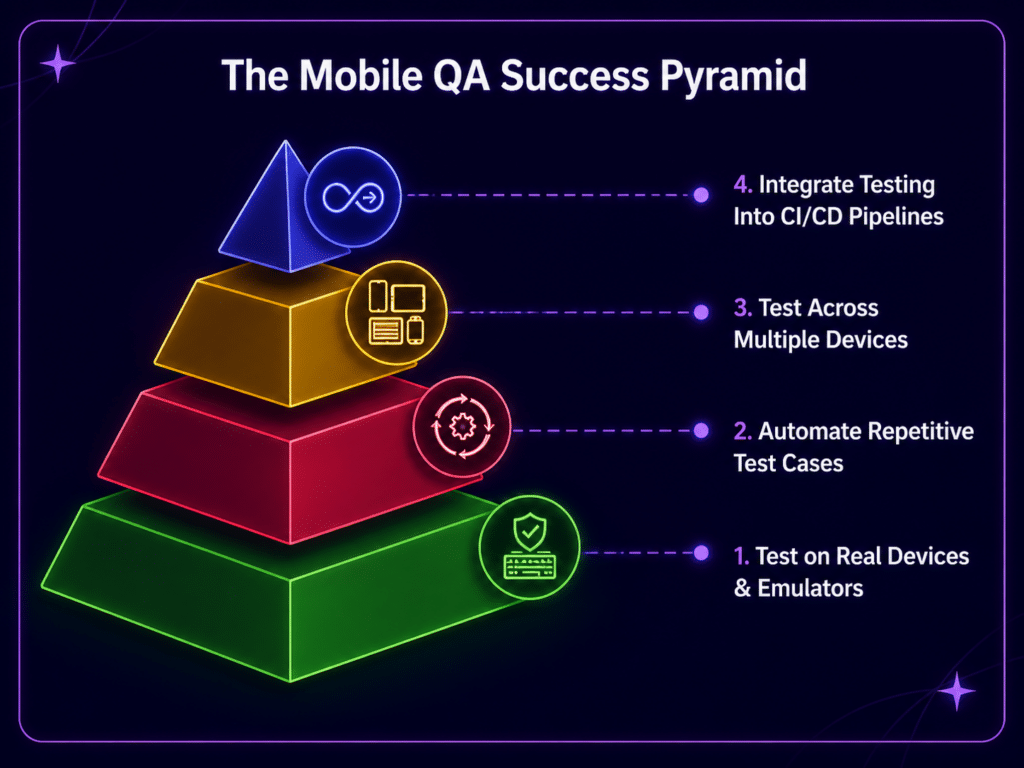
Mobile testing becomes complex long before most teams realize it.
At first, testing might involve a handful of devices, a few basic test cases, and some quick validation before release. In that environment, it’s easy to rely on intuition: test what’s available, fix what breaks, and move forward.
But as an application grows, that approach stops being reliable.
Mobile apps must run across a wide range of devices, operating system versions, and hardware configurations. As discussed in our article on mobile device fragmentation, even small differences between devices can lead to unexpected behavior.
A feature that works perfectly on one device may behave differently on another. A layout that looks correct in one environment may break under different screen sizes or system settings. Issues that never appear during development can surface once the app is used in real-world conditions.
Without a clear strategy, testing becomes reactive; teams spend time chasing issues after they appear instead of preventing them earlier in the process.
A mobile testing strategy introduces structure to this complexity. It helps teams decide:
Instead of trying to test everything at once, teams can focus their efforts where they matter most.
A testing strategy is not a list of tests. It is the set of decisions that determine which tests get written, when they run, and who acts on the results. Teams that skip this step end up with plenty of testing activity and no way to explain why it looks the way it does.
Most strategies settle the same handful of questions:
It is worth separating a strategy from a test plan, because the two are often used interchangeably and answer different questions. A strategy sets the approach and holds steady across releases. A plan applies that approach to a specific release, with its own scope, schedule, and exit criteria.
| Test strategy | Test plan | |
| Scope | The whole product, across releases | One release, feature, or sprint |
| Answers | How we test and why | What we are testing this time |
| Changes | Rarely, when the product or team changes | Every release cycle |
| Owned by | QA lead or engineering leadership | The team working the release |
No team can test every device, and trying to is the fastest way to spend a testing budget without improving quality. The goal is a device matrix: a short, deliberate list of device and OS combinations that represents the people actually using the app.
Three inputs narrow the field, and they work best in this order.
1. Start with your own install base, not the market. Your store consoles already report the device models and OS versions your app runs on. Google Play Console and App Store Connect both break installs down this way, and product analytics tools will do the same. Global market share is a poor substitute a banking app in one region and a game in another have almost nothing in common.
2. Set your floor from feature support. Work out the minimum OS version your app’s APIs require, then check it against what your users are on. Any device that cannot run your features does not belong in the matrix. This also surfaces the reverse problem: a large group of users stuck on an older version you were planning to drop.
3. Add spread deliberately. Once the top models are covered, fill the gaps that cause different failures rather than more of the same: a low-end device for memory and battery behavior, a tablet or foldable if you support one, one device per major manufacturer skin, and the oldest OS version you still support.
Treat the result as something you maintain, not something you finish. New flagships, new OS releases, and shifts in your own user base all change the list, and a matrix that has not been revisited in a year is usually testing last year’s users.
Emulators and real devices are often framed as a binary choice, but in practice, they serve different roles.
As discussed in our article on real devices vs emulators, virtual environments provide speed and convenience during development. They allow teams to test quickly, iterate on features, and debug issues without relying on physical hardware.
Real devices introduce the variability that emulators cannot reproduce. Differences in hardware, operating systems, and real-world conditions often reveal issues that would otherwise go unnoticed.
Most teams rely on both approaches, using each where it is most effective.
Emulators are typically used for:
| Emulators and simulators | Real devices | |
| Best for | Development, debugging, running many configurations quickly | Release validation, hardware behavior, final regression |
| Speed | Fast to start, easy to parallelise in a pipeline | Slower, but closer to what users experience |
| Cannot tell you about | Battery drain, camera, GPS accuracy, calls and SMS interruptions, real network conditions, manufacturer skins | — |
| Typical cost | Low, and scales with compute | Higher, whether through an in-house lab or a device cloud |
The practical division is that emulators tell you whether the code is correct and real devices tell you whether the app is usable. A layout bug will show up in either. A battery drain that only appears after twenty minutes of GPS use, or a crash specific to one manufacturer’s camera implementation, will only ever show up on hardware.
Real devices are used for:
A strong testing strategy utilizes both and defines when and how each should be used.
Deciding where and how to test still leaves the question of what to test for. Most mobile strategies draw on the same set of testing types, applied in different proportions depending on what the app does.
| Type | What it answers | Where it usually runs |
| Functional | Do the features work as specified — sign-up, search, payments, notifications? | Emulators early, real devices before release |
| Regression | Did this change break something that used to work? | Automated, on every build |
| Performance | How does the app behave under load, on weak hardware, on a poor connection? | Real devices, representative of the low end |
| Usability | Can people complete the task without being told how? | Manual, on real devices |
| Compatibility | Does it behave the same across the supported device matrix? | Real device cloud, in parallel |
| Security | Is sensitive data protected in transit, at rest, and at the API? | Dedicated passes, plus scans in the pipeline |
| API | Does the layer under the interface handle errors, timeouts and bad input? | Automated, independent of the UI |
The proportions matter more than the list. A payments app weights security and functional testing heavily; a media app weights performance and compatibility. What does not work is treating one type as a proxy for the rest a suite of green functional tests says nothing about whether the app drains a battery or leaks a session token.
API testing deserves a specific mention because it is the one most often skipped. Most mobile apps are thin clients over a backend, and testing only through the interface means you find out about a slow or fragile endpoint only once it has already degraded the experience.
Accessibility testing checks whether people using assistive technology can complete the same tasks as everyone else. On mobile that mostly means screen readers VoiceOver on iOS, TalkBack on Android along with text scaling, color contrast, and touch targets large enough to hit reliably. Apple’s guidance puts the minimum target at 44 by 44 points; Android’s is 48dp.
Automated checks catch a useful share of these issues, particularly missing labels and contrast failures, but they cannot tell you whether a screen reader announces a flow in an order that makes sense. That part needs a person with the assistive technology turned on. W3C’s guidance on applying WCAG to mobile is the usual starting point for deciding what to check.
An app that works in English on a device set to New York can break in ways that never appear in development. Translated strings run longer and truncate. Right-to-left layouts mirror incorrectly. Date, currency and number formats display wrongly, or worse, display plausibly but wrongly.
If you ship in more than one locale, test in more than one locale: switch the device language and region rather than the app setting, check the longest translation you support rather than the shortest, and confirm time-sensitive behavior across time zones. Localization testing is separate from location testing, which is about GPS, permissions and geofencing an app may need one, both, or neither.
Automation and manual testing are often treated as competing approaches, but in practice, they solve different problems.
Automation is most effective when consistency and speed matter. It handles repetitive tasks like regression testing, where the same scenarios need to be validated again and again as the application evolves.
It is particularly useful for:
Manual testing, on the other hand, fills in the gaps that automation cannot easily reach. It allows testers to explore how the app behaves in less predictable ways, uncover usability issues, and identify edge cases that were never explicitly defined.
This balance is what makes a testing strategy effective. Automation provides speed and scale, while manual testing provides insight and adaptability.
Deciding to use both still leaves the question of where the line sits. The answer is less about capability than about stability: automation pays off on things that are repetitive and unlikely to change, and costs more than it saves on things that are neither.
The other half of the decision is which layer to automate at. End-to-end UI tests are the slowest to run and the most fragile, because every layout change is a chance for them to break. A suite weighted toward unit and API tests, with UI automation reserved for the handful of journeys that genuinely need it, runs faster and survives redesigns. This is the testing pyramid, and mobile suites tend to drift away from it because the UI is the part that feels like the product.
Flaky tests deserve their own rule. A test that fails intermittently is worse than no test, because it teaches the team to ignore red builds. Track them, fix them or delete them, but do not leave them running.
Where an app is tested can be just as important as how it is tested.
Most teams begin in controlled environments: development happens locally, tests run in emulators or simulators, network conditions are stable, and devices are largely predictable. In these conditions, apps behave consistently, and issues are easier to reproduce.
But real users don’t always operate apps in controlled environments.
They use different devices, switch between Wi-Fi and cellular networks, run older operating systems, and interact with apps in unpredictable ways. As we explored in our article on why mobile apps fail in production, many issues only appear when apps encounter real-world conditions.
This gap between controlled testing and real-world usage is where many problems begin. A mobile testing strategy accounts for this gap.
During development, controlled environments like emulators and simulators allow teams to move quickly. They are ideal for early testing, debugging, and iterating on features without needing physical devices.
As testing progresses, real device environments become increasingly important. Testing on physical devices introduces variability (hardware differences, network conditions, and operating system behaviors) that cannot be fully replicated in virtual environments.
Some teams also simulate real-world conditions, such as unstable networks or performance constraints, to better understand how apps behave outside ideal scenarios.
The conditions worth simulating are the ones that have no desktop equivalent. A phone is interrupted constantly, and most of those interruptions happen at the worst possible moment — mid-payment, mid-upload, mid-form.
Most of these can be reproduced without exotic tooling. Network conditioning is built into Xcode and Android Studio, a proxy tool will throttle or drop traffic, and interruptions can be triggered directly on a real device. What they have in common is that none of them can be reproduced convincingly on an emulator, which is part of why the emulator and real-device split matters.
By testing across different environments, teams can balance speed with realism.
In modern development, testing increasingly happens throughout the development process, not just at the end.
As code changes, builds are created, and features are added, teams need a way to validate those changes quickly and reliably. This is where CI/CD (continuous integration and continuous delivery) comes into play.
When a developer makes a change to the codebase, that change is automatically built, tested, and prepared for release. Instead of waiting for a large testing phase at the end, testing becomes part of the development cycle itself. This means that teams can integrate testing directly into their pipelines without coordinating releases.
Automated tests run whenever new code is introduced, helping teams catch issues early, often before they reach QA, or even before another developer sees the change.
By integrating testing into CI/CD pipelines, teams can:
Running tests earlier in the pipeline is half of the shift. The other half happens before there is anything to run them against.
When testers join at planning rather than at handover, ambiguous requirements get caught while they are still cheap to change. Acceptance criteria written with someone who will have to verify them tend to be testable; acceptance criteria written without that person tend not to be. The same applies to risk the person who knows which areas have historically broken is the person who should be in the conversation about what to build next to them.
In practice this means a few small changes: QA attends backlog refinement, acceptance criteria are agreed before development starts, and features are tested as they are built rather than batched into a testing phase at the end. None of it requires new tooling, which is why it is often the cheapest improvement available to a team that already has a pipeline.
CI/CD strengthens a testing strategy; many teams combine quick automated tests in CI/CD pipelines with deeper testing on real devices later in the release process.
Mobile changes the economics of a bad release. A web team can roll back in minutes. A mobile team is waiting on store review, and in the meantime every affected user has the broken version installed. That difference is why controlling exposure belongs in a testing strategy rather than in a deployment runbook.
Feature flags separate shipping code from releasing a feature. The code goes out in the normal build, switched off, and is enabled for a small group first internal users, then a percentage of the install base, then everyone. If something is wrong, the feature is switched off remotely without waiting for a new build to clear review.
This gives a strategy a stage that testing alone cannot provide: real users, real devices, real network conditions, with the blast radius capped. It is the cheapest way to find the problems that only appear at a scale and variety no device matrix can reproduce.
Two things keep it from becoming a liability. Flags need an owner and a removal date, or the codebase accumulates permanent branches nobody remembers the purpose of. And a staged rollout is only useful if someone is watching the metrics for the cohort that has the feature otherwise it is a normal release with extra steps.
As mobile apps grow, testing becomes harder to manage.
What starts as a small set of devices and test cases quickly expands. More features are added, more devices need to be supported, and more personnel become involved in the testing process.
At some point, the challenge shifts from what to test to how to manage testing effectively.
Scaling mobile testing is not simply about adding more devices; it is about making testing easier to run, repeat, and share across teams.
Device labs make this possible.
Instead of relying on a small set of physical devices, teams can access a larger pool of real devices remotely. Tests can run across multiple devices without waiting for hardware to become available, and teams in different locations can work in the same environments.
Access to devices solves one half of scaling. The other half is what happens to everything the additional testing finds.
More coverage means more defects, and at some volume a team needs an agreed way to rank them rather than a queue. Severity and priority do different jobs here and are worth separating explicitly. Severity describes the impact on the app: whether a user can complete the task at all. Priority describes the impact on the business: whether this needs fixing now or can wait for the next release. The two come apart more often than people expect a crash in a feature nobody uses is high severity and low priority; a misspelled word on the payment screen is the reverse.
Defining both in the strategy, before the first disagreement, is what stops triage becoming a negotiation. It also gives the team a defensible answer when someone asks why their bug is not being worked on.
Three other things tend to break at this point, and all three are worth naming in advance:
Combined with automation, this allows testing to expand without slowing development.
A testing strategy is easy to justify in principle and hard to justify in a planning meeting without numbers. The useful ones are not testing metrics like test count or pass rate, which mostly measure how much testing you did. They are quality metrics, which measure what the testing was for.
| Metric | What it tells you |
| Crash-free sessions | The headline stability number, and the one that moves store ratings |
| ANR rate (Android) | How often the app stops responding — often invisible to QA, very visible to users |
| Cold start time | First-impression performance, and the metric most sensitive to low-end hardware |
| Response latency at p95 | What your slowest users experience, rather than your median one |
| Escaped defects | How many issues reached production that testing should have caught |
| Time to detect | How long a regression survives before anything flags it |
Two of these are worth dwelling on. Escaped defects is the closest thing to a direct score for a testing strategy: each one is a case where the approach had a gap. Time to detect is what CI/CD is actually buying you if a regression introduced on Monday is found on Friday, the pipeline is running tests but not the right ones early enough.
The rest come from production rather than the test suite, which is the point. Crash reporting and performance monitoring tell you what devices, OS versions and flows are failing in the wild, and that feeds straight back into the device matrix and the regression suite. Testing that does not close that loop keeps solving the problems you already knew about.
Mobile testing is not a single step in the development process. It evolves alongside the application itself.
Because mobile environments vary widely, apps rarely behave the same way across devices, operating systems, and network conditions. Without a clear approach, it becomes easy to miss issues that only appear under specific circumstances.
Emulators support fast development. Real devices provide a more accurate view of real-world behavior. Automation increases coverage, while manual testing uncovers issues that are harder to predict.
By combining these approaches, teams can test more effectively, catch issues earlier, and deliver more reliable mobile experiences.
A mobile testing strategy is the set of decisions that determines how an app is tested: what is in scope, which devices and OS versions are supported, which types of testing apply, where each type runs, how often, and who owns the results. It sets the approach across releases, rather than describing the tests for any one of them.
A strategy defines the overall approach and stays stable across releases. A plan applies that approach to a specific release or feature, with its own scope, schedule and exit criteria. Teams usually have one strategy and many plans.
Fewer than most teams expect. Build a device matrix from your own install base rather than global market share, set a floor based on the minimum OS version your features require, then add deliberate spread a low-end device, the oldest OS you support, one per major manufacturer skin. Revisit it at least once a year.
Both, for different jobs. Emulators and simulators are faster and cheaper, which makes them right for development, debugging and running many configurations in parallel. Real devices are the only place to validate hardware-dependent behavior, battery and performance characteristics, and release readiness.
Automate what is repetitive and stable regression suites, critical flows like sign-in and checkout, API checks. Keep exploratory testing, usability judgement and accessibility evaluation with people. Automating an unstable area usually produces maintenance work rather than coverage.
Look at production rather than the test suite. Crash-free sessions, ANR rate on Android, cold start time and escaped defects all measure whether testing is catching what matters. Test counts and pass rates mostly measure how much testing you did.