What Mobile App Testing Actually Is
A retail app ships with a new checkout flow. Tests pass on every device the team owns. Within a day, support is flooded, but only from one OEM. The build runs fine on the eight devices the QA team carries; it crashes on a phone none of them have ever touched. Mobile teams ship to thousands of device-and-OS combinations and own a few dozen. Mobile app testing is about closing the gap between the devices that run your tests and the devices that run your business.
Mobile app testing is the practice of validating an app’s behavior, performance, security, and usability across real devices, OS versions, network conditions, and hardware sensors before your customers do. It covers everything from a login button to the camera, GPS, and biometric flows where software meets physical hardware.
Where Does Your Team Actually Stand?
Climb the maturity ladder, run a 60-second self-check, and navigate the testing types that matter for your stage
The Four Levels of Mobile Testing Maturity
Click any level to explore — most teams sit at Level 02, and the jump to Level 03 is where escaped defects drop the most.
- Brittle locators that break with every UI change
- “Maintenance killed us” — keeping tests green becomes a second job
- Flaky tests that pass and fail on identical runs
- Coverage gaps: tests pass on team phones but break on OEM firmware
- Coverage across hundreds of device-OS combinations
- Failures triaged in seconds with full view-tree at the break
- QA bottleneck dissolves — devs ship at the speed validation can keep up
60-Second Maturity Self-Check
Six quick questions. We’ll place you on the ladder and surface the three highest-leverage next moves.
The biggest misconception in mobile app testing is that it means testing an app on a phone. It doesn’t. Mobile app testing is validating the interaction between software, the device, the network, and user behavior. The app is only one piece of the system.
That last category, where software meets hardware, is where mobile app testing stops resembling ordinary software testing, and it’s where most of this guide lives. We’ll start with why the problem is hard, then work toward what a mature practice looks like.
Want to skip ahead to where your team sits? Jump to the mobile testing maturity model and the full Mobile Maturity Assessment.
Why mobile app testing is uniquely hard
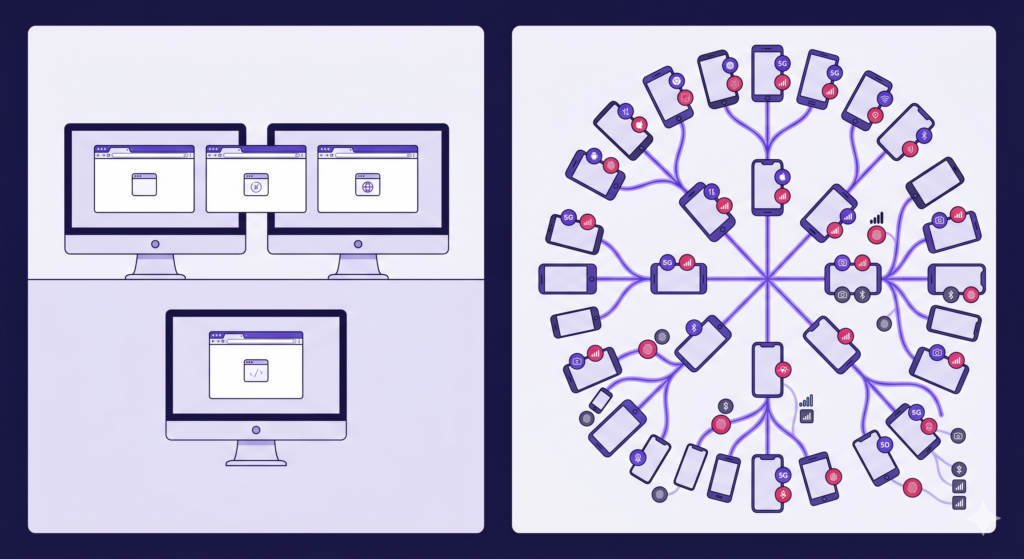
Web runs on a handful of browsers; mobile fans out across thousands of device, OS, network, and sensor combinations.
Web apps run in a handful of browsers on hardware you mostly control. Mobile apps run on thousands of device models, across years of OS versions, on networks that drop to 3G in an elevator and recover in the parking lot. The variables compound: device fragmentation, OS-version drift, memory pressure, OEM firmware that quietly changes behavior, and a sensor stack (camera, GPS, Bluetooth, biometrics) that no two phones implement identically. And unlike a server you can patch on a Tuesday, a mobile release ships to the public and lives on devices you can’t reach. A bug in that build becomes a public one-star review, and enough of them drop your app store rating before you can ship a fix.
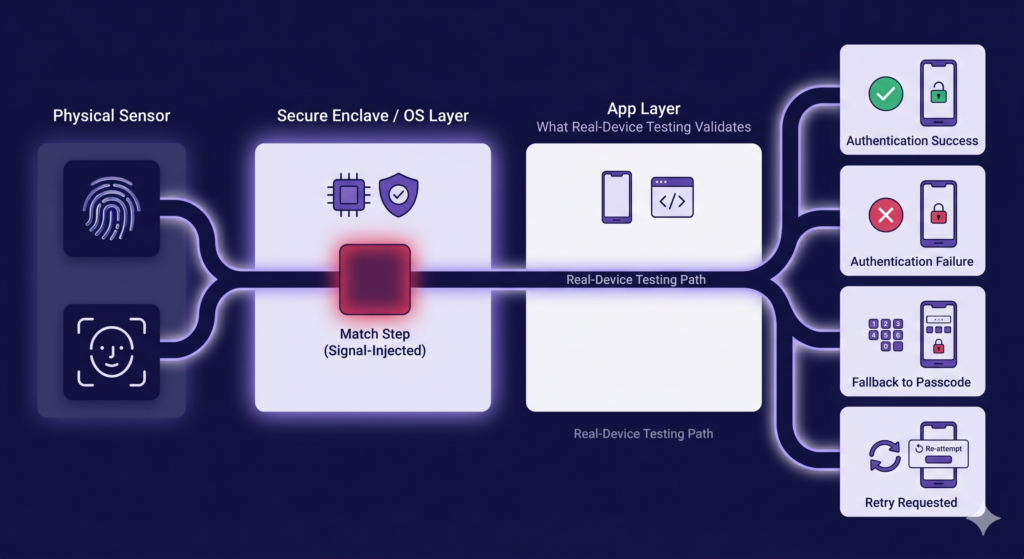
The fingerprint match is signal-injected on every device cloud. Real-device testing validates everything around it: the Secure Enclave prompt, the OS integration, and the app’s handling of success, failure, fallback, and retry.
The hardest bugs live where the hardware is the feature, not a UI element. Biometric authentication is the cleanest example. When a banking app, a wallet, or any high-value transaction gates the flow behind Face ID or a fingerprint, the thing under test isn’t a button. It’s the sensor-to-OS-to-app path. Mobile engineers at a major US airline describe the problem this way: a cloud that “tests” biometrics by sending a pass/fail signal to the app is “not really validating it, just bypassing it.” They’re right about the match itself. The fingerprint or face comparison is signal-injected across every device cloud, because you can’t present a real thumb to a phone sitting in a data center.
But the match is the smallest part of the flow. What real-device testing validates is everything around it: the Secure Enclave prompt actually firing, the OS-level integration, and the app’s handling of a real sensor response (success, failure, fallback to passcode, the retry path). That surface behaves correctly only on real hardware, and it’s where biometric flows actually break.
Field conditions make it worse. At a global building-materials producer, crews scan 20 to 30 QR codes in a few hours, in bad lighting, on rugged tablets, often with no signal. The app creates records offline and syncs them when connectivity returns. Emulators rarely reproduce that: the real network volatility, the camera stack under glare, the sync conflict that only appears after hours offline. These are challenges in mobile app testing that simply don’t exist on the desktop, and they get harder as a team matures, because the bugs that remain are increasingly environment-, device-, and hardware-specific.
Why emulators and simulators aren’t enough
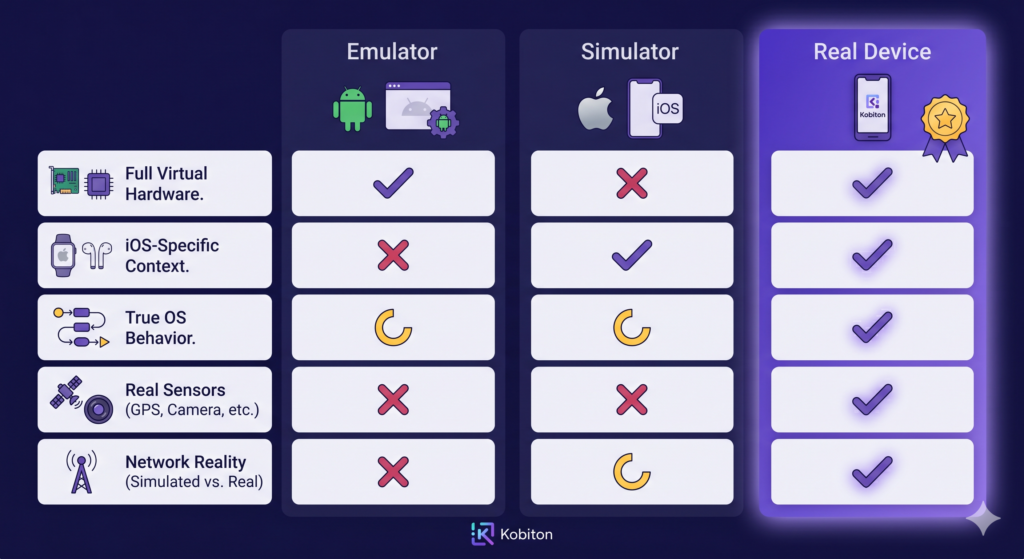
Emulators and simulators each cover part of the picture. Only a real device clears every row.
Start with the distinction, because teams blur it. An emulator (the Android world) mimics both the hardware and software of a device in software. A simulator (the iOS world) mimics only the software environment and runs your app as a native build on your Mac. Both are fast, free, and right there in the IDE. For early development like unit tests, layout checks, and inner-loop iteration, they earn their place, and you should use them.
They stop being trustworthy at the exact moment the hardware starts to matter. An emulator doesn’t run the OEM firmware on a specific Samsung or Pixel build. A simulator doesn’t have a real camera, a real cellular radio, a real Secure Enclave, or a battery being throttled by the OS at 12 percent. Neither reproduces certificate-store quirks, Bluetooth pairing, or the way memory pressure kills your app in the background on a three-year-old phone with forty other apps installed. This is the simulator vs emulator in mobile app testing question, and it has a clarifying answer: both sit on the same side of a more important line. Neither is a real device.
Which is why almost every enterprise team eventually says some version of the same sentence: “It worked in automation, but failed on the real device.” That sentence is the whole argument. Teams ship releases that are green across hundreds of emulator runs, then spend the next week triaging crashes from one OEM’s battery-optimization layer that no virtual device models. Emulators are good enough for early stages. They are not good enough for production confidence, and the more your users depend on hardware, the wider that gap grows.
Real-device testing: what it is and what it catches
Real-device testing means running your app on physical phones and tablets, the actual hardware your customers use, instead of a virtualized stand-in. Real mobile device testing is where you catch what emulators structurally cannot: hardware-sensor behavior, OEM-specific defects, true performance and battery draw, and the network conditions of the real world. Think a payment that fails only on one carrier’s network, or a camera capture that looks fine on a simulator and washes out under real sunlight.
The tell is a phrase you’ll hear from your own developers: “a bug that only happens on the real device.” Mobile developers at a US wealth-management firm describe the same pattern:
When something reproduces only on physical hardware, developers reach for the phone on their desk, and QA, who may not have that model or OS version, can’t follow.
Accessibility sharpens the point. VoiceOver and TalkBack don’t behave correctly on simulators; as the same team put it, for accessibility checks “I always default back to my physical device.” If a thing can’t be tested on a simulator, a simulator-only strategy has a hole in it.
What mature teams do differently is stop treating real devices as the thing you grab to reproduce a bug, and start treating them as where tests run by default: in CI, on every build, across a representative device set. That shift, from real devices as a debugging tool to real devices as the baseline, is the spine of the maturity model later in this guide. Kobiton’s real-device testing capability is built around exactly that default.
The types of mobile app testing: framed by the problem each solves
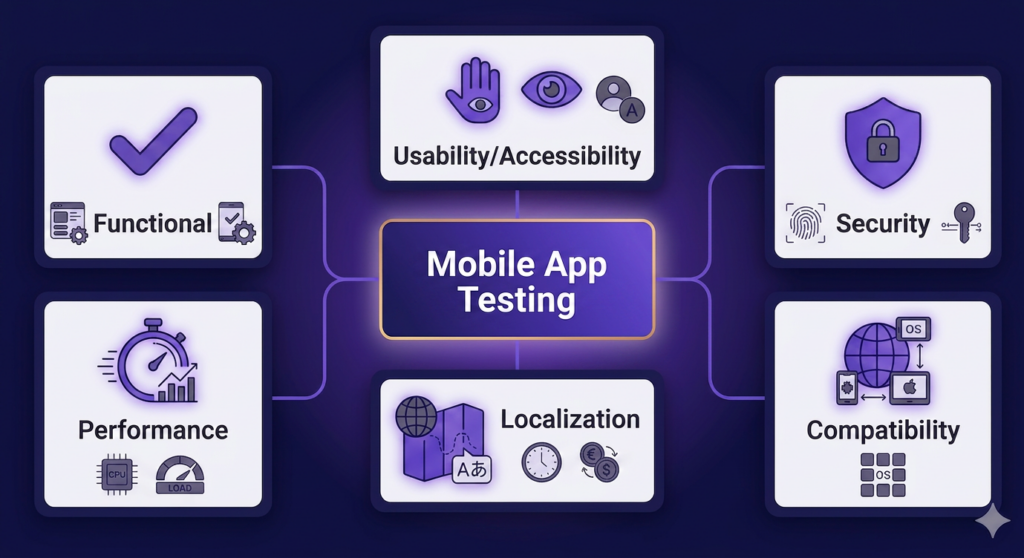
The major types of mobile app testing, each answering a different question about the app.
Most lists of the types of mobile app testing read like a glossary: functional, performance, security, compatibility, usability, accessibility, localization, interruption. Definitions stacked in a row. That’s not useful to someone deciding where to spend a sprint. Organize them by the question each one answers instead.
Does it work?
Functional testing checks whether features behave as specified: the login, the checkout, the form submission. Compatibility testing is about whether they keep working across the device, OS, and screen-size matrix your users actually carry. Interruption testing asks what happens when a call, a notification, or a dropped network lands mid-transaction. These are table stakes, and compatibility coverage quietly decides your defect rate. (See the compatibility testing guide and the functional testing guide.)
Is it fast and stable under real conditions?
Performance testing comes down to whether the app stays responsive (launch time, scroll jank, memory growth, battery draw) on real hardware under real load, not on a flagship phone plugged into the wall. A median device on a congested network is the honest test. Mobile performance testing goes deeper.
Is it safe?
Security testing asks whether data at rest, data in transit, authentication, and the certificate store hold up, especially in regulated industries where a mobile app is a front door to money or health records. Security testing for mobile apps covers the threat model.
Can everyone actually use it?
Usability testing asks whether real people can complete real tasks. Accessibility testing extends that to people who use VoiceOver, TalkBack, or larger text, and that’s a real-device job. Localization testing checks whether the app survives contact with other languages, currencies, date formats, and right-to-left layouts.
Manual, automated, and AI-assisted mobile app testing
Three modes, and the mistake is treating them as a hierarchy where each replaces the last. Manual testing is how you explore new features, edge cases, and the “what happens if I do this weird thing” that no script anticipates. Automated testing is how you defend, with regression suites that run on every build so the same bug doesn’t ship twice. They’re complementary, not sequential.
Scriptless automation sits between them, and it’s where a lot of enterprise value hides. A manual QA lead can record a session and turn it into a repeatable test without writing Appium code, then graduate to generated scripts as the suite grows. A regional transportation marketplace with a strong manual team and a growing backlog found the move that mattered wasn’t hiring SDETs; it was letting the testers they already had build automation without becoming coders. That cross-functional reach, supporting both technical SDETs and less-technical manual testers in one workflow, is what lets automation scale across a team. Scriptless test automation and the Appium handoff cover the technical path.
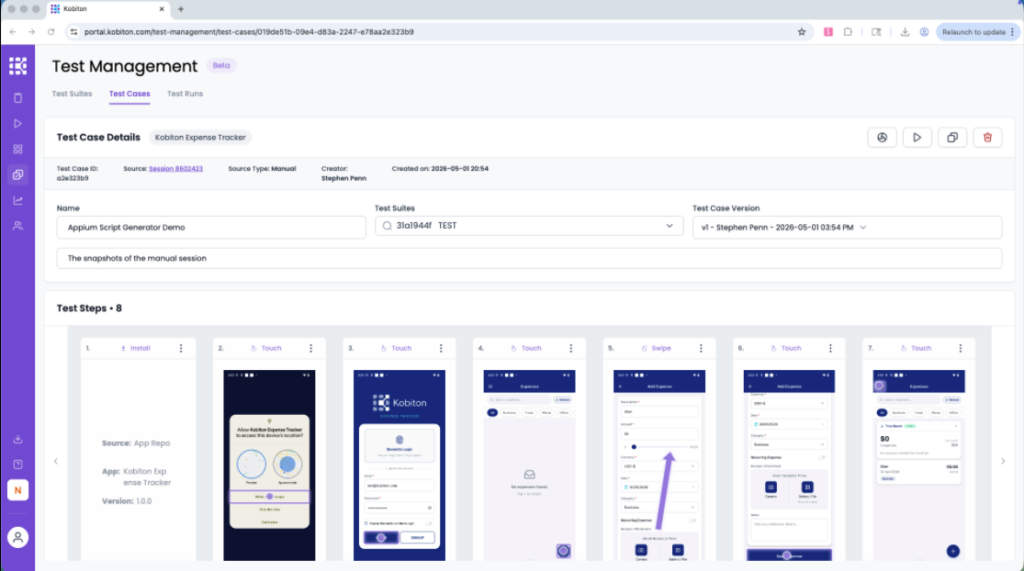
A manual session in Kobiton, captured step by step and converted toward an Appium script. No scripting required to start.
AI-assisted testing belongs in this section, with restraint. Used well, it removes repetitive maintenance (generating a first-draft script, suggesting a locator, flagging a likely-broken step) so engineers spend their time on risk, not upkeep. It does not replace QA judgment, and teams are right to distrust anything that claims it does. Keep a human in the loop. The test of any AI-assisted tool is whether it reduces the maintenance bill. If it doesn’t, you’ve added vendor cost, not capability.
Why mobile automation fails
Experienced readers have lived this section. Mobile automation fails in predictable ways: flaky tests that pass and fail on identical runs, brittle locators that break the moment a developer renames an element, environment instability, and the slow grind of maintenance that eats the time automation was supposed to save.
Brittle locators are the usual first wound. At a global building-materials producer running a hybrid app, the team fought element-location failures “for the last year and a half” as the UI churned: duplicate class names, shifting structure, locators that matched ten things or nothing. When the app changes weekly, a suite built on fragile selectors decays faster than you can repair it.
Then comes maintenance fatigue. “The maintenance killed us” is the most common reason teams abandon an automation effort, not because the tests didn’t work at first, but because keeping them green became a second full-time job. A co-head of engineering at a regional ride-hailing platform described the downstream effect as “clogging at the QA end”: developers shipped faster than QA could validate, and the backlog became the bottleneck. Asked what success looked like, the answer was specific: less flakiness, self-healing tests, and failures diagnosed in seconds, not engineer-hours.
That last point is where tooling earns its keep. Most failures are slow to diagnose because, when a test breaks, you have to rebuild the app’s state just to inspect what went wrong. Capturing the full view tree at the moment of failure collapses that loop: you see the screen’s actual element hierarchy at the break, so “the xpath no longer resolves because a developer moved the button” takes minutes to spot instead of hours. Self-healing locators that fall back to an alternate selector keep a suite running through the kind of UI churn that would otherwise red-line it. None of this removes the need for judgment; it removes the busywork around it.
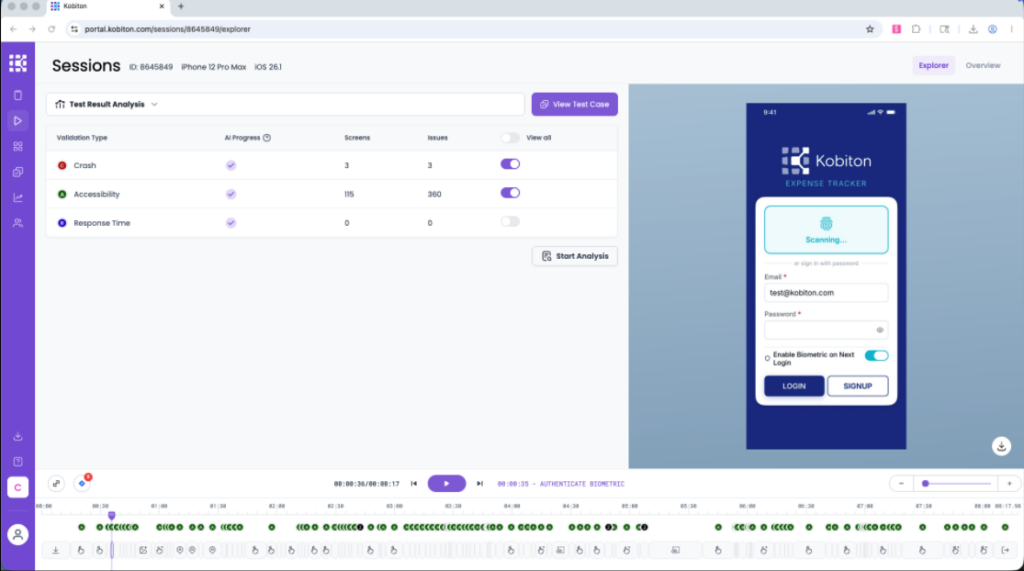
Session Explorer lays a session out on a timeline (like an editing timeline for a test) so defects are fast to find and share.
What changes at enterprise scale
Everything above gets harder when you add scale, regulation, and an existing investment to defend. The most common objection here is “we already have a device lab,” and on day one, that’s a real asset. The problem is operational entropy. Internal labs degrade: devices drift out of a known state, OS upgrades land unevenly, cables fail, phones get reserved and never freed, utilization is invisible, and a tester in another region can’t reach the rack at all. A lab is easy to stand up and expensive to keep honest.
Regulated industries add a second layer. At a US wealth-management firm we worked with, the constraints weren’t about the tests themselves; they were about the environment around them: apps wrapped by an MDM, a corporate network architecture that “adds some complexity” to device connectivity, and a formal security exception required just to add new device models to the pool. Work profiles, secure tunnels, port reviews. In a bank or a hospital, each of those is a sign-off, not a setting.
This is where deployment flexibility stops being a checkbox and becomes the differentiator. A team in financial services, healthcare, or government often can’t use a shared public cloud at all. The options that matter are public cloud, private cloud, on-premises, and fully air-gapped: the same testing platform meeting the data-residency and isolation rules the industry imposes, instead of forcing a choice between compliance and capability. Add governance and observability across all of it, and you have the difference between a lab that works and a lab that scales.
The mobile testing maturity model
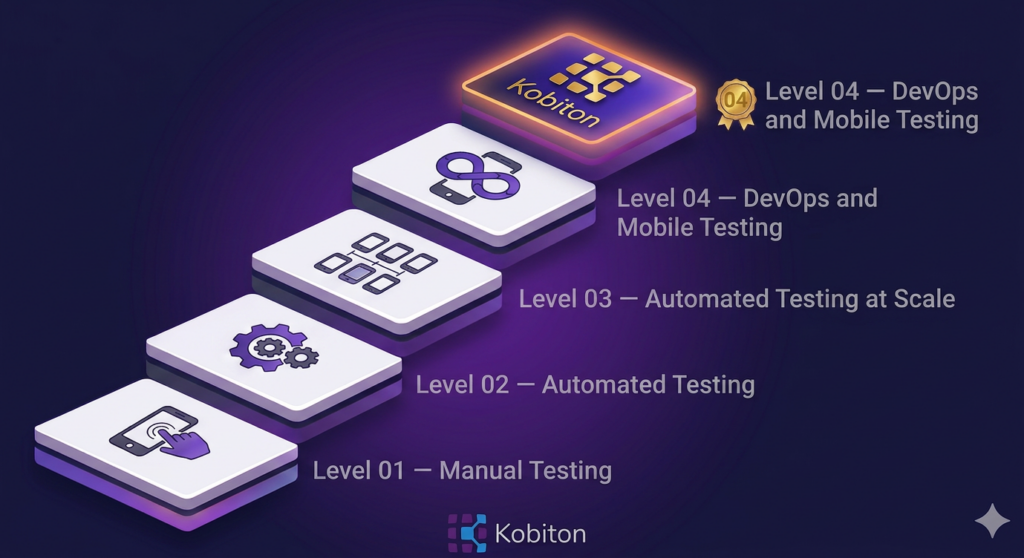
Kobiton’s four-level mobile testing maturity model. Most teams sit between Level 02 and Level 03: automating, but not at the scale customers actually demand.
Most of what separates a struggling mobile practice from a confident one isn’t a single tool. It’s where the team sits on a maturity curve. Kobiton’s mobile testing maturity model frames it as four levels:
- Level 01: Manual Testing. Testing on mobile devices is happening, often on a mix of emulators and real devices, but it’s hands-on. The work is to move past device-tethered testing: give teams a way to run sessions remotely and centralize results so the team isn’t reinventing the loop every release.
- Level 02: Automated Testing. Test scripts now exist, but mobile automation is harder than web: scripts need access to devices, feedback loops are slow, and scalability is limited by the handful of physical phones on the team’s desks. Emulators get pulled in because they integrate cleanly into automation, but the gap to real-device coverage starts to hurt.
- Level 03: Automated Testing at Scale. This is the inflection point. Customers carry thousands of device-and-OS combinations; meaningful coverage requires testing across hundreds. That’s not possible with a desk full of phones. It requires a mobile app testing platform and a device lab (physical, virtualized, or hybrid) so automation can run continuously across a representative device set.
- Level 04: DevOps and Mobile Testing. Mobile app testing nirvana. Automated mobile app testing at scale, embedded inside CI/CD, with the tooling and orchestration to ship with both confidence and efficiency.
The useful move is to locate yourself honestly. Most teams have some automated testing (Level 02) but lack the device coverage, platform discipline, and continuous integration that Level 03 actually requires. The jump from Level 02 to Level 03 (from “we automate on the devices we own” to “we test continuously across the devices our customers carry”) is where escaped defects drop the most. Knowing your real level tells you the next investment, not the eventual one.
Get a precise read on where your team sits
Kobiton’s Mobile Maturity Assessment is a 20-minute questionnaire that evaluates your mobile development, testing, and DevOps practices against industry benchmarks across UX, performance, accessibility, security, automation coverage, and CI/CD integration. You’ll receive a custom report and a six-month action plan reviewed with a Kobiton specialist. Concrete next moves, not a generic score.
Take the Mobile Maturity Assessment →
Building a modern mobile app testing strategy
A modern mobile app testing strategy, as of 2026, looks less like a longer test plan and more like a set of defaults. Real devices in CI, not on desks. Automation that maintains itself instead of consuming a headcount. Coverage chosen by user data, the devices, OS versions, and networks your customers actually use, rather than by what’s convenient to test. And observability that tells you whether the strategy is working, not just whether the last run passed.
What mature teams do differently is treat escaped defects as the metric that matters and work backward from it. Every choice (real versus virtual, manual versus automated, public cloud versus on-prem) is judged by whether it reduces the defects that reach customers and raises release confidence. That framing turns a tooling debate into a risk decision, which is the conversation an engineering manager can actually win with leadership.
If you take one thing from this guide, let it be the wedge it opened with: the goal of mobile app testing isn’t passing tests. It’s release confidence. The question isn’t whether your app works on a phone. It’s whether it works on your customer’s phone, in their environment, under real-world conditions. That’s the difference between testing software and validating experience. From here, the most useful next step is to place yourself on Kobiton’s maturity model with the Mobile Maturity Assessment: 20 minutes, a custom report, a six-month action plan reviewed with a Kobiton specialist.
Mobile app testing FAQ
What is mobile app testing?
Mobile app testing is the practice of validating an app across real devices, OS versions, networks, and hardware sensors before customers do, covering functional, performance, security, usability, and the hardware-interaction flows that emulators miss. The hard part isn’t the definition; it’s the device and environment variability behind it. Start with why that variability bites.
Is real-device testing necessary?
Yes, for any app that depends on hardware, networks, or accessibility, which is nearly all of them. Emulators are fine for early development, but biometrics, the camera, real battery and memory behavior, and OEM-specific defects only surface on physical devices. The fastest way to find your gaps is to take Kobiton’s Mobile Maturity Assessment and see exactly where your testing strategy is exposed.
What’s the difference between a simulator and an emulator in mobile app testing?
A simulator (iOS) mimics only the software environment; an emulator (Android) mimics both hardware and software, but both run in software, not on a real phone. They’re ideal for fast, early development and unreliable for the sensor, firmware, and network behavior that breaks apps in production. For anything customer-facing, confirm it on a real device.
How do you do mobile app testing?
You combine manual exploration, automated regression, and real-device coverage in CI: manual for new features and edge cases, automation for regression on every build, and real devices for anything touching hardware, networks, or accessibility. The mix shifts as you mature. To see where yours should land, locate your team on the maturity model above.
