What counts as an AI testing tool?
In mobile QA, AI testing tools may help generate test cases, maintain automation, analyze failures, detect visual changes, prioritize risk, recommend device coverage, or summarize test results. These tools do not all make the same kind of decision, so teams should evaluate trust at the task level.
Yes, but not blindly
Mobile QA teams should not automatically trust AI testing tools. They also should not dismiss them.
The question here is not whether AI will replace mobile testers. The better question is when testers should trust the AI tools being added to their workflow.
AI can help mobile testing teams move faster, expand coverage, reduce repetitive work, analyze results, and prioritize risk. Used well, it can make testing more focused and more efficient.
But trust is not the same as excitement.
A tool that generates test cases is useful only if those test cases reflect real product risk. A tool that summarizes failures is useful only if the summary is accurate. A tool that repairs broken automation is useful only if the updated test still validates the right behavior. A tool that prioritizes devices is useful only if the recommendation is based on relevant data.
With the ease of use and the seemingly polished answers AI can arrange, it can be tempting to trust the output too quickly. AI can feel reassuring. It can feel supportive. It can also save teams real time.
That does not make it inherently trustworthy.
Mobile QA teams can trust AI testing tools when the tool’s role, inputs, decisions, and limitations are clear. They should be cautious when AI behaves like a black box.
Trustworthy AI does not simply produce an answer that sounds useful. It produces output teams can inspect, test, verify, and correct.
At Kobiton, we work with teams evaluating AI-assisted mobile testing, real-device validation, and automation workflows. This guide is meant to help teams evaluate AI testing tools clearly, whether they are using Kobiton or another platform.
Why trust is complicated in mobile testing
Customer conversations show why this distinction matters. One independent software vendor described a mobile testing process that was still mostly manual and difficult to scale without a dedicated QA team. The team was interested in AI-assisted test generation, but the real need was practical: could AI help create useful tests for everyday mobile scenarios, including older devices, less technical users, and the kinds of real-world behaviors that do not always appear in a clean test environment?
That is the trust question mobile QA teams have to answer. Not whether AI sounds impressive, but whether the output reflects the users, devices, workflows, and risks the team actually needs to test.
A mobile app has to work across device models, operating systems, screen sizes, networks, gestures, permissions, sensors, accessibility settings, interruptions, performance constraints, and user expectations.
That means mobile testing is not just about whether a feature works in a controlled environment. It is about whether the app works for real people on real devices under real conditions.
AI can support that work, but it can also create new risks if teams trust it too quickly.
For example, AI might:
- generate irrelevant test cases
- over-report minor visual differences
- miss device-specific issues
- misclassify failures
- suggest the wrong tests to prioritize
- repair a broken script in a way that changes the test’s meaning
- produce confident summaries from incomplete data
- overlook accessibility issues that require assistive technology review
- optimize for activity instead of user impact
These risks do not mean AI testing tools are necessarily bad.
They mean AI testing tools need guardrails.
Trust is emotional for people, but in testing, trust has to become operational. A trustworthy AI tool should have a defined role, a clear task, visible reasoning, reviewable output, and boundaries that keep it from drifting beyond the work it was meant to do.
One tool does not make a full testing strategy. AI works best when it is treated as a capable support system with a specific job, not as a replacement for the judgment layer of QA.
What makes an AI testing tool trustworthy?
A trustworthy AI testing tool should help teams understand what it is doing and why.
Mobile QA teams should look for tools that provide:
- clear explanations of AI-generated recommendations
- visibility into what data the tool uses
- options for human review and approval
- ways to set thresholds and testing boundaries
- support for real-device testing
- useful reporting that connects failures to user impact
- controls for privacy, security, and sensitive data
- integrations with existing QA, CI/CD, and issue-tracking workflows
- feedback loops that allow teams to improve results over time
Trustworthy AI should reduce confusion, not add to it.
If a tool cannot explain why it made a recommendation, what it tested, what it skipped, or how it classified a result, teams should be careful about relying on it for release decisions.
This aligns with broader AI risk-management guidance. NIST describes trustworthy AI systems in terms such as validity, reliability, transparency, explainability, privacy, and accountability, which map closely to what mobile QA teams need from AI testing tools.
Transparency matters. Teams should be able to review the output, inspect the process, and understand whether the tool followed the rules it was given. Logs of AI output, test decisions, and tool behavior should be treated as testing data, not as disposable background noise.
AI can assist judgment, but a human should make the final call.
Start by asking what the AI is actually doing
The first question is simple: What is the AI actually doing?
Some AI testing tools generate test cases, others summarize failures. Some classify bugs, recommend regression coverage, or support self-healing automation. Some help with visual testing, accessibility checks, performance analysis, or risk-based prioritization.
Those are not all the same task.
Teams should be specific about what they expect from the tool. Clear instructions, acceptance criteria, and boundaries take unnecessary guesswork away from the AI and keep the judgment layer with humans.
One simple way to gain insight into the operation of your AI tool is to ask it to provide an audit after a task. That kind of audit makes it easier to decide whether the tool is suited to the task. It also gives the team a way to catch drift, shallow reasoning, or unsupported assumptions before they affect release decisions.
AI tools should also be allowed to admit when they cannot confidently complete a task. A tool that can say “I do not have enough information” is more useful than one that fills in missing context with a plausible answer.
Bounded tasks make AI more trustworthy
AI testing tools tend to be more reliable when the task is specific and bounded.
For example, a mobile QA team may ask AI to:
- summarize failures from a specific test run
- generate test ideas from a defined user story
- suggest regression tests for a changed workflow
- identify visual differences between two builds
- classify known failures into categories
- recommend test coverage for a documented release
- repair a locator after a minor UI change
These are focused tasks with clear inputs and reviewable outputs.
Teams should be more cautious when the task is broad or open-ended.
AI can support the testing process, but it should not be asked to become the entire testing strategy.
AI requires more context
AI output depends on context.
This becomes especially important in high-trust environments. In one customer conversation with a financial services organization, the discussion centered on moving from manual testing toward AI-powered automation. For teams that handle sensitive user workflows, trust cannot mean “the AI generated an answer.” It has to include data handling, review, validation, and confidence that AI-assisted workflows improve quality without introducing new risk.
A tool cannot understand product goals, release priorities, user expectations, business risk, or historical quality issues unless that information is available to it.
Mobile QA teams should ask whether the AI tool has access to relevant context, such as:
- requirements
- user stories
- acceptance criteria
- test history
- known bugs
- release notes
- device usage data
- crash reports
- analytics
- accessibility requirements
- design files
- business-critical flows
- production incidents
- support tickets
Without context, AI may produce output that looks useful but points the team in the wrong direction.
It may generate tests for low-value paths while missing a critical flow. It may prioritize common scenarios while overlooking an important edge case. It may summarize failures without understanding which ones block release.
AI is not in the room with the team. It does not automatically know what the team intends, what the test is meant to prove, or which risks matter most. It can only work from the context it is given.
Teams should not trust AI output more than the context behind it.
Human review is part of the process
Human review is not a weakness in AI testing. It is part of how teams make AI useful.
A trustworthy AI testing workflow should allow testers to review, approve, reject, and correct AI output. That may include reviewing generated test cases, checking repaired automation scripts, validating failure summaries, adjusting risk scores, or confirming whether a flagged issue is actually a defect.
A telecom customer raised a related workflow concern: AI-generated mobile test cases are more useful when they can be created inside the testing workflow instead of separately and then moved into the platform. That distinction matters because AI output becomes easier to trust when it is connected to the test environment, device context, execution results, and review process.
AI can handle repetitive work, but it should not become the final judgment layer.
Humans bring product context, intuition, empathy, domain knowledge, and an understanding of how users may experience the app. AI can emulate some of that language, but it does not understand the user experience the way people do.
Some test results may seem promising until a tester sees that the AI followed a path that was technically valid but irrelevant to the actual user journey. AI may confirm that elements are present or that a hierarchy is defined properly. A human still has to decide whether the flow makes sense.
The goal is not to remove testers from the loop. The goal is to reduce repetitive work so testers can spend more time on judgment, investigation, and user impact.
AI must earn trust
Mobile QA teams should be especially careful about trusting AI output that has not been validated on real devices.
Software testing already has process discipline around planning, execution, evidence, and reporting. The ISO/IEC/IEEE 29119 series exists to define internationally agreed software testing standards across testing activities, which is a useful reminder that AI-assisted testing still needs reviewable process and evidence.
Mobile apps depend on real hardware and real operating environments. Device model, OS version, screen size, network behavior, memory, battery, sensors, gestures, accessibility settings, permissions, and interruptions can all affect how an app behaves.
AI may suggest that a workflow is covered. It may recommend a smaller device set. It may summarize a test run. It may identify a visual or performance issue. But the app still has to work where users actually use it.
AI can help find an issue, classify a result, or point the team toward a likely area of risk. Real-device testing bridges the gap between AI-assisted output and actual mobile behavior.
An AI tool can identify a UI overlap. A tester still has to decide whether the layout is acceptable, whether the issue affects usability, and how it should be resolved.
Trust should end where evidence ends. For mobile QA, evidence still has to include real-device behavior.
Watch out for AI-generated confidence
One of the risks of AI testing tools is that their output can sound confident even when it is incomplete.
A summary may sound polished. A generated test plan may look comprehensive. A risk score may appear precise. A bug classification may sound reasonable.
But polished output is not the same as verified output.
Mobile QA teams should be especially cautious when AI provides:
- conclusions without evidence
- recommendations without explaining the data behind them
- risk scores without clear methodology
- summaries that do not link to underlying test results
- suggested fixes without review
- coverage claims without traceability
- accessibility conclusions without assistive technology testing
- release recommendations without human approval
True testing confidence should come from evidence, not tone.
AI can assemble convincing language around incomplete information. It can also be guided toward a preferred conclusion if teams ask it to reinterpret results without enough evidence. That makes verification essential.
Testing is iterative. Evidence has to be collected, reviewed, challenged, and tested again when needed.
If the tool cannot show how it reached a result, the team should treat the result as a suggestion, not a decision.
False positives and false negatives
AI testing tools can make two kinds of mistakes.
A false positive happens when AI flags something as a problem even though it is acceptable. For example, it may report an intentional visual change as a defect or treat a minor layout shift as a major issue. A false negative happens when AI misses a real problem. For example, it may fail to identify a device-specific bug, accessibility issue, performance slowdown, or confusing user flow. Both matter.
Too many false positives create noise and waste time. Too many false negatives create risk and misplaced confidence.
For accessibility, teams should also anchor AI-assisted findings in recognized guidance, not tool confidence alone. W3C notes that mobile accessibility is covered by W3C accessibility standards, including WCAG, and provides guidance for applying WCAG 2.2 to mobile applications.
Even strong testing systems can produce false positives and false negatives. The presence of AI does not remove that problem. It can make the results faster, broader, and more polished, but teams still need to test for accuracy.
The question is not whether the AI is perfect. The question is whether it improves the team’s ability to test well.
AI testing tools still need data discipline
AI is only as useful as the data and context behind it.
If a tool learns from incomplete test history, narrow device coverage, stale bug reports, poorly labeled results, or biased user data, its recommendations may reflect those gaps.
For mobile QA teams, data discipline matters. AI output depends on input quality. If the data is unclear, outdated, biased, incomplete, or mislabeled, the tool may reinforce those problems.
A human may understand that a typo in a test name refers to a known workflow. AI may not. A stale bug report may point the tool toward a problem that has already been fixed. Narrow device data may cause the tool to overlook users on older or less common devices.
AI can help identify patterns, but the patterns are only useful if the underlying data is reliable.
Bad data does not become better because AI touched it.
What trustworthy AI use looks like
With all these guardrails and caveats, it becomes clearer where AI can be trusted.
A strong AI use case often reduces repetitive work, improves visibility, or helps teams focus on higher-risk areas.
A trustworthy tool should also improve with feedback. It should not keep running outdated tests, repeating corrected mistakes, or adapting in ways the team cannot inspect.
Teams should be skeptical when an AI testing tool promises full replacement of human testing, claims complete coverage, hides what data it uses, treats generated tests as automatically correct, or creates more noise than value.
Testing is built on evidence. AI testing tools should be held to the same standard.
The same criteria can also become a practical decision tree for reviewing AI testing output.
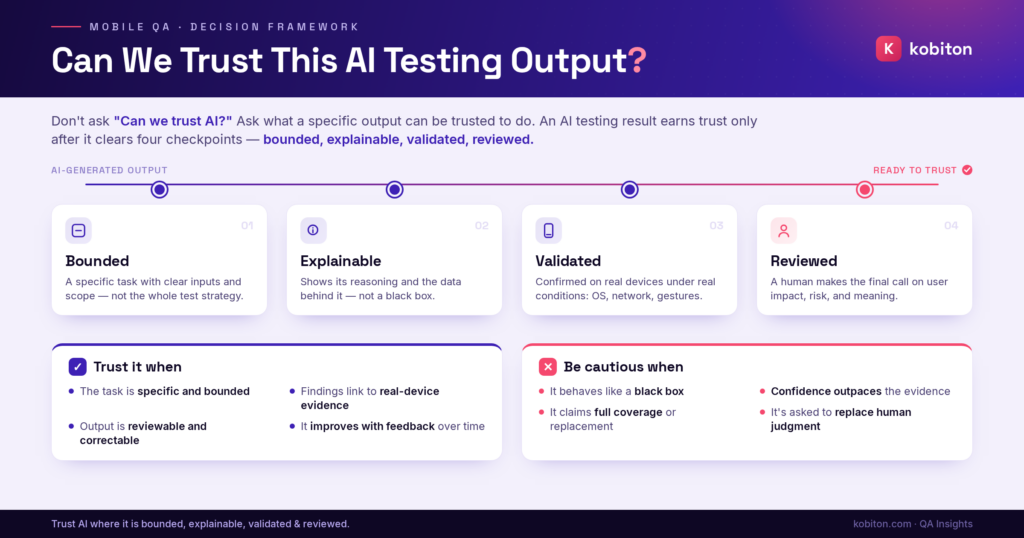
Can we trust this AI testing output?
Use this decision tree to review AI-generated testing output before acting on it. The goal is not to decide whether AI is “good” or “bad,” but to decide whether a specific output is bounded, explainable, evidence-based, and ready for human review.
AI testing output is most useful when teams can trace what the tool did, understand what data it used, and validate the result against real product behavior. If the output cannot be explained or verified, treat it as a lead rather than a conclusion.
Decision tree · Mobile QA
Final takeaway
Mobile QA teams should trust AI testing tools carefully.
AI can help teams generate tests, maintain automation, prioritize risk, analyze failures, detect patterns, and move faster. But AI should not be trusted blindly, especially when mobile apps still need real-device validation, human judgment, accessibility review, exploratory testing, and product context.
The right question is not “Can we trust AI?”
The better question is “What can we trust this AI tool to do, under what conditions, with what review?”
That framing keeps AI useful and keeps quality grounded.
To make an AI testing tool trustworthy, teams need to use it with clear tasks, strict boundaries, specific inputs, reviewable outputs, and evidence-based validation. In some cases, that may mean using multiple tools in a modular workflow: one tool to generate, another to check against acceptance criteria, another to summarize, and another to verify whether the process followed the required rules.
AI cannot give teams the full picture on its own. Humans still fill in the context, judgment, empathy, and meaning around the results.
Trust AI where it is bounded, explainable, validated, and reviewed.
Do not trust it where it asks to replace the judgment that makes mobile QA work.
FAQ
Can mobile QA teams trust AI-generated test cases?
Yes, but they should treat AI-generated test cases as a starting point, not final coverage. Testers should review each test case against the requirement, acceptance criteria, user flow, and known product risk. AI-generated tests become more trustworthy when the task is bounded, the input is specific, and the output is validated by a human before it enters the test suite.
How can teams tell whether AI testing results are signal or noise?
Teams can separate signal from noise by checking whether the AI finding is tied to evidence, repeatable behavior, real-device results, user impact, and known product risk. If the tool cannot explain why the finding matters, treat it as a lead, not a conclusion. A trustworthy signal should point testers toward something they can verify.
What should testers review before trusting an AI testing tool?
Testers should first confirm that the tool is suitable for the assigned task. Then they should review the input data, task boundaries, output explanation, supporting evidence, and validation path. If the AI received vague input and returned confident claims without traceable evidence, the output should not be used for release decisions without further review.
Does AI testing remove the need for manual review?
No. AI can reduce repetitive work and identify technical issues, but it should not become the final judgment layer. Human testers still need to review user impact, accessibility behavior, product context, release risk, and whether the app experience actually makes sense. AI can help surface findings, but people decide what those findings mean.
How should teams use AI testing tools with real devices?
Teams should use AI to generate, prioritize, summarize, and analyze testing work, then use real devices to validate how the app behaves under actual mobile conditions. Real-device testing is especially important for performance, gestures, sensors, permissions, network changes, accessibility settings, OS differences, and device-specific behavior. AI can guide the testing plan, but real devices provide the evidence.
Related reading
For a broader overview of AI’s testing role, see What AI Can and Can’t Do in Mobile App Testing.
For device validation, see AI Mobile Testing Still Needs Real Devices.
For prompt-specific workflows, see ChatGPT for Mobile Testing.