AI may be useful, but it’s not magic
AI is changing mobile app testing, but it is not a magic switch teams can flip to make quality happen automatically.
AI can help mobile QA teams see more and move faster.
It can generate test ideas, write scripts, and summarize failures. It can identify patterns across logs, test sessions, and historical bugs. It can help teams prioritize risk and reduce some of the maintenance burden that comes with test automation.
Those are meaningful gains, especially for mobile teams working across frequent releases, complex user flows, and many device and operating system combinations.
But AI has limits.
It does not automatically understand your product, your users, your business priorities, your release risks, or the way your app behaves on actual devices. It cannot fully judge whether a user experience feels clear, accessible, trustworthy, or usable. It cannot replace the human judgment needed to decide whether an issue matters.
What AI can do in mobile app testing
AI works best when the testing task involves repetition, pattern recognition, summarization, prioritization, or structured generation.
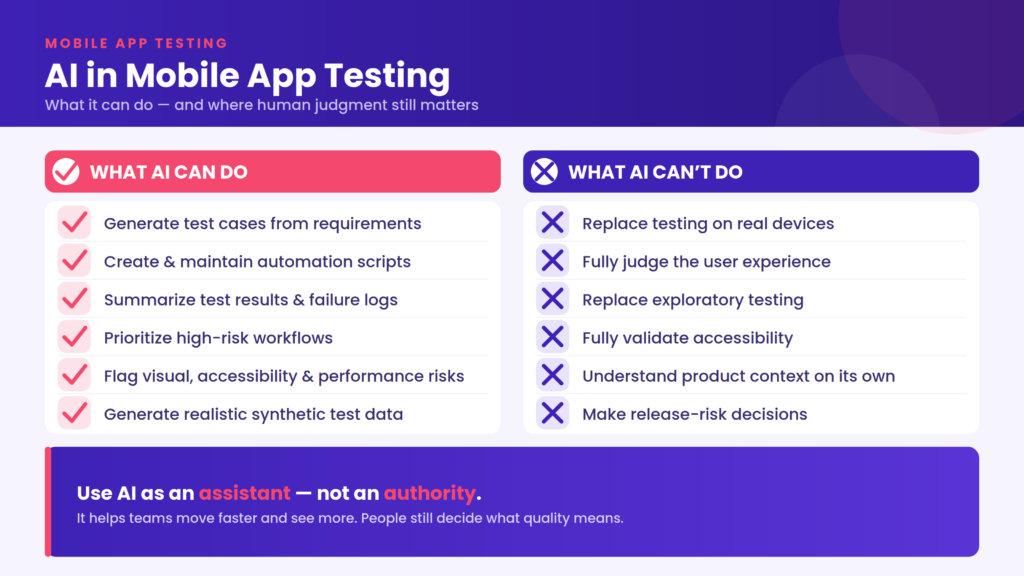
In mobile app testing, AI can help teams:
- generate test cases from requirements or user stories
- create baseline automation scripts
- suggest regression coverage after product changes
- summarize test results and failure logs
- identify recurring bugs or unstable flows
- classify issues by severity or area of impact
- support visual testing by detecting layout changes
- support accessibility checks by flagging common issues
- identify performance anomalies
- help prioritize high-risk workflows
- recommend device and OS combinations for testing
- support self-healing automation when locators change
- turn manual testing sessions into repeatable checks
These uses do not replace testers. They reduce friction.
AI is especially helpful when teams are facing a blank page, a large test suite, a messy failure report, or a release with too many possible paths to test equally.
Three technologies do most of the work
The capabilities above come from a small number of technologies. Knowing which one sits behind a given feature tells you a lot about where it will hold up and where it will not.
| Technology | What it does in mobile testing | Where it stops |
| Machine learning on historical data | Predicts likely failure areas, prioritizes tests, groups related failures, recommends device coverage | It can only extrapolate from what has already happened. A new feature, an unfamiliar device class, or a failure mode nobody has hit yet has no history to learn from. |
| Natural language processing | Turns requirements, user stories and manual sessions into draft test cases and scripts | It works from the words it is given. Requirements that leave out the real risk produce tests that leave it out too. |
| Computer vision | Compares rendered screens, flags layout shifts, finds elements when locators change | It sees that something changed, not whether the change was intended or whether a user would care. |
Most of the limits later in this article trace back to that table. AI in mobile testing is pattern recognition over history, language and pixels. It is very good at that, and it is not a substitute for knowing what the app is supposed to do.
AI can help generate test ideas
One of the simplest ways to use AI in mobile app testing is for test planning.
Natural language tools can help turn requirements, user stories, or acceptance criteria into draft test scenarios. That makes test creation more accessible to product managers, QA analysts, and non-technical stakeholders, but the output still needs review before it becomes part of the test plan.
For example, AI might suggest testing:
- login with valid and invalid credentials
- account creation with missing fields
- checkout with interrupted payment
- search with empty results
- settings changes that persist after app restart
- push notifications during an active flow
- session timeout after backgrounding the app
- app behavior after network loss
- accessibility behavior with larger text enabled
- device behavior across different screen sizes
That does not mean the AI-generated test plan is finished.
It means the tester has a starting point. The team still needs to review the suggestions, remove irrelevant cases, add product-specific context, and decide which scenarios matter most for the release.
AI can help create possibilities, but testers still need to decide what belongs in the plan.
AI can help create and maintain automation
AI can also support mobile test automation by making it easier to create and maintain.
Some AI-assisted tools can generate automated test scripts from manual sessions, product requirements, or existing test cases. Others help maintain test scripts by adapting to UI changes, updating locators, or suggesting repairs when a script fails.
This can be useful because traditional mobile automation can be brittle. A button moves. A label changes. An element identifier gets renamed. A pop-up appears. Suddenly, a test that worked yesterday breaks today.
AI-assisted automation can reduce some of that maintenance burden.
For example, AI may help:
- generate an Appium script from a baseline test session
- identify an element even if its locator changes
- suggest a new path when a UI flow shifts
- classify whether a failure is likely caused by the app or the test
- recommend updates to a regression suite after a feature change
But generated automation still needs review; using AI does not remove the need to validate the automation itself.
A test that runs successfully is only useful if it is testing the right thing. A self-healed locator still needs to find the correct element. A generated script still needs to reflect how users actually move through the app.
AI can help prioritize risk
Mobile teams rarely have unlimited time to test everything equally.
AI can help teams prioritize by analyzing signals such as historical bugs, code changes, user behavior, test results, device usage, crash patterns, and business-critical flows.
That can help teams ask better questions:
- Which workflows changed recently?
- Which areas have failed before?
- Which devices or OS versions show more issues?
- Which features affect revenue, safety, privacy, or account access?
- Which tests should run first?
- Which failures are likely related?
- Which areas need human review before release?
This is where AI can be especially useful. It can help turn a large amount of testing data into clearer signals. This risk prioritization still needs human judgment.
AI may identify a flow as high risk, but the team still has to decide what that means for the release. AI may suggest that a device combination deserves attention, but testers still need to validate the behavior. AI may flag an issue as severe, but people still need to understand user impact.
Risk-based testing does not mean ignoring low-risk areas. It means using human judgment and data together so the most important workflows receive the deepest attention, while lower-risk areas can be covered through repeatable automated checks.
AI can help with visual, accessibility, performance, and security checks
AI can also support several types of mobile test validation beyond basic functional testing.
For visual testing, AI can help detect layout shifts, missing elements, overlapping content, unexpected pop-ups, color changes, or inconsistent UI behavior across builds.
For accessibility testing, AI can help flag common issues such as contrast problems, missing labels, unclear touch targets, or screen reader-related risks.
For performance testing, AI can help identify anomalies in load time, responsiveness, memory usage, device temperature, battery drain, or crash behavior.
For security testing, AI can help detect suspicious patterns, risky data handling, or possible vulnerabilities that deserve review.
These checks can help teams catch more than “does the button work?”
A mobile app can function correctly and still deliver a poor experience if it is slow, visually broken, inaccessible, unstable, or insecure.
But AI-powered validations still need context. A visual change may be intentional. An accessibility warning may need assistive technology review. A performance anomaly may matter only if users feel it. A security finding may need deeper investigation.
AI can flag the signal. People decide what it means.
AI can help create better test data
AI can also help teams create and manage test data.
Mobile app testing often requires realistic data: user profiles, account states, payment conditions, location details, order histories, permissions, preferences, and edge cases. But teams cannot always use production data because of privacy, security, or compliance concerns.
Generative AI can help create synthetic test data that reflects real-world patterns without exposing sensitive user information. That can make it easier to test different user journeys, account types, regions, accessibility settings, or transaction scenarios.
For example, AI-generated test data may help teams validate:
- new user onboarding
- checkout behavior
- account recovery
- subscription changes
- location-based flows
- form validation
- error handling
- edge cases around empty, missing, or unusual data
But synthetic data still needs review. If the generated data does not reflect real users, real risks, or real product behavior, it can create a false sense of coverage.
AI can help create the data, but teams decide whether the data is meaningful.
AI is most reliable when the task is bounded
Across every use above, one thing predicts whether the output holds up better than the feature name does: how tightly the task is defined.
A bounded task has a specific input, a clear question, and an output someone can check. An open-ended task has none of those, and that is where AI output starts to sound confident and stop being useful.
Bounded tasks look like this:
- summarize the failures from a specific test run
- generate test ideas from one defined user story
- suggest regression tests for a workflow that changed
- identify visual differences between two builds
- classify known failures into categories
- recommend coverage for a documented release
- repair a locator after a small UI change
Compare those with “make sure the app is ready to release” or “test the checkout flow properly.” Both are reasonable things to want. Neither gives the tool an input to work from or the tester an output they can verify.
This is also the most practical way to start. Pick one bounded task the team already does by hand, give the tool the context it needs, and compare the output against the work you would have done anyway. Widen the task only once you know what the output looks like when it is wrong.
What AI cannot do in mobile app testing
AI is useful, but it should not be treated as the final authority on mobile quality.
AI cannot fully replace:
- real-device testing
- exploratory testing
- human judgment
- accessibility review
- usability evaluation
- release risk decisions
- product context
- user empathy
- domain expertise
- tester intuition
The problems begin when teams expect AI to do work it is not suited to do. That is not a flaw. It simply means AI should not become the entire testing strategy.
AI cannot replace real-device testing
AI mobile testing still needs real devices.
Mobile apps do not run in one clean, predictable environment. They run across real hardware, operating systems, screen sizes, sensors, network conditions, accessibility settings, battery states, memory limits, interruptions, and gestures.
AI can help decide which devices to prioritize. It can suggest which tests to run. It can analyze results across sessions. But users experience apps on actual devices.
That means teams still need to validate behavior across real conditions such as:
- device model differences
- OS version differences
- screen size and resolution
- network changes
- app backgrounding
- push notifications
- permission prompts
- camera and sensor behavior
- biometric authentication
- battery drain
- device temperature
- accessibility settings
- performance during long sessions
AI can guide real-device testing, but it cannot replace the device itself. The test should never remain a digital concept; at some point it needs to be tested in reality.
AI cannot fully judge user experience
A mobile app can pass a test and still feel bad to use.
AI may confirm that a button exists, a screen loads, or a flow completes. But that does not always answer the questions that matter to users.
Does the flow make sense?
Does the screen feel crowded?
Does the error message help the user recover?
Does the animation feel slow?
Does the checkout flow build trust?
Does the user know what to do next?
Does the app feel usable under real conditions?
Those questions require human judgment.
AI can help surface clues, but it cannot fully understand frustration, confusion, trust, or confidence. Those are human experiences, and mobile testing still needs people who can interpret them.
AI cannot replace exploratory testing
Exploratory testing is valuable because it is open-ended.
A tester follows curiosity, risk, product knowledge, and user empathy. They notice strange behavior, try unexpected paths, change direction, and ask questions the original test plan did not include.
AI can suggest paths, detect gaps, and learn from previous sessions, but exploratory testing still depends on human curiosity, product knowledge, and the ability to notice when something feels wrong before a formal assertion fails.
AI may eventually support exploratory work by suggesting paths, identifying coverage gaps, or responding to app behavior. But it still needs context and oversight.
AI cannot fully validate accessibility
AI can help with accessibility testing, but it cannot understand access on its own.
It can suggest accessibility test cases. It can flag missing labels, possible contrast issues, or touch target problems. It can help summarize findings and recommend areas for review.
But accessibility is not only a checklist.
A screen may pass an automated scan and still be confusing with VoiceOver or TalkBack. A button may have a label, but the label may not make sense in the flow. A modal may look clear visually but trap someone using assistive technology. A layout may work normally but break when larger text is enabled.
Mobile accessibility testing still needs real devices, assistive technologies, and human review.
AI can identify possibilities while people validate reality.
AI cannot understand product context unless teams provide it
AI needs context.
It does not automatically know your users, your release goals, your business model, your risk tolerance, your support history, your design intent, or your product roadmap.
Without context, AI may optimize for activity instead of impact. It may generate test cases that look useful but do not match the release. It may prioritize the wrong flows. It may over-report minor issues or miss the user journey that matters most.
Teams get better AI output when they provide better input.
That may include:
- product requirements
- user stories
- acceptance criteria
- historical bugs
- release notes
- device data
- analytics
- known risks
- accessibility requirements
- business-critical flows
- design files
- testing goals
Context is not only what you tell the tool. It is also the quality of everything it reads.
- A stale bug report sends the tool after a problem that was fixed two releases ago.
- Narrow device data teaches it that your users are on recent flagships when a large share of them are not.
- Mislabeled or inconsistently named results blur the patterns it is meant to find. A human reads past a typo in a test name and knows which workflow it means. The model does not.
- Incomplete test history makes a rarely exercised area look stable rather than untested.
None of this surfaces as an error. It surfaces as a recommendation that looks reasonable and points slightly in the wrong direction. Before trusting what a tool chose to prioritize, it is worth asking what it learned from.
AI gets things wrong in two directions
AI testing output fails in two ways, and they cost teams differently.
A false positive is something flagged that is fine: an intentional redesign reported as a visual defect, a minor layout shift raised as a major issue, a known flaky test summarized as a regression.
A false negative is a real problem that goes unreported: a bug that only appears on one device model, an accessibility barrier that only shows up under a screen reader, a slowdown that a clean synthetic run never feels.
| Error | What it looks like | What it costs |
| False positive | Noise. Intentional changes reported as defects, small differences escalated, findings that need a person to dismiss them | Review time, and eventually a team that stops reading the tool’s output at all |
| False negative | Silence. A device-specific bug, an accessibility barrier, a performance issue the run never surfaces | Misplaced confidence, because the coverage looked complete |
Both existed long before AI. What changes is volume and polish. Results arrive faster, cover more, and read more convincingly, which makes the noise louder and the silence harder to notice.
The practical response is to measure them. A tool whose false positive rate nobody tracks is a tool being trusted on tone.
AI output is only as useful as the context and data behind it. If the model is working from incomplete requirements, stale bug history, narrow device data, or poorly labeled test results, its recommendations may look confident while pointing the team in the wrong direction.
Confident output is not verified output
A summary can sound polished. A generated test plan can look comprehensive. A risk score can appear precise. None of that is evidence.
Be careful when AI output includes:
- conclusions with no evidence attached
- recommendations that do not explain the data behind them
- risk scores with no stated methodology
- summaries that do not link back to the underlying test results
- coverage claims with no traceability
- accessibility conclusions reached without assistive technology
- release recommendations no person has approved
These systems can assemble convincing language around incomplete information. They can also be steered toward a preferred conclusion if a team asks them to reinterpret a result without supplying anything new to go on. That is what makes verification the whole job rather than a formality.
If a tool cannot show how it reached a result, treat the result as a lead rather than a decision. Trust should end where evidence ends, and for a mobile app, evidence still includes behavior on a real device.
AI is not free to adopt
The limits above are about what AI can work out. There is a second set that has nothing to do with capability and everything to do with what adoption takes.
- Learning curve. Someone has to understand what the tool is doing well enough to judge its output. That is not the same skill as knowing Appium or XCUITest, and it takes time to build.
- Cost. Per-seat or per-agent pricing sits on top of device infrastructure, and the saving it is meant to deliver — hours not spent on maintenance — is easy to claim and harder to measure.
- Integration. AI output is worth much less outside the workflow. Tests generated in one place and moved into the platform by hand lose their connection to device context, execution results and review.
- Data handling. A tool that learns from your test history, crash reports and session data should be assessed like any other processor of that data, particularly in regulated environments.
None of these are reasons to avoid AI. They are the reasons a pilot on one bounded task beats a platform-wide rollout, and they belong in the evaluation rather than in the first month after it.
What to look for in an AI testing tool
Most of what separates a tool worth trusting from one that is not comes down to whether you can see what it did.
Look for:
- an explanation attached to every recommendation, not just the recommendation
- visibility into which data the tool used and which it did not
- review and approval steps a human has to pass through
- thresholds and testing boundaries the team can set
- execution on real devices, not only emulators
- reporting that connects a failure to user impact rather than to a pass rate
- controls for privacy, security and sensitive test data
- integration with the QA, CI/CD and issue-tracking tools already in use
- a feedback loop, so corrections change what the tool does next time
A quick way to test several of these at once: after the tool completes a task, ask it to account for what it did — what data it used, what it skipped, what it assumed. A tool that can answer is one you can audit. A tool that cannot is one you are trusting on reputation.
It is also worth preferring tools that can say they do not have enough information. A tool that fills a gap with a plausible answer is more dangerous than one that stops and asks.
None of this is unique to testing. NIST’s AI Risk Management Framework describes trustworthy AI in terms of validity, reliability, transparency, explainability, privacy and accountability, which maps closely onto what a QA team needs to see before acting on what a tool tells them.
How mobile teams should use AI
The strongest mobile testing strategies use AI as an assistant, not an authority.
A practical approach looks like this:
| Use AI to… | Keep humans responsible for… |
| Generate test ideas | Reviewing whether the tests are meaningful |
| Create baseline scripts | Confirming the scripts test the right behavior |
| Summarize failures | Deciding severity and release impact |
| Prioritize risk | Choosing what must be tested before release |
| Detect visual changes | Deciding whether the change matters |
| Flag accessibility risks | Testing with assistive technologies and real users when possible |
| Identify performance anomalies | Understanding user impact on real devices |
| Recommend device coverage | Validating behavior on actual hardware |
| Maintain automation | Reviewing whether the suite still reflects the app |
The same split works as a check on a single piece of output. Before acting on anything an AI tool produces, run it through five questions:
1. Was the task bounded? If the tool was asked something open-ended, expect to verify more of what comes back.
2. Can you see the inputs? Know what data it worked from, and what it did not have.
3. Is there evidence attached? A finding with no traceable result behind it is a lead, not a conclusion.
4. Has a person reviewed it? Someone with product context decides whether the finding matters.
5. Has it been validated on a real device? For anything involving rendering, performance, gestures, permissions or accessibility, this is where the evidence has to end up.
Output that clears all five can be acted on. Output that fails one is not necessarily wrong — it is unverified, which is a different thing and deserves different handling.
This keeps AI in the right place. AI reduces manual burden while people guide the work.
What changes when the AI acts on its own
Most of this article assumes AI produces something a person reviews. That assumption is being tested. Agentic tools do not follow a fixed script. They explore the app, decide what to do next, and adapt when the interface changes.
What that changes is reach. An agent can cover paths nobody wrote a test for, including ones a test plan would never have listed.
What it does not change:
- an agent infers intent from the app in front of it, not from what the product was meant to do
- a path an agent completes successfully may not be a path any user takes
- the agent’s own record of what it did becomes the evidence, so that record has to be readable
- someone still decides whether a finding should block the release
The review question shifts from “is this output correct?” to “is this account of what the agent did complete enough to check?” Boundaries and evidence matter more when the AI is choosing its own actions, not less.
Final takeaway
AI can be a powerful tool for mobile app testing.
It can generate test ideas, support automation, summarize results, prioritize risk, identify patterns, improve validation, and help teams move faster.
However, it cannot replace real devices, human testers, exploratory thinking, accessibility review, product context, or user understanding. Mobile testing works best when AI helps teams focus their time, not when it tries to erase the need for human judgment.
AI can help mobile QA teams move faster and see more clearly, but people still have to decide what quality means. Acknowledging that boundary is where AI goes from being a shiny new toy to a legitimately useful tool.
FAQ
Can AI replace manual mobile testing?
No. AI can take over repetitive work — drafting test cases, summarizing runs, prioritizing what to test first — and it can widen coverage across devices. It cannot judge whether a flow makes sense, whether an issue matters to users, or whether the app is ready to release. Teams get the most from AI when they use it to free up tester time rather than to remove testers.
Can mobile QA teams trust AI-generated test cases?
Treat them as a starting point rather than finished coverage. Review each case against the requirement, the user flow and known product risk before it enters the suite. AI-generated tests are most reliable when the input was specific, the task was bounded, and a person validated the output first.
What can AI not do in accessibility testing?
It can flag missing labels, contrast problems and touch target issues, and that is genuinely useful. It cannot tell you whether a screen makes sense with VoiceOver or TalkBack, whether a label means anything in the flow it sits in, or whether a modal traps someone using assistive technology. Those need real devices, assistive technology and human review, measured against WCAG rather than against a tool’s confidence score.
How do teams tell whether an AI testing finding is signal or noise?
Check whether it is tied to evidence: a specific test result, repeatable behavior, a real-device run, a known product risk. If the tool cannot explain why the finding matters or show what it was based on, treat it as a lead worth investigating rather than a defect worth filing.
Does AI remove the need for real-device testing?
No. AI can decide which devices to prioritize and analyze results across sessions, but people use your app on real hardware, with real network conditions, permissions, sensors, interruptions and battery states. Real devices are where an AI-assisted finding turns into evidence.
Where should a team start with AI in mobile testing?
With one bounded task the team already does by hand summarizing failures from a run, or drafting test ideas from a single user story. Give the tool the context it needs, compare the output against what your team would have produced, and widen the scope only once you know how the output looks when it is wrong.