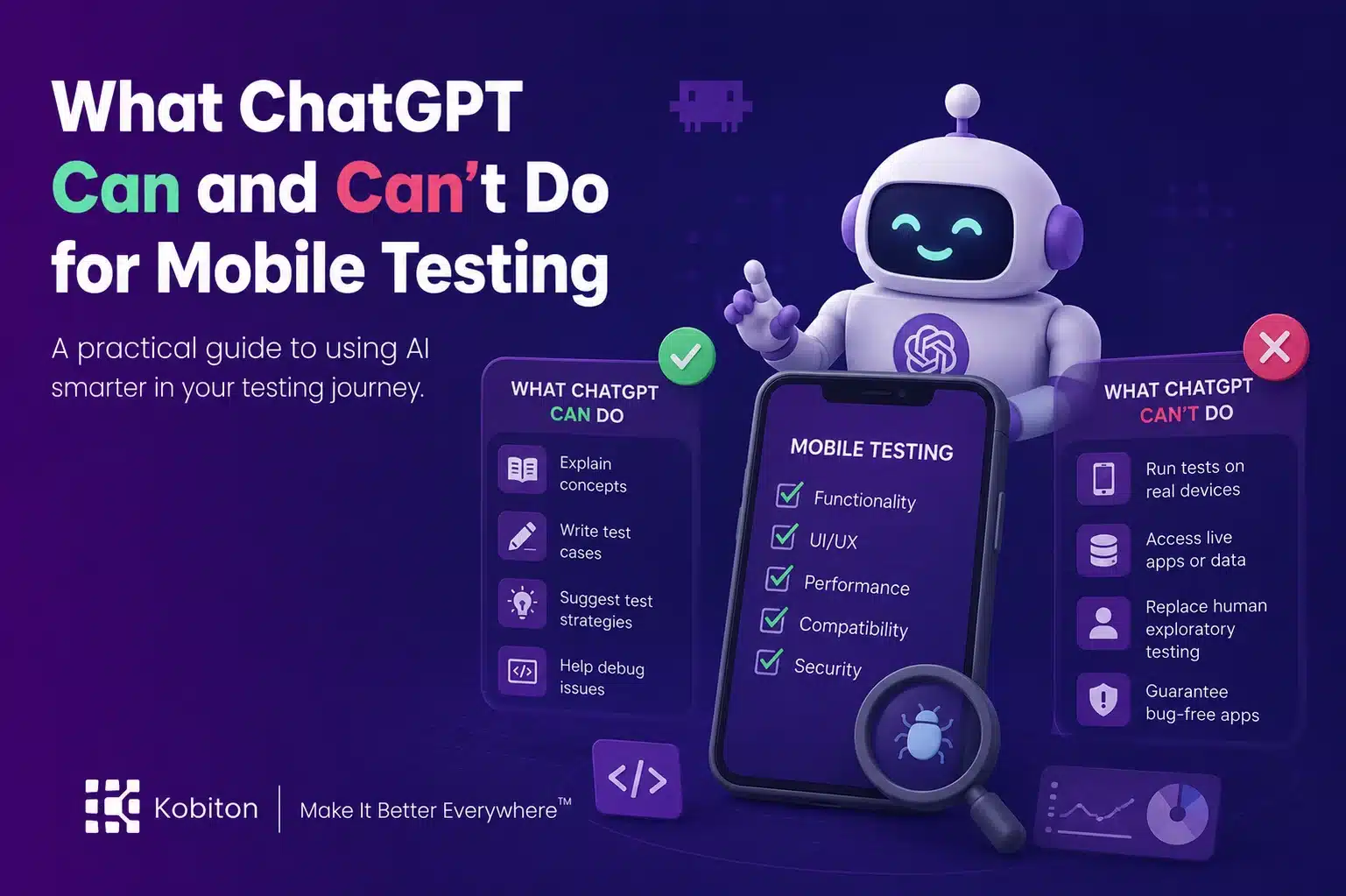
ChatGPT is useful, but vague prompts create vague testing output.
A prompt is a test input. If it is vague, incomplete, or missing constraints, the output will fail in unpredictable ways.
That is the simplest way to think about ChatGPT for mobile testing. The quality of the answer depends on the quality of the input. Ask a vague question, and ChatGPT has to fill in the gaps. Give it context, constraints, and a clear task, and it can become a useful assistant for testers, developers, and automation engineers.
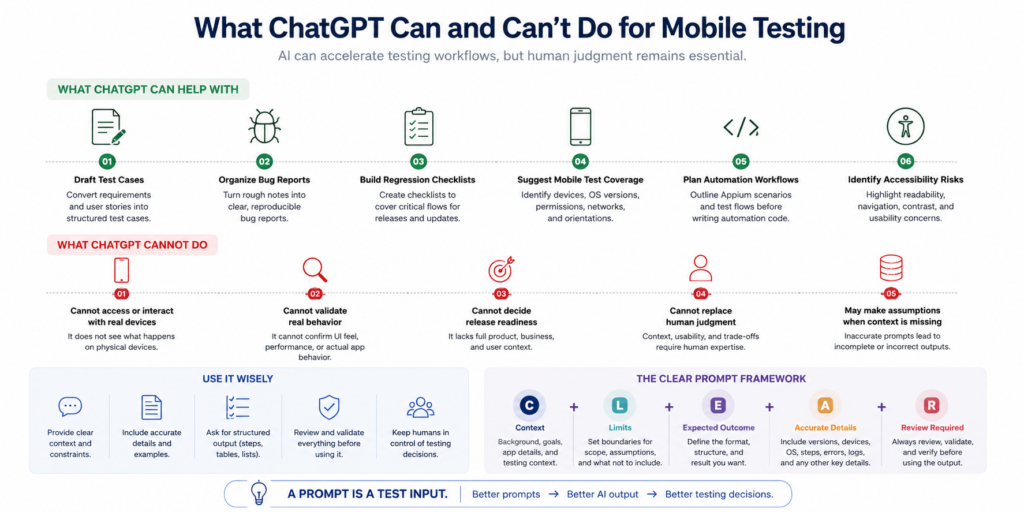
ChatGPT can help draft test cases, organize bug reports, brainstorm coverage gaps, and outline automation work. Powerful as it is, it cannot replace human testers, validate real-device behavior, or decide whether an app is ready to release. Mobile testing still needs human judgment, real devices, and a clear understanding of what the app is supposed to do.
The goal is not to hand testing over to AI. The goal is to use AI where it helps and keep people in control of the decisions that matter.
What ChatGPT can help with in mobile testing
ChatGPT is useful when the task involves organizing, drafting, comparing, or expanding information. It can help testers move from a blank page to a workable first draft faster.
For mobile testing teams, ChatGPT can help with:
- Drafting test cases from requirements, user stories, or acceptance criteria
- Turning rough notes into structured bug reports
- Brainstorming coverage ideas for devices, operating systems, permissions, and network conditions
- Creating regression testing checklists
- Planning Appium automation scenarios before writing code
- Identifying accessibility testing considerations
- Summarizing failure notes or logs when they are safe to share
- Rewriting test steps so they are easier to follow and reproduce
That support is useful because mobile testing has a lot of moving parts. A single test can depend on the app version, device model, operating system, screen size, orientation, permissions, network state, and the exact step where the issue occurs.
ChatGPT can help organize those details. It should not be trusted to invent them.
Generating mobile test data
Test data is one of the places ChatGPT earns its keep fastest. Automated tests need inputs that are valid, invalid, and awkward, and inventing hundreds of them by hand is slow. Describe the field, its rules, and the conditions you care about, and ChatGPT can produce a varied set in seconds.
For mobile apps, ask specifically for data that stresses the device and the UI, not just the validation logic:
- Long names and addresses that truncate or wrap on small screens
- Right-to-left text, accented characters, and emoji in text fields
- Locale-specific formats for dates, phone numbers, currency, and decimal separators
- Boundary values such as empty strings, maximum lengths, and zero or negative amounts
- Dates that cross time zones or daylight saving changes on the device
One rule applies every time: never paste real customer data into ChatGPT to use as a pattern. Describe the shape of the data instead, and let the model generate synthetic records.
What ChatGPT cannot replace
ChatGPT is not a tester. It does not know your app unless you give it accurate context. It cannot see what is happening on a physical device. It cannot confirm whether a button feels responsive, whether a layout works well on a specific screen size, or whether a workflow matches the product team’s intent.
It also cannot decide release quality. It can help identify risks, suggest test coverage, and make testing work easier to review, but it does not understand the full business context behind a release.
That distinction matters. Apps are built for people. Human testers understand context, usability, intent, and tradeoffs in ways AI cannot. A model can help process information, but humans remain responsible for deciding whether the output is accurate, useful, and complete.
Use ChatGPT as an assistant, but don’t let it decide for you.
Limitations to plan for in automation work
When ChatGPT moves from test ideas to test code, the risks become more specific:
- It can invent methods, parameters, and capabilities that don’t exist, and present them just as confidently as real ones.
- Its knowledge of frameworks lags behind current releases. Deprecated Appium and Selenium calls are a common result.
- It can’t check any locator against your app. Every element reference it writes is unverified until it runs.
- The same prompt can produce different code on different days. Keep what you accepted in version control, not in chat history.
- It may write code that works but is insecure, such as credentials hard-coded into a test.
- Anything you paste in leaves your environment. Keep credentials, customer data, and unreleased product details out of prompts, and follow your organization’s AI usage policy.
Vague prompt vs. useful prompt
Say it with me: a prompt is a test input.
A vague prompt asks ChatGPT to guess. A useful prompt gives it enough information to respond within the right testing context.
Vague prompt
“Why did my app fail on iPhone?”
There is not enough information here. Which iPhone? Which iOS version? Which app version? What test failed? Was it a manual test or an automated test? What was supposed to happen? What actually happened?
ChatGPT can still answer, but the response will probably be generic because the prompt is generic.
Better prompt
“Help me investigate an Appium test failure in a mobile app. The test failed on iPhone 15 running iOS 17.5 at step 12, where the script taps the “Sign up” button. The same test passed on iOS 16. The expected result was [expected result]. The actual result was [actual result]. The error message was [error message]. Review the likely causes, list what information is missing, and suggest next debugging steps. Do not assume product behavior that is not included here.”
This prompt gives ChatGPT a real job. It includes platform details, test context, expected and actual behavior, and instructions about how to handle uncertainty.
That does not guarantee a perfect answer. It does give the tester a more useful starting point.
Use the CLEAR framework for better mobile testing prompts
A good mobile testing prompt should be CLEAR:
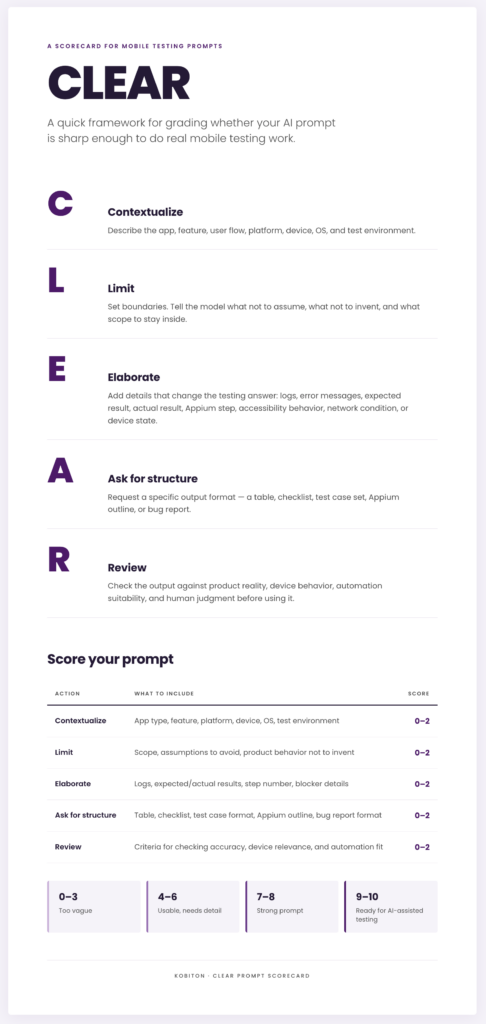
- Contextualize. Tell ChatGPT what it is working on: the app, the platform, the device and OS version, the app version, and whether the test is manual or automated.
- Limit. Set boundaries. Tell it which framework and version to use, what not to assume, and what is out of scope for this answer.
- Elaborate. Give it the details that change the answer: the exact step, the expected result, the actual result, and the error message or log excerpt.
- Ask for structure. Say what shape you want back, such as a numbered list of test cases, a table of likely causes, a Gherkin scenario, or a script with comments.
- Review. Check the output against the real app and real devices before it enters your test plan or suite.
The stronger the prompt, the less room ChatGPT has to wander. That matters in mobile testing, where a small missing detail can change the entire trajectory of an app’s development.
For example, “the button did not work” is not enough. “The ‘Sign up’ button did not respond after the keyboard covered the lower half of the screen on iPhone 15 running iOS 17.5” gives ChatGPT a specific condition to reason about.
The same rule applies to test case generation, bug report cleanup, Appium planning, accessibility review, and regression coverage. Context changes the answer.
Mobile test automation prompts you can adapt
Each of these follows the CLEAR pattern: context first, constraints stated, and a specific output requested. Replace the bracketed parts with your real details. The more of them you fill in, the less ChatGPT has to guess.
| Task | Prompt to adapt |
| Draft an Appium script | “Write an Appium 2 test in [Java / Python] using the [UiAutomator2 / XCUITest] driver for this test case: [steps]. Use only these locators: [accessibility IDs]. Use explicit waits, not sleeps. Flag any step where you had to assume a locator.” |
| Convert manual cases to BDD | “Rewrite these manual test cases as Gherkin scenarios for a mobile app. Keep one behavior per scenario, and move shared setup into a Background: [test cases].” |
| Find automation candidates | “From this regression checklist, sort each item into: good automation candidate, needs real-device manual check, or exploratory only. Give one line of reasoning for each: [checklist].” |
| Translate a test between frameworks | “Convert this [XCUITest / Espresso] test to an Appium 2 test in [language]. Keep the same assertions. List anything that does not translate directly: [code].” |
| Triage a flaky test | “This Appium test passes locally and fails intermittently in CI on [device / OS]. Here is the failing step and the log excerpt: [log]. List likely timing, locator, and environment causes in order of probability. Do not assume app behavior beyond what is shown.” |
| Review generated code | “Review this Appium script for deprecated methods, hard-coded waits, missing handling for permission dialogs or the keyboard, and locators that look invented: [code].” |
Whatever the task, finish the prompt the same way: ask ChatGPT to mark its assumptions. That single line makes review much faster.
Using ChatGPT to write Appium test scripts
Yes, ChatGPT can write an Appium script. Give it a test case and a language, and it will return code that looks right. On a mobile app, looking right and running are two different things.
The reason is simple. ChatGPT has never seen your app’s element tree. It doesn’t know your accessibility IDs, your Appium version, your client library version, or how your app behaves when a permission dialog appears. It fills those gaps with plausible guesses, and guesses make brittle tests.
Treat the generated script as a first draft of test logic, not a finished test. The prompt matters here as much as anywhere. Tell ChatGPT your language and client library, your Appium major version, the platform and automation driver (UiAutomator2 or XCUITest), and the real locators you pulled from an inspection session. Also tell it not to invent element IDs.
Even with a strong prompt, expect to fix a predictable set of problems:
| What ChatGPT often gets wrong | Why it breaks on mobile | What to do |
| Invented locators | The element IDs and XPath it writes come from guesswork, not your app. | Supply real locators from an inspection session. Prefer accessibility IDs over XPath. |
| Outdated API calls | It may use find_element_by_* methods, MobileBy, or TouchAction, all of which are deprecated or removed in current Appium clients. | State your client version in the prompt. Replace gestures with W3C Actions or the driver’s mobile: extension commands. |
| Appium 1 capability format | Appium 2 expects non-standard capabilities to carry the appium: prefix, for example appium:automationName. | Ask for Appium 2 capabilities explicitly, and review them before the first run. |
| Hard-coded sleeps or no waits | Screens load at different speeds on different devices and networks, so fixed sleeps cause flaky tests. | Replace sleeps with explicit waits on the element state you need. |
| No handling for system dialogs | Permission prompts, keyboards, and OS alerts cover elements and block taps. | Handle them in the script or use capabilities such as appium:autoGrantPermissions (Android) or appium:autoAcceptAlerts (iOS) where appropriate. |
| Ignores webviews | In hybrid apps, native locators can’t reach web content until the script switches context. | Tell ChatGPT the app is hybrid and ask for the context switch. |
Then run the script on real devices before it goes anywhere near your suite. A script that passes on one emulator has proven very little. The same script needs to hold up across the devices, OS versions, and screen sizes your users actually have.
How to review AI-generated testing support
ChatGPT output should be reviewed before it becomes part of a test plan, automation backlog, bug report, or release workflow.
Use these questions:
| Review question | Why it matters |
| Did ChatGPT invent product behavior? | AI may fill gaps with assumptions that sound reasonable but are wrong. |
| Are the details mobile-specific? | Mobile behavior depends on devices, operating systems, permissions, screen size, orientation, network state, and app lifecycle events. |
| Does the output match the actual app? | ChatGPT cannot know whether the app behaves as described unless the tester verifies it. |
| Are accessibility risks included? | Mobile quality includes users who rely on assistive technologies, alternate navigation patterns, readable content, and clear error handling. |
| Is the recommendation suitable for automation? | Some tests are good automation candidates. Others need manual review, exploratory testing, or real-device validation. |
| Are assumptions clearly marked? | Testers need to separate known facts from AI-generated possibilities. |
| Does the script run on a real device? | Generated code can look correct and still fail on the first step. A single real-device run is the minimum proof. |
| Are the locators and API calls current? | ChatGPT may use invented element IDs or deprecated client methods. Check both against your app and your Appium client version. |
| Are waits based on element state, not fixed time? | Hard-coded sleeps make tests slow on fast devices and flaky on slow ones. |
This is where human judgment stays in the loop. ChatGPT can make the work easier to start, compare, and organize. The tester still decides whether the output is accurate and useful.
Where AI fits in a mobile testing workflow
AI works best when it has a clear job, enough context, and a human reviewer who can decide whether the output is useful.
For example, an AI-assisted mobile testing workflow might help a tester generate an Appium script from a baseline test session, address blockers during test execution, or handle pop-ups that appear inconsistently across devices or app states. Those features can reduce manual effort and keep testing moving, but they still need human oversight. The tester provides the context, reviews the suggestion, and decides whether the next step makes sense.
That is the pattern worth keeping: AI helps with the work around testing, but it does not replace the judgment inside testing.
ChatGPT fits into that same pattern. It can draft test cases, clean up bug reports, outline Appium scenarios, and identify possible coverage gaps. It should not become the source of truth. Testers still need to validate the output against the app, the device, the environment, and the release goal.
A practical ChatGPT workflow for mobile test automation
Here is what that pattern looks like across one piece of automation work, from user story to pipeline:
1. Start from the user story and its acceptance criteria. Ask ChatGPT to draft test cases, including negative and edge cases.
2. Review the cases yourself. Remove anything that invents product behavior, and add the device, OS, and permission conditions that matter for this feature.
3. Decide which cases to automate. Keep the rest for manual or exploratory testing on real devices.
4. Ask ChatGPT for a first-draft Appium script for each automation candidate, giving it real locators from an inspection session.
5. Fix the draft: replace sleeps with explicit waits, update deprecated calls, and add handling for system dialogs.
6. Ask ChatGPT to draft the pipeline step, such as a GitHub Actions job or a Jenkinsfile stage that runs the new tests. Review it like any other config change.
7. Run the tests on real devices across your target device and OS matrix.
8. When a test fails, paste the failing step and a safe excerpt of the log back into ChatGPT for likely causes. Then verify the cause on the device yourself.
ChatGPT shows up in almost every step, but it doesn’t make the call in any of them. It drafts, and a person decides.
ChatGPT vs. AI built into a mobile testing platform
ChatGPT and the AI features inside a mobile testing platform aren’t competing for the same job. ChatGPT works from what you tell it. Platform AI works from what it can observe: the running app, the real device, and the recorded test session.
| Capability | ChatGPT | AI in a mobile testing platform |
| Drafting test cases from requirements | Strong | Varies by platform |
| Writing a script | From your description, with guessed locators | From a recorded session, using the app’s real elements |
| Seeing the app’s element tree | No | Yes |
| Running tests on real devices | No | Yes |
| Adapting when a locator changes | Only if you paste the new failure back in | Can self-heal during execution, where supported |
| Handling unexpected pop-ups and blockers | Can suggest code to handle them | Can detect and handle them during a run |
| Knowledge of your app and history | Only what is in the prompt | Builds on your sessions and results |
Most teams will use both. ChatGPT is fast for thinking work: coverage ideas, test data, and drafting documentation. Platform AI handles work that depends on the real app running on a real device. In both cases a tester reviews the output before it counts.
Frequently asked questions
Can ChatGPT write Appium test scripts?
Yes, it can draft them, but treat the result as a starting point. It doesn’t know your app’s real locators, and it often uses outdated API calls or fixed waits. Expect to fix those, then run the script on real devices before adding it to your suite.
Is code generated by ChatGPT ready to use in test automation?
Rarely as written. Generated tests usually need real locators, explicit waits, handling for permission dialogs and keyboards, and changes to fit your framework’s structure. Review it the way you would review any other code, not as finished work.
Can ChatGPT convert tests from one framework to another?
It can translate the structure and assertions, for example from an Espresso or XCUITest test to an Appium test. Ask it to list anything that doesn’t translate directly, because gestures, waits, and app-specific setup often need manual work.
Can ChatGPT run or execute automated tests?
No. ChatGPT can write test code and pipeline configuration, but it can’t run tests, interact with a device, or see the app. Execution happens in your test framework and on your devices, either a local lab or a device cloud.
Is it safe to paste test logs and code into ChatGPT?
Only after you remove anything sensitive. Take out credentials, tokens, customer data, and unreleased product details, and follow your organization’s policy on AI tools. When possible, describe the problem instead of pasting raw data.
Will ChatGPT replace test automation engineers?
No. It speeds up drafting and troubleshooting, but someone still has to understand the app, choose what to automate, verify results on real devices, and decide whether a release is ready. Those are the parts of the job that matter most.
Final takeaway
ChatGPT for mobile testing is most valuable when testers give it a clear job and review the result with human judgment.
Write it with the same care you would give any other test condition. Define the context. Set the constraints. Include the details that matter. Ask for a useful structure. Then review the output before it enters your workflow.
The better the prompt, the better the starting point. ChatGPT can draft, organize, and troubleshoot, but mobile testing still belongs to the people who understand the app, the devices, and the users.
ChatGPT for mobile testing is most valuable when it helps testers move faster without asking them to give up control. It can draft, organize, compare, and troubleshoot. It can help a tired team get from “blank page” to “workable first pass” faster.
The key takeaway remains the same: a prompt is a test input.