Mar 8, 2017
Addressing Testing in the Face of Device Fragmentation

Adam Creamer
Read More

However, when the same application is installed on a different device, issues can appear such as layout shifts, overlapping buttons, or features that stop working entirely.
This is a common scenario caused by mobile device fragmentation, one of the biggest challenges in mobile app testing.
Unlike desktop environments where hardware and operating systems are more standardized, the mobile ecosystem includes thousands of device models with different configurations and system behaviors.
Understanding device fragmentation helps explain why applications behave differently across devices and highlights the importance of comprehensive testing.
This article is part of a series exploring key challenges in mobile app testing and infrastructure.
Device fragmentation refers to the wide variety of hardware, operating systems, and manufacturer customizations across mobile devices.
Two devices running the same application may behave differently because of variations in processors, screen sizes, operating system versions, manufacturer modifications, and hardware capabilities.
While this diversity makes mobile platforms flexible and powerful, it also introduces complexity for developers and testers.
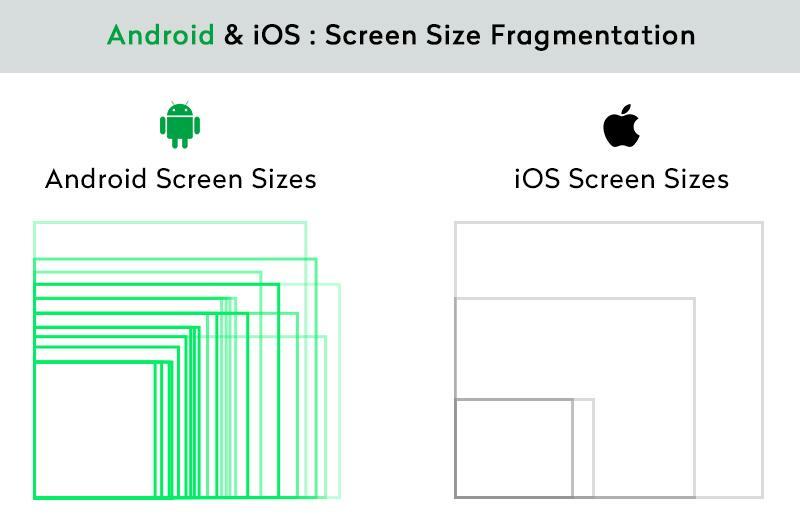
Mobile fragmentation appears in multiple forms, each affecting application behavior in different ways.
Hardware differences are one of the most visible causes of fragmentation. Devices vary widely across brands, generations, and product lines, meaning there is no single standard configuration.
Differences in processors, RAM, camera hardware, sensors, and GPU performance can affect how applications perform.
A feature that works smoothly on a high-end device may lag, behave inconsistently, or even crash on lower-powered devices with limited resources.
Operating system fragmentation is particularly common in the Android ecosystem, where multiple OS versions are used simultaneously.
Because manufacturers and carriers control updates, many users remain on older versions for long periods.
This requires applications to support multiple OS versions at the same time, which can lead to compatibility challenges.
For example, a feature built on a newer API may work correctly on a recent Android version but fail on older devices.
The root cause is Android’s open-source model. Google publishes each release, but every manufacturer has to port it to its own hardware and interface, and carriers often certify it before it reaches users. How long a device keeps getting updates depends on the manufacturer and the price tier. Recent flagships from Google and Samsung carry commitments of up to seven years, while many budget devices get far fewer. Google has narrowed the gap with Project Treble, which separates vendor code from the OS framework, and Project Mainline, which updates some system components through Google Play. Neither removes version fragmentation.
The practical decision is your support floor: the minimum Android version (minSdkVersion) you will support. Set it from your own analytics rather than global averages, and check Android’s API distribution data as a sanity check. Remember that raising targetSdkVersion changes behaviour too. Android 13, for example, made notifications an opt-in runtime permission for apps targeting it, so the same build can behave differently depending on the OS version it runs on.
Device manufacturers often customize operating systems with their own user interfaces and system behaviors.
Examples include Samsung One UI, Xiaomi MIUI, and Huawei EMUI.
These modifications can introduce subtle differences in how applications behave.
For instance, aggressive battery management systems can restrict background processes, affecting features such as push notifications, background services, and location updates.
Mobile devices vary greatly in screen size, resolution, and aspect ratio, including small phones, tablets, and foldable devices.
Layouts that work well on one screen may break on devices with different resolutions or scaling.
Foldable devices introduce additional complexity, as screen size and layout can change dynamically when the device is opened or closed.
This requires applications and testing strategies to adapt to changing screen configurations.
iOS is far less fragmented than Android because Apple controls both the hardware and the software and delivers updates directly to devices. Most users move to a new iOS version within months. Less fragmented still isn’t uniform, though, and iOS apps hit their own device-specific bugs.
For most teams, iOS coverage means the newest and oldest supported iPhones, one mid-size model, the oldest iOS version you support, and an iPad if your app runs on one.
Fragmentation often leads to device-specific issues that may not appear during initial development.
Common problems include user interface layout shifts, gesture inconsistencies, delayed push notifications, camera permission errors, and restrictions on background processes.
These issues may only occur on certain devices or configurations, making them difficult to detect without broad testing coverage.
Because these bugs only affect some users, they are easy to underrate in development and expensive to discover in production. The users who hit them rarely file a report. They leave a one-star review naming their device or simply uninstall. A layout bug on a popular mid-range model or a notification failure on one OEM can drag down store ratings for everyone, and store ratings feed directly into discoverability and installs.
Testing catches fragmentation bugs, but some design choices prevent them in the first place:
Emulators and simulators are useful for development and early testing but cannot fully replicate real device behavior.
They typically simulate a limited number of configurations and do not capture the full diversity of hardware and manufacturer customizations.
As a result, some issues only appear when applications are tested on physical devices.
That doesn’t make emulators the wrong tool. They are fast, cheap and easy to run on every commit. The practical question is which checks each environment should own:
| What you’re checking | Emulator or simulator | Real device |
| Layout across common screen sizes and densities | Good first pass | Confirm on key devices |
| Behaviour differences between OS versions and API levels | Good first pass | Confirm on key devices |
| OEM skin behaviour: battery optimisation, permission dialogs, background limits | Not reproduced | Required |
| Performance and memory pressure on low-end hardware | Not representative | Required |
| Camera, biometrics, GPS, NFC and other sensors | Limited or mocked | Required |
| Push notification delivery and background tasks | Unreliable | Required |
| Foldable posture changes | Useful for layout | Required for hinge behaviour and real rendering |
A common split is to run emulator tests on every commit and real-device tests on merges, nightly builds and release candidates, weighted by the device tiers described in the next section.
No team can test every device-OS combination in circulation, and trying to is a fast way to spend a testing budget without improving quality. The goal is a device matrix: a deliberately chosen set of configurations that represents the people who actually use your app.
Start by answering three questions about your audience:
1. Which platforms do your users run: iOS, Android or both? If analytics show a 70/30 split, your device list should roughly reflect it.
2. Which form factors do they use? Phones only, or tablets and foldables too? Each form factor you support adds a layout surface that needs its own coverage.
3. Do your users upgrade early or late? A consumer app skewed toward flagship owners can drop older OS versions sooner than a banking or field-service app used on budget or company-issued devices.
The answers multiply quickly. A modest Android plan of three phones and two tablets, each tested on two OS versions, is already 10 configurations. Two iPhones and two iPads on two iOS versions adds another 8. That is 18 configurations before you have run a single test case twice, which is why the matrix has to be weighted rather than simply listed.
| Strategy | How it works | Best for | Watch out for |
| Usage-weighted | Rank device models and OS versions by share of sessions in your own analytics or crash-reporting tool, and test from the top down. | Established apps with enough traffic data. | Long-tail devices with small but real user groups go untested until someone reports a bug. |
| Market-weighted | Pick popular models and OS versions from public market-share data for the regions you ship to. | New apps or new markets with no usage data yet. | Global popularity rarely matches your audience; regional mixes differ sharply. |
| Risk-based | Prioritise configurations that historically break your app: specific OEM skins, low-RAM devices, the oldest OS you support, unusual aspect ratios, foldables. | Mature apps with crash and defect history. | Needs disciplined tracking of which devices produce defects. |
Most teams do best starting usage-weighted and layering risk on top. If a mid-range Samsung model is a modest share of sessions but produces a disproportionate share of crashes, it belongs in your primary matrix regardless of rank.
A weighted matrix also tells you how often to test each tier, which keeps pipeline time under control without abandoning the long tail.
| Tier | What goes in it | When it runs |
| Tier 1: core | The configurations covering the majority of your sessions, plus a clean baseline device and your worst-case low-end device. | Every build or pull request. |
| Tier 2: extended | The next band of popular devices, additional OEM skins and older supported OS versions. | Nightly or on merge to main. |
| Tier 3: long tail | Remaining supported devices, tablets and foldables with low usage, and hardware-specific features. | Release candidates. |
A practical Tier 1 usually includes a device running stock or near-stock Android as a baseline, the most-used Samsung model in your analytics, a budget device with limited RAM, the oldest Android version you support, a current iPhone, and the oldest iPhone and iOS version you support. Add an iPad or foldable only if your analytics show meaningful use.
Testing across multiple devices can quickly become complex and difficult to manage manually.
Teams often need to test across different device models, operating system versions, hardware configurations, and distributed environments.
Device labs help address this challenge by providing access to a wide range of physical devices without requiring teams to maintain their own hardware.
There are three common ways to get access to the devices in your matrix, and each handles fragmentation differently:
| Approach | Strengths | Costs and limits | Fits teams that |
| In-house device lab | Full control over devices, data and network; hands-on access for hardware features such as NFC, camera and biometrics. | Devices must be bought, charged, updated and replaced; inventory and scheduling get harder as more teams share them; coverage is limited to what you own. | Handle sensitive data, need specific hardware, or have a small, stable matrix. |
| Public device cloud | Broad catalogue of models and OS versions on demand; no hardware upkeep; easy to add long-tail devices. | Shared devices; availability can vary at peak times; data policies must allow testing outside your network. | Need breadth quickly or have a large, changing matrix. |
| Hybrid | Keeps critical or sensitive devices under your control while the cloud covers breadth. | Two environments to manage unless they are unified in one platform. | Most scaling teams: core devices in-house, long tail in the cloud. |
Whichever model you choose, the operational problems of a device lab grow with fragmentation. Outdated OS versions produce misleading results. Without a central view, nobody knows which devices are free, in use or due for replacement. Teams sharing a small pool end up waiting for each other, which delays releases. Centralised, remote access to every device, whether it sits in your office or in a data centre, removes most of that friction.
Platforms like Kobiton allow teams to combine real device testing with virtual environments, enabling both speed and accuracy in testing workflows.
Keeping Cross-Device Testing Efficient
Managing fragmentation isn’t about owning more devices; it’s about getting the most signal from the ones you test on. A few practices make the difference:
It is the variety of hardware, operating system versions, manufacturer customisations and screen configurations across mobile devices in use. It causes the same app to look or behave differently from one device to another.
Android is open source and runs on hardware from many manufacturers. Each manufacturer customises it and controls its own update schedule. Apple builds both the hardware and iOS and pushes updates directly, so iOS users converge on new versions much faster.
There is no universal number. Build a matrix from your own analytics that covers the device models and OS versions most of your users run, plus your oldest supported OS and a low-end device. Test the core set on every build and the rest less often.
No. Emulators are good for fast, early checks of layout and OS-version behaviour. They don’t reproduce manufacturer customisations, real performance on low-end hardware or sensor behaviour, so real-device testing is still needed before release.
Yes, on a smaller scale. Several iPhone generations with different screen sizes, cut-outs and refresh rates stay in use. iPads add multitasking layouts, and each yearly iOS release can change permission and system behaviour.
Foldables add screen states that change while the app is running: folded, unfolded and partially folded. Test that layouts adapt and that app state survives the transition, on real devices where possible.
Mobile device fragmentation is a core challenge in mobile development due to the wide variety of hardware, operating systems, and manufacturer customizations.
Because applications rarely behave identically across all devices, testing across multiple environments is essential.
By combining emulator testing with real device validation, teams can identify compatibility issues early and deliver more reliable mobile experiences.