Jul 27, 2026
Claude Code iOS Simulator: Where Real Devices Fit

Frank Moyer
Read More

TL;DR: AI is accelerating code creation faster than testing can keep up. Kobiton’s Claude integration brings AI mobile test automation directly into the developer workflow, enabling teams to automate tests on real devices without leaving their AI workspace. This closes the growing quality gap by turning intent into validated outcomes in real time.
👉 Get started with Kobiton’s Claude Code plugin
Something fundamental has changed in how software gets built.
Developers are no longer just writing code. They are working alongside AI agents. Tools like Claude Code take high-level intent and translate it into working code, often iterating, fixing, and refining along the way.
Quality has not kept up.
Testing still sits outside the AI workflow. A developer writes code in one place, then has to leave that environment, switch tools, trigger tests, and interpret results somewhere else. That gap is where time gets lost and where quality starts to slip.
The bigger issue is not just friction. Teams also lose the real power that AI workspaces make possible.
When developers have to leave the AI workspace to validate quality, the agent loses visibility into what is happening. It cannot see the outcome, reason about the result, or adapt based on real-time feedback. That breaks the loop that makes AI-assisted development useful in the first place.
AI mobile test automation needs to happen where development is already happening: inside the AI workspace.
Kobiton now enables teams to automate tests on real mobile devices directly from Claude.
Without switching tools. Without leaving the workflow.
All through natural language or Claude’s knowledge of the code base.
Instead of writing rigid scripts step by step, teams can express intent. The AI agent interprets that intent, executes against a real device, and adapts based on what it sees.
What matters is what happens when the test actually runs.
A lot of automation still depends on spelling everything out in advance. Tap here. Type this. Wait three seconds. Hope the screen looks the same the next time through. That has always been fragile on mobile, where devices behave differently, permissions show up at the wrong time, and small UI changes can break a flow that worked yesterday.
Inside Claude, the model has a chance to react to what is actually happening instead of blindly following a script. It can look at screenshots, inspect logs, recognize when the app has drifted from the expected path, and try again with a better next step.
And because Kobiton is connected to real phones and tablets, that feedback comes from the environment that actually matters.
That claim deserves specifics, because it is the one a reader is most entitled to push back on.
An emulator reproduces the operating system. It does not reproduce:
This matters more when an agent is in the loop, not less. An agent chooses its next action from what it sees on screen. If that screen was drawn by a simulator, the agent is reasoning about a rendering your users will never get.
The practical split most teams land on: emulators for the fast inner loop while code is being written, real devices for anything that informs a release decision.
The connection is Model Context Protocol. MCP is a standard way for an AI assistant to reach outside its own chat window and operate a real system. Kobiton publishes an MCP server; the assistant connects to it; from that point the assistant can act on the platform rather than only talk about it.
What that opens up on the Kobiton side:
The part that matters for the wider argument: this is not a Claude-only arrangement. The same MCP connection works with Claude Code, Claude Desktop, the GitHub Copilot CLI, the Gemini CLI and the Codex CLI. A team standardised on Copilot gets the same real devices a team standardised on Claude does.
That is what makes integration a different bet from building a destination tool. A destination tool asks every engineer to come to it. An MCP server waits in whichever workspace each engineer already chose.
One Kobiton customer illustrates the problem clearly.
They have:
And still, 82 percent of their testing is manual.
At the same time, their developers are generating roughly 480 diffs per month using Claude Code.
The math does not work.
Manual testing cannot scale to match AI-driven development. Even large teams with significant device fleets cannot keep pace with the volume and speed of changes being introduced.
That leaves a widening quality gap:
The usual response is to hire more testers or invest in building automation frameworks. Both are slow. Both are expensive. Neither scales at the rate AI is accelerating development.
The real bottleneck now is quality.
As teams respond to this shift, two clear approaches are emerging.
Kobiton is firmly in the second camp.
Developers are already working inside Claude, Copilot, and similar environments. Asking them to leave that context for a separate testing workspace adds friction, slows them down, and undercuts the productivity gains that made AI coding tools valuable in the first place.
That is why Kobiton believes the integration model will win.
It keeps code creation and validation in the same loop. It preserves context, reduces tool switching, and allows the agent to participate in both creating and validating software instead of handing work off between disconnected systems.
In the agentic era, building a separate AI workspace for testing risks recreating the same fragmentation that slowed software teams down before AI arrived.
The argument above is about where an engineer works. There is a second version of it that matters more to whoever owns the release.
In a recent customer conversation, the person responsible for testing tools described a problem that has nothing to do with AI. Mobile results live in one system. Web results live in another. Pipeline results are in a third, manual test results in a fourth. Before a release decision, a QA manager collects all of it by hand.
Adding a separate AI testing workspace adds a fifth. That is the part of the destination-tool approach that tends not to get discussed: it is not only another environment for engineers to learn, it is another place quality evidence accumulates and has to be retrieved from.
An MCP-based workflow points the other way. If the assistant can reach the device cloud, and the issue tracker, and the test management system, evidence can move between them on request instead of being assembled by hand. Most enterprise stacks already hold some combination of Claude Code, Copilot, Gemini, Jira, qTest, CI pipelines, Appium suites, manual workflows and a real-device cloud. The integration bet is that connecting what is already there beats replacing it.
A better way to think about it is this: the person driving the test starts with the outcome they want, not a giant list of instructions.
They might say, “Log in, go to checkout, and complete a purchase.”
From there, Claude works through the flow on a real device. It sees the screen, takes action, checks whether the app responded the way it should, and keeps moving. When the path is obvious, it proceeds. When something unexpected shows up, it can pause, recover, or try a different route.
How much you get out of that depends almost entirely on what you put in. Intent is not the same as a wish.
| What you ask for | What comes back |
| “Test the app.” | An agent picking its own way through screens it has no opinion about. Nothing you can put into a release decision. |
| “Test checkout.” | A checkout attempt, on some device, with some account, measured against no stated expectation. |
| “Run a smoke test on an available Android device. Log in with the test account, add one item to the cart, complete checkout with the test payment method, and confirm the receipt screen appears.” | A defined path on a known device, with an explicit pass condition and artifacts that show whether it was met. |
A usable intent names five things:
Intent is not only for functional flows, either. “Show me which Android 15 devices are free,” “upload this build,” “run yesterday’s regression suite against it,” and “summarise why session 4821 failed” are all intents, and all produce something checkable. The test of a good one is simple: could someone else look at what came back and tell whether it worked?
That is the experience Kobiton is bringing into Claude.
The shift is bigger than speed alone. More people can participate in automation because they no longer need deep framework expertise to get started.
A person still matters in this loop. They decide what is worth testing, what a good outcome looks like, and when the result is trustworthy. The difference is that they no longer have to do every repetitive step by hand.
A prompt is not a test result. A generated script is not proof the app works. What closes that gap is what the session leaves behind.
Every run through Kobiton returns the same set of artifacts, whether a person started it or an agent did:
That list is what turns an agent’s summary into something reviewable. When Claude reports that checkout succeeded, the claim can be checked against the screen the device actually rendered.
It also gives a reviewer a fixed set of questions to put to any AI-assisted run:
1. What device and OS version did this run on?
2. Which build was tested?
3. What path did the test take, and was it the path we meant?
4. What did the app show on screen at the point that matters?
5. What appeared in the logs?
6. Did the result match the expectation we stated up front?
7. Does a person need to look at this before it counts?
Teams that treat the agent’s summary as the output get the speed and none of the confidence. Teams that treat the summary as a pointer into the artifacts get both.
Earlier we said mobile automation has always been fragile. It is worth being precise about which part of that an agent-driven run fixes, and which part it leaves exactly where it was.
What changes: a scripted test fails when its assumptions stop holding. A permission dialog appears that was not there last build, and the script taps a coordinate that is now behind a modal. An agent working from screenshots and a stated outcome can see the dialog, dismiss it and carry on, because it was told where to get to rather than which pixels to touch. The same goes for a renamed button, a reordered form, or an onboarding screen that only shows up on a fresh install.
What does not change: locator drift in your committed Appium suite. If you have four hundred scripted tests and a resource ID changes, those tests still break. An agent can run a flow past the problem; it does not go back and repair your suite. Healing at the locator level is a separate mechanism and a separate decision.
Where each one belongs:
| Situation | Better handled by |
| A flow you run often and need to run identically every time | A committed script, with healing on the locators |
| A flow that changes shape between builds | Intent expressed to the agent, re-evaluated each run |
| A check nobody automated because scripting it was never worth the effort | Intent expressed to the agent |
| A regression suite that has to produce a comparable signal for months | A committed script |
| Reproducing a reported bug across three specific devices | Intent expressed to the agent |
There is a failure mode worth naming here too. An agent that adapts its way around an obstacle can make a test pass that should have failed — the dialog it dismissed was the defect, not noise. That is the agentic version of a silently healed locator, and it needs the same discipline: read what the run actually did, not only what it concluded. Which is the argument for artifacts, again.
None of this makes the agent the judge.
Three distinctions hold, and they are worth stating plainly because the category keeps blurring them:
This matters most in shift-left workflows, where the appeal is obvious: a developer runs a regression check from Claude before the work ever reaches QA. That is a real gain. It does not remove the need for someone to think about edge cases, accessibility, usability, and what a change means in the context of the product. It moves that thinking later in the day and gives it better inputs.
The useful division is this. The agent decides how to reach an outcome. People decide which outcomes are worth reaching, and whether the result is trustworthy.
They can check behavior much closer to the moment code is written. That matters when AI is increasing output and the volume of changes keeps climbing.
Their value shifts upward. Less time goes into repeating the same manual flows or translating test cases into brittle scripts. More time goes into deciding coverage, spotting risk, and steering the agent toward meaningful validation.
Feedback comes back sooner, while decisions are still fresh and before defects have had time to spread downstream.
More importantly, quality becomes a shared responsibility again.
Not because everyone is writing automation code, but because more people can clearly express what should be tested.
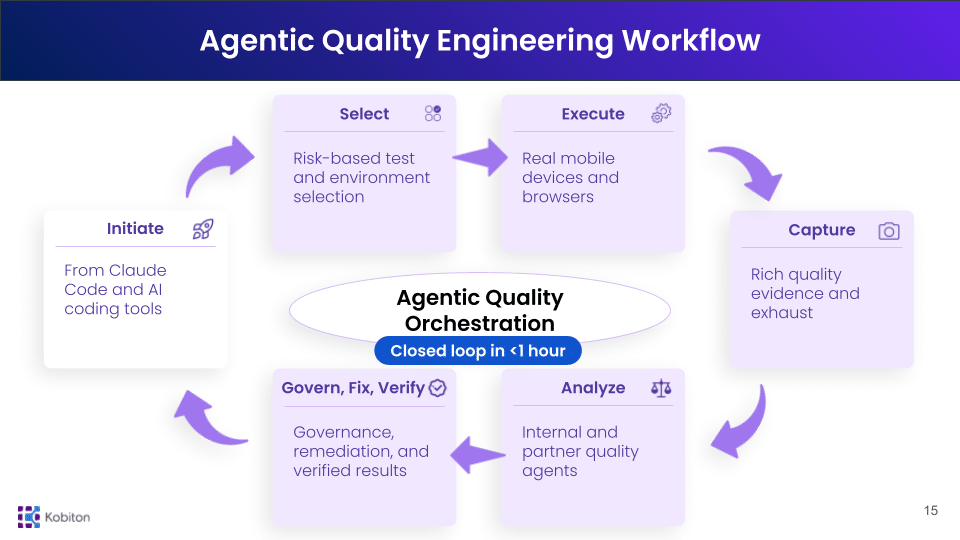
This launch did not come out of nowhere. Kobiton had already laid the groundwork with its earlier AI gateway, built around real-time device exhaust, partner AI integrations, and issue aggregation across test sessions.
Bringing real device testing into Claude is the next step.
The broader goal is to build a system where:
This is what Agentic Quality Engineering looks like in practice.
And it starts by meeting teams where quality now begins:
Inside the AI workspace.
The install takes minutes. Getting something useful out of it is mostly about picking the right first tasks.
1. Ask for a device list. Nothing is at stake, and it confirms the connection, the credentials and your device access in one step. If this does not work, nothing after it will.
2. Upload a build and launch it. The smallest possible end-to-end run: your APK or IPA on a real device, with a screenshot proving it got past the splash screen.
3. Run a login smoke test with the outcome stated. Give the flow, the device type, the test account and the expected end state. Then check the screenshots against what you expected, rather than reading the summary and moving on.
4. Point it at a session that already failed. Ask for a summary of a failure from your existing suite where you already know the cause. This is the cheapest way to calibrate how much weight the summaries can carry.
5. Take one check nobody ever automated. Every team has a flow that was never worth the scripting effort. That is where intent-driven runs pay for themselves first, and where a bad result costs nothing.
The common week-one mistake is starting with the regression suite. It is the largest surface, the most brittle, and the hardest place to tell whether an unexpected result is the agent’s fault or the app’s.
Using an AI model to turn a stated testing goal into actions against a mobile app, rather than writing every action out in advance as a script. In practice that means describing the flow and the expected outcome, letting the model drive the app, and reviewing the artifacts the run produces. The model still needs somewhere to run — a real device, a build, and an execution environment.
No. Appium remains the automation framework and the execution model underneath. Claude helps create, refine and interpret Appium-based work, and can trigger it. Teams with an existing Appium suite keep it — what changes is how work reaches that suite, not what runs it.
No. The connection is Model Context Protocol, and Kobiton’s MCP server also works with Claude Desktop, the GitHub Copilot CLI, the Gemini CLI and the Codex CLI. Teams standardised on a different assistant get the same real-device access.
Not as a like-for-like swap. A regression suite exists to produce a comparable signal on every build, and a committed script does that more predictably. Agent-driven runs are strongest on flows that change shape between builds, on checks nobody found time to script, and on reproducing a reported bug across specific devices.
Because what the AI sees is a rendering. Emulators do not reproduce vendor skins, GPU rendering, thermal and battery behaviour, biometric hardware, sensors, or real network conditions. An agent choosing its next action from a simulated screen is reasoning about something your users will never see.
No. It reduces the repetitive part — running the same flows by hand, translating test cases into scripts, collecting artifacts. Exploratory testing, usability, accessibility judgement and the decision about whether a result is good enough to release still need a person.
Install Kobiton for Claude Code and run your first real-device test directly from your AI workspace. Follow the setup instructions here.