Mar 19, 2025
AI-Powered Test Automation: What is the difference between No Code and Low Code?

Frank Moyer
Read More

The new Claude Code iOS Simulator is good, and I’d turn it on today. Claude builds your app, launches it in Apple’s Simulator, taps through the interface, looks at what came back, and keeps working. Change, observe, decide, repeat – all in one window instead of four.
Then you get to this line in the docs:
“Claude drives simulated devices only and can’t control a physical iPhone or iPad.”
Anthropic’s suggested workaround is to run the app on a real device through Xcode, watch it yourself, and then describe what happened to Claude or paste in a screenshot.
I appreciate that they wrote it down plainly. Most launch posts wouldn’t. But read the workaround again: you’re the cable between Claude and the phone.
You don’t have to be. The Kobiton Automate plugin is open source, speaks MCP, and lets Claude Code reach real devices – reserve one, install the build, run the journey, hand back the evidence.
Mobile development has always involved too much window-switching. You write in one place, build in another, watch it run in a third, and carry the result back by hand.
The simulator pane collapses that. Ask Claude to implement a feature, build it, launch it, check it. The simulator opens next to the conversation and both of you can drive the app.
My favorite part is that Claude finally has to check itself. No more “the code compiles” followed by me discovering the button does nothing.
For early feedback that’s exactly right. Does it build. Does the screen come up. Does the control respond. Can someone get through the flow.
Just be precise about what a green run buys you: the software worked in that simulator configuration. That’s the whole claim, and it’s a smaller claim than it feels like at 11pm when everything’s finally passing.
A simulator is an approximation running on a Mac with 32GB of RAM and a fiber connection. Your customer’s phone is a three-year-old iPhone at 8% battery on hotel wifi, and iOS is about to kill your app in the background because Instagram wanted the memory.
I’ve watched flows pass a hundred simulator runs and then fall over on hardware because a Face ID prompt grabbed focus half a second earlier than expected. There’s nothing wrong with the simulator in that story. It was answering a different question.
So use it to move fast while you’re building. Don’t ask it for evidence it was never designed to produce.
The limitation itself is fine. The workaround is what bothers me.
Count the steps. Leave the agent flow. Pick a device. Install the build. Recreate the journey. Watch. Decide what’s worth mentioning. Screenshot it. Explain it to Claude. Then, when Claude proposes a fix, run the whole sequence again.
At that point Claude isn’t reasoning about the device. It’s reasoning about your description of the device, filtered through whatever you happened to notice.
For a one-off visual check, that’s fine. For a team shipping every two weeks, it falls apart around the third device.
A screenshot shows a layout problem. It won’t show the interaction that produced it, how long the failure took, how the device was configured, or what console output was scrolling by underneath.
A written description is worse in one specific way: it only contains what you noticed. Everything else is gone, and you don’t know it’s gone.
And nothing you did becomes an asset. The observation lives in a chat thread nobody will find in March. It never turns into a test another engineer can run against tomorrow’s build.
People searching “Claude Code iOS Simulator MCP” are usually asking something broader – they want Claude to be able to act outside the local simulator.
The simulator pane isn’t an MCP integration. MCP is the part that reaches everything the pane can’t.
The Kobiton Automate project wires Claude Code into Kobiton’s device platform, so Claude can work with real devices, uploaded builds, live sessions, and results.
If you want to see what that looks like instead of reading another feature list, watch the walkthrough below. It shows Claude calling the Kobiton MCP server, finding available real devices, and bringing those device options back into the conversation.
Remote access to a phone isn’t new.
What’s different is that Claude can help orchestrate the work. The plugin gives it tools to list devices, check status, reserve one exclusively, and release it when it’s done. It can upload an .ipa and start a session on the device it just reserved.
So instead of “go test this on an iPhone and tell me what happened,” you say:
Find an available iPhone, install the latest build, complete the onboarding journey, and retrieve the results.
You still own the quality call. You’ve just stopped being the transport layer.
Already have Appium tests? Automate runs scripts in JavaScript, Python, .NET, or Java on Kobiton devices.
Haven’t scripted the journey yet? An automation session drives an Appium-based observe-decide-act loop on a reserved device from a plain-language description of the flow.
Need to poke at something yourself? The interactive workflow gives you device operations, logs, screen capture, and file handling where the platform supports it.
Getting Claude onto a real device solves access. It doesn’t automatically improve what you learn – that depends on what comes back.
A Kobiton session can preserve video, logs, screenshots, reports, commands, capabilities, and device metadata, which Claude can retrieve after the run. Kobiton’s Session Explorer also provides network and system analysis where configured and supported.
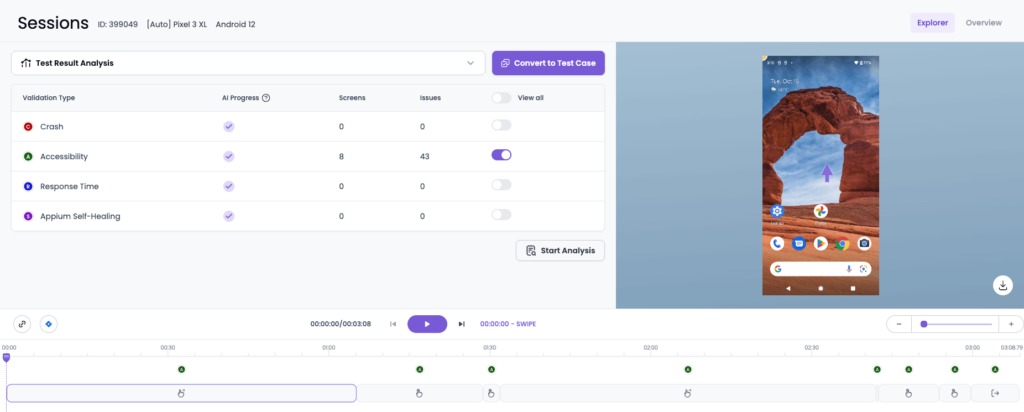
Hard mobile bugs are almost never explained by the final screen. The answer is in the thirty seconds before it, or in the environment around it. Which device, which OS build, what ran and in what order, what the logs caught while nobody was watching.
Same picture for Claude and for the team. Sounds like a low bar. Manual handoffs miss it constantly.
Save the finished automation session as a test case.
This is the sharpest break from the manual route. Report a result once and it evaporates. Save the journey and you own something that keeps working: refine it as the experience changes, group it with your other critical flows, run it again when the next build lands.
Nobody should try to automate every interaction. Pick the handful of behaviors that would genuinely hurt if they broke, and keep a reliable way to check them.
Kobiton runs saved test cases and suites across whatever devices you select, with results tied to each execution.
A big device count looks great on a slide and tells you very little. What I’d actually do: take the devices and OS versions your most valuable customers are on, and run the journeys that touch money, identity, hardware, or the network. Those are where the surprises live.
One mobile developer preparing to evaluate the Kobiton MCP server described the coverage problem this way:
“Today I run that matrix against two physical devices I happen to own – so the coverage gap a real-device cloud closes is a real, daily pain for me, not a hypothetical.”
Mobile Developer referring to Kobiton MCP
Automated runs hit conditions nobody predicted – an unexpected consent screen, a control that moved. Kobiton’s live remediation lets a person grab a blocked execution, fix the step, and let the run continue.
I like that more than the version of automation where humans supposedly stop being involved. They don’t. They just shouldn’t be the ones typing the same taps for the ninth time.
You’re not replacing the simulator. You’re running two loops with different jobs.
Inner loop. Use the Claude Code simulator while you’re implementing. Build, exercise the behavior, inspect the UI, kill the obvious problems. Keep it fast – that’s its entire advantage.
Outer loop. When there’s something worth validating, push the build to Kobiton. Have Claude pick a device, run a journey that matters, and bring back the evidence. Works? Save it as a test case. Fails? You have the video and logs instead of a vague memory. Then widen to the devices that represent real customer risk.
The outer loop is slower, and it should be. You’re buying confidence.
What ties them together is that evidence from the second loop feeds the next change in the first one. Successful journeys become tests. Tests catch the next regression. That’s the part a screenshot can never do.
The simulator pane deserves the attention it’s getting. Use it for what it’s good at: development speed and early feedback.
But when the product has to hold up on hardware, the answer shouldn’t be a manual run, a screenshot, and a paragraph of recollection. Kobiton Automate connects Claude Code to real devices over MCP, so the assistant that wrote the code can also run it on the phone your customer is holding – and give you something worth keeping when it does.