Jul 27, 2026
Out-of-Context Failures: Why a Second AI Agent Cannot Catch Them
Stephen Penn
Read More

Kobiton’s recent AI Testing benchmark compared three models on natural-language test steps. GPT 5.6 came out ahead with a 96% success rate.
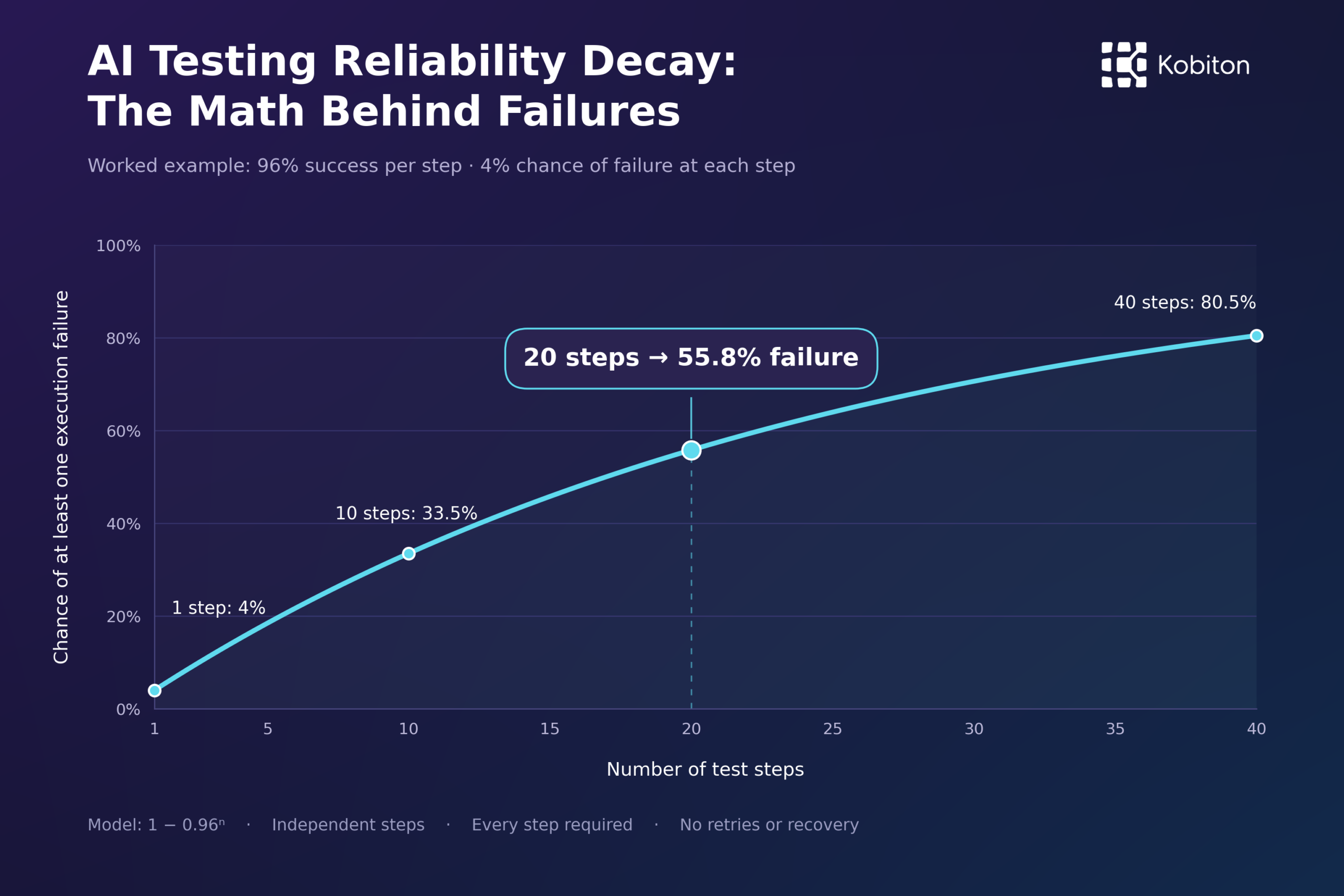
That sounds reassuring until you run the numbers: at 96% per step, a 20-step test fails 56% of the time.
We call this AI Testing Reliability Decay: complete-script success drops as fallible steps accumulate. For the team that maintains the suite, it shows up as more failed runs to investigate, rerun, and fix.
A two-step test passes only if both steps execute correctly:
0.96 × 0.96 = 92.2%
A twenty-step test needs all twenty:
0.96²⁰ = 44.2%
The formula is pⁿ, where p is the per-step success probability and n is the number of steps. It assumes independent steps with the same success rate and no retries.
This is the series reliability model, known in reliability engineering as Lusser’s law. The math has been around since the 1950s; AI Testing Reliability Decay is our name for it in testing. Each step stays 96% reliable, and the script still fails more often with every step you add.
Enter current and improved per-step success rates and a script length to compare complete-script reliability. Expand the investigation-cost section to estimate weekly failed runs, investigation hours, and labor cost. Cost estimates assume every modeled execution failure triggers investigation, using the same run volume, investigation time, and labor rate for both scenarios.
With Kobiton’s Appium AI, an Appium script can describe the element it needs, such as “the Submit button below the address form,” and AI resolves that description to an element during execution. The script still controls the actions and assertions. Appium AI works on iOS as well as Android.
Because the model resolves the description again on every run, it can pick the right element on one run and the wrong one on the next. Changes in the screen, the surrounding context, or the model’s behavior can all cause that.
Kobiton’s Appium Script Generator produces exportable scripts that engineers can inspect, edit, and maintain.
If generated code selects the wrong button, correct the saved script. The fix stays. You don’t ask AI to write it again on every run. With conventional Appium locators, each run reuses the corrected code. The script can still break when the app changes or the environment misbehaves. Account for that difference when you calculate ownership cost.
Kobiton’s Scriptless Automation uses deep learning to turn manual sessions into automated tests, with no scripts to maintain. We launched it in 2021, before GPT-3.5.
Kobiton’s Scriptless Automation faces the same reliability problem. Customers have attempted 100-step workflows only to have an iOS update popup or an app crash stop the run at step 79. Seventy-eight successful steps still add up to one failed test.
That’s why we encourage customers to pair Appium Script Generator with Appium AI. Teams edit the generated scripts to control test flow, assertions, and recovery, and use AI for element targeting. The aim is fewer flaky runs and less time spent investigating them.
Your current suite likely has broken locators, timing problems, and environment failures. They cost engineering time, too. In 2016, Google reported that about 1.5% of its test runs returned flaky results.
Run the same workflows through each approach you’re considering. Count the failures AI removes, the failures it introduces, and the work it takes to investigate both. Comparing AI against an imaginary, flawless conventional suite tells you very little.
If a selector consistently finds the right control, keep it. Try natural-language targeting where selectors are missing, fragile, or expensive to maintain.
Our AI Testing Benchmark: Opus vs. GPT vs. Qwen looks at target localization. Its centroid-correctness measure checks whether the proposed interaction point lands inside the intended control. That covers one source of execution errors; you still have to measure complete-script success.
Suppose your tests execute correctly 98.5% of the time and average 40 steps. Under this model, each step needs:
Per-step success = 0.985^(1/40) ≈ 99.9622%
Going from 99.96% to 99.99% per step raises forty-step success from 98.41% to 99.60%. That gain of 0.03 percentage points per step can change how much human attention the suite needs.
Set the script-level target first, then judge a vendor’s per-step number against it.
One Kobiton customer, a large US financial institution, requires a Jira ticket and investigation for every failed run. A team of 12 SDETs does nothing but investigate those failures, separating real bugs from automation problems before release.
For illustration, assume 1,000 forty-step runs a week, with 30 minutes of investigation for every failed execution. Improving per-step success from 99.96% to 99.99% means about 12 fewer failed runs and six fewer investigation hours a week. These are modeled savings using hypothetical run volumes and triage time.
“Click the close button” may be ambiguous. “Close the Search dialog using its upper-right button” gives the model more context. Test the revised instruction on screens with similar controls and measure whether wrong selections go down.
Check the outcome as well. If the AI clicks an X that clears the search field instead of closing the dialog, and the script never verifies that the dialog closed, you get a false pass.
Before retrying, check whether the action already went through. Nobody needs a payment test that helpfully charges twice.
Cap retries and record how much time and money they cost. Retrying the same mistaken interpretation may just reproduce the same failure. Report first-attempt success separately from success after recovery.
Shorter tests can make errors easier to find, but splitting twenty unchanged steps into four scripts doesn’t raise the odds that all twenty execute correctly. Better starting conditions, clearer instructions, or effective recovery can.
Ask questions vendors can answer with specifics:
Ask for results broken down by workflow and test length. A high average across easy tasks can hide an unreliable process your team runs every night.