Aug 24, 2021
August 2021 Product Update: Introducing Accessibility Assertions, Figma Integration, and UI Enhancements

Adam Creamer
Read More
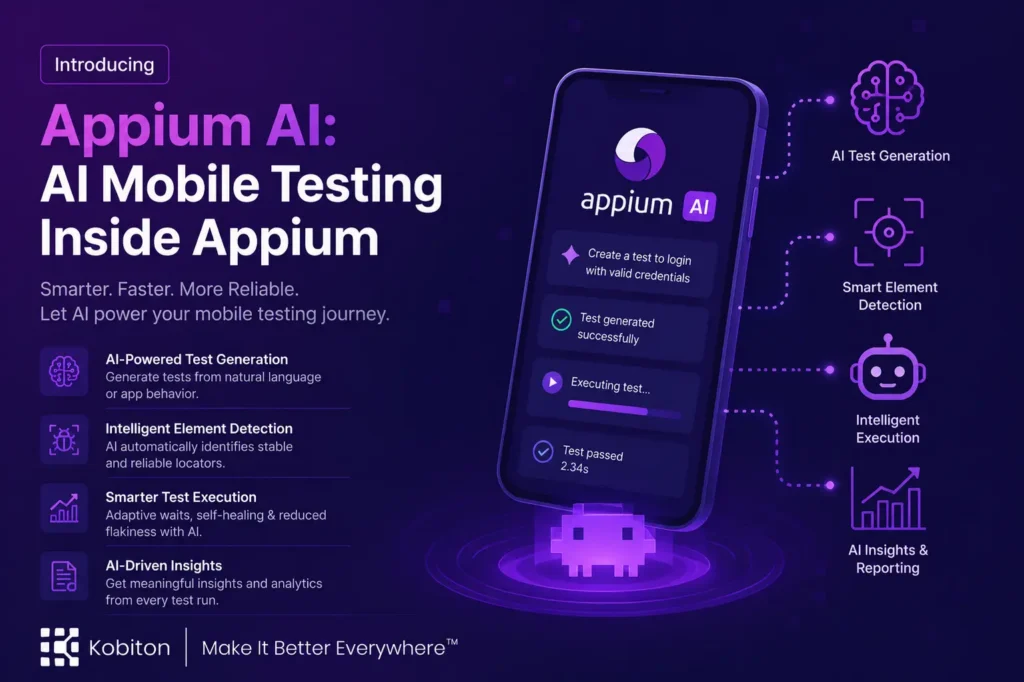
Kobiton Appium AI brings natural language element selection into the Appium workflow.
Teams keep their existing Appium scripts, frameworks, CI/CD pipelines, and real-device execution. They add AI where selectors are missing, brittle, or too expensive to maintain.
The result is a more resilient way to automate real mobile applications without forcing teams into a proprietary testing language or closed AI testing system.
The market is full of broad AI testing technology.
Some of it is useful. Much of it is not.
The common message is that AI will generate tests, maintain tests, debug failures, analyze results, and remove the hard work from quality engineering. That sounds attractive, but most experienced mobile teams know the reality is more complicated.
Mobile validation breaks down across several layers at once: test generation, real-device execution, UI rendering, timing, and ongoing maintenance.
A test can be generated quickly and still be worthless. A test can pass and still fail to validate the user experience. A test can work on one device and fail on another because the screen is smaller, the keyboard covers an element, or the OS behaves differently.
This is why AI mobile testing has to start from real mobile automation problems.
One of the most persistent problems is element identification. Traditional mobile automation depends on selectors: accessibility IDs, XPath, class names, text labels, coordinates, and view hierarchy. When those selectors are stable, Appium works well. When they are missing or unreliable, the automation becomes fragile.
AI earns its place when it reduces friction at the exact moment the script has to find something the user can clearly see but the automation framework cannot reliably locate.
Appium still matters because enterprise teams have built real automation programs around it.
They have frameworks, CI/CD pipelines, reporting, test data strategies, device selection logic, and engineering practices that depend on Appium. They have trained teams to use it. They have invested years in making it work at scale.
Enterprise teams should evaluate AI through an Appium lens: whether it makes existing Appium scripts easier to write, easier to maintain, and more effective against real mobile applications.
Appium gives teams a proven execution foundation. AI should strengthen that foundation.
That is the product principle behind Kobiton Appium AI. It is built for teams that use Appium and want AI to help with the parts of mobile automation that are still painful.
Appium AI preserves the structure, control, and repeatability of Appium while giving scripts a stronger way to interact with difficult mobile UI elements.
In practice, this means an automation engineer can write an Appium test and use a natural language prompt when a traditional selector is brittle, missing, or impractical.
Instead of only writing a selector for a reset button, the script can describe the reset button. Instead of failing on a custom-rendered control because there are no standard locators, the script can describe the content or element it needs. Instead of writing fragile scroll logic for a dynamic list, the test can describe the item it wants to find.
This is a practical model for AI in mobile app testing.
The test still owns the workflow, assertions, and execution path. AI helps resolve the intent of a step to the right element on the screen.
That is the core idea: keep Appium as the automation framework, and add AI where Appium needs more context.
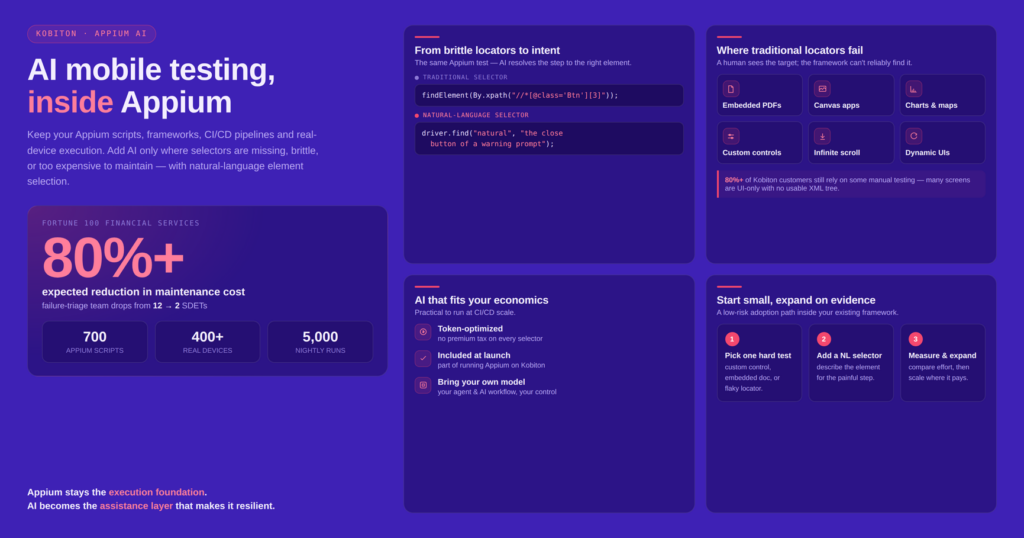
Appium AI is an AI capability that lets teams use natural language selectors inside Appium scripts.
The feature is designed for real mobile automation work. It helps teams interact with elements that are difficult or impossible to target with traditional selectors.
Consider a simple button. In a normal Appium script, the test author might locate it by accessibility ID, XPath, class name, or visible text. That works when the application exposes clean and stable locators. But many mobile applications do not.
Some buttons lack reliable identifiers. Some screens use custom controls. Some applications render content visually without exposing meaningful UI hierarchy. Some workflows include embedded documents, dynamic lists, or system dialogs. In those cases, the automation engineer often knows exactly what the user would tap, but the script has no clean way to express it.
Appium AI helps close that gap.
The script can describe the intended element in natural language. Kobiton then helps identify the matching element on the mobile screen and return it to the Appium test for interaction.
This is AI-powered mobile testing at the point where it becomes operationally useful. AI is not outside the workflow. AI is helping the test run.
Natural language selectors are the core capability of Kobiton Appium AI.
They allow a test author to describe the element they want instead of relying only on implementation-level details.
That matters because users do not think in selectors. Users think in intent.
They want to reset a count. Submit a form. Open an invoice. Select a transaction. Find an order. Tap the address. Confirm the total. Choose a product. Scroll to a specific record.
Traditional automation often forces teams to translate that user intent into brittle technical details. That translation is useful when the app provides reliable selectors. But when it does not, the automation becomes harder to write and harder to maintain.
Natural language selectors let the test stay closer to the intent of the user experience.
This does not mean every selector should become natural language. Stable accessibility IDs are still valuable. Clean testability practices still matter. Well-designed mobile applications should still expose reliable automation hooks.
The point is choice.
When a traditional selector works, use it. When it does not, Appium AI gives the team another option.
The biggest value of Appium AI is for teams that already take mobile automation seriously.
These teams are not looking for a toy. They are running tests in CI/CD. They are validating releases. They are supporting multiple devices, OS versions, screen sizes, and user conditions. They are under pressure to keep up with engineering teams that are moving faster than ever.
For these teams, mobile AI testing has to improve existing automation economics.
If a team has hundreds or thousands of Appium tests, even modest maintenance improvements matter. If AI can reduce time spent repairing brittle selectors, that is meaningful. If AI can help automate screens that were previously excluded from test coverage, that is even more meaningful.
This becomes more urgent as AI accelerates software development.
When developers can create more code faster, validation has to keep pace. Otherwise, the organization creates a new bottleneck. Engineering speeds up, but quality slows down.
Appium AI gives teams a practical way to close part of that gap. It helps them increase automation coverage without abandoning the frameworks, devices, and pipelines they already rely on.
A traditional test might struggle to locate a custom-rendered warning dialog button that lacks reliable identifiers.
With Appium AI:
// Close a warning prompt on first login.
const closeButton = await driver.find("natural", "the close button of a warning prompt");
if (await closeButton?.isExisting()) {
  await closeButton.click();
}The same approach works for visual content that may not exist in the application hierarchy, for example when scrolling to visually find an element:
for (let i = 0; i < 10; i++) {
  const flowers = await driver.find(
    "natural", "a bouquet of red flowers");
  if (await flowers?.isExisting())
    return flowers.click();
  await driver.scroll("down");
}The workflow, assertions, and execution remain standard Appium. AI simply provides a more flexible way to locate elements. These locator strategies can use solely page metadata, or additionally multi-modal vision models to understand what’s on the screen.
The most important shift with natural language selectors is from implementation detail to user intent.
Traditional mobile automation often depends on how the application is built. If the button has a reliable accessibility ID, the test can find it. If the hierarchy is stable, XPath may work. If visible text is unique, that may be enough.
But those assumptions often fail.
Engineering refactors a component. A new platform version changes the hierarchy. Tests are run with a new locale. A smaller screen changes the layout. The same test that worked yesterday now fails.
The automation engineer then has to determine whether the failure is a product defect, a test defect, a locator issue, a timing issue, or a device-specific problem. That investigation consumes time. Multiply it across a large suite, and maintenance becomes a serious drag on velocity.
One Kobiton customer, a Fortune 100 financial services company, runs roughly 700 Appium automation scripts across more than 400 devices, generating about 5,000 test executions every night. Twelve of their 60 SDETs spend the next day triaging failures from the prior night. Their process requires a Jira ticket for every failure, followed by categorization into application bugs, scripting issues, environmental issues, and scripts that need updates to match the latest application code.
By deploying Appium AI, the customer expects to reduce the maintenance effort from twelve support SDETs to two, representing more than an 80% reduction in maintenance cost.
Natural language selectors help by giving the system more context.
Instead of depending only on the implementation detail, the test can describe the element by intent: the reset button, the checkout button, the invoice total, the first available appointment, the address field, the transaction amount.
That is closer to how a person understands the screen.
This is a meaningful step forward for AI mobile app testing because it applies AI to one of the real bottlenecks in mobile automation. The AI is not just generating more test code. It is helping the test interact with the app in a more human-like way.
The hardest mobile applications to automate often fail at the locator layer, even when the workflow itself is straightforward.
Embedded PDFs are a common example.
A mobile app may display an invoice, contract, statement, medical document, insurance form, or receipt inside an embedded PDF viewer. A human can read it. A tester can understand what matters. But traditional locators may not exist for the values, fields, labels, or visual regions inside the PDF.
Canvas-based applications create a similar problem. The screen may include meaningful visual elements, but those elements may not map cleanly to inspectable UI nodes. Charts, maps, signatures, diagrams, and custom controls can all produce the same challenge.
Humans can understand these interfaces visually, but traditional automation may see only an opaque surface.
That is where AI in mobile app testing becomes practical.
With natural language selectors, the test can describe the thing the user would recognize. The system can use visual and contextual understanding to identify the target.
Think about a banking app where the user needs to confirm an amount inside a PDF statement. Or a healthcare app where a patient reviews a document before signing. Or a logistics app with a custom map. Or a retail app with a dynamic promotional layout.
More than 80% of Kobiton customers still have some level of manual testing because many mobile experiences include UI-only screens with no useful XML tree underneath.
Mobile applications are increasingly visual, dynamic, and custom-rendered. Automation needs to evolve to handle that reality.
Natural language selectors give teams a way to automate more of the real app experience without waiting for every screen to expose perfect selectors.
Infinite scroll is another classic mobile automation problem.
A user opens a screen, scrolls until they find an item, taps it, and continues. That sounds simple. But automation has to answer several questions.
How far should it scroll? How does it know the item is visible? What if the item appears after two swipes on one device and six swipes on another? What if the data changes? What if the item is visually recognizable but has no reliable selector?
Traditional automation handles this with custom scroll loops, waits, assumptions about screen structure, and retry logic. It can work, but it is often fragile.
Natural language selectors provide a better abstraction.
The test can describe the item it wants. The system can inspect the screen, scroll as needed, recognize the matching element, and return it when it appears.
That does not remove the need for good test design. It does reduce the amount of custom code required to automate a common mobile behavior.
Dynamic mobile UIs create the same challenge.
Screens may change based on user state, permissions, localization, backend data, feature flags, device size, or OS version. A locator may still exist, but it may no longer represent the thing the user actually needs to tap.
Intent-based selection gives teams a more adaptable way to interact with dynamic experiences.
That is the practical promise of mobile testing with AI: better abstractions for dynamic mobile interfaces.
Maintenance is where many mobile automation programs struggle.
Writing the first version of a test is rarely the biggest cost. Keeping the test working as the application changes is the real burden.
Every brittle selector creates future maintenance. Every workaround adds complexity. Every special case makes the framework harder to understand. Over time, teams can spend more time repairing tests than expanding coverage.
Natural language selectors help by reducing dependence on fragile implementation details.
They let teams use traditional selectors where they work and AI-assisted selectors where the UI is dynamic, custom, or poorly exposed to automation.
Teams should still add accessibility IDs, design for testability, and create clean, observable interfaces.
Appium AI exists for the messy parts of real mobile products: third-party components, embedded documents, custom controls, release deadlines, and flaky locators.
Appium AI gives those teams a practical tool.
It helps teams automate more of the real product surface area they need to support today.
One of the first concerns teams raise with AI is cost.
That concern is legitimate. A recent report on Uber’s AI coding adoption shows why. Uber’s CTO said the company had to rethink its AI budgeting after rapid Claude Code adoption, while reporting also noted that Uber’s 2025 R&D expense rose 9% to $3.4 billion and that the company expects R&D costs to keep climbing. The exact AI spend was not disclosed, but the lesson is clear: uncontrolled AI usage can become a real budget issue quickly.
If every test run triggers expensive calls to frontier models, AI-powered automation can become financially unpredictable. A feature that looks great in a demo may become too expensive when scaled across thousands of test executions.
This is especially important for teams running CI/CD. A test may run many times per day across branches, builds, devices, operating systems, and release candidates. Small per-call costs can compound quickly.
That is why token economics matter in AI-powered mobile testing.
The goal should not be to add AI at any cost. The goal should be to apply AI where it creates value and manage cost so the capability can be used at scale.
Kobiton’s approach is to optimize token usage and avoid making AI a separate premium tax on every Appium test. At launch, these Appium AI capabilities are included as part of running Appium scripts on Kobiton.
That matters because adoption depends on economics.
If teams are afraid to use AI because every selector may create a cost spike, they will limit usage to experiments. If AI is efficient enough to use in normal automation workflows, teams can apply it where it helps most.
AI should reduce automation friction without creating a new cost management problem.
AI testing workflows will be heterogeneous.
Enterprises will use different model providers, internal platforms, private models, agents, and routing strategies depending on sensitivity, cost, latency, and governance.
That means interoperability matters.
Kobiton’s view is that teams should be able to bring their own model, bring their own agent, and connect their own AI testing workflow. Appium AI should fit into that environment rather than forcing teams into a single vendor-controlled AI stack.
This is especially important because mobile automation sits at the intersection of many systems: source code, test code, CI/CD, device infrastructure, reporting, defect tracking, and AI agents.
No single tool owns the whole workflow.
A practical AI mobile testing platform needs to integrate into the broader environment. It should make mobile execution, device access, and test artifacts available to the tools teams already use.
That is why Appium AI is most powerful when it is not treated as a closed feature. It should be part of a larger automation strategy where AI helps author, execute, debug, and improve tests.
The best model should win for the task. The lowest-cost acceptable model should be usable. The team should remain in control.
Kobiton is not currently charging extra for these Appium AI capabilities.
That is intentional.
AI should be included in the value of running mobile tests so teams can use it where it helps without treating every selector as a budget decision.
For many organizations, the constraint is operationalizing AI in a way that is trusted, affordable, and useful.
If pricing discourages normal usage, the feature stays trapped in pilots. Teams try it once, share a demo internally, and then avoid using it at scale because nobody wants to explain an unpredictable AI bill.
Including Appium AI as part of Appium script execution helps teams start with practical use cases.
Pick a hard-to-automate test. Add a natural language selector. Run it. Measure whether it reduces authoring or maintenance effort. Expand based on evidence.
That is how useful product adoption happens.
Useful adoption starts by solving one painful problem, proving the improvement, then expanding.
Kobiton Appium AI is designed to do exactly that.
Many mobile teams still have important workflows that are tested manually because automation has been too difficult or too expensive to maintain.
Many important mobile workflows remain manual because the economics of automation have been poor for complex real-world apps.
A tester or developer can start with the workflow they understand, then use AI to accelerate the path to automation. Natural language selectors can help handle the parts of the flow that were previously blockers.
AI-assisted Appium automation increases the leverage of automation skills.
Instead of spending hours fighting one locator, the team can focus on what the test is supposed to prove. Instead of avoiding a flow because it includes an embedded document or dynamic list, the team can attempt to automate it with AI assistance.
The future of mobile automation is broader coverage of the experiences users actually depend on.
Some people argue that AI will make test automation frameworks irrelevant.
That is unlikely.
Frameworks exist because teams need structure, repeatability, reporting, governance, and integration. They need tests that can run consistently in CI/CD. They need artifacts. They need logs. They need control over environments, data, and execution.
AI does not remove those needs.
In fact, AI may increase the need for strong frameworks because teams will be able to generate more tests, more quickly. Without structure, that creates chaos. With structure, it creates leverage.
Appium will continue to matter because it provides a standard execution model for mobile automation. AI will make it easier to author, maintain, and improve those tests, but the tests still need somewhere to live and a reliable way to run.
Appium remains the execution foundation. AI becomes the assistance layer that makes Appium more resilient.
The clearest audience for Kobiton Appium AI is a team already running Appium tests.
These teams understand the value of automation, but they also understand the cost of maintenance. They know which screens are fragile. They know which locators break. They know which test cases are avoided because the app does not expose clean automation hooks.
For these teams, Appium AI can be adopted incrementally.
They do not need to rewrite the framework. They can start by identifying the hardest selectors and replacing or supplementing them with natural language selectors.
That is a low-risk adoption path.
Enterprise teams face a scale problem.
They have more apps, more teams, more releases, more device combinations, and more pressure to move quickly. AI can help, but only if it fits enterprise realities.
Kobiton’s Appium Script Generator allows a tester to generate an Appium script directly from a manual test in minutes. This functionality still matters because many teams need a practical bridge from manual testing to maintainable automation.
Kobiton Appium AI is useful for teams that want to apply AI to real mobile automation without abandoning Appium, CI/CD, or real device execution.
It gives these teams a way to experiment with AI in a controlled, practical way.
Start with the workflows that hurt. Measure the improvement. Expand based on evidence.
That is how enterprise adoption actually works.
Some teams will see value immediately because their applications are difficult to automate with traditional locators.
This includes apps with embedded PDFs, canvas-rendered screens, dynamic lists, custom controls, charts, maps, and other visual elements that do not expose clean selectors.
For these teams, natural language selectors are not just convenient. They may unlock automation coverage that was previously impractical.
That is where AI mobile app testing can create real operational value.
The best fit is any team that needs Appium automation to better reflect how users actually experience the app.
Users do not care whether a button has a perfect accessibility ID. They care whether the app works. They care whether the document opens, the transaction completes, the form submits, the result displays, and the workflow makes sense.
Automation should validate those experiences.
Kobiton Appium AI helps teams move closer to that goal by giving Appium scripts a more flexible way to interact with complex mobile screens.
The best way to start is not with a generic demo.
Start with a real workflow from your own app. Choose something that matters to users and has been painful for automation.
That could be a workflow with a custom control, an embedded document, a dynamic list, or a screen where selectors have historically been unstable.
Then add Appium AI where it can reduce friction.
The goal is to test whether AI helps with a real problem, not whether it performs well in a controlled example.
Do not start by converting your entire test suite.
Start with one test case.
Pick a test where the value is clear and the current automation cost is high. Use a natural language selector for the hard part. Run it. Observe the results. Compare the effort to your current approach.
This gives the team a concrete basis for deciding where Appium AI belongs in the automation strategy.
Good AI adoption starts with practical wins.
The key advantage of Kobiton Appium AI is that it works inside the Appium model.
Teams can adopt it without throwing away their existing automation investment.
Use AI where it helps. Keep traditional selectors where they work. Continue using Appium as the framework. Continue running tests through CI/CD. Continue applying engineering discipline to test design.
AI should make the workflow better.
It should not force the team to start over.
Appium AI is the use of artificial intelligence to improve Appium-based mobile test automation.
With Kobiton Appium AI, teams can use natural language selectors inside Appium scripts to find and interact with mobile elements that may be difficult to target with traditional selectors.
It helps teams write and maintain Appium tests for real mobile apps, especially when the UI includes dynamic, visual, or custom-rendered elements.
Traditional Appium relies on selectors such as accessibility IDs, XPath, class names, and other locator strategies.
Kobiton Appium AI adds natural language selectors to the Appium workflow. This means a test can describe the element it wants, and AI can help resolve that description to an element on the screen.
Kobiton Appium AI extends the existing Appium workflow.
Yes. These are some of the strongest use cases for AI mobile testing.
Embedded PDFs, canvas apps, charts, custom controls, and infinite scroll interfaces often lack clean selectors. Natural language selectors allow the test to describe the intended target in terms closer to how a user understands the screen.
This can make previously difficult mobile workflows practical to automate.
Not necessarily.
Kobiton has optimized token usage and is not currently charging extra for Appium AI capabilities. The product also supports workflows where teams can use local or private models, which can significantly reduce cost for certain natural language selector use cases.
For enterprise teams, this flexibility matters because AI cost must be predictable at automation scale.
Yes, but it should be adopted thoughtfully.
AI-powered mobile testing is useful when it improves real automation workflows, such as element selection, script authoring, failure diagnosis, and maintenance. But teams should still apply normal engineering discipline.
Tests need to be reviewed. Assertions need to matter. Results need to be trusted.
AI should accelerate the workflow, not remove accountability.
Mobile testing with AI helps Appium teams move faster by reducing the friction of writing and maintaining tests.
Natural language selectors can reduce time spent fighting brittle locators. AI-assisted workflows can help automate screens that were previously difficult to cover. Local model support and token optimization can make the economics more practical.
The result is leverage: teams keep the benefits of Appium while adding AI where it solves real mobile automation problems.