Apr 16, 2024
How to Write Automation Scripts

Cara Suarez
Read More

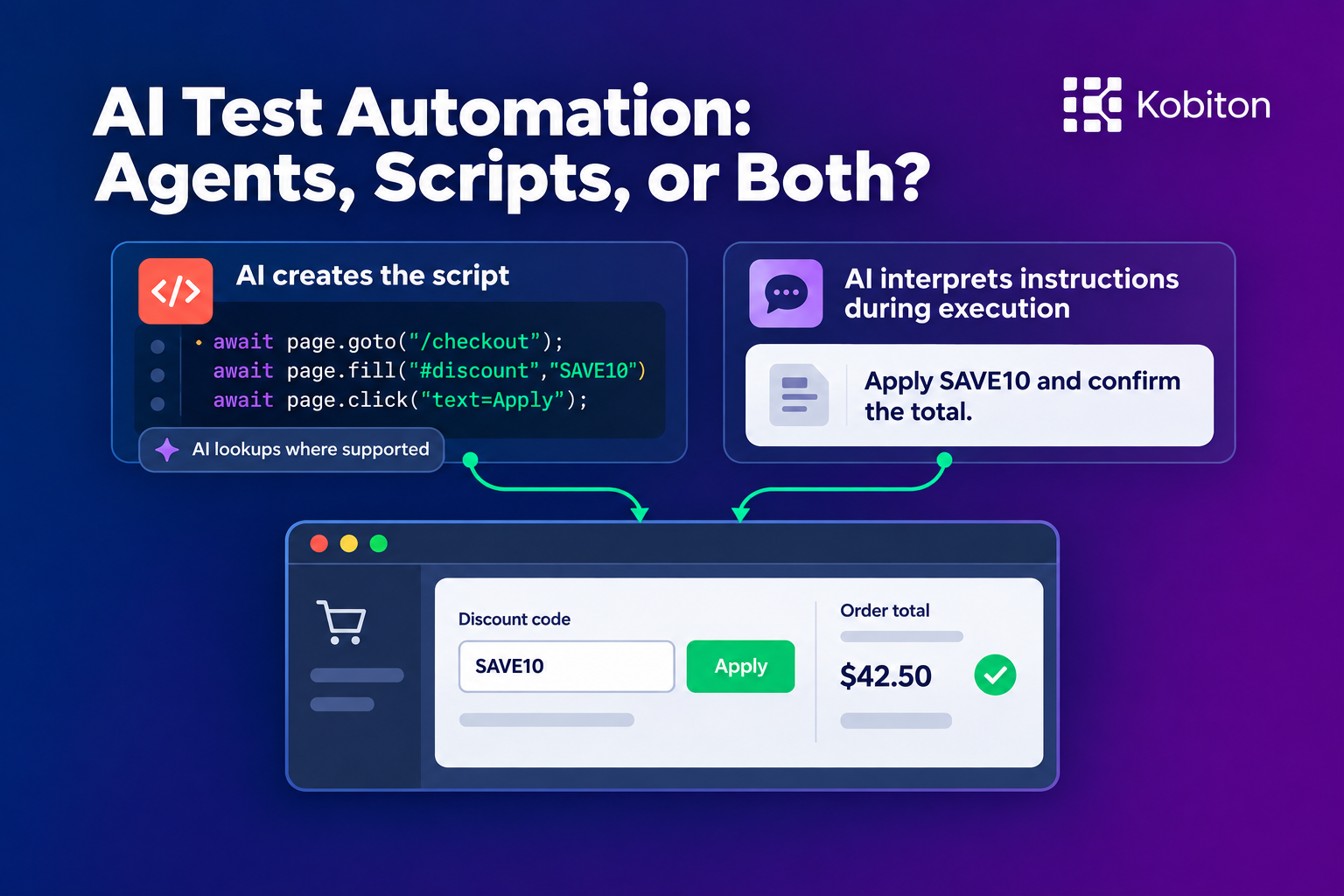
Understanding how to use AI in automation testing starts with two costs: creating reliable tests and keeping them reliable as the application changes. A tool that reduces the first cost can increase the second. A tool that takes more effort to set up can pay for itself across repeated regression runs.
Consider a checkout test: add a product, apply a discount, complete payment, and confirm the order. A tester can describe that flow in a few sentences. Automation needs enough detail to find each control, enter the specified discount code and payment details, and check the outcome.
AI can translate those steps into a traditional code-based automation script. In the second approach, AI interprets text-based instructions while the test runs and decides how to perform each step. Both reduce coding work, but they place different demands on the people creating and maintaining the tests.
Next month, the checkout changes. The discount field moves, the payment form gains a step, and tests start failing.
Someone must determine whether the application is broken or the automation needs updating. One of Kobiton’s Fortune 100 customers has 80 software development engineers in test (SDETs), with 12 dedicated to determining the root cause of test failures and resolving the issues. Company policy requires every test failure to be logged as a Jira ticket. Each failure creates work to log the ticket, investigate the cause, and resolve the issue—even when the application itself is working correctly.
AI can help with that investigation and repair. The approach you choose determines how much of that work happens automatically, how much it costs, and what evidence you can inspect when something goes wrong.
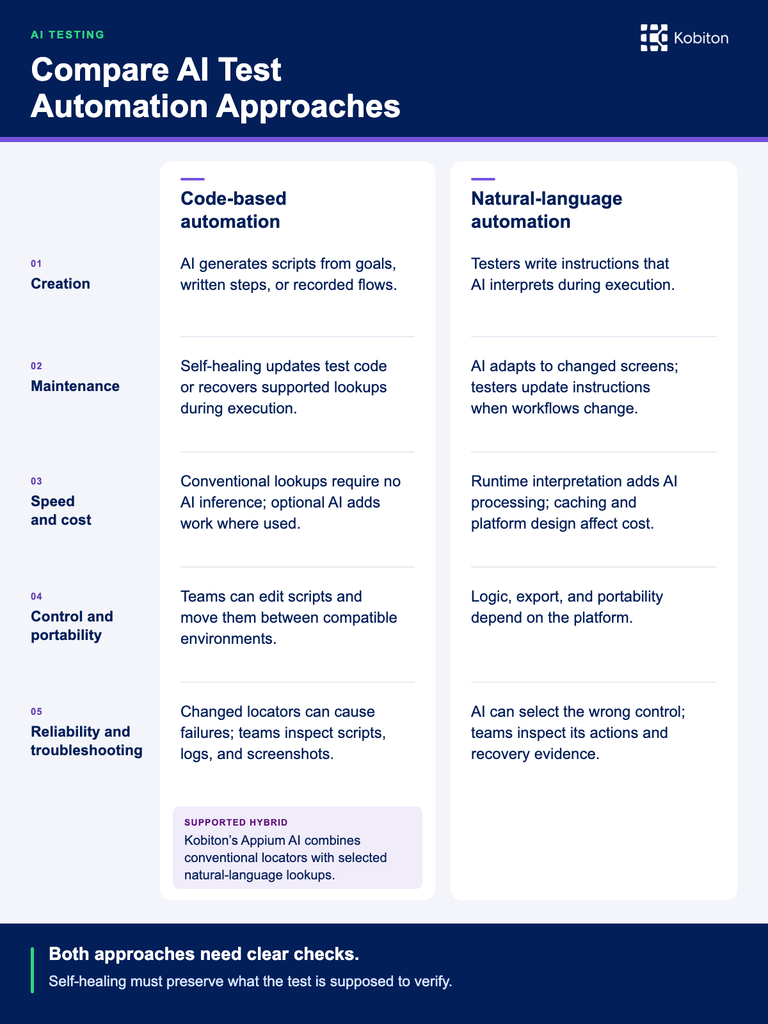
Traditional automation requires someone to turn a test case into executable steps: choose locators, write the actions, add checks, and handle the application’s timing. AI takes on more of that translation. A tester can supply a goal, written steps, or a demonstrated flow, then use AI to generate code or carry out the instructions.
The first approach uses an AI assistant, such as Claude or Codex, to produce automation code. You give it the application context and a goal or sequence of steps. It generates a script using a framework such as Playwright, Selenium, or Appium.
For the checkout example, you might specify the product, discount code, payment method, and expected order total. An agent with access to the application can explore the flow and identify the controls. More detailed instructions reduce how much it has to discover.
Once reviewed, a conventional script executes its programmed actions and checks. It uses locators, such as a button’s accessible name or a stable identifier, to find controls. Unless you deliberately include an AI capability, it does not need a model to decide where to click each time it runs.
Recording a manual flow is another way to create that script. A tester demonstrates the intended route instead of asking an agent to find it.
Kobiton’s Appium Script Generator follows this approach. A tester completes a manual session, converts it into a test case, and exports an Appium script. The exported code can be edited, extended, and integrated into an existing automation framework. The team gets a script built on open-source Appium that follows the flow the tester demonstrated.
For browser testing, Playwright Codegen records interactions as Playwright code. An AI assistant can then refine that recording to follow the team’s conventions. Microsoft documents this combination in its Power Platform testing guidance. Codegen records the interactions; the AI assistant refines the code.
Demonstrating a flow takes human time. It also removes some guesswork from generation. A recording shows which product you selected, how you reached checkout, and where you entered the discount. You still need to specify what the test should prove. Completing a purchase does not tell the generator whether the discount calculation was correct.
The result is a script your team maintains. Its execution behavior depends on the code and framework, whether the original author was a person, an AI assistant, or a recording tool.
In the second approach, AI reads the test instructions and decides how to carry them out as the test runs. A step might say, “Open the discount section and apply SAVE10.” The system uses screenshots, the UI tree, or both to decide how to carry out that instruction.
This can make authoring accessible to testers who understand the application but do not write automation code. They describe the intended behavior, and the platform handles the mechanics of interacting with the screen.
TestMu AI’s KaneAI is one example of a tool that lets testers author test steps in natural language.
Kobiton’s Appium AI combines scripts with natural-language lookups. The Appium script controls the workflow, while selected element lookups can use descriptions such as “the discount code field.” Conventional locators and natural-language lookups can coexist in the same script.
The team controls the sequence and conditions in code, using AI where describing a target is useful. Those AI lookups run when the script requests them.
Without AI, a failed regression test often sends an engineer back to the application to inspect the changed screen, find a replacement locator, and edit the script. At the Fortune 100 customer described above, 12 SDETs are dedicated to investigating and resolving test failures, with a Jira ticket required for every failure. AI can use the failed step and current application state to suggest or apply a correction. For scripts, that may mean updating the test code, such as replacing an outdated locator. For natural-language tests, it may mean interpreting the instruction against the changed screen.
For a scripted test, self-healing can recover an element during execution or help update the saved script. Both aim to keep the automation working when the application changes.
Suppose the checkout’s discount field has a new identifier. A script using the old identifier can no longer find it, even though customers can still apply discounts. The test needs a new way to locate the same field.
Kobiton’s Appium Self-Healing uses a baseline session to help recover supported element lookups when layouts change. When the original lookup works, the fallback leaves that behavior alone. When recovery succeeds, the current test continues from that step without restarting the run, and the session results identify corrected elements.
AI can also help investigate failures and update saved test code. Give an assistant the failing script, error output, screenshots, and relevant application context. It can compare the failed action with the current screen and propose a change to the automation script. A saved script change can then be verified with a new run, as in Playwright’s healer workflow.
A team already using an AI coding assistant can start with the tools and test files it has. Someone still needs to supply useful evidence and review consequential changes. Repeatedly exploring the application to diagnose a failure can use many tokens.
A recovered run and a repaired script are different outcomes. Runtime recovery may let today’s test finish while leaving the saved locator unchanged. Updating the automation script changes what future runs execute. For example, Kobiton’s Appium Self-Healing shows corrections in Session Explorer so you can copy them into your automation script. Determine which outcome your tool provides, or the same test may need healing repeatedly.
Natural-language tests, as described in the Creating Automation section above, can handle some interface changes by interpreting the same instruction against the updated screen. If “Apply the discount code” still identifies the intended action after the field moves, the instruction may need no editing.
When execution does fail, the platform can use the instruction to find another way to perform the action. The scope of that recovery varies.
Some AI testing tools use only screenshots to find controls. Others use the UI tree, which lists the controls and their attributes, or combine the tree with screenshots. These inputs give AI different ways to identify an element when the screen changes.
Our AI Testing Benchmark: Opus vs. GPT vs. Qwen compares model accuracy when locating controls using screenshots, accessibility trees, and a tree-first approach with screenshot fallback. It shows how the choice of input and fallback rule affects whether AI finds the intended control.
These capabilities can reduce the time testers spend rewriting navigation after an interface change. The platform takes on more of the work of choosing controls and recovering failed steps.
Maintenance still depends on how clearly the instruction describes the required behavior. “Complete checkout” gives an agent more freedom than “Apply SAVE10 and confirm that the merchandise subtotal falls from $100 to $90 before payment.”
That difference matters when a feature stops working. An agent might complete checkout without applying the discount if its objective only mentions finishing the purchase. The run can succeed while the intended regression check is lost.
When the business workflow itself changes, testers must update the instructions. If discounts now require a loyalty account, the test needs that account condition. Self-healing can adapt an interaction; testers still need to specify the new acceptance criteria, such as which account qualifies and which discount should apply.
An agent asked to discover an application must work out the route, inspect screens, try actions, and recover from wrong turns. That can save a tester from demonstrating every interaction, but the AI uses tokens to discover the route.
Written steps and recorded flows shift some of that work to the tester. The person supplies a known route, and generation can concentrate on translating it into automation. This is especially useful when manual regression cases already exist.
Natural-language authoring reduces the need to express those steps as code. It still requires enough precision to select the right account, product, and outcome. Ambiguous instructions can turn saved authoring time into investigation later.
Conventional locators avoid the time and tokens AI needs to interpret a screen. Application loading, device performance, and waiting still affect total runtime, but a successful ordinary lookup does not require an AI inference call.
Runtime AI adds interpretation work wherever it is used. In a hybrid script, the author chooses which lookups use AI. For example, a 20-step script might use conventional locators for 18 steps and natural-language locators for two. AI handles those two lookups; the other steps use their programmed locators.
With failure-triggered healing, AI is invoked only when a supported conventional lookup fails. A run in which those locators all work needs no AI recovery.
AI testing platforms may also cache decisions or group actions, so test-step counts do not translate directly into model-call counts.
The costs add up across repeated regression runs. For example, 200 tests with 20 steps each, run three times daily, produce 12,000 step executions per day before retries. Even a modest extra cost or delay on frequently repeated actions can matter.
| Approach | Where AI adds work | Cost to examine |
|---|---|---|
| Conventional scripts with AI assistance | Creation and later repairs | Generation, investigation, and human review |
| Scripts with failure-triggered healing | Supported lookup failures | Recovery frequency and tool fees |
| Scripts with AI lookups | Selected element lookups | Model usage and latency at those calls |
| Tests interpreting objectives during runs | Runtime planning and interaction | Repeated inference, recovery, and platform charges |
Add subscriptions, execution infrastructure, and human troubleshooting to the comparison. A platform may bundle model usage into credits or a subscription, but the recurring work still affects capacity or price (or both).
Editable Playwright, Selenium, and Appium scripts give SDETs direct control over the workflow. They can add branches, reuse helpers, inspect a failed command, and move tests between compatible execution environments.
That control matters when checkout differs by customer type or payment method. A team can express the conditions explicitly and review them alongside other code changes.
TestMu’s KaneAI also offers code export. When a test needs logic beyond what the test editor can express, exporting gives SDETs an automation script they can extend directly.
Here, code access means access to the automation scripts. An SDET can inspect the exact action, adjust the conditions, and rerun the test without needing access to the application’s source code.
Traditional scripts can be sensitive to changes in the attributes they use to find controls. Stable identifiers and meaningful locators reduce that exposure. A layout change does not necessarily break a script.
AI can tolerate some changes by recognizing the intended control, but it can also choose the wrong one. Repeated labels, ambiguous instructions, and similar-looking elements make that decision harder.
Our companion article, AI Testing Accuracy: How to Measure Automation Results, explains how to score correct selections, wrong selections, missed targets, and correct no-match responses.
Both approaches can produce a false failure, sending someone to investigate a working application. Both can also produce a false pass, allowing a defect to escape. A script that checks the wrong value is no more trustworthy than an agent that misunderstands the expected result.
Troubleshooting depends on the evidence available. With scripts, engineers can inspect the code and connect a failed action to logs and screenshots. For a managed platform, examine what it exposes about the selected element, executed action, recovery attempts, and result. Some platforms provide detailed evidence; the authoring format alone does not determine visibility.
Judge healing by whether it preserves the check you intended. A higher pass rate is useful only when the tests still detect the failures that matter.
Start with the work your team already has.
If you have a substantial script library and engineers comfortable maintaining it, AI-assisted generation and self-healing can help you extend and maintain those tests. There is little reason to rewrite working tests solely to gain AI assistance.
If you have detailed manual cases, recorded-flow conversion offers a direct path to scripts. Testers demonstrate the route, and engineers can refine and extend the script.
Complex flows can exceed what a purely natural-language workflow can express clearly. Consider a checkout test that branches by customer type, payment method, and discount eligibility, then repeats those combinations against a table of test data. Scripts give SDETs direct control over those conditions and datasets. If an AI testing platform cannot support the required combinations in its editor, the team needs custom code, exported scripts, or a supported hybrid.
If the people maintaining tests work most effectively in natural language, consider a platform that lets them own those instructions. Confirm that it supports your complicated workflows and provides enough execution evidence to investigate failures.
A supported hybrid such as Kobiton’s Appium AI can suit teams that want scripted control while describing selected targets in natural language. Consider which interactions would be easier to automate with a description.
Estimate the cost over the life of the test. Include creation, repeated execution, repairs, and the time people spend understanding failures.
A test run a few times may justify a different choice from one executed on every build across many configurations. Faster authoring matters more when tests change constantly. Efficient execution matters more as stable tests accumulate thousands of runs.
Use a familiar workflow to compare the alternatives. Look at the time needed to create it, the behavior across repeated runs, and the work required after an actual application change.
Choose the approach that reduces those costs while preserving the test’s purpose. For a checkout test, that means the correct purchase, price, and confirmation. Those requirements should remain clear whether the automation is maintained as code, instructions, or a supported combination of both.