Jul 13, 2022
What is Functional and Non-Functional Testing

Adam Creamer
Read More
Dynamic system testing using manual or automation testing is critical to any dev team. Knowing response times, how data is managed within an app, and the quantitative analytics that support decisions for teams is vital to the success of an app. Still, testing is nothing without a functional testing method that analyzes individual components throughout the development process to ensure ongoing success for the mobile app.
In practice, that means asking simple questions about every feature. When a user adds an item to their cart, does it land in the cart with the right quantity? When they change their profile picture, does the new one save and appear everywhere it should? When they tap “Forgot password,” does a reset email actually arrive? Functional testing is the discipline of asking those questions systematically, and proving the answer is yes before your users find out it isn’t.
Functional testing for mobile applications involves QAs determining if certain aspects of an app are acting in accordance with their expectations throughout the development process. It’s thought of as testing from the perspective of the end-user: your consumers that will be using your app on a day-to-day basis. In many ways, this is the most critical facet to your end game. Our goal is to explain what functional software testing should look like, and how you can prepare as an organization to implement functional software testing into your game plan moving forward.
If the outcome of functional software testing is to develop software that follows consistent protocol, with a user interface that’s reliable and properly integrated to achieve a high level of product stability, then habitualizing the process to reach that point is a necessity. Making these processes a facet of everyday testing will keep teams locked in on the task at hand and ultimately benefit the final product tremendously.
In functional testing, the process is a form of black-box testing whereby every component of a software or mobile app is tested against functional specifications and requirements. These specs can vary widely and funnel down to the most basic concepts, such as whether or not you’re able to login to the app with the proper credentials or does your “Create an account” icon actually generate the “create an account” screen for users to populate. This process varies from unit testing that’s traditionally done by developers, checking to see if the code works as expected. Unit testing, often referred to as a white box testing, devotes a large portion of the process to analyzing the internal structure of the code.
In practice, a functional test cycle follows the same sequence every time:
1. Gather the requirements. Start from the software requirement specification, user stories and business rules, which describe what each feature is supposed to do.
2. Identify the functions to test. Break the app down into the features and user flows that need verifying, such as login, search, add to cart, and checkout.
3. Prepare test data. Build inputs that reflect real use: valid entries, invalid entries, and edge cases such as an empty field or a zip code with too many digits.
4. Define the expected output. For every input, write down what the app should do before you run anything, so a result can be judged objectively.
5. Write and execute test cases. Run them manually or through automation, ideally on real devices with the OS versions and network conditions your users actually have.
6. Compare actual and expected results. Anything that doesn’t match is logged as a defect, recording what was tested, what happened and what should have happened.
7. Retest and repeat. Once a fix lands, rerun the failed case and the regression tests around it to confirm nothing else broke.
Because the tester only looks at inputs and outputs and never at the source code, this is a black-box technique. It answers the question that matters to the end user: does the feature do what it should?
The premise is that the individual components of code within an app’s design may look flawless on the screen, but functional testing analyzes whether these lines of code are interacting in practical form the way that designers intend. Functional software testing aims to address the prime reason the software is used, which leads to a number of goals and micro goals for testers to direct their attention towards.
Let’s apply this approach to testing by assessing whether or not a feature is working properly per its specs. To do so, testers can divide their testing goals into two parts: defect and validation testing.
Defect testing is a functional testing tool that is applied to uncover the defects in the functionality in terms of items like error messages and text handling. This type of test is used effectively when it determines the error causing a function to not operate as intended.
A validation test is a separate functional testing tool that demonstrates to developers that a software is meeting requirements, ultimately determining if the system is working as intended by the end of the testing cycle.
If applied to testing something like the checkout system of a store within a mobile app, testers should expect to be able to analyze the functionality of the following by the end of the testing cycle:
These types of baseline goals are key to measuring the success of a functional testing process. There are a myriad of other functional testing options as well, including:
You can’t test every possible input, so testers use a handful of techniques to pick the inputs most likely to expose defects. Using the checkout example above:
| Technique | How it works | Checkout example |
| Equivalence partitioning | Group inputs that should behave the same way and test one value from each group | Test one valid 5-digit zip code, one too short and one with letters, rather than every possible zip |
| Boundary value analysis | Test at and just beyond the edges of allowed ranges, where bugs cluster | If quantity is limited to 1–10, test 0, 1, 10 and 11 |
| Decision table testing | Map combinations of conditions to the outcome each should produce | Promo code valid or invalid × cart above or below minimum spend → discount applied or not |
| Positive and negative testing | Confirm valid input succeeds and invalid input is rejected gracefully | A valid card completes the order; an expired card shows a clear error |
| Error guessing / ad-hoc | Use experience to try inputs likely to break things | Double-tap the ‘Pay’ button, or paste emoji into the address field |
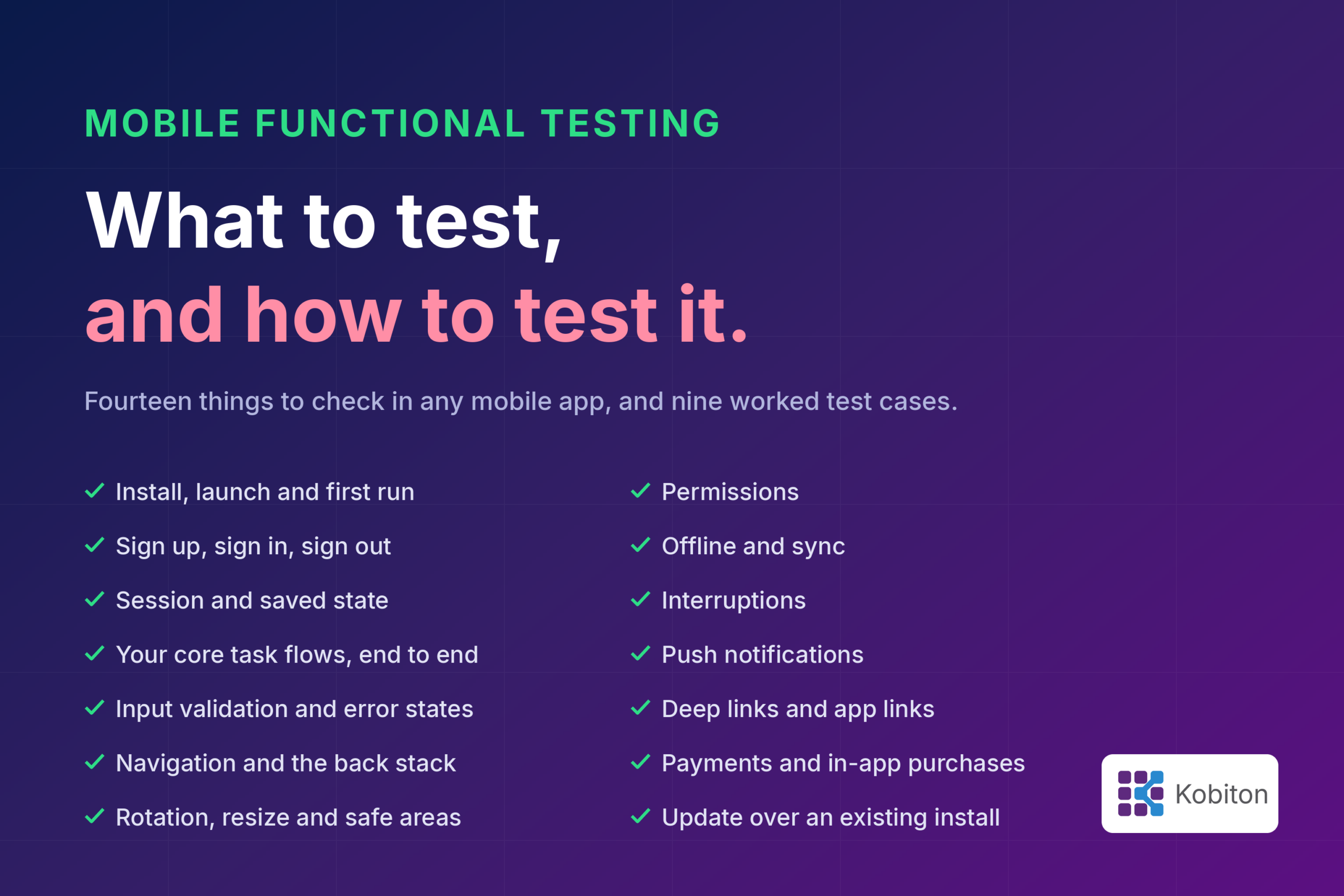
On mobile, a feature that works perfectly in a controlled setup can still fail in a user’s hand. Phones get interrupted, lose signal, deny permissions and kill apps in the background. A functional test plan for a mobile app needs to cover those conditions as well as the core flows.
| Area | What to verify | Example |
| Core user flows | Every primary journey completes and produces the right result | Sign up, log in, search, add to cart, check out |
| Input validation and error handling | Invalid input is rejected with a clear message and nothing breaks | A zip code with too many digits triggers an error, not a crash |
| Interruptions | The app resumes correctly after something takes over the screen | An incoming call arrives mid-payment and the order isn’t duplicated or lost |
| App lifecycle | State is preserved when the app is backgrounded, closed by the OS, or relaunched | A half-filled form is still there after the user switches apps and returns |
| Permissions | Features behave correctly when access is granted, denied or revoked later | Denying location access still lets users enter an address manually |
| Network changes | The app handles switching networks, weak signal and going offline | Moving from Wi-Fi to cellular doesn’t drop an upload in progress |
| Gestures and orientation | Taps, swipes, long-presses and rotation all trigger the right behavior | Rotating the device on the checkout screen keeps the cart contents |
| Notifications and deep links | Tapping a push notification or link opens the right screen with the right data | An ‘Order shipped’ notification opens that order’s tracking page |
| Device and OS coverage | Features work across the OS versions, screen sizes and manufacturers your users have | A date picker that works on a Pixel also works on a Samsung running an older Android version |
Many of these behaviors, such as manufacturer customizations, real interruptions and actual network handoffs, are hard to reproduce faithfully on emulators. That’s why teams validate them on real devices before release.
Functional tests can be run by a person working through the app, or by scripts that drive the app automatically. Most teams use both, because each is good at different things.
| Manual functional testing | Automated functional testing | |
| Best for | Exploratory testing, new features still changing, usability judgments, one-off checks | Smoke, regression and other tests that run on every build |
| Strength | Human judgment that catches what nobody thought to script | Speed, consistency, and the ability to run in parallel across many devices |
| Limitation | Slow, hard to repeat exactly, and doesn’t scale with release frequency | Only checks what it was written to check; scripts need maintenance as the UI changes |
A practical rule is to automate stable, high-frequency flows such as login, search and checkout, and keep manual effort for exploratory testing and newly built features. For native mobile apps, the most widely used automation frameworks are:
Scriptless tools sit alongside these frameworks, letting testers record flows without writing code. They are useful when a team is moving from manual to automated testing.
Functional testing checks what your app does: can a user log in, add an item to the cart, and check out? Non-functional testing checks how well it does it: how fast the checkout screen loads, whether it holds up when thousands of users hit it at once, and whether someone using a screen reader can complete the same purchase. An app can pass every functional test and still lose users because it is slow, crashes under load, or is frustrating to use. That is why teams run both.
| Functional testing | Non-functional testing | |
| Question it answers | Does the feature work as specified? | How well does the app perform while doing it? |
| Based on | Functional requirements, user stories, business rules | Performance, reliability, security, accessibility and usability targets |
| Mobile example | Tapping “Add to cart” adds the item and preserves the selected quantity | The cart updates in under a second on a mid-range Android device over 4G |
| Result | Pass or fail against an expected outcome | Measurements compared against thresholds or baselines |
| When it runs | Throughout development, from the first build to release | Typically once core functionality is stable, and continuously after |
| Common types | Smoke, sanity, integration, regression, system, user acceptance, localization | Performance, load, stress, security, accessibility, usability, failover |
The non-functional side is an umbrella for a long list of test types. The ones mobile teams run most often are:
Running non-functional tests early, rather than waiting for poor reviews after launch, is cheaper and protects how users perceive your app from day one.
Understanding the scope of projects and personnel required to undertake functional software testing, along with considering automation methods, can be a major endeavor for testing teams to undergo in the beginning. That’s where Kobiton steps in. The Kobiton experience encourages proper management of a testing cycle through a mobile testing platform that accelerates delivery and testing of mobile apps by offering manual and automated testing on real devices, in the cloud or on-premise. Kobiton can assist teams in understanding the scope of their project and the types of testing required to best achieve the results they’re looking for. With a top-down focus that will encourage organizational methods for better testing, along with automation tools that are second to none, you’ll be able to maximize the efficiency of your mobile app testing with a functional approach that ensures your product is ready to go at launch and be a smash hit.
Functional testing checks that each feature of an app does what it is supposed to do. A tester gives the app an input, such as entering credentials and tapping Log in, and confirms the output matches what the requirements say should happen.
User acceptance testing (UAT) is one type of functional testing. QA teams run functional testing throughout development to check features against requirements. UAT happens at the end, when end users or business stakeholders confirm the app meets their real-world needs and approve it for release.
Testing a login screen is a classic example. Valid credentials should take the user to their home screen, an incorrect password should show an error message, and repeated failures should trigger whatever lockout the requirements specify.
Usually, yes. Most functional testing treats the app as a black box, judging only inputs and outputs. The exception is unit testing, which developers write with full knowledge of the code and which is generally considered white-box testing.
No. Automation handles repetitive, well-defined checks such as smoke and regression suites very well. Exploratory testing, new features that are still changing, and judgment calls about whether something actually works for the user still need people.
Run smoke tests on every build, regression tests on every merge or release candidate, and the full functional suite before each release. Running them in your CI/CD pipeline makes this automatic.
Want to learn more about Functional Testing in Mobile? Download this free eGuide that covers different methods of Functional Testing.