Types of Mobile Performance Testing: A Complete Guide for QA and Engineering Teams
Users decide whether they trust a mobile app in the first few seconds. A screen that stutters, a checkout that hangs during a flash sale, a battery that drains after ten minutes of use any one of these can send a five-star download straight to the uninstall screen. Research consistently shows that even a one-second delay in load time measurably reduces conversions, and mobile users are famously unforgiving: most will abandon an app that feels slow rather than wait for it to recover.
This is why performance testing is no longer an optional, end-of-cycle activity. It is a core discipline that spans the entire mobile release process. However, performance testing is not a single test. Understanding the different types of mobile performance testing is essential because each one answers a specific question about how an app behaves under real-world pressure. Load testing determines whether your infrastructure can handle expected traffic, stress testing identifies its breaking point, and soak testing uncovers gradual issues, such as memory leaks, that may only appear after extended use. No single test can provide the complete picture.
This guide breaks down every major type of mobile performance testing, the metrics that matter, the tools that make it possible, and the best practices that separate teams who ship confidently from those who firefight in production. It also shows where real-device testing the foundation of accurate mobile performance data fits into a modern QA strategy.
What Is Mobile Performance Testing?
Mobile performance testing is the practice of evaluating how a mobile application behaves in terms of speed, responsiveness, stability, and scalability under a variety of conditions. Where functional testing asks “does this feature work?”, performance testing asks “does it work fast enough, reliably enough, and at scale on the devices and networks my users actually have?”
That last clause is what makes mobile performance testing uniquely difficult. A web app runs in a relatively controlled browser environment. A mobile app runs across thousands of device models, dozens of OS versions, wildly varying hardware capabilities, fluctuating network conditions, and finite resources like battery, memory, and CPU that it must share with every other app on the phone. A build that feels instant on the latest flagship device can crawl on a three-year-old mid-range phone running on a congested 4G network. Performance, in mobile, is always relative to the real conditions of real users.
Mobile performance testing generally splits into two complementary layers:
Client-side performance — how the app itself behaves on the device: launch time, screen rendering, frame rates, memory footprint, CPU usage, and battery consumption.
Server-side and network performance — how the backend, APIs, and network layer respond under load: response times, throughput, error rates, and the ability to scale as concurrent users climb.
A thorough strategy tests both. The most common failure in mobile QA is validating one layer while ignoring the other for example, load-testing the backend on a simulator while never measuring how the app renders on an actual low-memory device.
The Metrics That Define Mobile Performance
Before choosing a test type, you need to know what you are measuring. Clear, agreed-upon performance metrics are the foundation of every meaningful test — without them, “the app feels slow” is an opinion, not a defect. The metrics below recur across every performance test type in this guide.
Response time and latency. How long the app takes to react to an action, from a tap to a fully loaded screen. Measure this at percentiles p95 and p99 not just averages, because it is the slowest 5% of interactions that generate complaints and churn.
Throughput. The number of transactions or requests the system processes per unit of time. Throughput reveals whether your backend keeps pace as demand rises.
Error rate. The percentage of requests or interactions that fail. A rising error rate under load is one of the earliest warning signs of a capacity problem.
App launch and screen load time. Cold-start and warm-start times, plus the time to render individual screens. These are the first impressions that shape user perception.
Frame rendering and jank. Dropped frames and stutter during scrolling or animation. Smooth apps hold a steady frame rate; “jank” is the visible symptom of rendering that can’t keep up.
Memory consumption. How much RAM the app uses and — critically — whether that usage grows unbounded over time, which signals a memory leak.
CPU, GPU, and resource utilization. How heavily the app taxes the device’s processors and storage. High utilization translates directly into heat, lag, and battery drain.
Battery drain. How much power the app consumes during typical activity. Excessive drain is one of the most common reasons users uninstall.
ANR and crash rates. “Application Not Responding” events and crashes under load. These are the hard failures that performance testing exists to prevent.
Recovery time. After a spike or failure, how long the system takes to return to normal operation.
The Core Types of Mobile Performance Testing
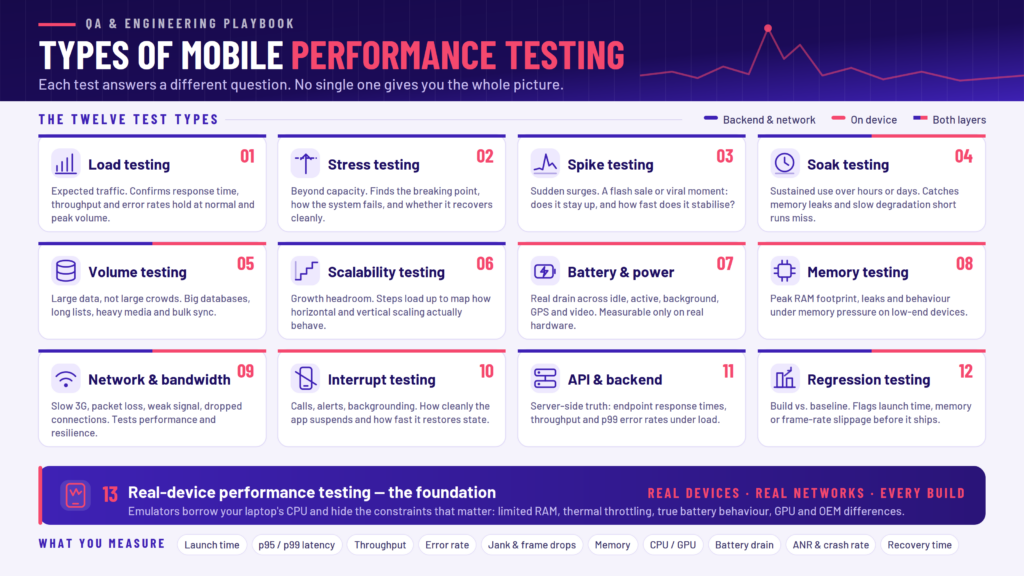
Each performance test type isolates a different dimension of behavior. Together they form a complete picture. The following are the essential types every mobile QA and engineering team should understand.
1. Load Testing
Load testing measures how your application performs under an expected number of concurrent users or transactions — both typical daily volume and anticipated peak volume. The goal is to confirm that the app and its backend maintain acceptable response times, throughput, and error rates when demand is realistic.
Load testing is the workhorse of performance validation. It answers the everyday question every product owner cares about: “Will the app hold up when our normal users show up?” It is ideal for pre-launch validation, establishing performance benchmarks during development, and confirming that a new release hasn’t degraded under the traffic you already serve.
Example: Simulating 10,000 concurrent users browsing and checking out to confirm the app maintains sub-two-second response times during a normal business day.
2. Stress Testing
Stress testing deliberately pushes the system beyond its normal operating capacity to find its breaking point. Where load testing validates expected conditions, stress testing asks “How much can this take before it fails, how does it fail, and how gracefully does it recover?” Testers typically escalate load to five or ten times normal levels until performance degrades or the system fails.
The value of stress testing is not just discovering the ceiling it’s observing behavior at the ceiling. Does the app crash abruptly, or does it degrade gracefully with clear error handling? Does the backend recover cleanly once load returns to normal, or does it stay wedged? Knowing your failure modes in advance is what prevents a bad afternoon from becoming a full outage.
Example: Ramping traffic far past projected peaks to identify the exact concurrency at which checkout begins timing out and verifying the system returns to normal afterward.
3. Spike Testing
Spike testing evaluates how the system responds to sudden, sharp surges in traffic over a very short period. Unlike stress testing, which escalates gradually, spike testing simulates an abrupt jump the kind triggered by a flash sale, a viral moment, a marketing push, or breaking news.
The two questions spike testing answers are stability and recovery speed: does the app stay up when demand quadruples in thirty seconds, and how quickly does it stabilize once the surge passes? Apps with auto-scaling backends are especially reliant on spike testing, because it exposes whether scaling kicks in fast enough to matter.
Example: Simulating a 10x traffic jump the instant a limited-time promotion goes live, then measuring how long the system takes to stabilize.
4. Soak Testing (Endurance Testing)
Soak testing also called endurance testing evaluates performance over an extended period of sustained use. Its purpose is to surface problems that don’t appear in short test runs: memory leaks, gradual performance degradation, resource exhaustion, and slow-building instability.
This is one of the most valuable and most overlooked test types in mobile. Many of the worst mobile performance defects are invisible in a five-minute smoke test and only emerge after an hour, a day, or a week of continuous operation. A tiny memory leak that adds a few kilobytes per screen transition is harmless in a quick check but crashes the app after prolonged use. Soak testing is how you catch it before your users do.
Example: Running a realistic user workload continuously for 24 to 72 hours while monitoring memory usage to confirm it stays flat rather than climbing steadily upward.
5. Volume Testing
Volume testing assesses how the application behaves when it must process large amounts of data, rather than a large number of users. The focus shifts from concurrency to data scale: big databases, large local caches, lengthy lists, heavy media libraries, or bulk sync operations.
Volume testing surfaces data-related bottlenecks that other test types miss inefficient database indexing, slow queries against large tables, memory bloat when loading long lists, or storage-handling problems. An app that flies with a test account holding ten records can grind to a halt against a real account holding ten thousand.
Example: Loading a messaging or media app populated with years of historical data to confirm search, scroll, and sync remain responsive.
6. Scalability Testing
Scalability testing determines how well your system adapts as demand grows over time. Rather than testing a single fixed load, it incrementally increases users or data to measure how gracefully the system scales and to identify the point at which adding more resources stops delivering proportional gains.
Scalability testing evaluates both horizontal scaling (adding more servers or instances) and vertical scaling (increasing the resources of existing infrastructure). Its output is planning intelligence: it tells you whether your architecture can grow with your user base, and where you’ll need to invest before growth outpaces capacity.
Example: Stepping load from 1,000 to 100,000 users in stages to map how response time and cost scale with demand, and where the architecture needs to evolve.
7. Battery and Power Consumption Testing
Battery testing measures the impact your app has on device power during various activities — idle, active use, background operation, and resource-heavy tasks like video playback, GPS tracking, or continuous syncing. Because battery life is one of the most emotionally charged aspects of the mobile experience, an app that drains power quickly earns some of the harshest reviews and fastest uninstalls.
This test type is unique to mobile it has no meaningful web equivalent and it can only be measured accurately on real hardware. Battery testing often reveals inefficiencies that other tests miss: wake locks that never release, over-aggressive background polling, or GPS usage that never powers down.
Example: Measuring battery drain during 30 minutes of active navigation to confirm the app isn’t consuming power far beyond comparable apps.
8. Memory Testing
Memory testing focuses specifically on how efficiently the app allocates and releases RAM. It overlaps with soak testing but zooms in on memory behavior in particular: peak memory footprint, leaks, and how the app behaves when the device is under memory pressure.
This matters enormously on low-end and older devices, which have far less RAM to spare. An app that runs comfortably on a flagship device may be aggressively killed by the OS on a budget phone if its memory footprint is too large. Memory testing catches the leaks and bloat that lead to crashes, ANRs, and the dreaded “app keeps stopping” experience.
Example: Profiling memory across repeated navigation cycles on a low-memory device to confirm allocation returns to baseline after each screen is closed.
9. Network and Bandwidth Testing
Network testing validates how the app performs across the full range of real-world connectivity: fast Wi-Fi, congested 4G, spotty 5G, weak signal, high latency, packet loss, and complete disconnection. Mobile users move constantly between network conditions, and an app that assumes a fast, stable connection will fail the moment reality intervenes.
Good network testing evaluates both performance (does the app stay responsive on a slow connection?) and resilience (does it handle dropped connections gracefully, queue actions, and recover when connectivity returns?). Network throttling and simulation are essential techniques here, ideally combined with testing on real devices connected to real networks.
Example: Simulating a 3G connection with intermittent packet loss to confirm the app degrades gracefully instead of hanging or losing user data.
10. Interrupt Testing
Interrupt testing evaluates how an app handles the constant interruptions of mobile life — incoming calls, SMS messages, push notifications, alarms, low-battery warnings, plugging in a charger, or the app being backgrounded and restored. While often categorized as functional testing, interruptions have a direct performance dimension: how quickly and cleanly does the app suspend, and how fast does it restore state when the user returns?
An app that takes several seconds to recover after a phone call, or that reloads from scratch every time it’s backgrounded, delivers a sluggish experience even if every individual feature “works.” Interrupt testing ensures performance holds up across the stop-start reality of real usage.
Example: Triggering an incoming call mid-transaction and confirming the app resumes instantly with all data intact.
11. API and Backend Performance Testing
Much of an app’s perceived performance actually lives in its backend. API performance testing measures the efficiency of the server-side calls that power the app response times, throughput, and error rates for each endpoint under load. Because a single screen may fire multiple API calls, a slow or unreliable endpoint can bottleneck the entire user experience even when the client-side code is flawless.
Testing APIs in isolation lets teams pinpoint exactly where server-side latency originates, validate that endpoints scale, and catch regressions in backend performance before they reach the app. This is often the fastest, most cost-effective layer to test continuously, since it doesn’t require the full client stack.
Example: Load-testing the checkout API to confirm p99 response times stay within budget as concurrent requests climb.
12. Performance Regression Testing
Performance regression testing detects slowdowns introduced between releases. Its job is to compare the performance of a new build against an established baseline and flag any metric launch time, memory usage, response time, frame rate that has degraded, even slightly.
Performance rarely collapses all at once; it erodes release by rlease, a few milliseconds and a few megabytes at a time, until users notice. Regression testing is how you catch that erosion early. Integrated into a continuous testing pipeline, it turns performance into a guardrail: any build that makes the app measurably slower fails the check before it ships.
Example: Automatically comparing cold-start time and memory footprint of each release candidate against the previous version, and blocking the build if either regresses beyond a set threshold.
13. Real-Device Performance Testing
Real-device performance testing is less a separate category than the foundation that makes all the others trustworthy on mobile. It means running your performance tests on actual physical iOS and Android devices across a range of models, OS versions, and hardware tiers rather than on emulators or simulators.
The reason is simple: emulators cannot accurately reproduce the factors that dominate mobile performance. They run on your machine’s powerful CPU and abundant memory, so they mask the exact constraints limited RAM, thermal throttling, real battery behavior, GPU differences, manufacturer OS customizations that cause real-world slowdowns and crashes. Battery drain, thermal effects, and true device-level rendering simply cannot be measured on a simulator. A performance number from an emulator tells you how the app runs on your laptop; a performance number from a real device tells you how it runs for your users.
Example: Executing the same performance suite across a matrix of a flagship phone, a three-year-old mid-range device, and a low-memory budget phone to see where performance actually breaks.
Manual vs. Automated Performance Testing
Performance testing can be executed manually or through automation, and mature teams use both.
Manual testing has a place in exploratory performance work feeling out how an app responds, investigating a specific reported slowdown, or validating a nuanced user experience that’s hard to quantify. It’s flexible and human, but it doesn’t scale, it’s hard to reproduce precisely, and it can’t run continuously.
Automated testing uses scripts and testing tools to execute performance tests repeatedly and consistently. Automation is what makes load, stress, soak, and regression testing practical at all you cannot manually simulate 50,000 users or watch memory for 48 hours straight. More importantly, automation lets performance testing move left, running on every build inside a CI/CD pipeline so problems are caught in minutes rather than in production.
The practical answer is a blend: automate the repeatable, high-volume, and continuous tests, and reserve manual effort for exploration and judgment calls. Frameworks like Appium, Espresso, and XCTest handle the automation layer, and they integrate cleanly with real-device platforms so those automated tests run against genuine hardware rather than emulators.
Tools for Mobile Performance Testing
A complete mobile performance toolkit generally spans a few categories:
Automation frameworks — Appium (cross-platform), Espresso (Android), and XCTest (iOS) drive automated test execution and integrate into CI/CD pipelines.
Load and stress testing tools — Platforms that generate large volumes of simulated users and transactions to test backend and API capacity.
Device labs and real-device clouds — Access to a wide matrix of real physical devices, which is where accurate client-side performance data actually comes from.
Profiling and monitoring tools — Utilities that capture device-level metrics (memory, CPU, GPU, battery, frame rate) and application logs during a test run.
Production monitoring / APM — Tools that continue watching performance after release, closing the loop between testing and real-world behavior.
This is where Kobiton fits naturally into the stack. Kobiton provides a real-device cloud purpose-built for mobile testing, giving teams on-demand access to a broad matrix of real iOS and Android devices across models and OS versions. Because performance is only as accurate as the hardware it’s measured on, running tests on Kobiton’s real devices produces the device-level truth that emulators can’t: genuine startup times, memory and battery behavior, frame rendering, and OS-specific quirks. Kobiton captures session videos, logs, artifacts, and device-level data from every run, so when a performance issue appears, teams can see exactly what happened rather than guessing from an aggregate number.
Crucially, Kobiton isn’t a separate silo. It integrates with Appium-based automation, so teams can fold startup, memory, and battery checks directly into their existing automated workflows and CI/CD pipelines making real-device performance testing a routine part of every release rather than a special event. Teams can build device matrices that reflect real risk (high-traffic devices, older phones, low-memory hardware, models with known crash patterns) and validate performance where it actually matters: on the devices their users hold in their hands.
Best Practices for Mobile Performance Testing
Test on real devices, not just emulators. This is the single most important practice in mobile performance testing. Emulators are useful for quick functional checks, but they cannot reproduce the memory limits, battery behavior, thermal throttling, and hardware variation that drive real performance. Accurate results require real hardware.
Define clear performance metrics and thresholds up front. Decide what “good” means — target launch time, acceptable p95 response time, maximum memory footprint, allowable battery drain before you test. Metrics without agreed thresholds produce data no one can act on.
Combine multiple test types. No single test tells the whole story. Pair load with stress, run soak tests to catch leaks, add spike tests if you expect surges, and always validate on real devices. The types in this guide are complementary, not interchangeable.
Shift performance testing left and make it continuous. Integrate performance and regression checks into your CI/CD pipeline so every build is measured automatically. Catching a regression in a pull request is cheap; catching it after a store release is not.
Test across a representative device matrix. Your users aren’t all on the latest flagship. Include older, mid-range, and low-memory devices, and prioritize the models and OS versions your analytics show your audience actually uses.
Simulate real network conditions. Test on slow, congested, and intermittent connections — not just office Wi-Fi. Network variability is one of the biggest real-world performance factors.
Keep the user at the center. Performance metrics are proxies for one thing: user experience. Prioritize the interactions users perform most and care about most — launch, core workflows, checkout — over micro-optimizing paths no one touches.
Automate the repeatable, explore the rest manually. Automate load, stress, soak, and regression testing for consistency and scale; reserve human testers for exploratory work and experience-quality judgment.
Monitor performance in production. Testing doesn’t end at release. Real-user monitoring closes the loop, surfacing issues that only appear at true production scale and feeding them back into your test suite.
Foster cross-team collaboration. Performance is a shared responsibility across QA, development, and operations. The teams that ship fast apps treat performance as everyone’s concern, not a gate at the end of the line.
Bringing It All Together
Mobile performance testing isn’t one test it’s a coordinated set of them, each illuminating a different way your app can succeed or fail under pressure. Load and stress testing map your capacity and its limits. Spike testing prepares you for sudden surges. Soak and memory testing hunt down the slow leaks that crash apps over time. Volume and scalability testing make sure you can grow. Battery, network, and interrupt testing account for the messy reality of mobile life. API and regression testing keep the backend fast and stop performance from eroding release by release. And real-device testing is the foundation that makes every one of those results trustworthy.
The common thread across all types of mobile performance testing is that the results are only as realistic as the conditions under which the tests are conducted. An emulator running on a fast machine will often flatter your app, while real users operating real devices across different networks will not. That is why effective mobile teams build their performance strategy around real hardware. A real-device cloud such as Kobiton, integrated directly into automated CI/CD workflows, has become a practical foundation for modern mobile performance testing. Test under the conditions your users experience, measure what genuinely matters, and combine the appropriate test types. This approach turns performance from a source of production surprises into a competitive advantage.
Frequently Asked Questions
What is the difference between load testing and stress testing?
Load testing checks performance under expected traffic to confirm the app holds up under normal and peak conditions. Stress testing deliberately pushes beyond capacity to find the breaking point and observe how the system fails and recovers. Load testing validates; stress testing probes limits.
Why can’t I just use an emulator for performance testing?
Emulators run on your computer’s powerful hardware, so they mask the exact constraints limited RAM, real battery behavior, thermal throttling, GPU differences, and manufacturer OS customizations that drive real-world mobile performance. Battery drain and true device rendering can only be measured on real hardware. Emulators are fine for quick functional checks but unreliable for performance.
What are the most important mobile performance metrics?
The essentials are app launch and screen load time, response time and latency (measured at p95/p99), throughput, error rate, frame rendering/jank, memory consumption, CPU and battery usage, and ANR/crash rates. Which matter most depends on your app, but launch time, responsiveness, memory, and battery are near-universal.
How often should mobile performance testing run?
Ideally on every build. By integrating performance and regression checks into a CI/CD pipeline and running them on real devices, teams catch slowdowns in minutes rather than discovering them after a store release. Continuous, automated performance testing is far cheaper than post-release firefighting.
Where does Kobiton fit into performance testing?
Kobiton provides a real-device cloud that gives teams on-demand access to a wide matrix of real iOS and Android devices, capturing session videos, logs, and device-level metrics from every run. It integrates with Appium-based automation and CI/CD pipelines, so real-device performance checks startup, memory, battery, and more become a routine part of every release rather than a special event.
