Mobile Performance Testing in CI/CD Pipelines: The Complete Guide to Real-Time Monitoring and Faster, More Reliable Releases
Modern mobile teams are expected to ship updates constantly fixing bugs, adapting to new OS versions, and adding features without ever letting the app get slower, less responsive, or less stable. The problem is that speed and quality pull in opposite directions when performance is treated as an afterthought.
Too often, teams pour their energy into features and functional bug fixes, then discover slow load times, battery drain, or memory leaks only after the build is live and users are already complaining. At that point, fixes are slower, costlier, and far more stressful. Integrating mobile performance testing directly into your CI/CD pipeline flips that dynamic: it turns performance from a post-launch scramble into a continuous, proactive part of how you build.
This guide explains what Mobile Performance Testing in CI/CD Pipelines is, why mobile apps make it uniquely challenging, how to embed it into every stage of a CI/CD pipeline, how to automate it in practice, and how a real-device cloud platform like Kobiton makes the whole process scalable.
What Is Mobile Performance Testing in CI/CD Pipelines?
Mobile performance testing measures how an app behaves under real-world conditions across different devices, networks, and workloads. Much of it is client-side measurement—understanding what’s happening on the device and inside the app itself while a user interacts with it.
The metrics that matter most include:
- App launch and screen load time — how quickly the app and its screens become usable
- Frame rate (FPS) and UI smoothness — how fluid scrolling, animations, and transitions feel
- API and network latency — request and response times, throughput, and error rates
- CPU, memory, and battery usage — how efficiently the app uses device resources
- Crash rates and ANRs (Application Not Responding) — overall stability under load
Unlike functional testing, which asks “does this feature work?”, performance testing is data-driven and continuous. It tracks how these numbers trend across builds, which is exactly why it fits so naturally into a CI/CD workflow.
Why Mobile Apps Make Performance Testing Harder
Performance testing is challenging for any software, but mobile adds constraints that desktop and web teams rarely face. Understanding these is key to designing a pipeline that actually catches problems.
Device fragmentation and limited access to real devices. Most QA teams test on a small handful of popular devices. Real users, however, run the app across a sprawling mix of models, chipsets, screen sizes, OS versions, and battery conditions. Issues tied to slower processors, older hardware, or constrained memory frequently appear only on devices the team doesn’t physically own—so they surface as user complaints rather than test failures.
Long feedback cycles when testing is manual. Regression testing grows with every feature. Running large suites by hand delays feedback, pushing problems later into the cycle where they’re more expensive to fix. Automation makes it possible to test on every build instead of waiting for milestones.
App store review delays raise the cost of missed bugs. Once a build enters app store review, fixes are no longer instant. A single missed issue can force a rebuild, a fresh submission, and another review wait—leading to delayed launches, lower ratings, more support tickets, and lost revenue when users abandon broken flows. This makes catching defects before submission disproportionately valuable on mobile.
These constraints are the reason “test early, test often, test on real devices” is not just a slogan for mobile teams—it’s an economic necessity.
Why Performance Testing Belongs in Your CI/CD Pipeline
A CI/CD pipeline automates building, testing, and deploying code so teams can release frequently. But CI/CD alone only guarantees that code moves quickly—not that it performs well. Without performance checks, a pipeline will happily ship inefficient code into production at high speed.
Embedding performance testing into CI/CD delivers compounding benefits:
- Catch regressions early. Performance bottlenecks are found before they reach users, while the offending code is still fresh in a developer’s mind.
- Validate continuously. Every commit is checked, so quality is maintained build over build rather than audited once before release.
- Deliver a consistent user experience. Validating across devices, OS versions, and network conditions ensures the app feels reliable in the real world, not just in the lab. Consistency builds the kind of trust that turns users into loyal ones.
- Support scalability. By simulating heavier traffic and resource usage, teams can confirm the app holds up as the user base grows—so scaling up doesn’t mean slowing down.
- Reduce costs and rollbacks. Fixing a problem during development is far cheaper than an emergency patch, a forced rollback, or a damaged app store rating after launch.
- Shorten feedback loops. Developers get results in minutes instead of days, which means less rework and fewer secondary regressions.
In short, CI/CD moves your app forward fast; performance testing makes sure it isn’t quietly falling apart along the way.
The Role of Real-Time Performance Monitoring
Real-time monitoring takes performance testing a step further by continuously tracking behavior during and after test execution, rather than only reporting a final pass/fail verdict.
What real-time monitoring captures:
- Live CPU, memory, and battery consumption
- Network request timings and failures as they occur
- UI rendering and frame-by-frame performance
- Device-specific performance variations
Why it matters:
- It detects issues as they happen, not after a test completes
- It helps surface intermittent or environment-specific problems that single-pass/fail results hide
- It enables instant feedback inside the pipeline
- It supports trend analysis, so you can see gradual degradation forming over time
Instead of a binary result, teams gain visibility into how performance evolves across builds—which is what makes proactive fixes possible.
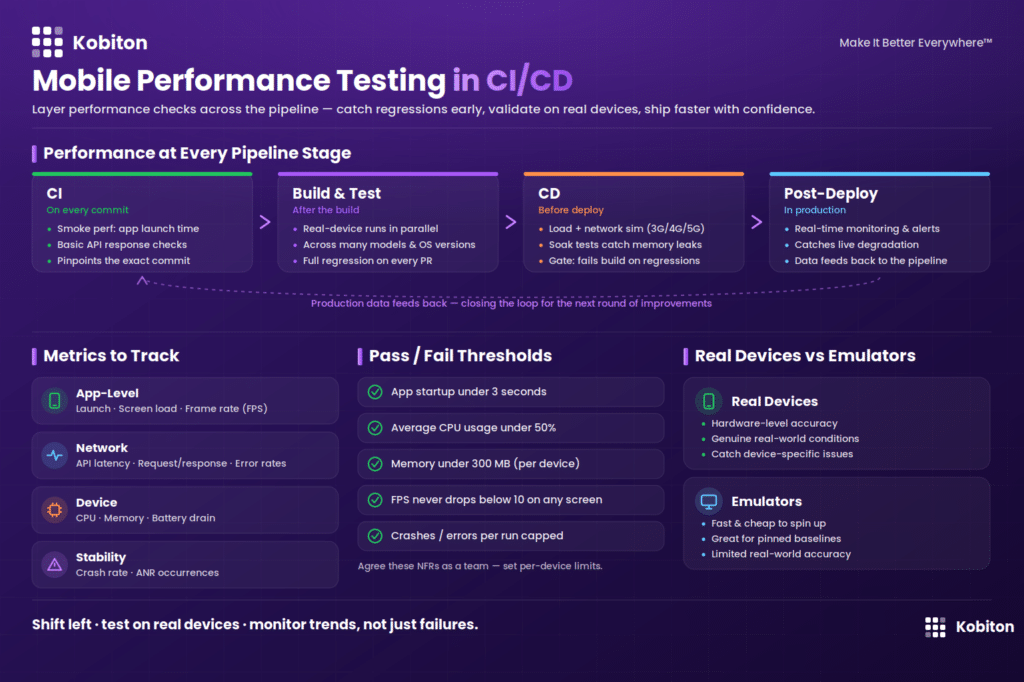
How Mobile Performance Testing Fits Into Each CI/CD Stage
Performance testing isn’t a single gate; it’s layered across the pipeline, with lighter checks early and heavier validation later.
1. Continuous Integration (CI) Stage
Lightweight checks run on every commit so obvious regressions are caught immediately:
- Smoke performance tests, such as app launch time
- Basic API response-time checks
- Resource-usage sanity checks
A core strength of CI here is pinpointing the exact change that caused a problem. Because developers merge small, frequent changes and each merge triggers an automated build, a failure can be traced to a specific commit instead of an end-of-sprint tangle of merged work.
Example: A developer merges a small update that accidentally breaks the checkout button logic. CI runs within minutes, surfaces the failure, identifies the exact commit, and the fix ships the same hour, long before QA or users ever see it.
2. Build & Test Stage
Once the app is built, automated performance scripts run on real devices in parallel across multiple models and OS versions. Real-time monitoring captures detailed metrics, and cloud-based device infrastructure provides the scale without a physical device lab.
Example: A regression suite that takes several hours by hand runs in roughly 20 minutes across dozens of devices in parallel. That speed makes it realistic to run full regression on every pull request—and to expose a layout that breaks only on an older, smaller screen before users ever encounter it.
3. Continuous Delivery (CD) Stage
Before deployment, deeper validation runs:
- Load testing for peak-traffic conditions
- Network simulation across 3G, 4G, 5G, and poor connectivity
- Soak (long-running) tests to detect memory leaks over extended sessions
Crucially, CD only moves a build forward when these tests pass. If a change breaks a core flow, the pipeline stops the build immediately rather than letting an unstable release slip through.
Example: A subtle break in the login flow is introduced during a routine update. Instead of being caught during final regression, automated tests fail on merge and block the build—keeping the release on schedule.
4. Post-Deployment Monitoring
After release, real-time monitoring continues in production, triggering alerts when performance degrades. That production data feeds back into the pipeline, closing the loop and informing the next round of improvements.
How to Automate Mobile Performance Validations in Practice
One question trips up most teams: how do we actually automate performance measurement rather than profiling manually—start profiling, run the app, stop profiling, repeat?
The most practical starting point is to reuse the automated functional tests you already have. Most mobile teams run UI tests (for example, with Appium) that install a packaged build on a device or emulator and walk through a real user journey. While that functional test executes, you can capture performance data on what’s happening “under the hood.”
Example: An Appium test for an e-commerce app simulates a user searching for a product, selecting it, adding it to the cart, and checking out. The functional assertions confirm the right product and quantity were added. At the same time, you measure the response time of tapping “Add to Cart” and watch memory usage when the action repeats—does it climb toward an OutOfMemory error? The same test now validates both behavior and performance.
If your team has no automated functional tests yet, don’t wait for full coverage. Start small: automate one valuable, high-traffic use case—app startup time or the login experience—and begin measuring it over time. A single tracked metric on every build is far more useful than a perfect plan that never ships.
This approach also scales cleanly: the same parallelized automated tests that expand device coverage are the ones gathering your performance data, so you’re not maintaining two separate systems.
Key Metrics to Track
To keep performance testing actionable, focus on measurable KPIs grouped by what they reveal:
App-level metrics
- Launch time
- Screen load time
- Frame rate (FPS)
Network metrics
- API latency
- Request/response time
- Error rates
Device metrics
- CPU usage
- Memory consumption
- Battery drain
Stability metrics
- Crash rate
- ANR occurrences
Tracking these consistently—build over build—is what lets you spot gradual declines before they become user-facing problems.
Setting Pass/Fail Criteria and Performance Thresholds
Defining the line between “ship it” and “fail the build” is one of the hardest parts of performance testing—and one Kobiton-style pipelines handle well once thresholds are agreed upon.
Start with vendor guidance. Google and Apple both publish performance best practices; for instance, an app rendering at 60 FPS generally delivers the smoothest experience. But a number alone isn’t a verdict. Is 30 FPS a failure? It depends on the app:
- Games and graphics-heavy apps have high FPS requirements, so a drop is serious.
- Transactional apps may care far less about FPS and far more about how fast a key action—logging in, adding to cart—completes. Measuring end-user response time for those actions is the better signal.
The recommended approach is to define pass/fail criteria with the whole team, as explicit non-functional requirements (NFRs). Concrete, agreed-upon examples might include:
- App startup time under 3 seconds
- Average CPU usage under 50%
- A capped number of crashes or errors per run
- Per-device thresholds, since the same build behaves differently on different hardware—for example, memory usage must stay under 300 MB on a specific device, or the build fails if FPS drops below 10 on any screen
When you hit your targets on every build, you gain real confidence in the user experience—and the pipeline can automatically fail builds that cross a line.
Real Devices vs. Emulators: Choosing the Right Environment
Both have a place, and the right choice depends on what you’re trying to learn.
Emulators
- Faster and cheaper to spin up
- Excellent for benchmarking one version against another (say, v2.6 vs. v2.5), because you can pin the exact hardware and OS and reuse the identical environment—minimizing the noise that makes comparisons unreliable
- Limited accuracy for true performance metrics
Real devices
- Provide accurate, hardware-level insight
- Reflect genuine real-world user conditions
- Detect device-specific issues emulators miss
The rule of thumb: use emulators when you need a stable, controlled baseline for comparison; use real devices when you need to know how the app actually feels for users. Real-device cloud platforms like Kobiton let teams get that real-world accuracy at scale—without maintaining a physical device lab.
Best Practices for Mobile Performance Testing in CI/CD
- Set clear performance goals first. Decide what “good” looks like across devices and conditions before you start measuring, so tests have benchmarks to enforce.
- Shift performance testing left. Run lightweight checks early in the pipeline to catch issues quickly and cheaply.
- Use parallel testing. Execute across many devices and OS versions simultaneously to compress feedback time.
- Define performance thresholds. Set clear, team-agreed benchmarks (for example, launch under 3 seconds) and let the pipeline enforce them.
- Simulate real-world conditions. Test across real device types, network speeds, and usage patterns rather than ideal lab settings.
- Monitor trends, not just failures. Watch metrics over time to catch gradual degradation, not only hard test breaks.
- Separate your test layers. Keep fast smoke checks in CI and run deeper performance suites in nightly builds.
- Integrate with developer workflows. Pipe results straight into GitHub, Slack, or CI dashboards so teams can act immediately.
Common Challenges and How to Solve Them
| Challenge | Solution |
| Slow test execution | Run tests in parallel and prioritize critical user flows |
| Flaky, inconsistent results | Test on real devices in stable, controlled environments |
| High infrastructure costs | Use a cloud-based real-device platform instead of an in-house lab |
| Limited device coverage / fragmentation | Run automated tests across a broad real-device cloud in parallel |
| Lack of visibility | Implement real-time monitoring dashboards and trend tracking |
How Kobiton Supports Mobile Performance Testing in CI/CD
Kobiton brings the pieces above together into one practical workflow:
- A real-device cloud for accurate, real-world performance measurement at scale—no physical lab to maintain
- AI-driven automation that reduces test creation and maintenance overhead
- Integration with CI/CD tooling like Jenkins and GitHub Actions, so performance validation runs automatically on every build
- Real-time insights into app performance across devices, networks, and OS versions
The result is continuous performance testing that strengthens release quality without slowing down your release cadence.
Future Trends in Mobile Performance Testing
- AI-based anomaly detection that flags unusual performance metrics automatically
- Predictive performance analysis that warns of likely regressions before deployment
- Deeper integration with DevOps observability tooling for unified monitoring
- Greater reliance on real-time, in-pipeline monitoring as release cycles keep accelerating
Conclusion
Mobile performance testing has moved from a nice-to-have to a core requirement of modern CI/CD. As release cycles compress and user expectations climb, teams can’t afford to discover slowdowns, crashes, or battery drain only after launch—especially with app store review delays raising the cost of every missed bug.
By combining automated testing built on existing functional tests, real-device validation across a fragmented device landscape, clearly defined pass/fail thresholds, and continuous real-time monitoring, teams can catch issues early, protect the user experience, and ship faster with confidence. Performance stops being a release-day gamble and becomes a steady, measurable part of how great mobile apps get built.
