Why mobile app testing for medical apps is different
Mobile app testing for a medical application carries a burden that consumer apps never face: a defect can put a patient at risk. When an app manages insulin dosing, monitors glucose, or relays remote patient data, the QA team is validating clinical behavior, not just a user flow. A crash on a shopping app costs a sale. A missed alert on a Mobile Medical App (MMA) can cost a person their health.
A member of my family uses cochlear implants that can pair with a mobile medical app, so I have seen why the quality of these apps matters.
“When you’re testing a Mobile Medical App, you’re not just validating mobile app quality, you’re validating a patient’s confidence that the information they rely on is accurate, available, and reliable when they need it most. In healthcare, every release carries a higher standard because mobile app quality ultimately supports patient safety.” Stu Hume, CTO, Kobiton
That raises the bar in three ways. Patient safety means the app has to behave correctly across real devices, operating systems, network conditions, and patient scenarios, not just on the two phones sitting on a tester’s desk. Regulatory expectations from the U.S. FDA’s Digital Health Center of Excellence and medical device software lifecycle standards such as IEC 62304 require traceable, documented verification. And Software as a Medical Device (SaMD) products inherit a risk-based posture, where the depth of testing scales with the harm a failure could cause.
The rest of this guide breaks down the testing types that matter most for patient-facing apps, what each one catches, and how to combine them.
Manual mobile app testing: still essential for medical apps
Automation is necessary for regulated apps, but it is not sufficient. Manual testing is where a human explores the app the way a stressed patient or a clinician actually would, and notices the things a script was never told to check. A scripted test confirms the behavior you anticipated. Manual exploratory testing finds the behavior you did not.
For MMAs, manual sessions on real devices matter for a specific reason: many failure modes only appear under messy, human conditions. A low-battery state mid-reading. A notification arriving during a dose-entry screen. A rotation, an interruption, a backgrounded app that loses its connection. QA teams at regulated medical-device makers routinely run remote manual sessions, taking control of a physical device in a lab to reproduce and confirm these edge cases before they sign off.
Manual testing also covers the judgment calls automation cannot make: does this warning read clearly under stress, is this confirmation step easy to misread, does the flow feel safe. For more on where manual coverage earns its keep, see why manual mobile testing still matters.
Functional testing: validating the workflows that affect patients
Functional testing verifies that the app does what it is specified to do, and for a medical app the specifications that matter most are the ones tied to patient outcomes. Dose calculations have to be correct every time. State has to be preserved if the app is interrupted. And critical alerts have to fire, reliably, on the actual device.
That last point is easy to underestimate. In one regulated medical-device program, the QA team treated certain notifications as “patient critical” and would not accept a passing test that only confirmed the alert was triggered in code. They needed proof the alert actually played on the device, capturing video and audio so they could confirm the patient would have seen and heard it. That is the difference between testing that the system intended to warn the user and testing that the warning reached them.
Strong functional coverage for an MMA includes positive and negative paths, boundary conditions on clinical inputs, interrupted and resumed workflows, and verification that safety-critical outputs (alarms, alerts, confirmations) are observable end to end. A practical starting point is this guide to functional testing.
Compatibility testing across devices, OS versions, and Bluetooth
Mobile application testing for healthcare runs straight into the fragmentation problem: hundreds of active iOS and Android device models, multiple OS versions in the field, and screen sizes and chipsets that behave differently under load. A medical app cannot ship “works on the latest iPhone” as a coverage statement when patients are carrying three-year-old hardware running an OS two versions back.
“Early in Kobiton’s history, we saw firsthand why mobile quality in healthcare has to be treated differently. In consumer software, a defect can cost revenue and trust. In a medical application, a defect can impact a person’s life. That is why testing medical mobile apps has to prove the app works reliably on the real devices, networks, alerts, and patient conditions where human life is at stake.” Frank Moyer, Kobiton Founder
Even on the most disciplined platform, fragmentation is real. As of January 2025, Apple reported iOS 18 on 68% of all iPhones, leaving roughly a third on iOS 17 or older. On Android the spread is wider still, with the active install base split across many OS versions at once, as Google’s own Android distribution dashboard shows. A medical app has to behave correctly across that entire range, not just the newest phones.
Real devices are non-negotiable here. Emulators miss sensor behavior, real-world performance, and the connectivity quirks that define an MMA. Many medical-device teams build committed on-premises device labs, sometimes scaling to hundreds or even a thousand device ports for execution, precisely because the coverage has to reflect what patients actually use. Coverage is typically phased, with one platform brought to full depth first and the second platform added as more development teams come online.
Bluetooth Low Energy adds another dimension. Connected MMAs pair with insulin pumps and continuous glucose monitors, and that pairing has to be tested under realistic interference. As one engineer put it, connecting reliably is hard when hundreds of other Bluetooth devices are competing for the same airspace. Pairing, reconnection after signal loss, and data integrity across the BLE link all belong in the compatibility plan. Real-device coverage is what makes that testing credible, and it is the foundation MMA compatibility depends on.
QA Insight: A Bluetooth connection that works at the bench can fail in a room full of competing signals. Test pairing and reconnection on real devices, under real interference, before you trust it in a patient’s hands.
Usability testing for patient-facing clarity
A medical app can be functionally correct and still unsafe if a patient cannot read it under pressure. Usability testing checks that the people who depend on the app, often without technical training and sometimes during a health event, can understand what it is telling them and act correctly.
For MMAs this means glanceable status, unambiguous error states, and accessibility for users with low vision, limited dexterity, or color blindness. Color-coded dashboards are common in this category for a reason: a person managing blood sugar can read red, yellow, or green at a glance and make a small correction before a reading becomes a crisis. Usability testing confirms that those signals are clear on real screens, at real brightness, in the conditions patients actually use them. It is also where you validate that critical actions are hard to perform by accident and easy to perform when they count.
Beta testing and real user feedback
Beta testing puts the app in front of real patients and clinicians before general release, and it surfaces risks that controlled QA cannot. This is also where real-world evidence, increasingly emphasized in digital-health oversight, starts to accumulate.
Real users exercise the app in combinations no test plan anticipates. Consider how patients describe the features they depend on most:
“If I were in a medical crisis due to my blood sugar, I may not be able to call for help, but my Dexcom can alert my family. Since using the continuous glucose monitor, I have better blood sugar control because my data is literally at my fingertips in my phone instead of needing a lab order to see my trends.” Susie Masyada
Each of those capabilities, the alerting, the follower notifications, the data sharing, is a feature whose real-world reliability only becomes visible at scale, across many devices and many living situations. Beta feedback is how teams catch the gap between “passed QA” and “works in a patient’s actual life.”
Choosing the right mobile app testing mix: manual, functional, compatibility, and automation
No single testing type covers a medical app. The skill is combining them deliberately, then deciding what to automate. Mobile automation testing is what makes regulated release cadences sustainable: teams drive tests from CI through a command-line runner and execute many sessions in parallel against a real-device lab, so a full regression does not gate every build by hand.
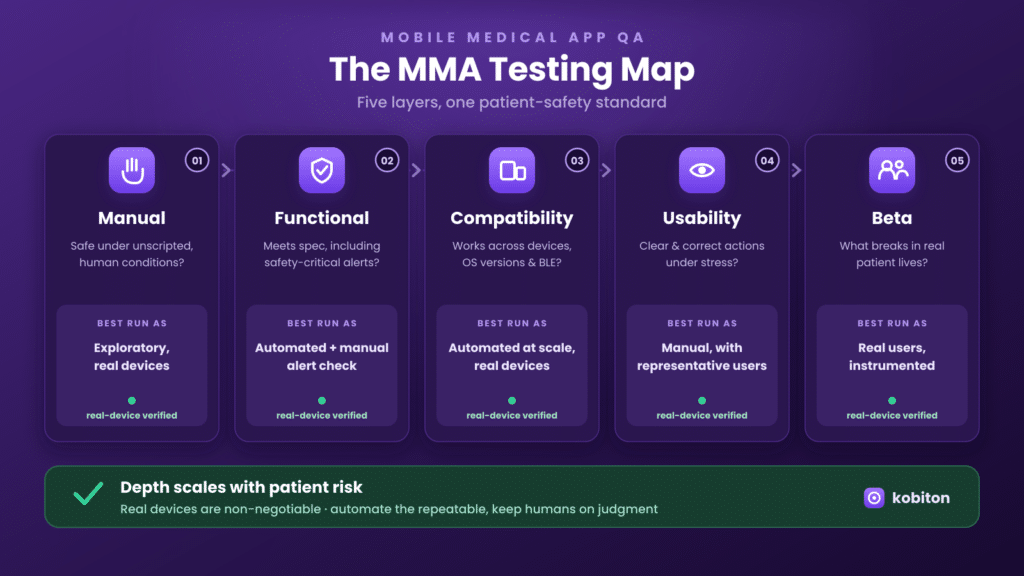
| Testing type | Primary question it answers | Best run as |
| Manual | Does it behave safely under unscripted, human conditions? | Exploratory, on real devices |
| Functional | Does it do what the spec requires, including safety-critical outputs? | Automated, with manual confirmation of critical alerts |
| Compatibility | Does it work across devices, OS versions, and BLE peripherals? | Automated at scale on real devices |
| Usability | Can a patient understand and act correctly under stress? | Manual, with representative users |
| Beta | What breaks in real patient lives that QA could not predict? | Real users, instrumented |
AI mobile testing is changing where the effort goes. Natural-language and agentic test authoring lowers the cost of creating and maintaining automation, which lets regulated teams expand coverage without proportionally expanding headcount. The principle holds regardless: automate the repeatable and the high-volume, keep humans on judgment, safety confirmation, and exploration. Mobile automation testing scales the repeatable layer so manual effort goes where it matters.
What is shaping mobile medical app quality in 2025 to 2026
For teams tracking mobile testing news in the regulated space, recent FDA guidance highlights several themes shaping mobile medical app quality through 2025 and 2026, including increasing use of AI-enabled software, greater emphasis on lifecycle management and post-market performance monitoring, heightened expectations for cybersecurity and software quality, and continued application of a risk-based regulatory approach.
“We can’t just change that. It’s a whole process, because we’re regulated.” QA Manager, regulated medical-device maker
For QA, the practical reading is straightforward. Cybersecurity testing moves from optional to expected. AI-enabled features need their own validation strategy, because a model that updates is not a static feature. Lifecycle management and post-market monitoring raise the value of beta testing and post-release performance tracking. And the risk-based approach means your test depth should be traceable to the harm each function could cause. None of that replaces the testing types above. It raises the standard for how thoroughly you apply them.
Frequently asked questions
What types of mobile app testing do medical apps need?
At minimum: manual, functional, compatibility, usability, and beta testing. Regulated MMAs typically add security and performance testing, with depth scaled to clinical risk under a risk-based approach.
Why test mobile medical apps on real devices instead of emulators?
Emulators cannot reproduce sensor behavior, real performance under load, or Bluetooth connectivity with pumps and CGMs. Patient safety claims rest on behavior verified on the hardware patients actually use.
How do you test Bluetooth connectivity for an insulin pump or CGM?
Validate pairing, reconnection after signal loss, and data integrity across the BLE link, under realistic interference. Real-device labs are required because BLE behavior cannot be simulated reliably.
How much mobile app testing should be automated?
Automate the repeatable and high-volume layers (functional regression, compatibility across devices) through CI. Keep manual effort for exploratory testing, usability, and confirmation of safety-critical alerts.
Bringing it together
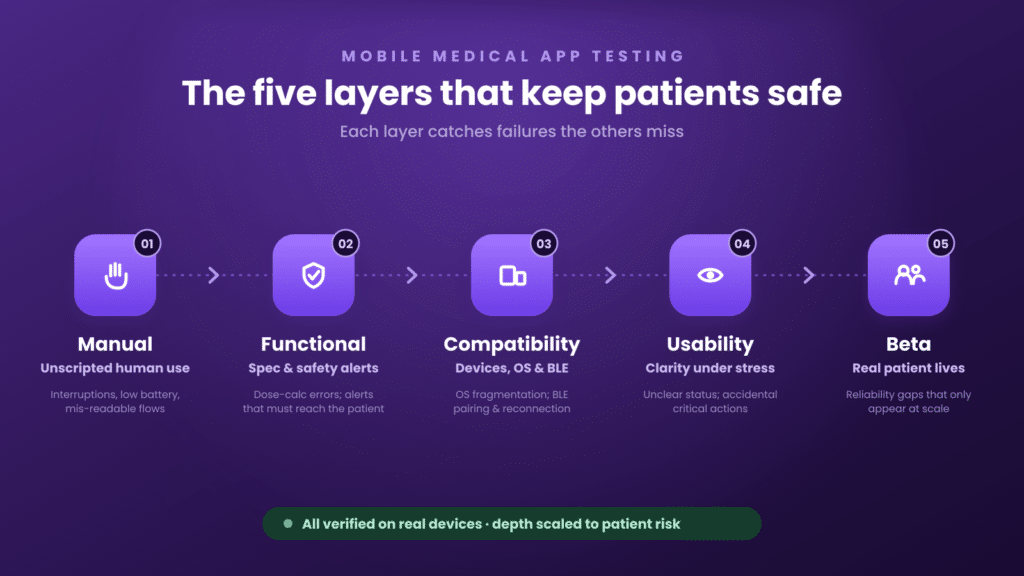
Testing a mobile medical app is not one activity. It is a deliberate combination of manual, functional, compatibility, usability, and beta testing, applied with depth proportional to patient risk and backed by real-device coverage. Teams that get the mix right reduce escaped defects, hold the line on compliance, and ship with confidence that the app behaves the way a patient’s safety depends on.
To see how a real-device platform supports manual, functional, compatibility, and automated testing for patient-facing apps, learn more about real-device testing with Kobiton.
