Mobile accessibility testing verifies that a mobile app can be used by people with disabilities, including people who rely on assistive technology, adjusted display settings, alternate input methods, captions, clear navigation, or extra time to complete tasks.
But mobile accessibility testing is not only about whether an app passes a checklist. It is about whether a person can perceive, understand, navigate, and complete a task when the screen, controls, audio, gestures, text, or navigation do not work for them in the default way.
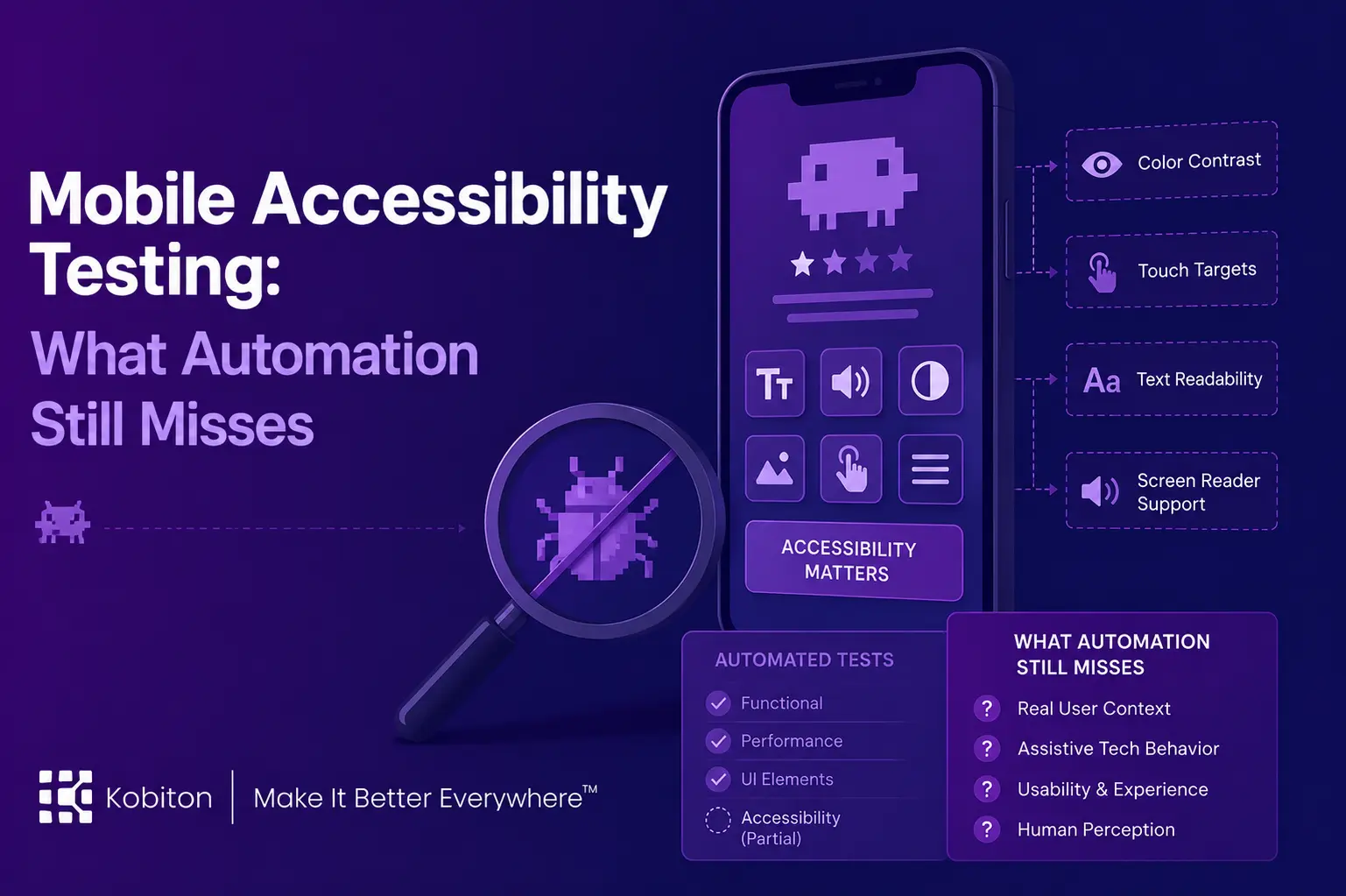
Automated Mobile Accessibility Testing can identify important technical issues, such as missing labels, contrast failures, touch target problems, and some structural issues. However, it cannot fully determine whether the mobile experience works for a real person using real device settings and assistive technology.
WCAG 2.2 provides the central accessibility framework many teams use, organized around making content perceivable, operable, understandable, and robust. But WCAG also notes that following the guidelines does not address every user need. Accessibility testing has to account for that gap.
WCAG begins with the principle that information and user interface components must be presentable to users in ways they can perceive. That principle is simple, but mobile testing makes it complicated. A tool may confirm that content exists on the screen, but people perceive content through vision, hearing, touch, assistive technology, device settings, context, and cognitive load.
Apps are not designed for checklists. Apps are designed for people.
Accessibility is more than compliance
Who are mobile apps designed for?
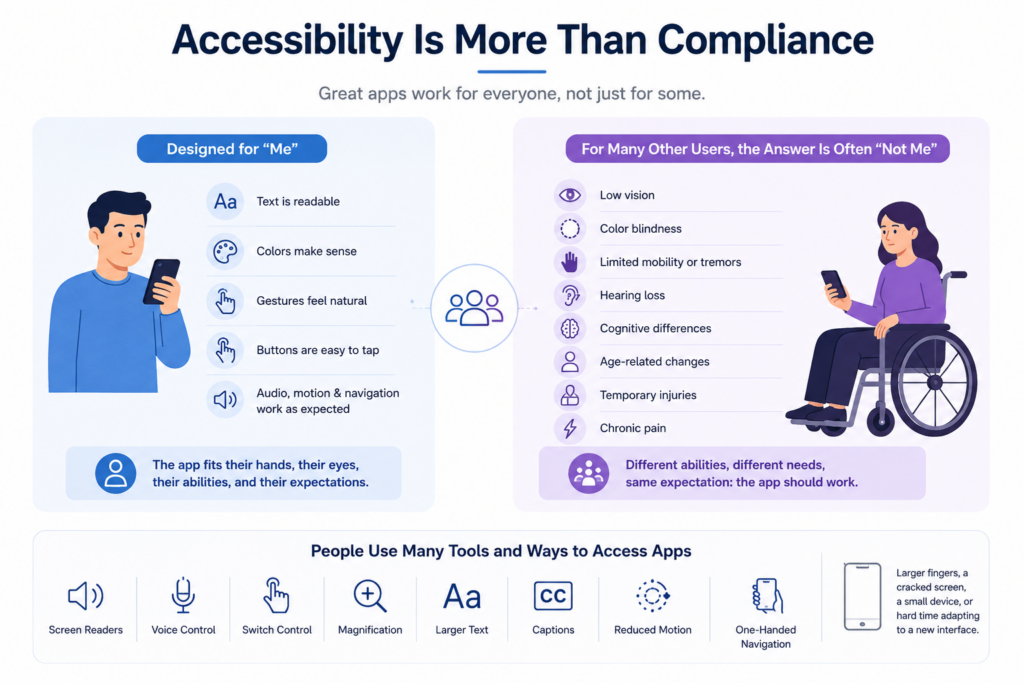
For many users, the obvious answer is “me.” The app fits their hands. The text is readable. The colors make sense. The gestures feel natural. The buttons are easy to tap. The audio, motion, and navigation all work the way they expect.
For many other users, the answer is often “not me.”
A person may have low vision, color blindness, limited mobility, hearing loss, tremors, chronic pain, cognitive differences, temporary injuries, or age-related changes in vision, dexterity, or memory. Someone may use a screen reader, voice control, switch control, magnification, larger text, captions, reduced motion, or one-handed navigation. Someone may simply have larger fingers, a cracked screen, a small device, or a hard time adapting to a new interface.
Those users should not have to fight their apps too.
It helps to be specific about what the baseline is. WCAG sets conformance at three levels A, AA and AAA and AA is the level most obligations reference and most teams target. WCAG was written for web content, so W3C publishes separate guidance on interpreting it for non-web software and for mobile specifically, which is what makes it applicable to native apps at all.
Around that sit actual legal requirements, which differ by market. In the United States, the Americans with Disabilities Act has been read to cover digital services, and a separate rule sets a technical standard for state and local government apps. In the European Union, the European Accessibility Act applies to mobile apps in sectors including banking, e-commerce and transport. Which standard and version binds a given team depends on where it operates and who its customers are.
All of which sets a floor. Everything this article describes whether the focus order makes sense, whether the flow can be finished, whether the experience is exhausting sits above it.
Accessibility standards matter. They give teams a shared way to identify barriers and improve app quality. WCAG guidance is often used as a foundation for digital accessibility, and mobile accessibility guidance helps teams apply accessibility principles to mobile web, native, and hybrid apps. But compliance is not the whole experience.
A screen can meet several technical requirements and still feel difficult to use. A button can have a label and still appear in an illogical place. Text can technically resize and still break the layout. A flow can pass automated checks and still become exhausting for someone using a screen reader, switch control, voice control, magnification, or one-handed navigation.
Mobile accessibility testing should help teams find those gaps before users do.
Accessibility is also a market service
Accessibility is often discussed as a compliance requirement, but it is also a way to serve more people well.
Accessible apps can reach users who are too often left out of design decisions. That includes disabled users, aging users, users with temporary injuries, users in distracting environments, and users whose needs change from one moment to the next.
A puzzle app may pass a checklist, but can a great-grandmother enlarge the text, understand the controls, and play with her granddaughter from half a continent away?
A banking app may have labeled buttons, but can someone using a screen reader move through the transfer flow without confusion?
A map app may display the right route, but can someone with low vision actually follow it?
These are not abstract questions. They are the moments where mobile apps either welcome people in or remind them that the product was not built with them in mind.
Accessibility helps users feel considered. It builds trust. It expands who can participate. It makes the app better for people who already experience unnecessary friction in the physical world and should not have to encounter more of it on the device in their hand.
Customer examples show why automation is only part of accessibility testing
In one healthcare customer conversation, a small mobile team described using Kobiton while completing WCAG 2.1 accessibility testing across multiple patient-facing mobile apps in a matter of weeks. The team used automated findings to identify non-compliant items, then separated issues they could address in the app from issues tied to third-party web shells or platform dependencies. That split helped the team assign ownership, validate fixes, and understand which accessibility issues required deeper follow-up beyond the initial automated finding.
That distinction matters. Automated checks can help teams find and track accessibility issues faster, but human review is still needed to decide what the issue means, who owns it, and whether the user experience is actually improving.
In another customer conversation, a digital accessibility engineer compared screen reader behavior on a handheld device with behavior during remote device testing. The team noticed possible differences in the screen reading flow, including focus movement that seemed to skip parts of the interface, and planned to retest and record the behavior. A scanner can flag labels, contrast, or touch target size, but a person still has to verify whether the focus order and assistive technology experience make sense in the actual flow.
What automated accessibility checks can catch
Automated checks are useful for issues that can be evaluated against clear technical rules. For example, tools can help identify contrast problems related to WCAG 1.4.3 Contrast Minimum, touch target concerns related to WCAG 2.5.8 Target Size Minimum, and focus-order issues related to WCAG 2.4.3 Focus Order.
They can help identify issues such as:
- Missing accessibility labels
- Low color contrast
- Small or crowded touch targets
- Images or icons without useful descriptions
- Form fields without clear labels
- Inconsistent heading or navigation structure
- Elements that may not be reachable by assistive technology
- Layout issues caused by text scaling
It is worth being precise about when automation is the right instrument rather than a stopgap. Automated checks win whenever the question has a defined rule and an expected answer: does this control have an accessible name, is this target large enough, does this text meet the contrast ratio. They win again whenever the same question has to be asked hundreds of times, across every screen and every build, where a person would lose accuracy through sheer repetition.
That is not a small category. It covers most of what breaks between one release and the next, and catching it automatically frees human attention for the questions that need it.
These checks are valuable because they reduce obvious barriers. They also help teams find repeated issues across screens, builds, and releases.
They can also catch things a non-disabled tester might not think to check at first, not because that tester is careless, but because people move through technology in different ways. A person who does not rely on a screen reader may not immediately notice a confusing announcement order. A person who can easily tap small controls may not notice how difficult those controls are for someone with limited dexterity. A person who can distinguish certain colors may not notice that color is doing too much of the work.
Those checks matter. But they do not answer every accessibility question. A technically valid focus order still needs to make sense in the user’s task flow. A target may meet a minimum size and still be hard to use in context. A contrast ratio may pass while the experience remains difficult under real mobile conditions.
Which accessibility tools actually run these checks
Most of the checks described above come from a small set of platform tools, and it helps to know which one produces which finding. Android and iOS expose accessibility information differently, so the tooling does not overlap as much as teams expect.
| Tool | Platform | What it gives you | Where it stops |
| Android Accessibility Scanner | Android | On-device scan of the current screen for missing content labels, small touch targets and low contrast, with an overlay showing the affected elements | One screen at a time, driven by hand. No CI integration and no view of the flow between screens. |
| Accessibility Test Framework / Compose checks | Android | The same rule set, run from inside your existing instrumentation or Compose UI tests so findings arrive with every build | Only covers the screens your UI tests already reach. |
| Accessibility Insights for Android | Android | Automated checks plus guided manual steps for things the automation cannot decide alone | The guided steps still need a person to make the call. |
| TalkBack | Android | The actual screen reader experience — announcement order, focus movement, gesture navigation | Entirely manual, and reading it correctly takes practice with the gestures. |
| Xcode Accessibility Inspector | iOS | Inspection of labels, traits, hierarchy and expected VoiceOver output, plus audits for issues like clipped text and Dynamic Type support | Requires macOS with Xcode. Clearing every audit finding does not mean the app is accessible, and Apple says so explicitly. |
| XCTest accessibility audits | iOS | Audit checks run from automated UI tests, with findings able to fail the test | Same coverage limit as any UI test suite. |
| VoiceOver | iOS | Rotor navigation, announcements, state and role as a real user receives them | Manual, screen by screen, and slow across a large app. |
| axe for Mobile | Android and iOS | A consistent rule set across both platforms, useful when one team owns both apps | Rule-based, so bounded by the same limits as every scanner. |
The pattern in that table is worth noticing. Every tool in the left column produces findings faster than a person can. Not one of them appears in the right-hand column as something that tells you whether a task can be completed.
Automation has moved, and the limits moved with it
It would be easy to read all of this as an argument that automated accessibility checks have stalled. They have not. Both platforms have pulled accessibility checking into the test frameworks teams already run, which changes when findings arrive rather than what they can find.
On Android, the same rule set behind Accessibility Scanner can run inside Compose UI tests, so a missing content description surfaces as a failing test rather than as an item in a scan report someone opens later. On Apple platforms, XCTest can run an accessibility audit against a running app during a UI test, and a detected issue can fail the test outright.
For a team with existing UI test coverage, that means an accessibility regression can behave like any other regression: it blocks the build, it gets assigned, and it gets fixed before anyone has to schedule an audit.
What has not changed is the shape of the question these checks answer. A Compose check can tell you a control has no accessible name. It cannot tell you whether the name it does have makes sense at the point in the flow where a user hears it. An XCTest audit can flag clipped text at a larger type size. It cannot tell you whether the screen is still usable once the text fits. The checks arrive earlier and more often than they used to. They are answering the same class of question they always were.
What mobile accessibility testing still needs from humans
Automation can identify many technical accessibility issues, but it cannot always understand context.
It may know that a button has a label. It may not know whether the label makes sense in the flow. It may know that text exists. It may not know whether the user can understand what to do next. It may know that an element is technically reachable. It may not know whether reaching it takes too many gestures or sends the user through a confusing path.
A test can detect the “Pay now” button, but can a person find it, understand it, and activate it confidently?
What if the button depends on two similar shades of green? What if the text is technically present but too small on a particular screen? What if the modal can be opened but not dismissed by someone using assistive technology? What if one wrong letter changes the meaning of a message, and the keyboard makes correction difficult?
These are not edge cases. They are part of whether the app works for the people using it.
Automation can help make an app technically more accessible. Human review helps teams understand whether the experience is actually usable.
The newer WCAG criteria are the hardest ones to automate
WCAG 2.2 added nine success criteria, and several of them describe mobile interactions directly. What is striking about them, read together, is how few can be settled by inspecting an element.
| Criterion | What it asks | What a scanner can tell you |
| 2.4.11 Focus Not Obscured (Minimum) | Whether a focused control ends up hidden behind other content, such as a sticky banner or a keyboard | It can sometimes detect overlap. It cannot tell you the user has lost their place. |
| 2.5.7 Dragging Movements | Whether anything requiring a drag has a single-pointer alternative | It can find the drag handler. Deciding whether the alternative is workable is a judgment call. |
| 2.5.8 Target Size (Minimum) | Whether pointer targets are large enough or spaced far enough apart | This one automates well, which is why it is the criterion most teams already check. |
| 3.2.6 Consistent Help | Whether help appears in the same place across the app | It can compare positions. It cannot tell you the help is useless when found. |
| 3.3.7 Redundant Entry | Whether users are made to re-enter information they already supplied in the same process | It has no way to know two fields are asking for the same thing. |
| 3.3.8 Accessible Authentication (Minimum) | Whether signing in depends on remembering or transcribing something | It can detect a field. Whether the cognitive demand is unnecessary is exactly the kind of question a person has to answer. |
Only one row in that table is comfortably machine-testable. The rest are the same thing the article has been describing throughout: rules about whether a person can get through a task, written in the language of a standard.
What automation can check vs. what humans should review
Use this comparison to understand where automated accessibility checks are useful and where human review is still needed. Automation can help teams find common technical issues quickly, such as missing labels, contrast problems, touch target concerns, and some structural issues.
Human review is still needed to validate whether the mobile experience works in context. That includes screen reader flow, cognitive load, task completion, timing, gesture behavior, and whether someone using assistive technology can actually complete the task.
Accessibility · Mobile QA
In practice that division of labor turns into a sequence. Each layer feeds the next:
| Step | Approach | What it gives you |
| Run baseline checks | Automated accessibility checks, ideally inside the test suite | Rule-based issues caught on the build that introduced them |
| Test on real devices | Real-device testing across screen sizes and OS versions | Behavior under the conditions users actually have |
| Use assistive technologies | VoiceOver, TalkBack, Voice Control, Switch Access | Whether the flow can be navigated at all without sight or precise touch |
| Review task completion | Human review of complete journeys | Whether someone can finish what they came to do |
| Track and fix | Normal defect workflow, prioritized by user impact | Accessibility issues treated as bugs rather than as a separate backlog |
| Repeat every release | Regression checks in CI | Fixed issues staying fixed |
The order matters more than it looks. Running human review before the automated pass means spending expensive attention on issues a scanner would have caught in seconds.
Automation struggles with cognitive accessibility
Automated checks are weakest when the question is not “does this element exist?” but “can a person understand and use this experience?”
Cognitive accessibility often depends on clarity, memory load, timing, help text, error recovery, layout consistency, and whether the user can complete a task without becoming confused or overwhelmed. Those are not simple pass/fail conditions.
W3C’s guidance on making content usable for people with cognitive and learning disabilities includes supplemental guidance beyond WCAG requirements and emphasizes involving users in research, design, and testing activities. It also notes that automated testing often focuses on technical areas and cannot fully assess whether people with cognitive or learning disabilities can use the content. (W3C)
For mobile teams, that means automated accessibility checks can help identify important issues, but human review and user testing are still needed to understand whether the app experience works for real people.
What screen reader testing actually involves
Most of what this article describes as human review happens, in practice, with a screen reader running. VoiceOver on iOS and TalkBack on Android are how a tester stops seeing the screen and starts receiving it the way a user who cannot see it does.
Apple recommends testing apps with accessibility settings and assistive technologies turned on rather than relying on inspection alone, and Android's guidance makes the same point about testing from the user's perspective. Both platform vendors are saying the thing this article is saying: the tool findings are a starting position.
- A screen reader pass through a flow is looking for a specific set of things:
- Whether focus moves in an order that matches the task, rather than an order that matches the layout file.
- Whether each control is announced with a name that means something out of context — 'Submit order' rather than 'button'.
- Whether the role and state come through, so a toggle announces as a toggle and reports whether it is on.
Whether anything changes silently. A success banner that appears visually and announces nothing is one of the most common and most damaging defects in this category.
- Whether a modal can be dismissed, and whether focus comes back somewhere sensible afterward.
- Whether the user can recover from an error without starting over.
None of those questions has a rule a scanner can apply. All of them are answered within a few minutes of turning the screen reader on.
Kobiton supports accessibility testing with iOS VoiceOver and Android TalkBack, so teams can run these passes on real devices rather than approximating them.
Screen readers are not the whole picture
Screen reader testing gets the most attention because it is the most visible form of assistive technology, but a large share of the people described at the top of this article never use one. Someone with a tremor, someone who navigates by voice, someone who has simply turned the text size up — each meets a different set of barriers.
Depending on what the app does, a fuller pass covers:
- Larger text and Dynamic Type, at the largest size the platform supports, checking for clipping, overlap and controls pushed off screen.
- Voice Control and voice navigation, checking that controls can be addressed by the name a user would say.
- Switch Control and Switch Access, which expose focus order problems faster than almost anything else because every step is sequential.
- Magnification, where a layout that assumes the whole screen is visible starts to fail.
- Reduced motion and increased contrast, both system settings an app can ignore without ever failing a scan.
- An external keyboard, checking that everything is reachable and that focus is visible when it arrives.
- Orientation changes, which frequently reset focus or strand a user mid-task.
The right combination follows the app and its users rather than a standard checklist. A banking app and a puzzle game do not need the same coverage.
What this looks like in one real flow
Take a transfer between two accounts in a banking app. Every control on every screen has a label. Contrast passes. Touch targets are large enough. An automated scan returns nothing.
Now run the same flow with a screen reader on and the system text size turned up:
1. From the dashboard, find and open Transfer. The screen reader should announce what this screen is for, not just read the first element on it.
2. Choose the source account, then the recipient. At a larger text size, check that each field's label is still associated with its input rather than wrapping away from it.
3. Enter an amount, then deliberately leave a required field empty and submit. The error should be announced, not just outlined in red, and focus should be able to reach it.
4. Correct the error. Check that valid information entered a moment ago has not been cleared and does not have to be typed again.
5. Complete authentication. Check that it does not require reading a code off another screen and holding it in memory.
6. Submit, and listen.
Step six is where this flow usually breaks. The app displays a confirmation banner, the transfer has genuinely succeeded, and the screen reader says nothing at all, because the change was made visually without ever being exposed to the accessibility system. The user waits, hears nothing, and submits again.
There is no broken element in that flow. Every individual control would pass inspection. The defect lives in the transition between two states, which is precisely the space automated checks do not occupy — and it is the kind of defect that costs a user real money.
Why mobile accessibility testing needs real devices
The State of Mobile App Accessibility report found that nearly three-quarters of tested mobile user journeys included accessibility barriers that resulted in a Poor or Failing experience. That kind of finding reinforces why accessibility testing has to evaluate complete tasks, not just isolated screens.
Mobile accessibility happens where the user meets the app. That makes real-device testing important. Users interact with mobile apps through actual screens, operating system settings, assistive technologies, haptics, audio, gestures, orientation changes, and physical device conditions. W3C’s mobile accessibility guidance explicitly addresses mobile web content, native apps, and hybrid apps, which makes it a better authority for this article than generic web-only accessibility guidance.
A flow might look fine in a static review but become difficult when VoiceOver or TalkBack announces the controls. A layout might fit on one device and crowd important actions on another. A button might be large enough in one orientation and awkward in another. A pop-up might interrupt the flow and leave a screen reader user without a clear path forward.
The two platforms also differ in ways that go deeper than screen size. They expose accessibility information differently, and their screen readers move through an interface differently.
| Android | iOS | |
| Screen reader | TalkBack | VoiceOver |
| How users move through a screen | Largely linear — swipes step through elements in order | Rotor-based, letting users jump between headings, controls or other element types |
| Focus behavior | Varies across devices and custom views; complex layouts often need focus handled explicitly | More consistent, though dynamic content updates still need focus managed deliberately |
| Device and OS spread | Wide, with manufacturer variation on top | Narrow by comparison |
| Common testing difficulty | Custom components that expose nothing useful, plus gesture conflicts | Partial VoiceOver support on custom controls and interactions between accessibility settings |
For cross-platform apps this matters more, not less. Shared source code does not produce shared accessibility behavior — each platform maps it through its own APIs, so a screen that works cleanly with VoiceOver can fail with TalkBack from the same codebase. Both need validating separately.
Device differences matter too. An app can look readable on one screen and shrink into something difficult to use on another. A color combination may appear one way on one device and differently on another. Screen size, brightness, resolution, operating system settings, and assistive technology behavior can all affect the user experience.
Just like teams cannot assume an app will run perfectly on every device because it passed on one, they cannot assume every person uses technology in the same configuration.
This is one of the reasons real-device accessibility testing matters. With support for iOS VoiceOver and Android TalkBack, Kobiton can help teams test how mobile app experiences behave with the assistive technologies users actually depend on.
Testing on real devices helps teams understand how accessibility behaves in context. It also helps reveal problems caused by device fragmentation, operating system differences, screen sizes, and app interruptions.
Accessibility is not only a design property. It is a lived interaction.
Final takeaway
Automated accessibility checks are useful, but they cannot feel the path.
The goal should not be simply to pass a check. The goal should be to make the app usable when someone needs it to work differently than it works for you.
Mobile accessibility testing needs both systems and people. Automated Mobile Accessibility Testing can catch repeatable issues, while real devices help test actual behavior. Human review is still needed to understand whether the app can be navigated, understood, and completed by people with different needs.
People want to feel seen, not sold to. They want to use their apps without being reminded of all the ways the world already makes them adapt. Mobile devices are part of daily life. They hold conversations, maps, games, photos, finances, routines, memories, and small moments of independence.
They are not just screens. They are personal worlds shaped by habit, need, and care.
Everyone deserves to feel welcome in their own.
FAQ
What is mobile accessibility testing?
Mobile accessibility testing verifies that people with disabilities can use a mobile app with assistive technology, adjusted device settings, alternate input methods, captions, clear navigation, and enough time to complete tasks. It combines automated checks, real-device testing, assistive technology review, and human evaluation.
What can automated accessibility checks catch on mobile apps?
Automated accessibility checks can help identify issues such as missing labels, low contrast, small touch targets, some focus-order problems, and certain structural issues. These checks are useful because they can run consistently across builds and help teams find common problems earlier.
Why do automated accessibility checks pass when the app is still hard to use with a screen reader?
Because the two are measuring different things. Automated checks confirm that elements meet defined rules a control has a name, a target is large enough, text meets a contrast ratio. A screen reader experience depends on things no rule covers: whether focus moves in an order that matches the task, whether announcements make sense at the moment they are heard, whether a state change is communicated at all. An app can satisfy every rule and still leave someone unable to finish. The way to find out is to run the flow with the screen reader on.
What do automated accessibility tools miss?
Automated tools often miss issues involving task completion, cognitive load, unclear instructions, confusing focus order, screen reader meaning, gesture difficulty, and whether a real person can use the app independently. A tool may confirm that an element exists, but a human still has to verify whether the experience makes sense.
Does WCAG 2.2 apply to mobile apps?
Yes. WCAG 2.2 applies to web content and is commonly used as a foundation for mobile accessibility testing, including mobile web, native, and hybrid app experiences. W3C also provides mobile accessibility guidance to help teams apply accessibility principles to mobile-specific behaviors such as touch, orientation, small screens, and device settings.
Why does mobile accessibility testing need real devices?
Mobile accessibility testing needs real devices because assistive technology behavior, screen size, gestures, orientation, audio, haptics, performance, and device settings can change the user experience. Automated Mobile Accessibility Testing can help identify common accessibility issues efficiently, but testing only in a simulated or automated environment can miss problems that appear when someone uses VoiceOver, TalkBack, larger text, reduced motion, captions, or other settings on an actual device.
Is accessibility testing only about compliance?
No. Compliance matters, but accessibility testing is also about whether people can actually use the app. A mobile app can meet some technical requirements and still create barriers if the flow is confusing, the screen reader experience is unclear, the timing is too strict, or users cannot complete key tasks independently.
How often should mobile accessibility testing run?
Automated checks should run whenever the rest of the test suite runs, so a regression surfaces on the build that caused it. Manual review with assistive technologies belongs after changes to accessibility-sensitive features and before release. Critical flows are worth retesting after design system changes, framework upgrades and OS updates, since any of those can change how accessibility information is exposed. Treating accessibility as an annual audit means finding issues long after they shipped.
Is accessibility testing the same as usability testing?
They overlap but they are not the same. Accessibility testing asks whether people with disabilities can use the app, including with assistive technology, and is measured against standards like WCAG. Usability testing asks how easy and intuitive the app is for anyone. In practice accessibility work improves usability for everyone larger touch targets, clearer error messages and consistent navigation help users who never think of themselves as having an access need.
Related reading
Manual Mobile Testing Still Matters
What Automated Accessibility Testing Can and Can’t Catch
Can AI Help With Mobile Accessibility Testing?
AI Mobile Testing Still Needs Real Devices