Enterprise mobile QA teams are under pressure from every direction. Release cycles are faster. Device coverage is broader. Automation suites require constant maintenance. Developers are using AI to write and change code more quickly, which means QA teams need ways to validate more change without losing confidence in the release.
AI mobile testing can help, but only when it is applied to the right parts of the workflow.
For enterprise QA teams, AI mobile testing is not one feature or one magic button. It is a set of capabilities that can help teams plan tests, generate test cases, maintain automation, prioritize risk, analyze results, and connect testing work to real-device execution. The value comes from reducing testing drag and improving the evidence teams use to make release decisions.
What is AI mobile testing?
AI mobile testing uses artificial intelligence to support mobile app testing tasks across planning, execution, automation, maintenance, and analysis.
In practical terms, AI can help teams:
- Generate test cases from requirements, user flows, recorded sessions, or historical patterns.
- Suggest which app areas need more coverage.
- Maintain automated tests when UI elements or flows change.
- Identify visual, functional, or behavioral differences.
- Analyze test results and surface likely causes of failure.
- Prioritize testing based on risk, usage, release changes, or historical defects.
- Connect testing tasks to automation tools, real devices, and CI/CD workflows.
AI mobile testing is most useful when it supports a specific testing job. A team may use AI to speed up test creation, reduce script maintenance, prioritize regression coverage, inspect failures, or make test results easier to act on.
AI shines where it removes repetitive work, improves coverage, or makes the testing workflow easier to sustain.
Why AI mobile testing matters for enterprise QA
Enterprise mobile testing is difficult because the mobile environment is inherently fragmented. A release may need to work across Android and iOS, multiple operating system versions, different screen sizes, older devices, lower-spec hardware, network changes, and device-specific behaviors.
At the same time, mobile apps are changing quickly. AI-assisted development can increase the amount of code entering the release pipeline, which can be useful for engineering velocity, but it also increases the need for verification. When code creation gets faster, testing becomes the place where teams determine whether that code is viable.
Traditional testing workflows often struggle with this pressure. Manual regression testing can be slow. Scripted automation can be brittle. Test planning can become reactive if no overarching strategy or specific metrics have been set. QA teams may know which areas are risky, but still lack enough time, data, or tooling to cover everything thoroughly.
AI mobile testing helps by focusing effort where it matters most. Instead of testing every area equally, teams can use AI-assisted workflows to identify high-risk flows, generate coverage faster, repair broken tests more efficiently, and review results with better evidence.
For enterprise teams, the value is not simply faster testing, but more pointed testing.
Where AI helps in the mobile testing workflow
AI can support several parts of the mobile QA workflow, especially where the work involves repetitive tasks, large result sets, historical patterns, or risk-based decisions. It is useful for collecting and comparing information that would take a team much longer to review manually, such as product changes, historical defects, usage data, test results, session artifacts, and release history.
That makes AI helpful during test planning. Instead of relying only on memory, manual review, or the loudest recent bug, teams can use AI-assisted workflows to identify patterns and surface areas that may need more attention. For example, AI can help point testers toward high-impact flows, recently changed features, recurring failure areas, or parts of the app where coverage has started to drift.
AI can also help with test creation and automation maintenance. It can suggest test cases for common user journeys and edge cases, help generate regression coverage for important flows, and support updates when UI locators or app behavior changes. In larger automation suites, this can reduce some of the maintenance drag that slows teams down between releases.
The same pattern applies to coverage analysis. AI can help teams assess gaps across devices, operating system versions, app workflows, and test types. That does not mean AI decides the test strategy on its own. It gives the team a clearer view of where coverage may be thin, where risk may be higher, and where additional validation may be useful.
These capabilities are most effective when the team already knows what it wants to improve. A vague goal to “use AI in testing” is hard to measure. A focused goal such as “reduce script maintenance,” “generate regression coverage for checkout,” or “prioritize tests for each release candidate” is easier to evaluate.
AI test planning and risk-based prioritization
Test planning is one of the clearest places where AI can support enterprise QA.
Traditional test planning often depends on manual review of requirements, user stories, acceptance criteria, known defects, and release scope. That process can work, but it becomes difficult when the app changes quickly or when the team supports multiple platforms and device types.
AI can help by analyzing large amounts of testing and product data. For example, AI-assisted workflows may use historical bug data, user behavior, code changes, test outcomes, performance trends, and production incidents to suggest which areas deserve more attention.
This supports risk-based testing.
Risk-based testing focuses effort on the areas most likely to affect the business or user experience. For a mobile app, high-risk areas may include login, checkout, payment, account management, onboarding, search, messaging, data sync, or hardware-dependent workflows. AI can help assign priority based on signals such as recent code changes, defect history, user traffic, technical complexity, or previous failures.
All of this gives the team a clearer way to decide where human review, automation, real-device coverage, or deeper investigation should go first.
AI test case generation and automation support
Test case creation is another strong use case for AI mobile testing.
QA teams often spend significant time turning requirements, acceptance criteria, user stories, and known workflows into test cases. AI can help generate a first pass of test scenarios, edge cases, and expected outcomes. It can also help convert recorded sessions, natural-language instructions, or existing documentation into reusable test flows.
This can be especially useful for regression testing. Instead of starting from a blank page, teams can use AI to propose coverage for critical flows and then refine the output with QA judgment.
AI can also support automation by helping teams generate or update scripts. For example, a team might use AI-assisted tooling to create tests from a manual session, update an existing script, or suggest additional cases based on a changed workflow.
The important word is “support.” AI-generated test cases still need review. A generated test may miss business context, misunderstand expected behavior, or create coverage that looks complete but does not match the actual release risk. Enterprise teams should treat AI-generated tests as a starting point, then review, refine, and validate them before relying on them for release decisions.
Self-healing and test maintenance
Automation maintenance is one of the largest sources of testing drag.
A test that worked last release may fail after a button changes, a locator moves, a screen is redesigned, or a workflow is updated. When this happens repeatedly, teams can spend more time repairing tests than expanding coverage. The automation suite still exists, but it becomes expensive to trust.
AI-augmented testing can help reduce this maintenance burden. Self-healing automation can identify when a script fails to find an expected element and suggest or apply a better match. AI-assisted maintenance can also help detect structural changes in the app and update tests when the intended flow is still valid.
This matters because broken tests create noise. If a test fails because the app is broken, the team needs to investigate. If a test fails because the script is stale, the team loses time repairing the test. AI can help separate those situations and reduce the manual work required to keep automation useful.
Self-healing should still be reviewable. If a test silently changes too much, the team may lose confidence in what the test actually validates. Enterprise teams should look for AI-assisted maintenance that preserves visibility into what changed, why it changed, and whether a human needs to approve it.
AI test analysis and defect discovery
AI can also help teams make sense of test results.
Enterprise mobile testing can generate large amounts of evidence: logs, screenshots, videos, crash reports, device metadata, network data, performance signals, and automation results. Reviewing all of that manually can slow down the feedback loop.
AI-assisted analysis can help by grouping similar failures, highlighting likely causes, identifying patterns across devices, and surfacing results that need human attention. For example, AI may help distinguish between a locator issue, a real app failure, a device-specific problem, a network issue, or a recurring defect.
This can make test results more actionable. Instead of asking the team to inspect every failure from scratch, AI can help triage the evidence and point reviewers toward the most likely issue.
The benefit is not only speed. Better analysis can also improve confidence. When failures are easier to explain, teams can decide faster whether to fix the app, update the test, rerun the session, or adjust coverage.
AI mobile testing still needs real-device execution
AI can help teams create, maintain, prioritize, and analyze tests, but mobile app quality still depends on what happens on real devices.
Mobile users experience apps through hardware, operating systems, sensors, permissions, accessibility settings, network conditions, battery state, and performance constraints. A generated test can describe a workflow. An emulator can support early validation. AI can recommend which devices or flows deserve attention. But none of those prove that the app works under the conditions users actually experience.
That is the practical boundary: AI can guide real-device testing, but it should not replace it.
Real-device execution helps teams validate mobile behaviors that are difficult to judge from logic, generated scripts, or simulated environments alone, including:
- camera, biometrics, GPS, Bluetooth, haptics, barcode scanning, and other hardware-dependent features
- screen size, resolution, orientation, refresh rate, and rendering differences
- CPU, memory, battery, temperature, and responsiveness under real device conditions
- weak networks, Wi-Fi and cellular handoffs, push notifications, app switching, and session interruptions
- accessibility settings such as VoiceOver, TalkBack, larger text, reduced motion, captions, switch access, and voice control
- manufacturer-specific behavior, operating system differences, permissions, and WebView behavior
AI can help teams decide where to focus coverage. For example, it can identify recently changed workflows, high-use features, recurring failures, or risky device and OS combinations. That makes real-device testing more targeted.
But a recommendation is not proof. If AI recommends testing a payment flow on a smaller set of high-priority devices, the team still needs to run the test on those devices and review the evidence.
For enterprise QA teams, real-device execution gives AI-assisted testing a stronger foundation. It connects generated tests, risk recommendations, and failure analysis to the actual mobile environments where users experience the app.
Common challenges with AI mobile testing
AI mobile testing can improve QA workflows, but adoption still comes with practical challenges.
One challenge is data quality. AI-assisted testing depends on the information available to it. If historical test results are incomplete, defect data is messy, or requirements are inconsistent, the output may be less useful. Teams may need to improve test data, naming conventions, session records, and result history before AI recommendations become reliable.
Another challenge is false positives and false negatives. AI may flag behavior that is acceptable, or miss behavior that should be reviewed. This is why AI-assisted results need a review process, especially for high-risk workflows or release decisions.
Integration can also be difficult. Enterprise teams often already have automation frameworks, CI/CD pipelines, issue trackers, device labs, reporting tools, and manual QA processes. AI testing tools need to fit into that environment instead of creating another disconnected workflow.
Skill gaps can also slow adoption. Teams may need to learn how to review AI-generated tests, interpret AI-assisted analysis, adjust prompts or inputs, and decide when human approval is required.
These challenges are manageable when teams start with a focused use case, define review expectations, and connect AI testing to existing workflows instead of trying to transform everything at once.
What to look for in an AI mobile testing platform
Enterprise teams should evaluate AI mobile testing platforms based on workflow value, not AI labels.
A useful platform should support the testing work the team already needs to do. It should make test creation easier, reduce maintenance burden, improve real-device coverage, provide reviewable evidence, and integrate with the tools the team already uses.
When evaluating AI mobile testing tools, look for capabilities such as:
- AI-assisted test creation from prompts, requirements, recordings, or existing flows.
- Support for manual, automated, and scriptless testing workflows.
- Self-healing or maintenance assistance for automated tests.
- Real-device execution across Android and iOS.
- Logs, screenshots, video, session metadata, and other evidence for debugging.
- Support for Appium or existing automation frameworks.
- CI/CD, issue tracking, and development workflow integrations.
- Result analysis that helps identify failure patterns or likely causes.
- Human review controls for AI-generated or AI-updated tests.
- Security, access control, reporting, and governance features for enterprise teams.
The platform should help the team answer a practical question: does this make our testing workflow easier to scale, review, and trust?
Before adopting AI mobile testing broadly, enterprise QA teams should understand where their current workflow is ready and where it still needs structure. AI works best when the team has clear test priorities, reviewable evidence, real-device coverage, and a process for deciding which results require human judgment.
Use the readiness score below to evaluate where your team stands and which gaps to close before expanding AI-assisted testing across releases.
AI Mobile Testing Readiness Score
AI mobile testing works best when it starts with a clear workflow, not a vague goal to “add AI.” Before adopting AI-assisted testing, teams should understand which app flows matter most, where automation already exists, how tests are reviewed, and whether results can be validated on real devices.
Use this assessment to evaluate how ready your team is to add AI-augmented mobile testing to your QA workflow. The score can help identify where your team is already prepared, where the process needs more structure, and which gaps to close before expanding AI-assisted testing across releases.
Pick a device, OS, browser, and network condition to see whether the combination is realistic and what to test.
Turn on JavaScript to run the check. Everything is worked out in your browser — nothing is sent anywhere.
Selections stay in your browser. Nothing is stored or submitted.
If your team is still in the early stage, start by identifying critical mobile flows, improving test evidence, and defining how AI-assisted results should be reviewed. If your team is already building readiness or ready to expand, look for an AI mobile testing platform that supports real-device execution, automation workflows, reviewable session evidence, and integration with the tools your team already uses.
After identifying your readiness level, the next step is choosing tools that support the workflow you want to build. For enterprise mobile teams, that usually means connecting AI-assisted test creation, automation, real-device execution, evidence review, and release workflows in one testing process.
How Kobiton supports AI-augmented mobile testing
Kobiton helps teams bring AI-augmented testing into real-device mobile QA workflows. Teams can use Kobiton to test on real devices, review session evidence, support manual and automated testing, and reduce the operational work of maintaining device infrastructure.
Kobiton MCP extends AI-assisted testing beyond planning and script support. With Kobiton’s Model Context Protocol integration, supported AI coding assistants can connect to Kobiton so teams can check device availability, reserve devices, upload app builds, run automation or scriptless tests, and review session results and artifacts. This brings AI assistance closer to real mobile test execution, where teams can act on devices, tests, and results from the tools they already use.
As AI-assisted testing expands, the goal is not to remove QA judgment from the process. The goal is to make high-value testing easier to create, run, review, and maintain across the devices and workflows enterprise teams already depend on.
FAQ
What is AI mobile testing?
AI mobile testing uses artificial intelligence to support mobile app testing tasks such as test creation, script maintenance, visual validation, issue detection, and result analysis. In enterprise QA, AI is usually most useful as an augmentation layer that helps teams reduce repetitive work and improve coverage, not as a replacement for the testing strategy itself.
How can AI help mobile app testing?
AI can help mobile QA teams create tests faster, reduce repetitive manual work, identify visual or functional changes, assist with test maintenance, and surface issues that may need review. It can also help teams move from manual testing toward automation by lowering some of the setup and maintenance burden.
Can AI do app testing by itself?
AI can support app testing, but teams still need clear test goals, real-device coverage, review processes, and release criteria. AI-generated or AI-assisted results should be reviewable, especially when they affect release decisions, customer-facing flows, or high-risk app behavior.
Why does AI mobile testing still need real devices?
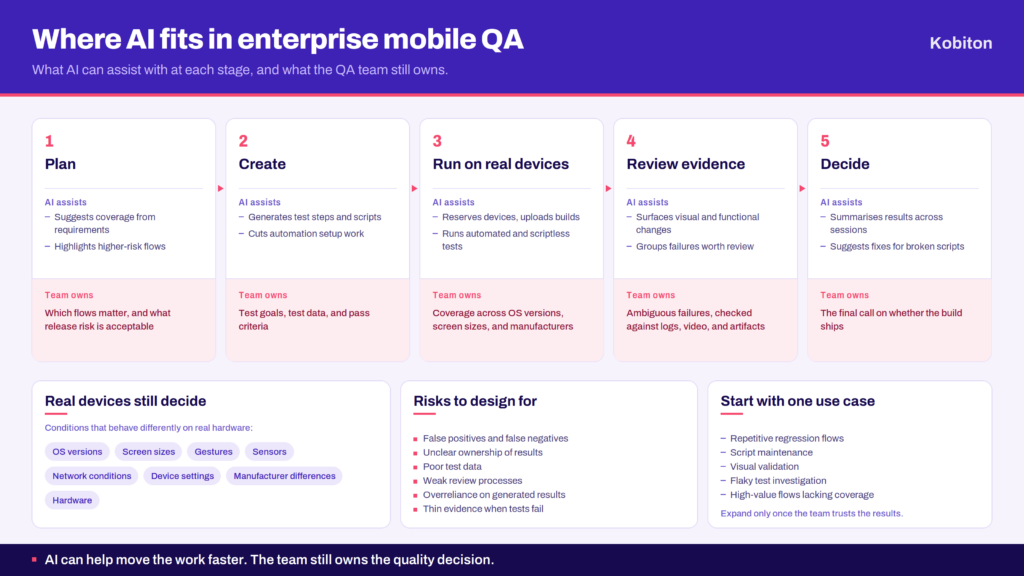
Mobile app behavior depends on real hardware, operating system versions, screen sizes, device settings, gestures, sensors, network conditions, and manufacturer differences. AI can help create, maintain, or analyze tests, but real-device execution helps teams validate how the app behaves in conditions closer to actual user environments.
What are the risks of AI-augmented mobile testing?
Common risks include false positives, false negatives, unclear ownership, poor test data, weak review processes, and overreliance on generated results. Teams can reduce these risks by starting with critical flows, reviewing AI-assisted outputs, keeping evidence such as logs and video, and defining where human approval is required.
Does AI replace manual mobile testing?
No. AI can reduce repetitive manual work and help teams scale automation, but manual testing still matters for exploratory work, judgment-based review, usability, edge cases, and release confidence. The strongest workflows usually combine AI assistance, automation, real-device execution, and human review.
How should enterprise QA teams start using AI mobile testing?
Start with a focused use case. Good candidates include repetitive regression flows, script maintenance problems, visual validation, flaky test investigation, or high-value flows that need better coverage. Then define review steps, real-device coverage, evidence requirements, and how results will fit into existing QA or CI/CD workflows.
What should teams look for in an AI mobile testing platform?
Teams should look for AI capabilities that fit their current workflow, support real-device testing, provide clear evidence when tests fail, integrate with existing automation or CI/CD tools, and allow human review where needed. Enterprise teams should also consider access control, reporting, scalability, governance, and support.
Final takeaway
AI mobile testing is most valuable when it improves specific parts of the QA workflow. It can help teams plan better tests, generate coverage faster, reduce automation maintenance, prioritize risk, analyze failures, and connect testing work to real-device execution.
For enterprise QA teams, the goal is not to replace the testing strategy with AI. The goal is to make the testing system easier to scale, review, and trust.
AI can reduce repetitive work, but it does not remove the need for QA judgment. Enterprise teams still need people to define release risk, decide which flows matter most, review AI-assisted results, investigate ambiguous failures, and decide whether the evidence is strong enough to ship. AI can help move the work faster. The team still owns the quality decision.
The best starting point is a focused workflow. Choose one area where AI can reduce testing drag, such as test generation, script maintenance, risk prioritization, or result analysis. Run it on real devices, capture reviewable evidence, and expand only when the team can trust the results.
AI-assisted mobile testing can increase the speed of the testing process, but it does not automatically ensure quality. It gives enterprise QA teams new ways to create, execute, maintain, and evaluate tests at the speed modern mobile releases require.