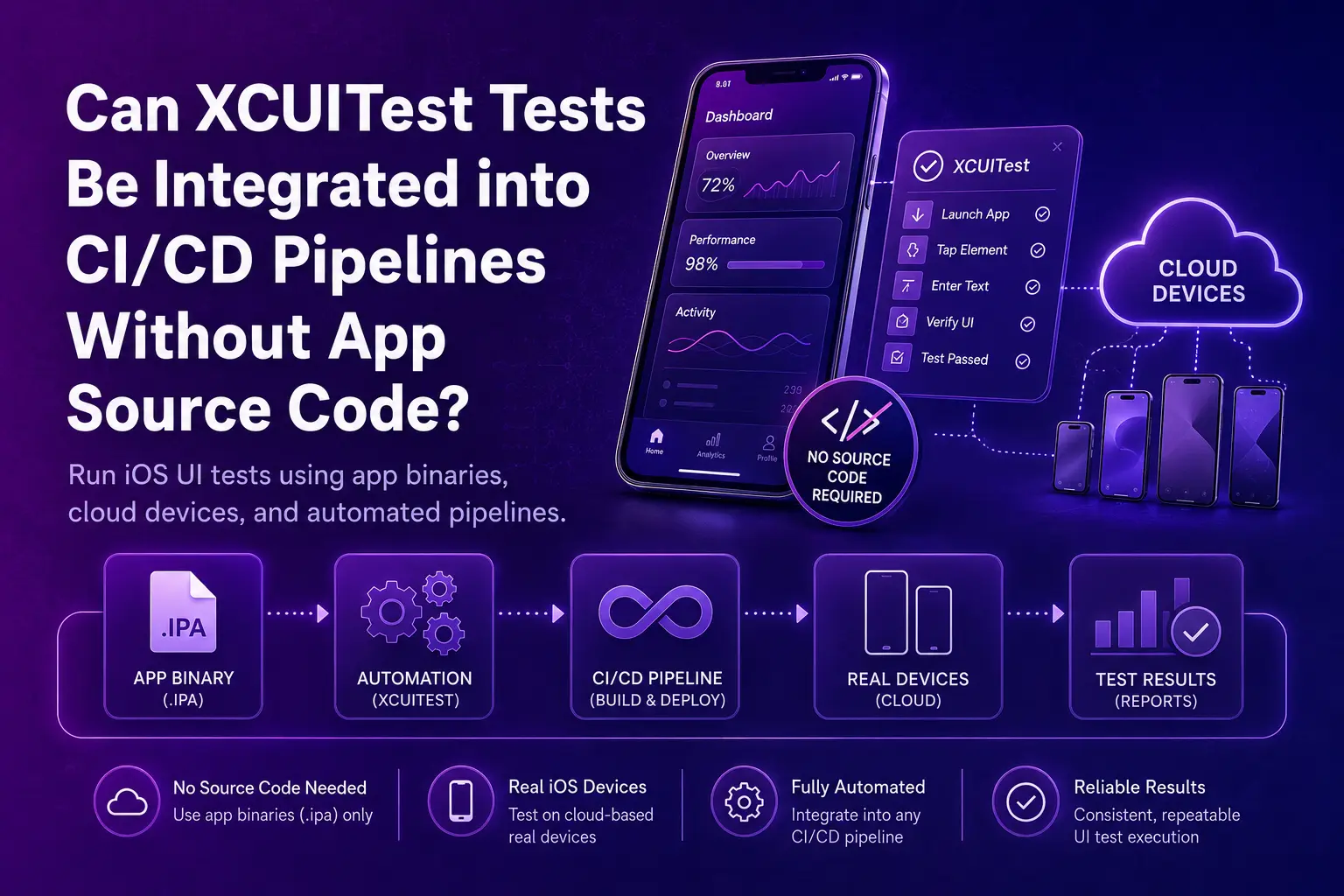
Mobile app teams are under constant pressure to release updates faster while still maintaining reliability and performance. Continuous Integration and Continuous Deployment (CI/CD) pipelines play a critical role in helping teams achieve this balance.
But what happens when you need to test an iOS app using XCUITest tests and you do not have access to the app’s source code?
This situation is more common than many teams expect. Enterprises often need to validate third-party apps or internally distributed builds where the source code is not available. Fortunately, XCUITest can still be used in these cases, and with the right tools and approach, it can be integrated seamlessly into CI/CD workflows.
Interactive XCUITest CI/CD pipeline visualization
XCUITest CI/CD pipeline
Run real iOS tests on the binary — no source code required
Understanding the XCUITest Framework
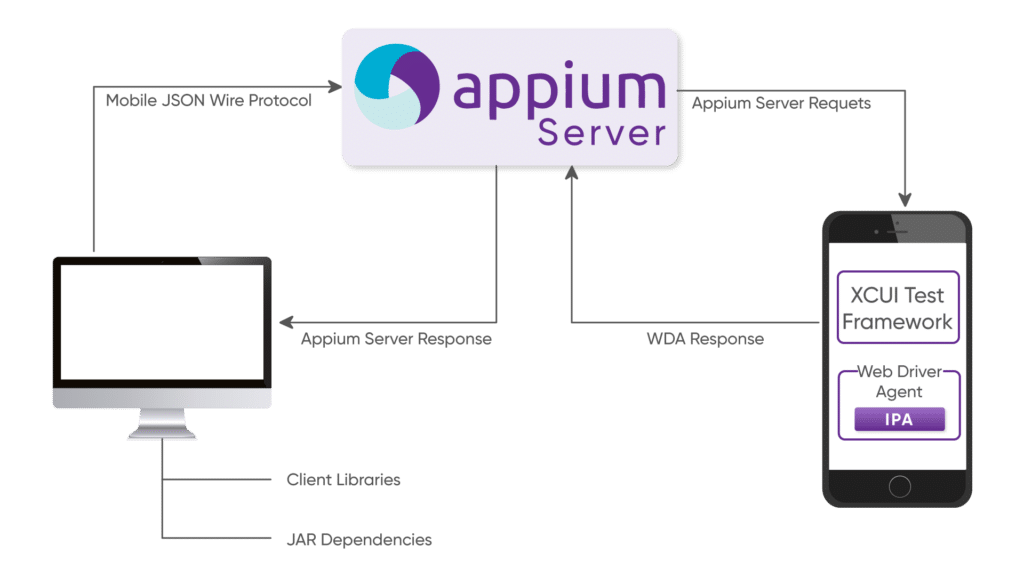
The XCUITest framework, which is part of Apple’s XCTest suite, is the native UI testing solution for iOS applications. It allows developers and testers to simulate real user interactions such as taps, swipes, and text input, and then verify whether the app responds correctly.
Compared to many open source alternatives, XCUITest offers several advantages, including:
Tight integration with Xcode
Fast execution on both iOS simulators and real devices
Built-in accessibility support for reliable element identification
If you are new to UI testing on iOS, a beginner-friendly XCUITest tutorial can help you get started. Apple’s official XCUITest documentation is often the best place to begin. However, beyond basic tutorials, real-world teams need to understand how these tests can be operationalized and executed reliably at scale.
Running XCUITest Without Source Code
In most cases, XCUITest is tightly connected to projects within Xcode. However, what if you only have access to the compiled application binary?
By using the XCUIApplication(bundleIdentifier:) API, testers can launch and interact with apps that are already installed on a device. This means you do not necessarily need access to the application’s source code, as long as you are able to install the app on a real device or simulator using an .ipa file or enterprise distribution method.
This capability makes it possible to:
Test third party applications that employees or customers rely on
Validate internally distributed builds without direct access to development repositories
Catch regressions introduced by app updates before they reach end users
XCUITest vs Appium: Which Works Best Without Source Code?
When comparing XCUITest vs Appium, both frameworks offer useful capabilities depending on your testing requirements.
XCUITest
Designed specifically for iOS and deeply integrated into Apple’s ecosystem
Provides faster execution and more reliable interaction with UI elements
Requires tests to be written in Swift or Objective-C
Appium (using the XCUITest driver)
Supports cross-platform testing for both iOS and Android
Uses the WebDriver protocol and supports multiple programming languages
Execution can be slightly slower compared to native XCUITest
For teams focused primarily on testing iOS applications, native XCUITest tests typically provide greater stability and performance. However, for organizations testing across multiple platforms, Appium combined with the XCUITest driver offers a flexible and unified automation approach.
Integrating XCUITest Tests into CI/CD Pipelines
The real challenge is not just writing tests. The key challenge is integrating those tests into automated workflows that run consistently with every build. Even without source code access, this integration is possible with the right setup.
Prepare the App Binary
First, obtain the signed .ipa file or ensure the application is installed on the target testing devices.
Leverage Real Devices in the Cloud
Local simulators are helpful during development, but they cannot fully replicate real-world device behavior and performance conditions.
Using a real device cloud, such as Kobiton, allows teams to run XCUITest tests on thousands of iOS devices without the overhead of maintaining physical hardware.
Automate Test Execution in CI/CD
Next, integrate XCUITest into your CI/CD platform, such as Jenkins, GitHub Actions, or GitLab CI.
Command-line tools like xcodebuild and xcrun, or Kobiton’s integrations, can be used to trigger automated test runs whenever a new build becomes available.
Capture Results and Feedback
Finally, store and analyze logs, screenshots, and performance metrics generated during test execution.
With Kobiton’s AI-driven insights, teams can quickly detect flaky tests, performance regressions, and stability issues before they affect users.
Best Practices for CI/CD Integration
To get the most value from automated testing, teams should follow several best practices:
Automate critical user journeys first, such as login, navigation, and checkout
Use accessibility identifiers in the application whenever possible to make UI elements easier to locate and interact with
Run tests in parallel across multiple devices to shorten feedback cycles
Combine automation with exploratory testing to achieve broader coverage and uncover unexpected issues
While XCUITest is highly effective at detecting regressions, manual testing and AI-assisted exploration help ensure a more complete testing strategy.
How Kobiton Enhances XCUITest Testing
While native tools are powerful, they may not fully meet the needs of large enterprise testing environments. Kobiton extends the capabilities of XCUITest by providing additional features designed for scale and efficiency.
Real device testing at scale
Teams can access thousands of iOS devices on demand without maintaining physical device labs.
AI-powered automation
Automation scripts can be generated faster, flaky tests can be reduced, and feedback loops become significantly shorter.
CI/CD and DevOps integration
Kobiton connects directly with existing CI/CD pipelines, allowing teams to automate mobile testing without major infrastructure changes.
Enhanced Appium support
Teams can combine XCUITest Appium tests with cross-platform automation within a single unified platform.
Final Thoughts
Yes, it is absolutely possible to run XCUITest tests in CI/CD pipelines without access to the app’s source code. With the right approach, teams can test third-party or closed-source applications and still ensure stability, reliability, and performance with every release.
When combined with Kobiton, these tests go beyond basic automation. Teams gain access to enterprise-scale device coverage, AI-enhanced insights, and seamless DevOps integration. Whether you are learning through an XCUITest tutorial, comparing XCUITest vs Appium, or exploring the capabilities of the XCUITest framework, Kobiton enables teams to deliver high-quality mobile applications with confidence.
FAQs
Can XCUITest run without app source code?
Yes, XCUITest can run without source code if the app binary is available and the app can be installed on a device or simulator.
How can XCUITest launch an app without source code?
It can use the XCUIApplication(bundleIdentifier:) API to launch and interact with an already installed iOS app.
Can XCUITest be integrated into CI/CD pipelines?
Yes, XCUITest can be integrated with CI/CD tools like Jenkins, GitHub Actions, and GitLab CI using tools such as xcodebuild, xcrun, or Kobiton integrations.
Is XCUITest better than Appium for iOS testing?
For iOS-only testing, XCUITest is usually faster and more stable, while Appium is better when teams need cross-platform testing.
No Source Code Required
Run XCUITest on Real iOS Devices Inside Your CI/CD Pipeline
- ✓Test third-party and closed-source builds straight from the signed .ipa
- ✓Access thousands of real iOS devices instead of maintaining a physical lab
- ✓Connect directly to Jenkins, GitHub Actions, or GitLab CI — no infrastructure overhaul
- ✓Surface flaky tests and performance regressions with AI-driven insights