When teams plan Android UI automation, two tools usually come up first: UI Automator and Appium. Both are widely used, but they serve different purposes. Choosing the right one depends on how deep your testing needs to go, whether you support multiple platforms, and how flexible you want your automation framework to be.
This guide explains what UI Automator is, how it compares to Appium, and where each fits within a practical Android testing strategy.
What is UI Automator?
UI Automator is Google’s Android testing framework designed for UI level automation across the entire device.
It allows tests to interact with:
Your app interface
System applications such as Settings and Notifications
Other installed apps
It works through Android’s accessibility layer and follows a black box approach, which means it does not require access to your app’s source code.
Key Capabilities of UI Automator
Supports interaction across apps and system UI
Runs on both real devices and emulators
Works without relying on internal app code
Suitable for end-to-end Android user flows
Where UI Automator Fits Best
Testing permission dialogs
Handling system-level flows, such as notifications and settings
Validating multi-app scenarios like sharing or deep linking
Running smoke and regression checks on Android devices
UI Automator is especially useful when your test cases extend beyond a single app and involve real device behavior.
What is Appium?
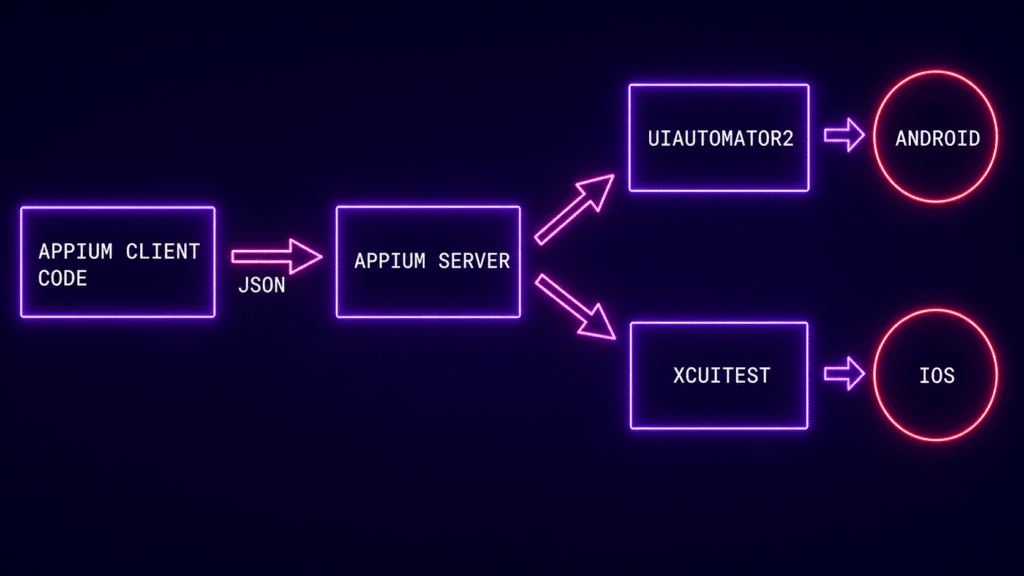
Appium is an open-source automation framework built on the WebDriver protocol. It supports cross-platform mobile testing, allowing teams to test Android and iOS using a single API.
Unlike UI Automator, Appium works as a server that sends commands to devices and executes them through platform-specific drivers.
Key Capabilities of Appium
Supports both Android and iOS
Works with multiple programming languages such as Java, Python, and JavaScript
Handles native, hybrid, and mobile web applications
Uses UI locators like XPath, ID, and accessibility labels
Where Appium Fits Best
Teams that test both Android and iOS
Large-scale automation frameworks
CI CD pipelines that require cross-platform coverage
Testing hybrid apps and WebView-based interfaces
Appium is often the preferred choice when teams want a single automation layer across different mobile platforms.
UI Automator vs Appium: Core Differences
Platform support
UI Automator supports Android only
Appium supports both Android and iOS
Setup complexity
UI Automator is lightweight and easier to set up
Appium requires server setup and driver configuration
Language support
UI Automator is mainly used with Java or Kotlin
Appium supports multiple programming languages
Cross-app testing
UI Automator handles system UI and cross-app flows well
Appium requires additional setup for similar scenarios
Execution speed
UI Automator runs faster on Android devices
Appium may be slightly slower due to the WebDriver communication layer
Best use case
UI Automator works well for Android system-level and end-to-end flows
Appium works well for cross-platform automation
Deep Comparison: Strengths and Limitations
1. Scope of Testing
UI Automator
UI Automator operates at the device level. It can interact with anything visible on screen, including system UI and other apps. This makes it a strong choice for Android-specific user flows.
Appium
Appium focuses more on application-level automation. It handles in-app interactions well, but system-level testing requires extra configuration and is less straightforward.
2. Cross-Platform Strategy
UI Automator
Limited to Android
No support for iOS
Appium
Provides a single framework for Android and iOS
Useful for teams aiming for a unified testing approach
If your product roadmap includes iOS, Appium becomes a necessary part of your setup.
3. Stability and Flakiness
UI Automator
Generally more stable for Android native interactions
Works directly with the accessibility layer
Appium
Can face stability issues due to:
Heavy reliance on XPath locators
WebDriver communication delays
Synchronization challenges
4. Developer Experience
UI Automator
Simple and focused on Android
Easy for developers familiar with Java or Kotlin
Appium
Requires server setup and driver management
Includes more components to maintain within CI pipelines
5. Test Coverage
UI Automator is best for:
Android system-level flows
Device-specific testing
Validating real user behavior on Android
Appium is best for:
Cross-platform test suites
Large-scale automation frameworks
Testing across multiple devices and environments
When You Should Use UI Automator
Choose UI Automator when:
You are testing Android-only applications
You need system-level UI interaction
You want stable and straightforward Android automation
You are running tests on real devices or through platforms like Kobiton
Your focus is on complete Android user workflows
Example use case:
Testing login flow, handling notification permissions, and deep linking into another app within the same test scenario.
When You Should Use Appium
Choose Appium when:
You need support for both Android and iOS
You are building a cross-platform automation framework
Your team uses different programming languages
You want a centralized automation setup for mobile applications
Example use case:
Running the same checkout flow on both Android and iOS devices within a CI pipeline.
UI Automator vs Appium in a Real Testing Strategy
In real-world setups, teams often use both tools together instead of choosing only one.
UI Automator handles Android system and device-level validation
Appium handles cross-platform functional automation
When combined with a real device cloud like Kobiton, this approach gives better coverage and more realistic testing conditions across devices.
Final Recommendation
If your focus is strictly Android UI testing, UI Automator is a simple and stable option for system-level and end to end flows.
If you are working across multiple platforms or building a large scale automation framework, Appium is the better long term choice.
For most teams, the practical solution is not choosing one over the other, but using both in the right areas to get reliable and scalable test coverage.