
UI Automator is an Android testing framework used to automate UI testing for Android applications. It allows developers and testers to simulate user interactions with interface elements across both apps and system-level components, such as device settings, notifications, and even third-party applications.
One of the main strengths of UI Automator is its ability to interact across multiple apps. It is also commonly used for black box testing, where the internal code of the application is not accessible.
What is UI Automator and How Does it Work?
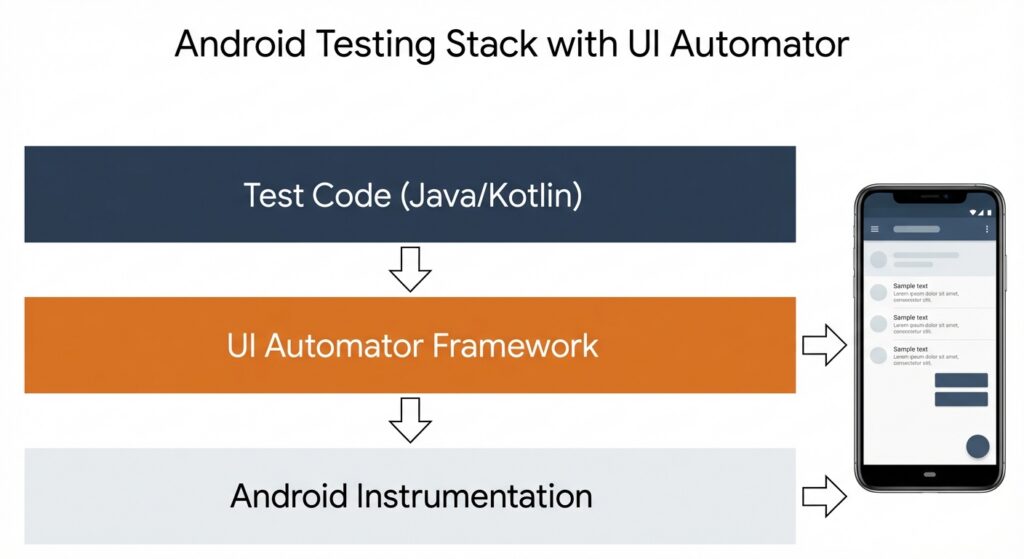
UI Automator is a powerful tool designed to automate the testing of Android applications. Unlike some other testing frameworks, UI Automator enables interaction not only with the application under test but also with system-level features, including notifications, device settings, and third-party apps. This capability makes it particularly valuable for cross-app testing scenarios.
The framework works by using a set of APIs that interact directly with visible UI elements on the screen. These APIs can access elements regardless of whether the application is currently in focus. As a result, testers can validate the behavior of apps in situations that closely resemble real user interactions.
Another important characteristic of UI Automator is that it operates independently of the application’s source code. This makes it highly suitable for black box testing. By simulating user actions such as tapping, typing, or scrolling, UI Automator provides a reliable way to verify the functionality and behavior of Android applications in real-world conditions.
Key Features of UI Automator
Several core features make UI Automator an effective framework for Android UI testing.
Cross App Testing
UI Automator can automate tasks that span multiple applications or system settings. This capability makes it ideal for testing workflows where an app interacts with other apps or system components.
UI Interactions
The framework supports a wide range of user actions, including clicking buttons, entering text in input fields, and scrolling through UI elements. These actions allow testers to replicate realistic user behavior during automated tests.
UI Automator APIs
UI Automator provides a set of APIs such as UiDevice, UiObject, and UiSelector. These APIs help testers locate UI elements and interact with them efficiently. They also allow test scripts to remain flexible and adaptable across different application interfaces.
Setting Up UI Automator for Android Testing
Getting started with UI Automator is relatively straightforward. First, you need to install the required dependencies by adding them to your build. Gradle file. After completing the setup, you can begin writing automated tests using the available APIs.
The UiDevice API allows interaction with the Android device itself, enabling actions such as pressing hardware buttons or navigating system screens. Meanwhile, the UiObject API allows testers to interact with specific UI elements within the application.
Once the tests are written, they can be executed directly from Android Studio or run through the command line using Gradle. This setup allows teams to run automated tests quickly and reliably without needing access to the application’s internal source code.
Benefits and Limitations of Using UI Automator
UI Automator offers several advantages for Android UI testing.
Cross App Testing
It enables testing across multiple applications and system components, which is essential for validating workflows that involve interactions between different apps.
No Access to Source Code Required
UI Automator works independently of the application’s source code. This makes it a strong option for black box testing scenarios.
Supports Real Devices and Emulators
The framework allows tests to run on both physical Android devices and emulators, ensuring flexibility across different testing environments.
However, there are also some limitations to consider.
API Level Limitation
UI Automator only supports Android API level 18 and above, which corresponds to Android 4.3 and later versions.
Slower Performance
Compared to other Android testing frameworks such as Espresso, UI Automator may run slower because it interacts with UI elements and system components at a higher level.
Limited Gesture Support
The framework does not support more complex gestures such as pinch-to-zoom or drag and drop, which may be necessary for testing certain types of interactive applications.
Conclusion
UI Automator is a valuable framework for Android UI testing, offering a powerful way to automate interactions with both applications and system-level components. Its ability to perform cross-app testing and simulate real user actions makes it especially useful for validating complex user workflows. Although the framework has some limitations, including slower performance and restricted gesture support, it remains an excellent option for many Android testing scenarios. For teams aiming to build robust test automation pipelines, UI Automator can be even more effective when combined with cloud-based testing platforms such as Kobiton, which help improve test coverage, scalability, and execution speed.