Mobile applications are no longer simple interfaces. They are adaptive systems that respond to user behavior, device conditions, and assistive technologies in real time. In this environment, Mobile Accessibility Testing is no longer limited to rule based checks. It is evolving into a smarter, context aware process powered by AI.
This shift matters because accessibility is not just about passing guidelines. It is about making sure every user can interact with your app without friction. This guide explains how AI is changing accessibility testing in mobile apps and why traditional approaches alone are no longer enough.
Why Mobile Accessibility Testing Needs AI
Traditional accessibility testing typically relies on:
WCAG rule validation
Static UI scans
Scripted automation tools
While useful, these methods often miss real issues such as:
Dynamic UI changes during runtime
Context dependent accessibility problems
Actual user interaction patterns
Behavior of assistive technologies like VoiceOver and TalkBack
AI helps close this gap by moving from fixed rules to learning based analysis. Instead of only checking what is visible on the screen, AI can interpret how the interface behaves as users interact with it.
This means teams can identify issues that appear only during real usage, such as layout shifts, broken navigation flows, or inconsistent focus handling.
AI vs Traditional Automation in Accessibility Testing
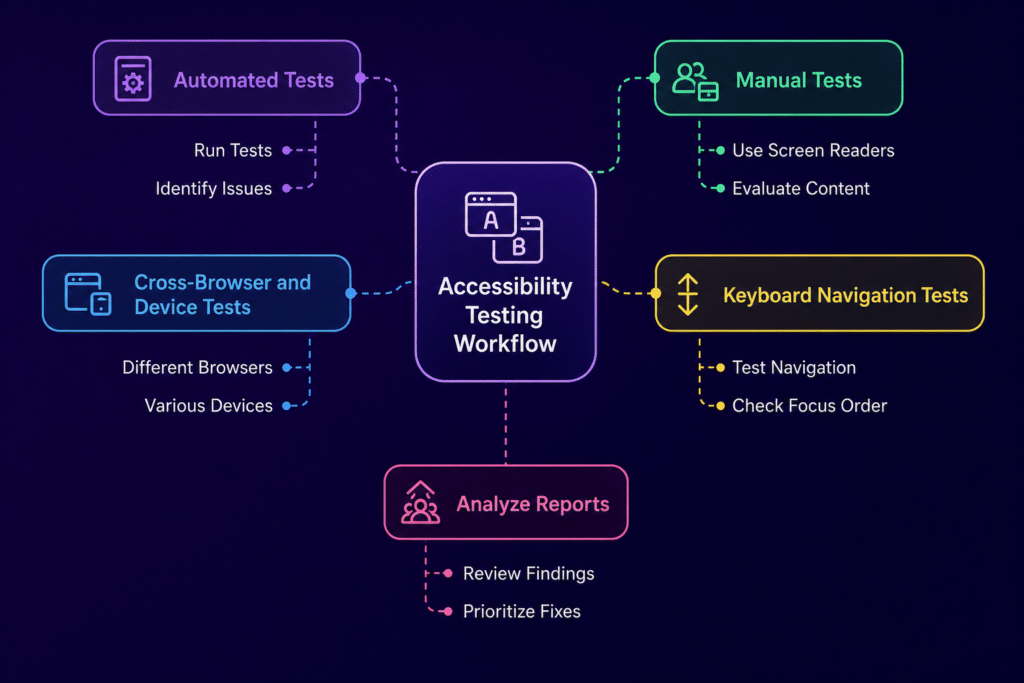
Traditional automation focuses on predefined rules, while AI adds a layer of understanding.
Detection moves from simple WCAG checks to context aware analysis
UI interpretation shifts from static elements to dynamic behavior
Coverage expands from limited flows to full app interactions
Adaptability improves as AI adjusts to UI changes instead of breaking
Outputs become more actionable with deeper insights into root causes
AI does not replace automation. It strengthens it by making testing more responsive to real world scenarios.
How AI Transforms Mobile Accessibility Testing
Context Aware Issue Detection
AI can identify missing labels even when the UI changes dynamically. It can distinguish between decorative and functional elements and detect incorrect reading order in complex layouts. This closely reflects how users experience apps through screen readers.
Simulation of Assistive Technology Behavior
Instead of only validating UI properties, AI can simulate how assistive tools behave. This includes VoiceOver navigation, TalkBack focus movement, and gesture interactions. As a result, teams can test complete accessibility journeys rather than isolated screens.
AI Based Visual Understanding
Modern AI models can interpret screenshots in a way that is similar to human perception. They can detect overlapping elements, identify contrast issues, and understand layout hierarchy without relying on structured UI trees.
This becomes especially important in mobile environments where UI rendering differs across devices.
Smart Test Generation
AI can automatically generate accessibility test scenarios based on user flows. It can highlight high risk screens and identify areas where coverage is missing. This reduces the need for writing large volumes of scripts while still improving test depth.
Root Cause Analysis and Fix Suggestions
AI does more than flag issues. It explains why they occur, maps them to WCAG guidelines, and suggests practical fixes. In some cases, it can provide code level recommendations, which helps developers resolve issues faster.
Beyond Automation: The Strategic Shift
AI changes the way teams think about accessibility testing.
Instead of asking, did we test this screen, teams begin to ask, can every user complete this journey successfully.
This shift is important because accessibility is not limited to individual screens. It is about the entire experience from start to finish.
AI supports this by enabling:
Continuous accessibility validation within CI CD pipelines
Early detection of accessibility risks before release
Adaptive testing for changing UI and UX patterns
Platforms like Kobiton can support this approach by providing real device environments where AI driven tests can run under real world conditions, giving more accurate insights into how accessibility issues appear across devices.
Key Use Cases of AI in Mobile Accessibility Testing
Continuous Accessibility Monitoring
AI runs checks across multiple builds and flags regressions early, helping teams catch issues before they reach production.
Accessibility Testing in CI CD
Accessibility checks become part of the development workflow instead of being treated as a separate phase. This leads to faster feedback and fewer late stage fixes.
Cross Device Accessibility Validation
AI helps validate accessibility across different screen sizes, operating systems, and orientations. When combined with real device platforms like Kobiton, this becomes far more reliable than emulator only testing.
Real User Behavior Simulation
AI can mimic how users with disabilities interact with apps. This reveals usability issues that static checks often miss, such as confusing navigation paths or inconsistent focus behavior.
Challenges in AI Driven Accessibility Testing
AI introduces new capabilities, but it also has limitations.
It can produce false positives in complex layouts
It may struggle with highly customized UI components
Its effectiveness depends on the quality of training data
Final accessibility decisions still require human validation
AI works best as a supporting layer alongside experienced accessibility testing teams, not as a replacement.
Best Practices for AI Based Mobile Accessibility Testing
Combine AI testing with manual validation using assistive technologies
Use AI for early detection rather than final compliance checks
Integrate accessibility testing into every build cycle
Continuously improve models using real user behavior data
Validate AI findings through real user feedback whenever possible
Future of AI in Mobile Accessibility Testing
The next stage of AI in accessibility testing will likely include:
Autonomous systems that explore apps in a user like manner
Tests that adapt automatically as the UI changes
Early risk scoring to identify accessibility issues before deployment
Closer integration with design systems to prevent issues at the design stage
Conclusion
AI is reshaping Mobile Accessibility Testing from a static validation process into a behavior driven system. It moves beyond automation by understanding user journeys, simulating assistive technologies, and learning from real usage patterns.
The result is a shift toward mobile applications that are not just compliant with standards, but genuinely usable for everyone.