
Agile teams operate in short, fast-paced cycles where testing must move at the same speed as development. In many sprint environments, QA becomes a bottleneck when validation depends heavily on scripts, repeated manual checks, or unstable automation frameworks. This is where No Code Validations change the way teams handle sprint-level quality checks.
Instead of relying on code-heavy test scripts, teams define validation rules through visual, rule-based systems. This shift allows QA and product teams to move faster, reduce dependency on developers, and keep feedback loops tight throughout the sprint.
Understanding No-Code Validations in Agile Testing
No Code Validations are structured checks created without writing automation scripts. These validations focus on verifying application behavior using configurable rules such as:
Field input rules, including format, length, and required values
UI behavior conditions such as visibility, state changes, and button enablement
Workflow conditions based on user journeys
Data consistency across screens or APIs
These validations rely on visual builders or rule-based configurations rather than traditional scripting. This makes them easier to update and maintain as sprint requirements evolve.
In an agile setup, this means validation logic can be adjusted as quickly as user stories change, without slowing down the team.
Why Agile Sprints Struggle Without No-Code Validations
Sprint testing often faces common issues:
Frequent UI changes that break scripted tests
Tight deadlines that limit regression coverage
QA bottlenecks caused by scripting dependencies
Repetitive validation work across multiple stories
Traditional automation frameworks require constant maintenance. Even small UI updates can force teams to rewrite test scripts, which slows down sprint velocity and increases overhead.
No Code Validations reduce this burden by removing the need to rebuild validation logic every time the interface or workflow changes.
How No Code Validations Improve Sprint Testing Efficiency
Faster test creation inside sprints
QA teams can define validation rules through visual interfaces instead of writing scripts. This allows new features to be tested immediately within the sprint without waiting for automation updates.
Reduced dependency on coding skills
Non-technical team members can participate in creating validations. This spreads responsibility across QA, developers, and product teams, improving collaboration during sprints.
Stable regression coverage across iterations
Reusable validation blocks can be applied across multiple user stories. This reduces duplication and helps maintain consistent regression coverage over time.
Early defect detection in CI/CD pipelines
When integrated into CI workflows, validations run automatically on every build. This helps teams catch issues early, before they move further into the sprint cycle.
Better alignment with the changing sprint scope
Agile requirements change frequently. Rule-based validations are easier to adjust compared to scripted tests, which makes them more suitable for evolving backlogs and shifting priorities.
Where No Code Validations Fit in the Agile Sprint Workflow
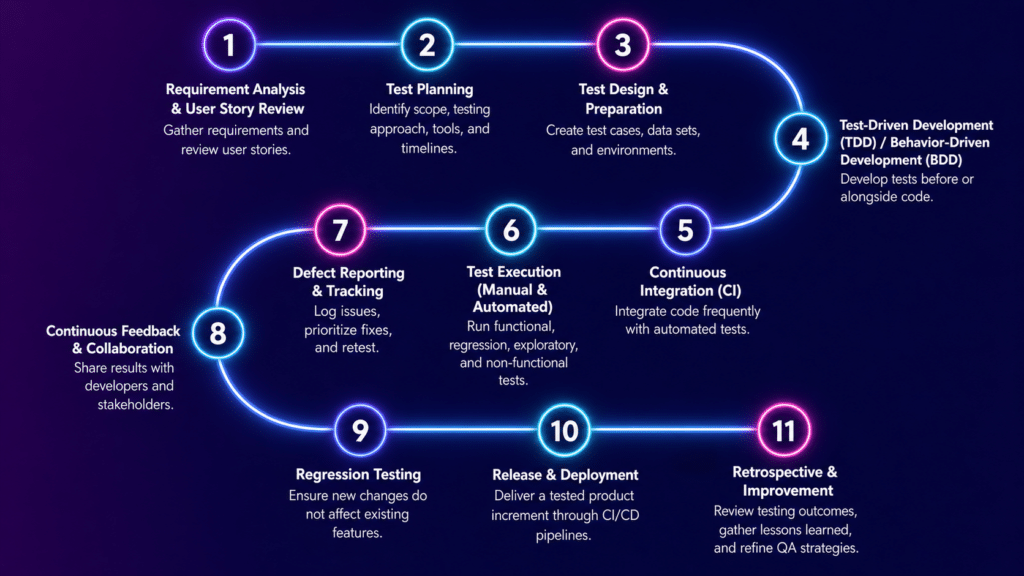
No Code Validations can be applied across every stage of a sprint:
Sprint Planning
Acceptance criteria can be translated directly into validation rules. Teams can also identify reusable patterns early.
Development Phase
Validation checks can run continuously on feature branches, helping teams verify UI behavior as features are built.
CI Build Stage
Automated validations execute after each commit, catching issues before integration.
Sprint Testing Phase
Full regression validation sets can run across different devices and environments to verify user journeys.
Sprint Review
Validation results provide clear and consistent data to support release decisions.
Real Value in Mobile Agile Teams
For mobile-first teams, sprint testing becomes more complex due to device fragmentation, OS differences, and UI variations across platforms.
When combined with platforms like Kobiton, No Code Validations become much more effective. Teams can validate UI behavior on real devices, detect layout issues across different screen sizes, and run consistent checks across both Android and iOS builds.
Kobiton also allows parallel execution across multiple device environments, which helps reduce device-specific testing gaps and makes sprint testing more predictable in mobile CI pipelines.
Common Use Cases in Agile QA
Sprint regression checks
Reusable validation sets keep core features stable after each sprint.
UI consistency validation
Teams can confirm that layout, alignment, and visibility remain consistent after updates.
Form and input validation
Field-level checks can be handled without writing scripts.
User journey validation
End-to-end flows such as login, onboarding, and checkout can be verified through structured rules.
Cross-device behavior checks
Applications can be tested across multiple devices and operating systems to confirm consistent behavior.
Challenges Teams May Face
While No Code Validations improve testing efficiency, there are still some challenges to consider:
Limited flexibility for highly complex logic
Dependence on tools for advanced workflows
Need for structure to prevent disorganized validation setups
Risk of duplicate or overlapping validation rules in larger teams
Most teams handle these challenges by combining no-code validations with lightweight scripting for more complex scenarios.
Best Practices for Agile Teams
Structure validations around user stories instead of isolated UI actions
Maintain a reusable validation library for each sprint cycle
Separate critical validations from optional checks
Align validation rules closely with acceptance criteria
Review and clean validation sets after each sprint
Combine rule-based validations with scripted tests when needed
Final Thoughts
No Code Validations shift agile testing from script-heavy execution to structured, rule-based verification. In sprint environments where speed and adaptability matter, this approach reduces testing friction, improves collaboration, and supports consistent quality across releases.
Instead of spending time maintaining fragile test scripts, teams can focus on validating real user behavior and delivering reliable features with every sprint.