
Mobile applications are no longer just front-end experiences. Every tap, swipe, and interaction connects to APIs, microservices, and backend systems that handle data, authentication, and business logic. While Appium Script Generation makes UI automation easier, real quality comes from validating the entire flow from the user interface to the backend response.
Many teams are moving away from isolated UI tests and building connected validation pipelines. In these setups, Appium scripts do more than simulate user actions. They also trigger API checks and confirm backend behavior in real time, giving a clearer picture of how the application actually performs.
What is Appium Script Generation
Appium Script Generation is the process of automatically creating mobile automation scripts using the Appium framework. Instead of writing scripts manually, testers can generate them based on real user interactions or with the help of AI-assisted tools.
Platforms like Kobiton make this process practical by allowing teams to:
Perform manual actions such as taps, swipes, and text input
Convert those actions into reusable Appium scripts
Export scripts in multiple languages such as Java, NodeJS, and C #
This approach saves a significant amount of time. Tasks that previously required hours of scripting can now be completed in minutes, allowing teams to focus more on validation than on script creation.
Why UI Only Testing is No Longer Enough
Traditional Appium automation focuses on validating what happens on the screen:
Button interactions
Navigation between screens
Element visibility and layout
However, modern applications depend heavily on backend systems. Every visible action often triggers multiple processes behind the scenes, including API calls, authentication checks, and data synchronization.
Without backend validation, teams may face issues such as:
UI tests passing while APIs fail silently
Data inconsistencies across devices or sessions
Errors that only appear after release in real user environments
Relying only on UI validation creates a false sense of confidence, especially in complex applications.
The Shift from Script Generation to End-to-End Validation
The way teams approach automation is changing.
Earlier approach
Scripts were written manually
Testing focused only on UI behavior
Failures were often detected late
Current approach
Scripts are generated automatically
API validation is included during test execution
UI and backend are validated together within CI CD pipelines
This shift moves testing from surface-level checks to full system validation, where every layer of the application is verified as part of a single flow.
How Appium Script Generation Works in Kobiton
Kobiton provides a structured workflow that simplifies script generation and execution.
Manual session recording
Testers interact with the application on real devices to simulate actual user behavior
Script generation
The platform converts recorded actions into Appium code that can be reused
Script export
Scripts are exported in standard Appium format, making them flexible and easy to integrate
CI CD integration
Generated scripts can run automatically across devices and pipelines, allowing continuous validation
This process reduces manual effort while keeping testing aligned with real user interactions.
Integrating API Validation with Appium Scripts
Adding API and backend validation to Appium scripts creates a more complete testing strategy.
API Assertions Within Test Scripts
Generated scripts can be extended to include API checks such as:
Validating response status codes
Verifying response payload data
Matching UI data with API responses
For example, when a user logs in, the script can validate the UI response and also call the API to confirm authentication tokens and user data.
Backend Data Validation
Tests can confirm that backend processes are working as expected during user flows. This includes:
Verifying database updates after transactions
Confirming order creation in e-commerce systems
Checking payment status updates
Service Virtualization for Controlled Testing
Teams can simulate backend conditions to test edge cases, such as:
Slow API responses
Server errors
Unexpected data scenarios
This helps validate how the application behaves under real-world failure conditions without relying on live systems.
Architecture of a Unified Testing Flow
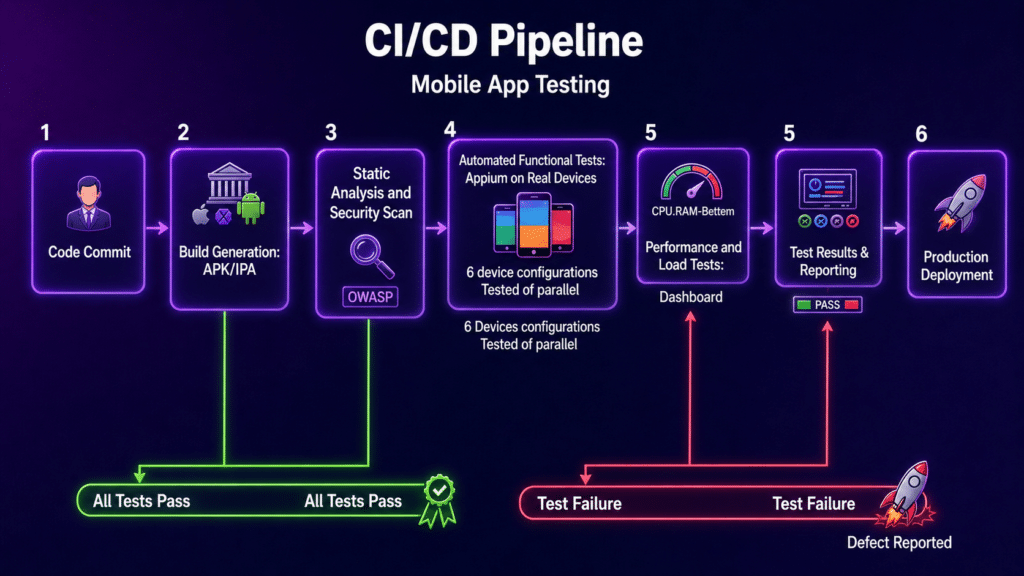
A connected testing flow typically follows this structure:
User action triggered through an Appium script
UI validation of elements and navigation
API validation of request and response
Backend verification through services or databases
Final test result based on combined validation
This layered approach improves accuracy and helps identify issues at the exact point where they occur.
Key Benefits of This Integration
Faster Automation Cycles
Generated scripts reduce manual work and allow teams to build and execute tests quickly
Higher Test Coverage
Combining UI, API, and backend validation ensures that no part of the system is left unchecked
More Stable Tests
Generated scripts tend to be more consistent across devices and app updates
Clearer Debugging
When a test fails, teams can quickly identify whether the issue is related to the UI, API, or backend systems
Challenges and How to Handle Them
Script Maintenance
Even generated scripts need updates when the UI changes
Solution: Use AI-assisted or self-healing mechanisms to reduce maintenance effort
API Dependency
Unstable backend services can cause test failures
Solution: Use mocks and service virtualization to control dependencies
Data Synchronization
Differences between UI data and backend data can lead to inconsistencies
Solution: Use centralized test data management to keep everything aligned
Best Practices for Implementation
Start with critical user journeys such as login, checkout, and payments
Always combine UI validation with API assertions
Use real devices to test under actual conditions
Integrate testing into CI CD pipelines for continuous feedback
Keep scripts modular by separating UI logic from API validation logic
Real World Use Case
In an ecommerce application:
An Appium script logs in the user
API validation confirms successful authentication
The user places an order
Backend validation confirms the order is recorded correctly
The UI displays a success message
This approach verifies the entire transaction flow from start to finish, not just what appears on the screen.
Future Trends in Appium Script Generation
AI-driven automation is improving script generation, stability, and failure prediction
Intent-based testing allows teams to define actions instead of writing detailed scripts
Unified platforms like Kobiton are bringing together script generation, device testing, API validation, and performance monitoring in one place
Conclusion
Appium Script Generation is no longer limited to creating automation scripts. It is now part of a broader testing approach that connects UI actions with backend validation.
By combining UI, API, and backend checks, teams move from basic automation to full end to end quality assurance. This approach reduces risk, improves reliability, and reflects how modern mobile applications actually operate.