Test automation frameworks often start strong but become fragile as the application evolves. Even small UI updates can break element locators, leading to failed test runs, delays, and constant maintenance work. This is where Appium Self-Healing makes a real difference. It allows your automation scripts to recover from minor UI changes automatically, helping your tests remain stable and reliable over time.
What is Appium Self-Healing?
Appium Self-Healing is an approach that enables test scripts to adapt when UI elements or locators change. Instead of failing immediately, the framework looks for alternative ways to identify the same element using patterns, attributes, or historical data.
For example, if an element ID changes but other attributes like text or class remain similar, the framework can still locate it. This reduces flaky tests and minimizes the time spent fixing broken scripts after every release.
Why Add Self-Healing to Your Framework?
Most traditional automation frameworks rely heavily on static locators. The moment a UI element changes, tests fail and require manual updates. Over time, this becomes a major bottleneck.
Introducing self-healing shifts your framework from being reactive to more adaptive. It helps your automation keep up with frequent UI updates without constant intervention.
Here is what you gain:
- Less time spent fixing broken tests
- More consistent test execution
- Faster feedback cycles for your team
- Better return on your automation efforts
For teams using platforms like Kobiton, combining real device testing with self-healing strategies can further improve reliability across different environments.
Analyze Your Current Framework
Before adding Appium Self-Healing, take a step back and review how your current framework behaves.
Start by identifying where failures happen most often. In most cases, locator-related issues are the main cause.
Focus on:
- The locator strategies you currently use, such as XPath, ID, or accessibility ID
- Patterns in test failures across recent runs
- How well your logging and reporting capture these failures
This step gives you a clear picture of where self-healing will deliver the most value.
Choose the Right Self-Healing Approach
There is no single way to implement self-healing in Appium. The right approach depends on your framework complexity and team capabilities.
1. AI-Based Tools
Some tools use machine learning to detect UI changes and suggest alternative locators. These tools can integrate with Appium and update element references automatically. Platforms like Kobiton often complement these workflows by providing consistent device-level validation alongside intelligent test execution.
2. Custom Logic
You can build your own fallback mechanism by storing multiple locator options for each element. If the primary locator fails, the framework moves to secondary options. This gives you full control and keeps the logic transparent.
3. Attribute Matching
Instead of relying on exact locators, this method finds elements based on similar attributes such as visible text, class names, or hierarchy. It works well when minor UI changes occur without altering the overall structure.
Update Your Locator Strategy
Self-healing only works as well as your locator strategy allows. If your framework depends heavily on long and fragile XPath expressions, improvements are necessary.
Follow these practices:
- Use unique IDs wherever possible
- Store multiple locator options for critical elements
- Maintain a centralized object repository for better control
- Keep locators simple, readable, and easy to maintain
A well-structured locator strategy gives your self-healing logic a strong foundation to work from.
Implement a Fallback Mechanism
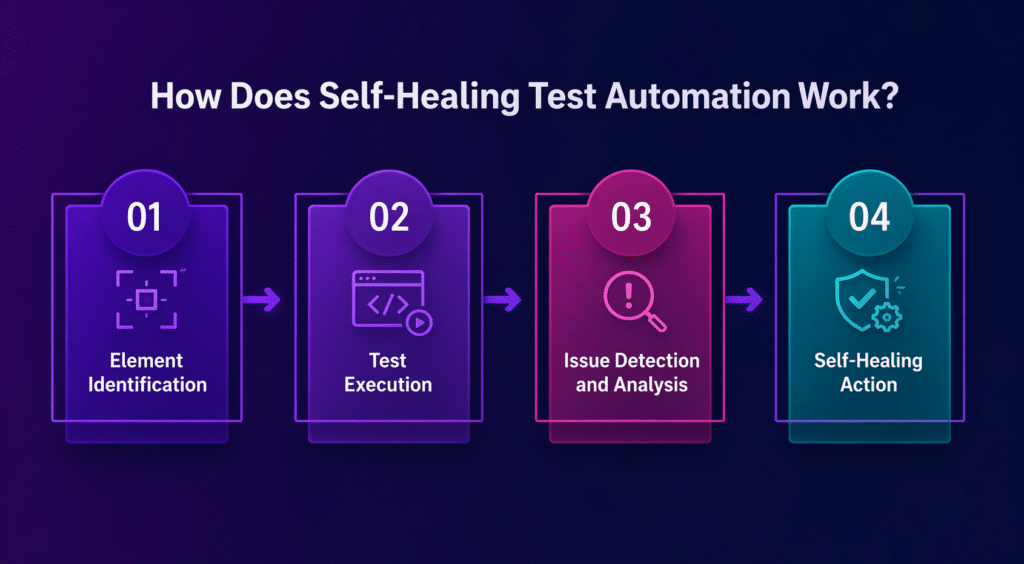
The fallback mechanism is the core of Appium Self-Healing. When the primary locator fails, your framework should attempt alternative methods in a defined order.
A simple flow could look like this:
- Try locating the element using ID
- If not found, switch to accessibility ID
- Then, attempt XPath or class name as a last option
You can implement this by wrapping your element-finding methods with custom logic that cycles through these options automatically.
Add Logging and Reporting
Self-healing should not silently fix everything without visibility. Your team still needs to know when something has changed in the UI.
Make sure you capture:
- Which locators failed
- Which alternative locators were used successfully
- A comparison of healed tests versus failed tests
This level of transparency helps you track UI changes, maintain control, and debug issues faster when needed.
Test and Refine the Implementation
Once self-healing is in place, run your test suite and observe its performance. The goal is not just fewer failures, but also accurate recovery without masking real issues.
Pay attention to:
- Whether the correct elements are being identified
- Any performance impact during test execution
- Cases where the framework selects the wrong fallback
Fine-tuning this process over time keeps your framework reliable and efficient.
Final Thoughts
Adding Appium Self-Healing to an existing test automation framework is a practical step toward reducing maintenance and improving stability. By strengthening your locator strategy, introducing fallback logic, and maintaining clear reporting, you can build a framework that adapts to change rather than breaking because of it.
With the right setup, your tests stay consistent even as your application evolves, allowing your team to focus more on quality and less on fixing scripts.