Mobile apps today are expected to work for everyone, including people with disabilities. At the same time, teams are releasing updates faster through CI/CD pipelines. This often creates a gap where accessibility testing is pushed to the end or skipped altogether.
Mobile accessibility testing needs to be part of the pipeline from the start. When it is built into your workflow, every release is checked for accessibility issues before it reaches users. This leads to more reliable apps and fewer surprises after deployment.
What Is Mobile Accessibility Testing in CI/CD
Mobile accessibility testing checks whether your app can be used by people with visual, auditory, motor, or cognitive impairments.
When it is integrated into a CI/CD pipeline:
- Tests run automatically on every code change
- Issues are identified early in development
- Releases maintain a consistent level of usability
Most pipelines already include unit tests, UI tests, and security checks. Accessibility testing simply becomes another quality checkpoint in that same process.
Why Accessibility Testing Should Be Part of CI/CD
1. Faster Release Cycles Need Automated Validation
Frequent updates leave little room for manual accessibility checks. Without automation, issues build up and are harder to manage.
2. Early Detection Reduces Fix Costs
Fixing accessibility problems during development is far simpler than fixing them after release, especially when UI changes are involved.
3. Real User Impact
Accessibility directly affects how people interact with your app. Poor experiences can lead to lower retention and potential compliance issues.
4. Scaling Across Devices
Mobile apps run on many devices and operating system versions. Manual testing alone cannot cover all combinations effectively.
Where Accessibility Testing Fits in the CI/CD Pipeline
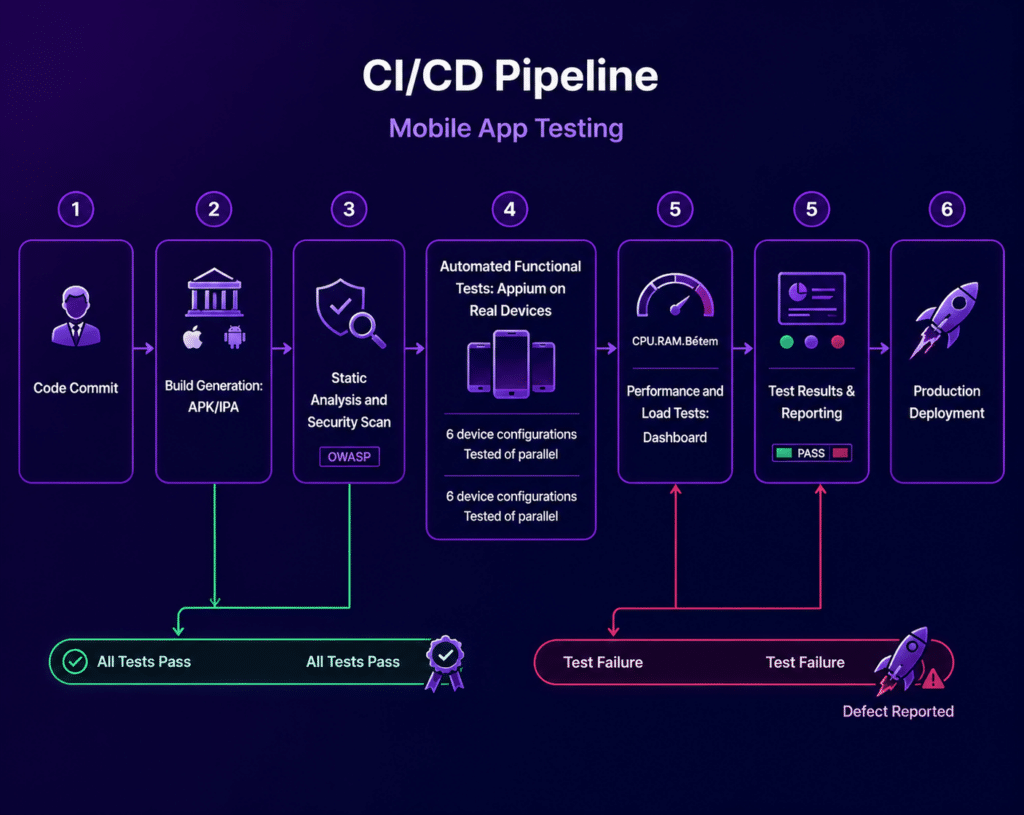
A typical mobile CI/CD pipeline includes:
- Code commit
- Build process
- Automated tests
- Deployment
Accessibility testing should be included at multiple points:
Pre Build Stage
- Linting for accessibility rules
- Code-level checks, such as labels and contrast hints
Build Stage
- Accessibility scanning tools
- UI structure validation
Test Stage
- Automated accessibility tests on emulators and real devices
- Screen reader compatibility checks
Post Build or Pre Release
- Regression accessibility testing
- Manual checks for edge cases and usability
Step-by-Step Guide to Integration
Step 1: Define Accessibility Standards
Start with widely accepted guidelines such as:
- WCAG
- Platform-specific standards for iOS and Android
Create a clear checklist that includes:
- Text contrast
- Screen reader labels
- Touch target sizes
- Navigation order
This ensures your team is aligned on what “accessible” actually means.
Step 2: Add Accessibility Checks to Your Pipeline
Integrate accessibility tools into your CI workflows, such as:
- GitHub Actions
- Jenkins
- GitLab CI
Trigger checks automatically:
- On pull requests
- On merges to the main branch
- On scheduled builds
This keeps accessibility testing consistent without slowing down development.
Step 3: Automate Accessibility Testing
Use automation frameworks to:
- Detect missing labels
- Identify contrast issues
- Validate UI hierarchy
Run these alongside:
- Unit tests
- UI tests
- Performance tests
This keeps accessibility aligned with overall app quality.
Step 4: Test on Real Devices
Emulators are useful, but they cannot fully replicate real user behavior.
Using platforms like Kobiton allows you to:
- Validate screen readers such as TalkBack and VoiceOver
- Test gestures and touch interactions
- Check performance across real devices and environments
Real device testing helps catch issues that are often missed in simulated environments.
Step 5: Run Tests in Parallel
Accessibility testing can increase pipeline time if not managed properly.
To keep pipelines efficient:
- Run tests across multiple devices at the same time
- Separate quick checks from full test suites
Parallel execution helps maintain speed without reducing coverage.
Step 6: Set Accessibility Gates
Define clear pass and fail conditions:
- Fail builds when critical issues are found
- Allow warnings for minor issues
This makes accessibility a measurable part of your release criteria.
Step 7: Monitor After Release
Accessibility work does not end at deployment.
Track:
- User feedback
- Issues reported in production
- Crashes related to assistive technologies
Feed these insights back into your CI/CD process for ongoing improvements.
Best Practices for Mobile Accessibility Testing in CI/CD
Shift Testing Earlier
Run accessibility checks as early as possible to prevent issues from spreading.
Focus on High Impact Flows
Prioritize key user journeys such as:
- Login
- Navigation
- Checkout
Combine Automation and Manual Testing
Automation finds common problems, but manual testing helps validate real usability.
Keep Tests Maintainable
Avoid overly complex test suites that slow down your pipeline.
Align with DevOps Workflows
Accessibility should sit alongside security and performance testing, not outside it.
Use Real Device Coverage
Test across multiple devices, operating systems, and screen sizes for accurate results. Platforms like Kobiton make this easier without maintaining physical labs.
Common Challenges and Practical Solutions
Slower Pipelines
Use parallel testing and split test suites into smaller groups.
Limited Tooling
Combine different tools and include real device platforms for better coverage.
Unstable Tests
Stabilize your UI tests and reduce dependencies that cause inconsistency.
Lack of Awareness
Train teams on accessibility standards and show how it impacts real users.
Sample CI/CD Workflow with Accessibility Testing
stages:
 - build
 - test
 - accessibility
 - deploy

accessibility_tests:
 script:
   - run-accessibility-scan
   - run-ui-accessibility-tests
allow_failure: falseHow Kobiton Supports Accessibility Testing in CI/CD
Kobiton helps teams bring accessibility testing directly into their CI/CD pipelines by:
- Providing access to real devices in the cloud
- Supporting both automated and manual testing
- Allowing parallel execution across multiple devices
- Integrating with tools like Jenkins and GitHub Actions
With Kobiton, teams can continuously validate accessibility without maintaining their own device infrastructure, making it easier to keep testing consistent at scale.
What Is Changing in Accessibility Testing
Mobile accessibility testing is becoming more advanced with:
- AI-based issue detection
- Automated suggestions for fixes
- Smarter prioritization of test cases
- Closer integration with QA systems
As CI/CD pipelines continue to evolve, accessibility testing is becoming a standard part of automated quality checks rather than an optional step.
Conclusion
Integrating mobile accessibility testing into CI/CD pipelines allows teams to release quickly without overlooking usability.
By combining:
- Automation
- Real device testing
- Continuous validation
Teams can make accessibility part of everyday development instead of treating it as a last step.