Mobile gamers expect the same smooth experience whether they are using a high-end smartphone or an older tablet. They want responsive controls, stable performance, and visuals that feel polished.
The challenge is that mobile devices vary widely in hardware, operating systems, screen sizes, and performance capabilities. These differences can quickly turn into quality issues if they are not handled properly.
This guide explains what device compatibility means in mobile game testing, why it matters, how to plan for it effectively, and which tools can support your testing workflow.
What is Device Compatibility in Mobile Game Testing
Device compatibility refers to how well a mobile game performs across different devices. This includes variations in hardware, screen resolution, operating systems, memory, GPU performance, input methods such as touch and gyroscope, and even network conditions.
In practice, compatibility goes beyond simply launching the game. It covers how well the game plays, how the interface adjusts to different screens, how stable the performance is, and how the game behaves under real-world conditions.
Why Compatibility Matters for Mobile Games
Mobile users are highly fragmented. Players may be using:
- Older Android devices with limited RAM
- Large screen tablets
- iPhones with notch or Dynamic Island layouts
- Foldable devices with unique screen ratios
If a game performs poorly on commonly used devices, the impact is immediate. Ratings drop, users stop playing, revenue declines, and marketing efforts become less effective.
A consistent experience across devices is directly tied to retention and long-term growth.
Key Compatibility Factors in Mobile Game Testing
1. Operating System Variants
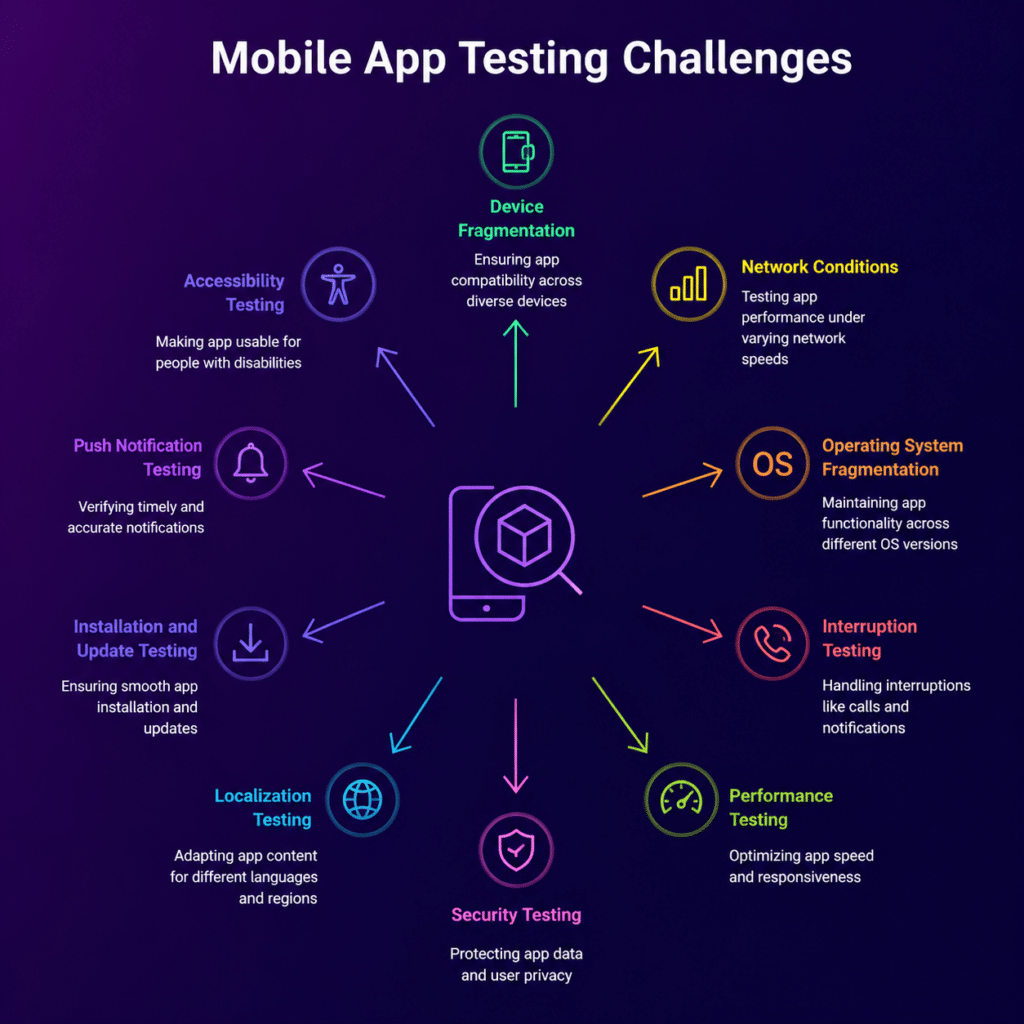
Android devices run on many different OS versions at the same time, which creates fragmentation. On the other hand, iOS users tend to adopt updates quickly.
These differences affect APIs, permissions, and runtime behavior.
Tips
- Build a test matrix based on real OS usage data
- Test both older stable versions and the latest releases
2. Hardware Diversity
Devices vary in CPU power, GPU capability, memory, and sensors.
Test scenarios should include:
- Low RAM devices with 2 to 3 GB
- Mid-range devices with limited GPU power
- High-end devices with high refresh rate displays
Focus on frame drops, crashes, texture loading issues, and memory leaks across different hardware levels.
3. Display Resolution and Aspect Ratios
Games must adjust properly to different screen types, such as:
- Standard widescreen displays
- Ultra-wide screens
- Notched devices
- Foldable devices
Common issues include:
- UI elements being clipped or misaligned
- HUD overlaps important areas
- Incorrect scaling of gameplay elements
4. Network Conditions
Network behavior is closely tied to device performance because of differences in modems and OS level networking.
Test under:
- Slow 3G connections
- Unstable 4G and 5G networks
- WiFi fluctuations
- Offline scenarios
Best Practices for Building a Compatibility Test Strategy
1. Define Your Device Test Matrix
Group devices based on:
- Market share across Android and iOS
- Target regions
- Performance tiers
- Screen sizes and resolutions
Keep this matrix updated regularly using analytics and user feedback.
2. Prioritize Devices Based on Real Usage
Use data to identify:
- Devices with the highest user activity
- OS version distribution
- Regional device trends
This allows you to focus testing efforts where they matter most.
3. Combine Real and Virtual Devices
A balanced approach works best:
- Real devices provide accurate performance and hardware behavior
- Emulators and simulators help with quick iteration and automation
Platforms like Kobiton give teams access to real devices in the cloud, making it easier to test across a wide range of hardware without maintaining a physical lab.
4. Automate Where It Makes Sense
Automation is ideal for repetitive checks, such as:
- App launch and load time validation
- UI scaling across resolutions
- Basic user interaction flows
Manual testing should focus on gameplay experience, edge cases, and usability issues.
5. Monitor Performance Continuously
Track key metrics like:
- Frame rate stability
- App launch time
- Memory usage
- Crash frequency
Run baseline tests early and compare results across devices to catch issues sooner.
Tools for Device Compatibility in Mobile Game Testing
1. Cloud Device Labs
Cloud platforms provide access to real devices hosted remotely.
Benefits include:
- No need to maintain physical devices
- Access to a wide range of OS versions and device types
Teams often use solutions like Kobiton to run manual tests, perform regression checks, and validate behavior on popular devices.
2. Automation Frameworks
Automation tools help run tests quickly across multiple devices.
Common use cases:
- UI testing across different screen sizes
- Integration with CI pipelines
- Automated log collection
These frameworks help maintain consistency across builds.
3. Performance Monitoring and Crash Reporting
Performance tools help compare behavior across device groups.
Key metrics include:
- Frame rate drops
- Thermal throttling
- Memory usage on lower-end devices
- Crash reports linked to specific devices
Where Compatibility Testing Fits in the QA Workflow
Compatibility testing should be part of every stage of development.
Recommended phases:
Pre Alpha
Run early tests on key devices to confirm basic stability
Alpha and Beta
Expand device coverage and focus on UI issues and performance edge cases
Release Candidate
Run the full test matrix with both automated and manual testing
Post Release
Monitor live data and fix device-specific issues quickly
Common Compatibility Challenges and How to Handle Them
UI Misalignment
Use flexible layouts and test on extreme screen sizes
Memory Issues on Low-End Devices
Optimize assets and scale textures dynamically
Input Delays
Test across devices with different touch response rates
Network Related Bugs
Simulate unstable connections and handle failures smoothly
Checklist for Device Compatibility Testing
| Category | What to Test |
| Installation | Install and uninstall across OS versions |
| Launch | Cold start, resume, interruptions |
| UI | Layout scaling and safe area handling |
| Interaction | Touch and gesture responsiveness |
| Performance | Stable frame rates |
| Resource Usage | Memory, battery, thermal behavior |
| Sensors | Gyroscope and orientation changes |
| Networking | Offline and slow connections |
Conclusion
Device compatibility testing plays a key role in delivering a reliable mobile gaming experience across a wide range of devices.
With a structured approach, a mix of real and virtual testing, and the right tools, teams can reduce post-release issues, improve player retention, and maintain consistent performance across their mobile game testing process.