Modern mobile teams are expected to release updates quickly without compromising user experience. This is where Continuous Testing becomes a key part of the development process, especially when combined with real device testing instead of relying only on emulators.
This guide explains how Continuous Testing works for mobile apps, why real devices are necessary, and how teams can implement it effectively within CI CD pipelines.
What is Continuous Testing in Mobile Apps?
Continuous Testing is the practice of running automated tests throughout the entire software lifecycle, from development to production, to get fast and consistent feedback on every code change.
Instead of leaving testing until the final stage, it becomes part of every step in the CI CD pipeline. This allows teams to identify issues early, reduce risk, and release updates with more confidence.
For mobile apps, Continuous Testing goes beyond simple checks. It includes:
Running tests across multiple devices and operating system versions
Validating UI behavior, performance, and network response
Monitoring real user conditions after release
Improving the product continuously through feedback loops
Why Continuous Testing Needs Real Devices
Mobile environments are unpredictable. Emulators are useful for early testing, but they cannot fully replicate real world conditions such as battery consumption, network instability, or hardware interactions.
Testing on real devices provides a more accurate view of how the app performs in real user scenarios.
Key advantages of real device testing
Real world conditions allow validation under actual network environments and device states
User experience is more accurate, including gestures, responsiveness, and UI rendering
Device fragmentation is handled better across different screen sizes, OS versions, and hardware types
Hardware interactions, such as GPS, camera, sensors, and notifications, can be tested reliably
Cloud-based platforms like Kobiton give teams access to a wide range of real devices without the need to maintain physical labs. This improves scalability, reduces overhead, and allows teams to collaborate more effectively across locations.
Core Principles of Continuous Testing for Mobile Apps
Test Automation First
Automated tests run on every code change, providing immediate feedback and reducing dependency on manual testing.
Shift Left Testing
Testing starts early in development so issues are caught before they become costly to fix.
Shift Right Testing
Testing continues after release through monitoring and real user feedback, helping teams understand how the app behaves in production.
Parallel Execution on Real Devices
Tests run simultaneously across multiple devices, reducing execution time while increasing coverage.
Continuous Feedback Loop
Developers, QA, and DevOps teams share insights continuously, which helps improve quality with every iteration.
CI CD Integration
Testing is fully integrated into pipelines so that every build is automatically validated before moving forward.
Continuous Testing Workflow for Real Devices
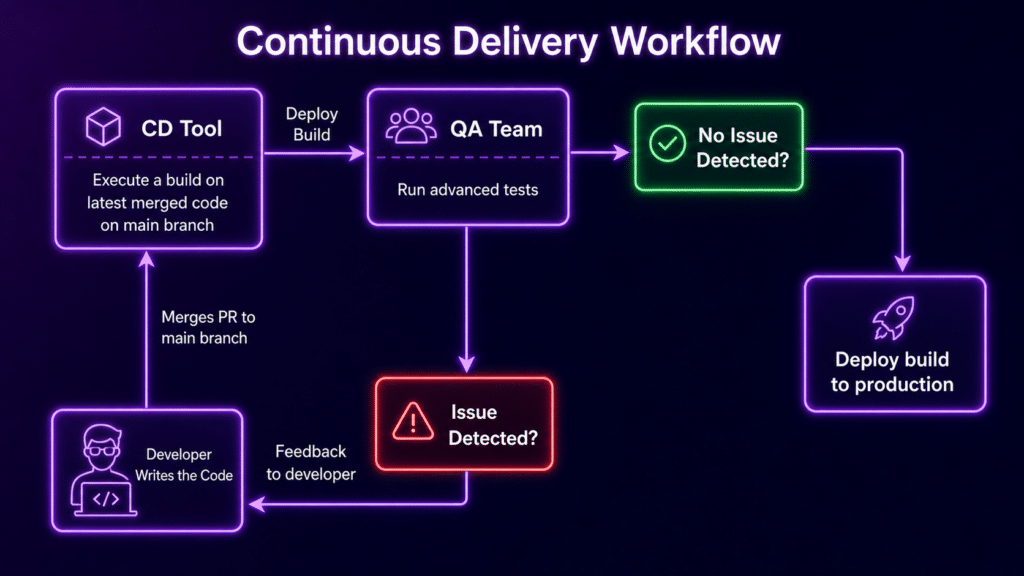
A typical workflow follows a structured path:
Step 1: Code Commit
Developers push changes to the repository.
Step 2: CI Trigger
CI tools such as Jenkins or GitHub Actions start automated builds.
Step 3: Test Execution on Real Devices
Tests run on a cloud-based device lab that covers multiple devices and OS versions, often using platforms like Kobiton.
Step 4: Parallel Testing
Multiple test cases run at the same time to reduce overall execution time.
Step 5: Results and Feedback
Failures, logs, and performance metrics are reported immediately, allowing quick action.
Step 6: Deployment or Fix
If tests pass, the build moves to staging or production. If tests fail, issues are fixed and tests are re run.
Key Use Cases
Regression Testing
Automatically confirm that new updates do not break existing features.
Cross Device Compatibility Testing
Run the same test suite across Android and iOS devices to maintain consistency.
Performance Testing
Measure responsiveness and stability under real network conditions.
CI CD Pipeline Validation
Stop faulty builds before they reach production.
Post Release Monitoring
Track crashes, latency, and user behavior to understand real-world performance.
Challenges in Continuous Testing for Mobile
Mobile testing introduces several challenges that teams need to plan for.
Device Fragmentation
A wide range of devices, OS versions, and configurations increases testing complexity.
Network Variability
Apps must perform reliably across unstable and changing network conditions.
Test Maintenance
Frequent UI changes can break automated scripts, requiring ongoing updates.
Limited Device Access
Maintaining physical devices is costly and difficult to scale without cloud solutions.
Fast Release Cycles
Testing must keep pace with rapid deployments in agile environments.
Best Practices for Continuous Testing on Real Devices
Use real device cloud platforms instead of maintaining in-house labs to improve scalability and access
Focus on high-impact test cases, especially critical user journeys that directly affect user experience
Run tests in parallel across multiple devices to reduce execution time
Keep test scripts stable by using reliable selectors or scriptless approaches where possible
Monitor production continuously to track real user metrics such as crashes, latency, and engagement
Align development, QA, and operations teams so feedback is shared quickly and acted on efficiently
Continuous Testing vs Traditional Testing
Timing
Continuous Testing runs throughout the lifecycle
Traditional Testing happens at the end of development
Speed
Continuous Testing provides fast feedback
Traditional Testing results in delayed feedback
Device Coverage
Continuous Testing uses real devices and cloud infrastructure
Traditional Testing is limited to a smaller set of devices
Automation
Continuous Testing relies heavily on automation
Traditional Testing uses less automation
Risk
Continuous Testing reduces risk through early detection
Traditional Testing carries a higher risk due to late issue discovery
How Kobiton Supports Continuous Testing
Kobiton helps teams implement Continuous Testing for mobile apps by providing access to real devices through a scalable cloud platform.
It allows teams to run tests in parallel across many devices, integrate testing into CI CD pipelines, and receive real-time logs and insights. This setup removes the need for physical device labs while improving both speed and test coverage.
By testing under real-world conditions, Kobiton helps teams identify issues that might otherwise go unnoticed in emulator-based testing.
Future of Continuous Testing for Mobile
Continuous Testing is evolving with new technologies and approaches.
AI-driven automation is helping generate test cases and detect issues earlier
Predictive analytics is improving how teams identify potential defects
Device selection is becoming smarter by using real user data
Integration with DevOps workflows is becoming deeper and more seamless
As mobile ecosystems continue to grow, testing will rely more on real devices, cloud infrastructure, and automation working together to deliver reliable and high quality apps.