Continuous Testing has moved far beyond simply running automated scripts. It is now about building quality checks into every stage of the delivery pipeline. Using a continuous test template can help standardize these checks across teams. In modern DevOps workflows, this approach allows teams to validate code changes as they happen, shorten feedback cycles, and release with greater confidence.
This guide explains how to design a scalable Continuous Testing framework, covering architecture, tools, and practical implementation steps. It also reflects real mobile testing needs and platforms such as Kobiton, where testing on real devices plays a central role.
What Is Continuous Testing?
Continuous Testing is the practice of running automated tests throughout the software development lifecycle to provide real-time feedback on product quality.
Unlike traditional QA models, where testing happens late in the cycle, Continuous Testing:
- Starts early in development through shift left practices
- Runs continuously within CI and CD pipelines
- Covers both functional and non-functional validation
This approach allows teams to identify issues early, when they are easier and less costly to fix, while also reducing the risk of releasing unstable builds.
Why a Continuous Testing Framework Matters
Without a framework, testing often becomes a collection of disconnected scripts. A proper framework turns it into a structured, repeatable system that scales as the product grows.
Key Benefits
- Faster feedback cycles that support rapid development
- Lower regression risk through consistent validation
- Stronger test coverage across multiple layers
- Greater confidence in every release
When testing is fully integrated into CI and CD, teams can validate software continuously instead of waiting until the final stages of development.
Continuous Testing Framework Architecture
A solid architecture is the foundation of any reliable Continuous Testing setup. It defines how tests are structured, executed, and reported.
1. Core Layers of the Framework
a. Test Pyramid Structure
- Unit tests handle small pieces of logic and run quickly in large volumes
- API or service tests validate business logic and integrations
- UI tests cover end-to-end scenarios, but are fewer due to higher maintenance
This layered model keeps execution efficient while maintaining strong coverage.
b. CI and CD Integration Layer
- Automated triggers on every code commit
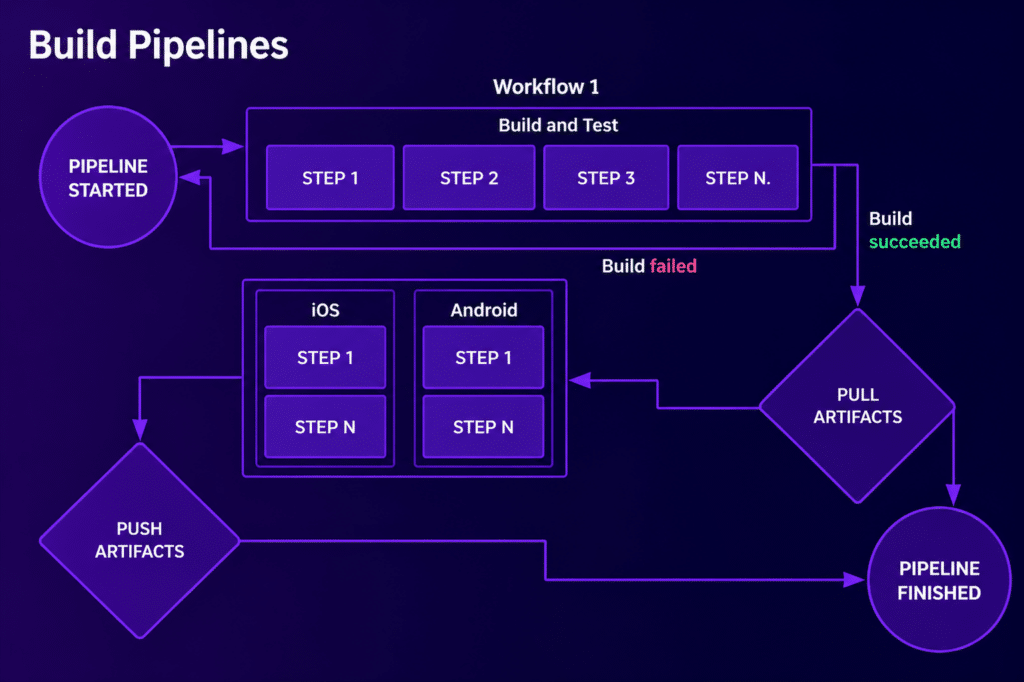
- Pipelines that execute tests as part of the build process
- Validation checkpoints that prevent faulty builds from progressing
c. Test Environment Layer
- Real devices for accurate mobile testing
- Emulators and simulators for quick validation
- Service virtualization to isolate dependencies
Stable and consistent environments are necessary to produce reliable test results, especially at scale.
d. Test Data Management
- Dynamic data generation for flexible testing
- Secure handling of sensitive data
- Environment-specific datasets for realistic scenarios
e. Reporting and Analytics Layer
- Central dashboards for visibility
- Clear failure insights to speed up debugging
- Risk-based reporting to highlight critical issues
2. High-Level Architecture Flow
Code Commit → CI Pipeline → Automated Test Execution →
Test Environment (Real Devices or Cloud) → Results → Feedback Loop
This continuous loop allows teams to validate changes quickly and act on feedback without delay.
Key Components of a Continuous Testing Framework
1. Test Automation Engine
This component manages test execution, supports parallel runs, and handles validation across platforms.
2. Orchestration Engine
It coordinates when and how tests run, manages dependencies between services, and prioritizes tests based on risk and impact.
3. Device and Environment Management
For mobile applications, this layer is especially important. Platforms like Kobiton provide access to real devices in the cloud, helping teams test across a wide range of devices without maintaining physical labs.
4. Test Repository
A centralized location for:
- Test cases
- Execution history
- Coverage mapping
This improves visibility and makes it easier to reuse and maintain tests.
5. Feedback and Monitoring System
- Real-time alerts when tests fail
- Performance tracking across builds
- Quality gates that control releases
Tools for a Continuous Testing Framework
A reliable framework uses a combination of tools across different stages of the pipeline.
CI and CD Tools
- Jenkins
- GitLab CI
- CircleCI
These tools automate build, test, and deployment workflows.
Test Automation Tools
- Selenium for web testing
- Appium for mobile applications
- Cypress and Playwright for modern web apps
Unit Testing Frameworks
- JUnit
- NUnit
- Jasmine
Performance and Monitoring Tools
- JMeter
- Grafana
- Splunk
Mobile Testing Platforms
- Kobiton for real device testing and actionable insights
Step-by-Step Implementation Guide
Step 1: Define Your Testing Strategy
Identify the types of tests required and align them with business risks. Set clear quality benchmarks so teams know what defines a successful release.
Step 2: Integrate with CI and CD
Configure pipelines to trigger tests on every commit. Add quality gates so only stable builds move forward.
Step 3: Set Up Test Infrastructure
Use cloud-based environments to scale testing easily. For mobile applications, include real device testing through platforms like Kobiton to capture real-world behavior. Containerization tools such as Docker and Kubernetes can help standardize environments.
Step 4: Build Automated Test Suites
Focus on API tests first, as they are stable and provide strong coverage. Keep UI tests limited but meaningful. Write reusable scripts to reduce maintenance effort over time.
Step 5: Implement Smart Test Execution
Run only the tests affected by recent changes using test impact analysis. Combine this with parallel execution to reduce overall test time.
Step 6: Add Reporting and Feedback
Set up dashboards that show test results clearly. Use automated alerts so teams can respond quickly to failures. Include root cause insights where possible.
Step 7: Continuously Improve
Regularly review test performance. Remove unstable tests, improve coverage, and refine pipelines to keep execution efficient.
Best Practices for Continuous Testing
Start Testing Early
Testing during development helps catch defects before they grow into larger problems.
Focus on API Testing
API tests offer strong coverage with lower maintenance compared to UI tests.
Use Real Devices for Mobile Testing
Emulators cannot fully replicate real-world conditions. Real devices provide more accurate results and help identify issues related to performance, hardware, and network behavior.
Automate Where It Makes Sense
Automate repetitive processes such as test execution, reporting, and environment setup to save time and reduce human error.
Maintain Test Stability
Keep scripts clean and reliable. Use stable locators and remove flaky tests that produce inconsistent results.
Prioritize Based on Risk
Run high-impact tests first so critical issues are identified early in the pipeline.
Common Challenges and Practical Solutions
Slow test execution can delay feedback. This can be improved by running tests in parallel and selecting only the relevant tests for each build.
Flaky tests reduce trust in automation. Stable environments and better scripting practices help address this issue.
Device fragmentation is a major concern in mobile testing. Using a real device cloud such as Kobiton, allows teams to test across many device types without added overhead.
Complex pipelines can become difficult to manage. Simplifying orchestration and keeping configurations clean makes maintenance easier.
High maintenance effort often comes from poorly structured tests. Modular design and reusable components help reduce this burden.
Continuous Testing for Mobile Apps
Mobile testing introduces additional challenges such as operating system variations, device diversity, and changing network conditions.
A strong Continuous Testing framework for mobile applications should include:
- Testing on real devices
- Automated execution across multiple environments
- Performance monitoring under real conditions
Kobiton supports this by providing scalable access to real devices, faster issue detection through intelligent insights, and smooth integration with CI and CD pipelines.
KPIs to Measure Success
- Test coverage percentage
- Execution time
- Defect detection rate
- Pass and fail ratio
- Deployment frequency
Tracking these metrics helps teams understand how well the framework is performing and where improvements are needed.
Final Thoughts
A well-structured Continuous Testing framework turns testing into a constant feedback system rather than a final checkpoint. With the right architecture, tools, and implementation approach, teams can release reliable applications faster while maintaining high-quality standards, especially in mobile environments where real device testing plays a key role.