Mar 19, 2025
AI-Powered Test Automation: What is the difference between No Code and Low Code?

Frank Moyer
Read More
The app came up with isConfigured=false and every purchase button disabled. So I did the natural thing in the vibe coding era: I let the AI that built it investigate. It checked its own code: correct. It checked the environment keys: loaded and exported, both of them. It inspected the JavaScript bundle it was serving and found the key inlined right there, verified three times. Every artifact
the AI could reach said its build was fine. The model had, in effect, debugged itself and passed.
The phone disagreed. It was quietly running an older cached bundle it had fetched days earlier, something no amount of inspecting the code, the keys, or the served bundle could reveal. A force-stop and relaunch pulled the current one, the buttons lit up, and the “bug” was gone. Zero code changes.
That is the whole problem with testing AI-generated code, compressed into one evening. Vibe coding produced a working app, the AI investigated its own work and produced a green light, and the only thing telling the truth was a physical Galaxy in a device lab.
Here’s the context. Over the past month I vibe-coded a real mobile app with Claude Code, now at 48 builds across Android and iOS, with a monetization layer, a persistence layer, and PDF export. Roughly 99% of the work was automated: the AI wrote the code, wrote the unit tests, dispatched the device runs, even filed its own session logs. And from build one, I made a rule: the AI never gets to grade its own homework. Every build has to prove itself somewhere the AI can’t flatter itself.
This is the field log of what that gate caught.
Everyone has read the disaster stories by now: the exposed databases, the deleted production data, the mass-leaked API keys. The data behind them is consistent. GitClear’s 2025 analysis of 211 million changed lines of code found duplicated code blocks rose eightfold while refactoring collapsed from roughly 24% of changes to under 10%: AI generates fast and cleans up nothing. Veracode’s 2025 benchmark across more than 100 models found they chose an insecure implementation in 45% of coding tasks. An April 2026 Cloud Security Alliance research note found 62% of AI-generated code carries a design flaw or a known vulnerability. And developers already know it: in Stack Overflow’s 2025 survey, 84% use or plan to use AI tools, yet only 33% trust their accuracy, with 46% actively distrusting the output.
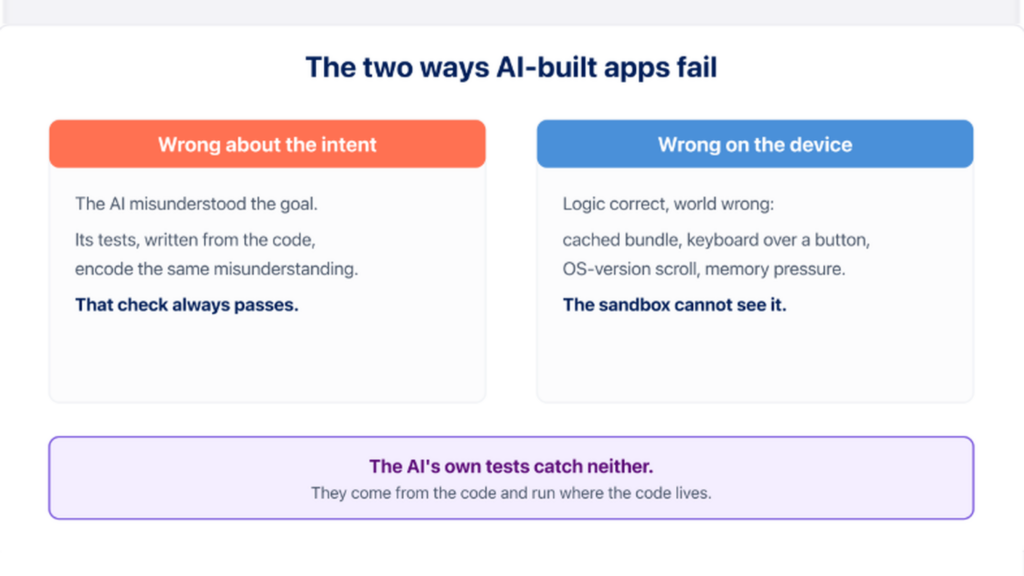
What the disaster stories rarely explain is the mechanism. AI-built apps fail in exactly two ways.
Wrong about the intent. The AI misunderstood what the app should do. Here’s the part that makes this failure mode nearly invisible: the AI’s tests encode the same misunderstanding. When the model writes tests by looking at the code it
just wrote, the tests verify that the code does what the code does. That check always passes. It never checks whether the app does what you meant.
Wrong on the device. The logic is correct and the app still fails in the world: a cached bundle, a keyboard covering a button, an OS version that handles a scroll differently, memory pressure killing a background state. The AI’s sandbox structurally cannot see any of this.
Two failure modes. The AI’s own testing catches neither, because its tests come from the code and run in an environment the model controls. Moving those same tests onto better hardware fixes nothing; flawed tests pass anywhere. The independence has to come from outside the code. So I anchored the gate to two things the code cannot touch.
The app is a port of a real spreadsheet: a real deal-analysis workbook, used on actual transactions, with formulas that produce known-correct outputs. That spreadsheet became the answer key.
Before the AI wrote each calculation engine, the expected values were pinned from the workbook into test fixtures. Not derived from the code, because the code didn’t exist yet. Written down first, by a human, from requirements, to full float precision. The current suite is 220 unit tests, all passing against numbers the AI never generated. Those unit tests and the AI’s own code inspection are what produce the green light before a build ever reaches a device.
Then the same answer key runs on-device, through the UI, the way a user would enter it. Four canonical scenarios ship with the harness:
A good short deal must produce ALL GOOD: profit $45,388, ROI 78.24%, LTV 52.74%.
A bad short deal must produce HAS ISSUES: ROI 10.25% and LTV 85.26% both failing.
A good long deal must produce ALL GOOD: $56,225, 42.67%, 65.89%.
A bad long deal must fail everything: negative $29,273, negative 9.40%, LTV 103.76%, and it must surface the maximum allowable offer of $170,000.
The AI can refactor whatever it wants. If a build renders $45,389 instead of $45,388 on a real phone, the gate fails, and no amount of confident model output argues with it. The app’s whole purpose is killing bad deals in seconds before an investor overpays; the answer key does the same job to bad builds.
That’s the fix for intent failure: correctness defined outside the code, before the code.
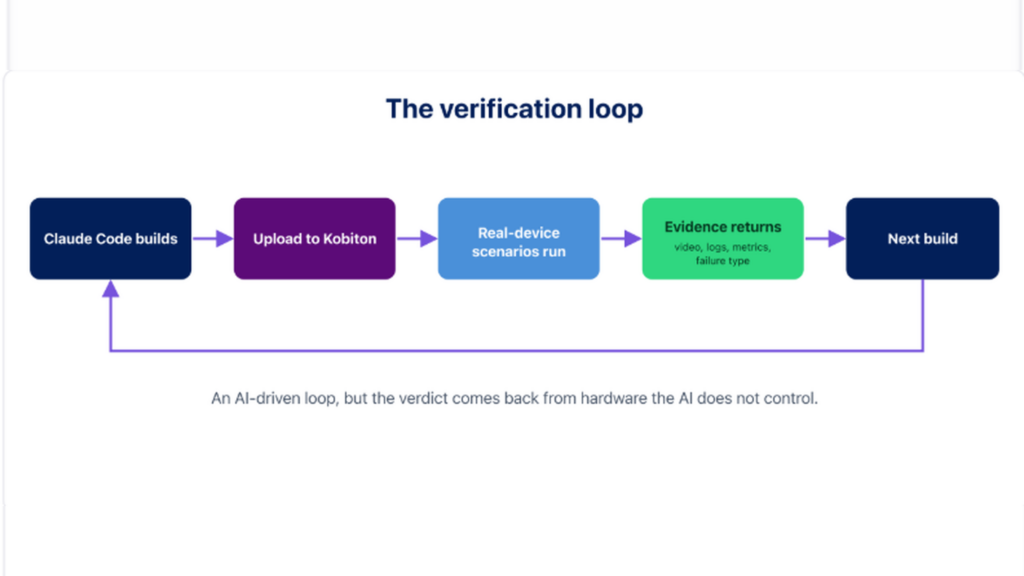
The second check is where those scenarios run. Every build uploads to Kobiton and executes the scenario suite on real devices: Galaxy S21 Ultra on Android 12
and 15, Galaxy S22 on Android 16, Pixel 8. Same scenarios, multiple OS generations, 330 real-device sessions since May, including 40 fully autonomous scenario runs. The whole loop is driven from Claude Code through Kobiton’s MCP integration, which means the AI that built the app also dispatches the tests, but the verdict comes back from hardware it doesn’t control.
What comes back is the point. Every session produces evidence the model didn’t generate: full video of the run, device logs, system metrics, and a failure type when something breaks. TIMEOUT. BLOCKER_ENCOUNTERED. SCROLL_ELEMENT_NOT_FOUND. That last one became a forensic case on its own when a scroll regression reproduced on exactly one Android condition and nowhere else, the kind of device-conditional break I wrote about in the mobile UI testing post.
The gate also had to grow up about what a failure means. Some red runs weren’t the app at all: a DC-500 infrastructure error when a device failed to connect, thermal throttling warnings on a hot Galaxy, and my stale-bundle evening. A mature gate classifies three ways: the app is wrong, the device conditions broke it, or the lab hiccupped. Conflate them and you either chase ghosts or, worse, learn to ignore red.
One more evidence class showed up that I didn’t design, and it might be the most instructive of the three.
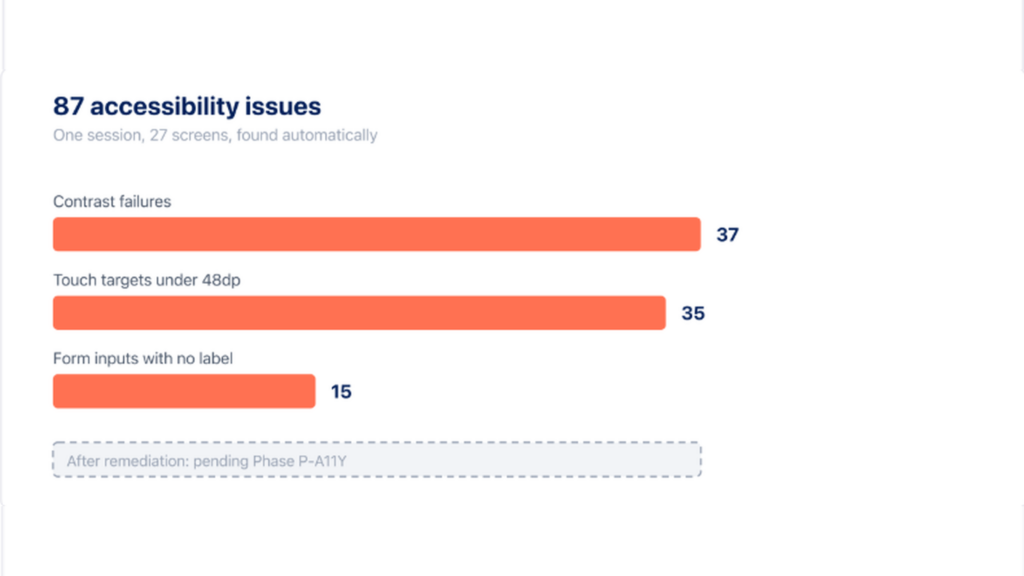
With IQS enabled on your Kobiton plan, automatic accessibility checks run in the background of every session; on my org, that meant every single run got scanned without my asking. I pulled the findings for one ordinary session via the API: 5 minutes 50 seconds of session time, 27 screens analyzed, 87 issues. Thirty-seven contrast failures, 35 touch targets below Android’s recommended 48dp touch-target size, 15 form inputs with no accessible label.
Sit with what that means. The AI’s unit tests passed. My answer-key scenarios passed. The math was perfect on every device. And the app would have shipped with buttons a lot of real people can’t reliably tap and inputs a screen reader can’t name. An entire failure category, invisible to code-derived tests AND to my human scenarios, caught only because the platform was watching on its own. Strictly, this is intent failure of the sneakiest kind: requirements nobody wrote down, so no answer key covered them.
The fix economics are the encouraging part: because the AI built the UI from shared components, one change to the shared input component clears roughly 30 of the 87 issues at once. Remediation is scheduled with a definition of done of zero issues in the app’s package. (internal link, added at publish) For the discipline behind accessibility testing itself, see the mobile accessibility testing guide; the point here is narrower: the gate caught a failure mode nobody was looking for.
What the AI’s checks said, versus what real devices said, build by build. A few rows that earn their place:
| Build | The AI’s checks | Real devices | Class |
| Jun 17 build (versionCode 4) | Green | A button the test needed wasn’t found, on one Android version (SCROLL_ELEMENT_NOT_FOUND) | Device conditional |
| Jun 26, local dev build | Green | App looked misconfigured; the phone was running a stale cached build (isConfigured=false) | Device conditional (environment) |
| Jul 10 run | Green | The lab failed to connect to the device; a rerun passed (DC-500) | Infrastructure noise |
| Jul 9 scan session | Green | 87 accessibility findings on 27 screens | Category the tests never covered |
| Jun 27 build (versionCode 5) | Green | All four money scenarios exact to the dollar | Verified against the answer key |
When the monetization gating went live, the device suite ran the full regression against the actual release-profile build. All four money scenarios came back green on real hardware, and no paywall fired at any gated point: saving a second deal, exporting a PDF, opening the long calculator. That was the fail signal, because in the test build the bypass makes the tester a pro user; a paywall appearing would have meant the bypass was broken. The production build carries neither bypass flag, so the free-pro backdoor can’t ship. The purchase flow itself was proven separately, by hand, on a tethered phone: two test purchases, receipts accepted, pro unlocked, and the deliberate failure path granting nothing.
The uncomfortable math: AI multiplied my build velocity. One person, 48 builds in a month, working nights, with roughly 99% of the work automated end to end. For honesty’s sake, here is the complete list of what stayed manual: the app store account, signing, and product setup; the payment provider’s dashboard configuration and paywall template; one tethered-phone purchase verification the day money flows went live; and the judgment calls, deciding scope, approving fixes, killing bad directions. Everything else, code, tests, device runs, logs, was generated.
Generation is no longer the constraint; verification is. If your verification doesn’t scale with your generation, you haven’t accelerated development, you’ve automated the production of untested code. Senior engineers report spending a substantial portion of their work week triaging and refactoring AI output that reached production unchecked.
This answer-key-plus-real-device loop is one answer at solo scale, and it holds at team scale because the shape is the same as the maturity model jump from Level 02 to Level 03: real devices in CI as the default gate, not the thing you grab after a bug report. The AI twist is only that the volume is higher and the code’s confidence is fake. Development on this app now runs parallel AI agent lanes, engines and screens on separate branches merged through PRs, and verification keeps pace because pinned tests gate every merge and device runs gate every build. For regulated teams the same gate runs private cloud, on-prem, or air gapped; the discipline doesn’t care where the devices rack.
If you take one number to your VP of Engineering, take the trust gap: 84% of developers use or plan to use AI tools, 33% trust what comes out. The gate is how you close it, because trust built on evidence scales and trust built on vibes doesn’t.
1. Who writes your tests? (the AI, from the code / humans, from requirements)
2. Where do they run? (simulator or emulator / real devices)
3. Where do expected results come from? (the code’s current behavior / an external source of truth)
Verdicts: blind to intent, blind to device, blind to both, or gated.
Anchor verification to two things the code can’t touch: scenarios with human-defined expected results written from requirements, and execution through the real UI on real devices. The AI’s own tests verify the code against itself; the two external checks verify it against your intent and your users’ hardware.
For maintenance work, yes: draft scripts, locator suggestions, flagging broken steps, with a human in the loop. For verdicts, no. If the same model writes the code and the tests, the tests inherit the code’s misunderstandings and validate its bugs. Expected results have to come from a source the model didn’t produce.
The stale-bundle story is the answer. Every artifact the AI could inspect said the build was fine; the physical phone was running different code entirely. Simulators share the AI’s blind spots because they live in the same controlled environment. Real hardware is the only party in the loop with no stake in the outcome.
Vibe testing is the verification half of vibe coding: natural-language test scenarios, run autonomously on real devices, and judged against expected results a human defined from requirements rather than from the code the AI wrote. The plain-English scenario is the easy part; the expected results and the real hardware are what make it testing instead of theater.
Vibe coding is real, and it’s fast, and I’m keeping the app. But the speed only becomes shippable speed when every build has to convince something that
can’t be sweet-talked: an answer key written before the code, and hardware that doesn’t care how confident the model sounds. That’s the wedge worth keeping: anchor your testing to things the code can’t touch.
Where does your team actually stand? Kobiton’s Mobile Maturity Assessment is a 20-minute read on your testing practice against industry benchmarks, with a custom report and a six-month action plan reviewed with a specialist.