Jan 2, 2024
iOS Automation Testing Best Practices

Cara Suarez
Read More
Real device testing is often treated as the final step before release.
Teams run their tests, verify a few key flows, and confirm that everything works on physical hardware. Once that passes, the app is considered ready.
But real device testing isn’t just a final check.
In many cases, it’s the first time an app is exposed to the conditions users actually experience. And even when tests pass, that doesn’t always mean the app is ready for release.
As we’ve explored throughout this series, mobile apps behave differently across devices, operating systems, and real-world conditions. When done with intention, testing on real devices helps surface those differences early.
In this guide, we’ll walk through practical best practices for real device testing, including how to approach device coverage, test under real-world conditions, and integrate real devices into a broader testing strategy.
Real device testing is where theory meets reality.
Emulators and simulators are valuable during development, but they cannot fully reproduce how an app behaves on actual hardware. Differences in performance, sensors, network conditions, and operating system behavior often only appear on physical devices.
As discussed in our article on real devices vs emulators, this gap is one of the main reasons bugs escape into production.
Real devices introduce the variability users experience every day. They show how an app behaves under real constraints, not ideal ones.
Testing on real devices helps teams move from “it works in development” to “it works for users.”
Real device testing is essential, but it’s easy to use it incorrectly.
One common mistake is treating real devices as a final validation step instead of part of the testing process. When testing only happens at the end, issues are discovered late, when they are more expensive and disruptive to fix.
Another issue is limited device coverage. Testing on only one or two devices may confirm that the app works in those specific cases, but it does not reflect how it behaves across a broader user base.
Teams also often test under ideal conditions. Stable networks, fully charged devices, and controlled environments do not reflect how users actually interact with apps.
These gaps reduce the effectiveness of real device testing.
Without a clear approach, even testing on real hardware can miss the issues that matter most.
Effective real device testing starts with thoughtful device coverage.
As discussed in our articles on device selection and prioritization [link], the goal is not to test every device, but to test the right ones.
A balanced approach typically includes:
This combination helps teams capture common user scenarios while still exposing edge cases.
Device coverage should also evolve over time. As new devices are released and user behavior shifts, testing priorities should be adjusted to reflect those changes.
Network conditions are one of the most overlooked aspects of mobile testing.
In development environments, apps are often tested on stable Wi-Fi connections. In reality, users experience fluctuating signal strength, latency, and transitions between networks.
These conditions affect how apps load data, handle requests, and recover from interruptions.
Testing under varied network conditions helps reveal issues such as timeouts, failed requests, and inconsistent user experiences.
Some teams simulate these conditions, while others test directly on real networks. Either approach provides a more accurate picture of how the app behaves outside controlled environments.
Real device testing does not always need to be done manually.
Automation can be extended to real devices, allowing teams to run tests at scale while still validating behavior on physical hardware.
This is especially useful for regression testing, where the same scenarios must be verified repeatedly across multiple devices.
By combining automation with real device access, teams can increase coverage without significantly increasing testing time.
Manual testing still plays an important role, particularly for exploratory testing and usability validation. Automation ensures consistency; manual testing provides context.
Performance often varies significantly between devices.
An app that performs well on a high-end device may struggle on older or lower-powered hardware. Differences in CPU, memory, and thermal behavior can all affect responsiveness and stability.
Monitoring performance across a range of devices helps teams identify these issues early.
This includes tracking load times, responsiveness, and resource usage under different conditions.
Testing across devices with varying capabilities ensures that performance remains acceptable for the majority of users, not just those with the latest hardware.
Real device testing is more than a final validation step. It is a critical part of building reliable mobile applications.
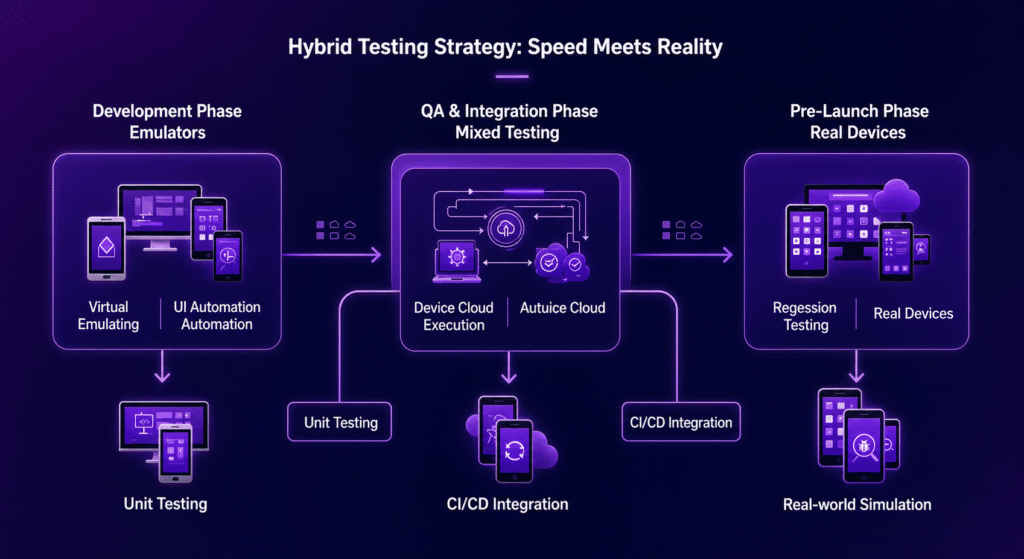
By testing across the right devices, under realistic conditions, and as part of a broader testing strategy, teams can uncover issues that would otherwise go unnoticed.
Combined with other testing approaches, real device testing helps teams build, test, and release with greater confidence.