Feb 8, 2024
Kobiton Open-Sources Appium Script Generation

Brittney Lawrence
Read More
As a successful developer, you should be aware of tools and strategies that can enable you to not only do your job successfully but more efficiently, as well. That’s why a comprehensive understanding of open-source tools like Appium vs Selenium – including how Selenium for mobile testing compares with other automation approaches – and understanding the differences between them can be so important.
Appium is a popular open-source test automation framework for mobile applications. It is widely used for mobile app automation testing, enabling the automation of tests on various mobile platforms, including native, hybrid, and web applications. Appium testing is frequently used for both mobile and desktop applications and was first released in 2012. Appium speaks the W3C WebDriver protocol, extended with mobile-specific capabilities and commands, to operate Android and iOS sessions and to drive native, mobile web, and hybrid applications.
Selenium is also an open-source test automation framework but for web applications alone. Selenium enables cross-browser testing, allowing web application testing and verification for consistency and correctness across different web browsers such as Chrome, Brave, Firefox, and others. While Selenium is not primarily designed for native mobile apps, teams may explore selenium for mobile testing scenarios when testing mobile web applications through supported browser automation approaches.
Selenium was first released in 2004. It facilitates automated testing, eliminating the need for manual efforts by using tools like Selenium Grid.
Appium and Selenium look alike from the test script because they share the same foundation: the W3C WebDriver protocol. Your test code sends standardized commands (find this element, click it, read its text) over HTTP, and something on the other end carries them out. The difference is what sits on the other end.
Since Appium 2, drivers are no longer bundled with the server. You install only the ones you need (for example, appium driver install uiautomator2), so each platform driver can be updated independently of Appium itself.
| Layer | Appium | Selenium |
|---|---|---|
| Test script | Appium client library (builds on Selenium’s) | Selenium client library |
| Protocol | W3C WebDriver plus mobile extensions | W3C WebDriver |
| Middle layer | Appium server (Node.js) | None locally; Selenium Grid when running at scale |
| Automation backend | UiAutomator2 (Android), XCUITest (iOS), other drivers for Windows and macOS desktop apps | chromedriver, geckodriver, safaridriver, msedgedriver |
| Where tests run | Real device, emulator, or simulator | Desktop browser, or mobile-emulated browser |
Appium vs Selenium
Select your use case to highlight the best fit.
Despite their similarities, there are some notable differences between Appium and Selenium.
For example, Appium testing is primarily focused on mobile applications, while Selenium is widely used for web application testing. Appium offers cross-platform testing for both Android and iOS, supporting testing of mobile apps on different platforms. Additionally, both tools can run tests across different operating systems, including Android, iOS, and Windows. Selenium Grid allows for parallel testing across different environments, which helps manage large test suites faster. Selenium provides broad browser compatibility for web applications.
Regardless of these differences, it’s important to learn how mobile test automation tools like Appium and Selenium can impact any comprehensive application development strategy.
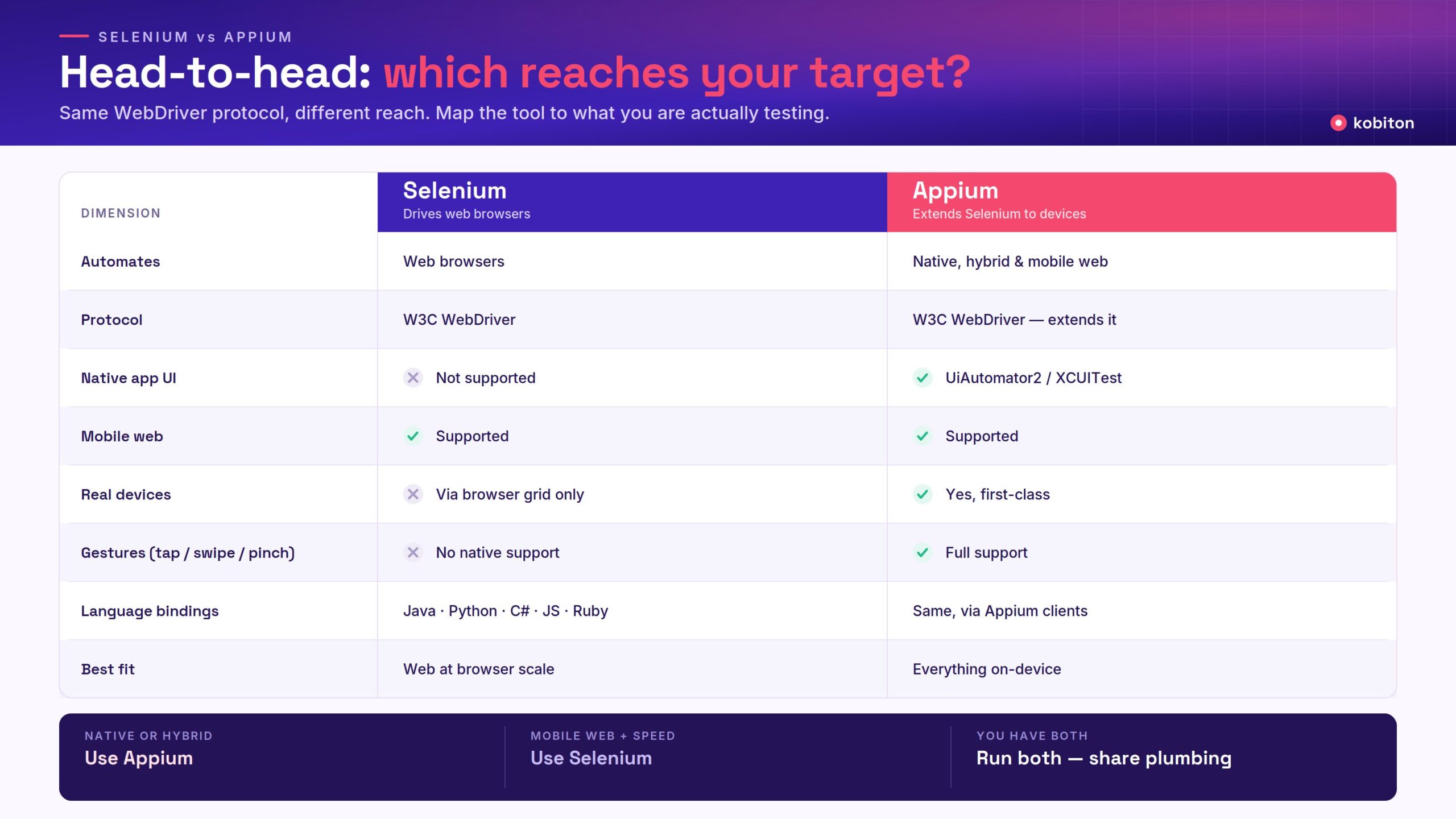
If you only need the headline differences, this table summarizes how the two frameworks compare. The sections below go into each dimension in more detail.
| Dimension | Appium | Selenium |
|---|---|---|
| What it automates | Mobile apps (native, hybrid, and mobile web); desktop apps through additional drivers | Web applications running in a browser |
| Native Android and iOS UI | Yes, through platform drivers (UiAutomator2, XCUITest) | No |
| Hybrid apps (native shell + web views) | Yes; switches between native and web-view contexts in one session | No |
| Mobile web | Yes; drives Chrome and Safari on real devices, emulators, and simulators | Emulated mobile viewports in desktop browsers; real mobile browsers need extra tooling such as Appium or a real-device cloud |
| Mobile gestures (swipe, pinch, long-press) | Yes, through W3C Actions and driver-specific mobile commands | Pointer and touch actions inside the browser only |
| Protocol | W3C WebDriver, extended with mobile capabilities and commands | W3C WebDriver |
| Architecture | Client library → Appium server (Node.js) → platform driver → device | Client library → browser driver → browser |
| Parallel execution | Yes, across multiple devices; each parallel session needs its own device | Yes, through Selenium Grid or a cloud grid |
| Setup footprint | Heavier: Node.js, Appium server, drivers, Android SDK and/or Xcode (macOS only for iOS) | Lighter: a language binding and a browser; Selenium Manager fetches drivers automatically |
| Execution speed | Slower per test: device startup, app install, and on-device rendering add time | Faster per test, especially headless or on a grid |
| Cost and license | Free, open source (Apache 2.0) | Free, open source (Apache 2.0) |
| Best fit | Anything that runs on a mobile device | Web applications at browser scale |
In practice, here’s what each framework needs before you can run a first test:
Once everything is installed, the test code is strikingly similar. Here are the same steps in Python; the main difference is how the session is configured.
| Step | Selenium (web) | Appium (Android app) |
|---|---|---|
| Imports | from selenium import webdriverfrom selenium.webdriver.common.by import By | from appium import webdriverfrom appium.options.android import UiAutomator2Optionsfrom appium.webdriver.common.appiumby import AppiumBy |
| Start a session | driver = webdriver.Chrome() | options = UiAutomator2Options()options.device_name = 'Pixel 8'options.app = '/path/to/app.apk'driver = webdriver.Remote('http://127.0.0.1:4723', options=options) |
| Open the page or app | driver.get('https://example.com/login') | The app is installed and launched when the session starts |
| Find and tap an element | driver.find_element(By.ID, 'login').click() | driver.find_element(AppiumBy.ACCESSIBILITY_ID, 'Login').click() |
| End the session | driver.quit() | driver.quit() |
Both frameworks are free, open source, and widely adopted, but each comes with trade-offs worth understanding before you commit.
Appium is designed to address platform fragmentation in mobile app testing for both Android and iOS platforms. Appium is part of the Selenium WebDriver family and utilizes the Selenium WebDriver API.
Developing a test automation framework in Appium can be straightforward once users are familiar with many of Kobiton’s recommended best practices for the platform.
Regarding mobile app development, Appium enables the QA to write test scripts in different programming languages — such as JavaScript, Java, Ruby, Python, PHP, and C#.
At their core, top mobile automation tools like Appium are designed to assist with the implementation of automation testing strategies; Kobiton has found that Appium specifically excels at most mobile application development plans.
Appium offers cross-platform testing for mobile gaming applications, and integration with various tools and frameworks for mobile app testing. This can prove to be quite valuable, with the Appium platform providing compatibility with different devices and across multiple platforms.
Appium testing also provides a great degree of scalability and flexibility, making it an efficient choice for mobile testing in the enterprise environment.
Selenium is an open-source test case automation framework that enables QAs to automate web application testing. Its tool suite today consists of three main components: Selenium WebDriver, Selenium IDE, and Selenium Grid. Selenium facilitates automated testing, eliminating the need for manual efforts, and supports cross-browser testing across various web browsers such as Chrome, Brave, and Firefox. Given its unique characteristics, there are a handful of testing scenarios when it might be an ideal open-source tool for your own applications.
Selenium testing supports multiple programming languages and integration with various tools and frameworks for web app testing.
Additionally, Selenium testing provides features such as browser compatibility testing, UI testing, and regression testing, making it an efficient choice for testing e-commerce platforms. Selenium is also used to verify and test functional test scenarios on e-commerce websites, ensuring cross-browser compatibility and functionality.
When it comes to SaaS solutions, Selenium provides scalability and flexibility — making it an efficient choice for testing SaaS solutions in different environments.
For many teams, Appium vs Selenium isn’t an either/or decision. If you have a web application and a mobile app, you’ll likely run both, and because Appium builds on Selenium’s WebDriver client, much of your existing investment carries over.
| Area | Carries over from Selenium | Changes for Appium |
|---|---|---|
| Language and client | Same language and WebDriver commands (find element, click, send keys, waits) | Add the Appium client library for your language |
| Test architecture | Page objects, test data handling, assertions, and runners such as TestNG, JUnit, or pytest | Screens replace pages; some flows need mobile-specific steps |
| Session setup | Same pattern of creating a driver with options | Mobile capabilities: platformName, appium:automationName, appium:deviceName, appium:app |
| Locators | ID and XPath strategies still exist | Prefer accessibility IDs and platform-native selectors over CSS selectors and long XPath |
| Interactions | Clicks, text entry, explicit waits | Gestures (swipe, scroll, long-press), app lifecycle, permissions, and context switching for hybrid apps |
| CI/CD | Same pipeline, reporting, and scheduling | The pipeline needs access to devices or a device cloud |
A practical way to adopt Appium alongside an existing Selenium suite:
For a deeper look at the migration path, see Selenium for mobile testing: where it works, and where Appium takes over.
Choosing a framework is only half the decision. Where your Appium and Selenium tests run determines which bugs they can find.
| Environment | Good for | What it misses |
|---|---|---|
| Desktop browser with mobile emulation (Selenium) | Fast checks of responsive layout, mobile navigation, and mobile-specific web flows | Real touch input, mobile browser differences (such as Safari on iOS), OS behavior, device performance, native components |
| Android emulators and iOS simulators (Appium) | Early functional testing during development; broad OS-version coverage at low cost | Manufacturer customizations, real memory and thermal limits, sensors and biometrics, real network conditions |
| Real devices (Appium, or Selenium against real mobile browsers) | Release validation and anything hardware-dependent: performance, gestures, permissions, interruptions, OEM skins | Slower and costlier to scale in-house, which is why many teams use a real-device cloud |
Because both frameworks speak the same WebDriver protocol, the same scripts can usually move from a local emulator to a real-device cloud by changing the server URL and capabilities rather than the test logic. A common pattern is to run fast browser and emulator checks on every commit, then run the full suite on real devices before each release.
Some of the factors to consider when choosing between Appium and Selenium are:
In practice, the decision starts with one question: what are you testing? Once you know the type of application, the right framework is usually clear.
| If you’re testing… | Use | Why |
|---|---|---|
| A native Android or iOS app (.apk or .ipa) | Appium | Selenium has no access to native UI elements. Appium drives them through the UiAutomator2 driver on Android and the XCUITest driver on iOS. |
| A hybrid app (native shell with web views) | Appium | Appium can switch between the native context and the web-view context within the same test session. |
| A responsive website or PWA: layout and flow checks | Selenium | Chrome’s mobile emulation gives you a mobile viewport and user agent at browser speed, with no device setup. |
| A mobile website: real device behavior (OS dialogs, real touch, device performance) | Appium, or Selenium against a real-device cloud | Emulated viewports don’t reproduce real hardware. You need an actual mobile browser on an actual device. |
| A desktop web application across browsers | Selenium | Mature browser support, Selenium Grid for parallel runs, and the largest ecosystem of frameworks and reporting tools. |
| A web app and a native app | Both | Run each where it fits, and share the programming language, test architecture, and CI pipeline between them. |
When the app type doesn’t settle it — for example, a mobile-web product where either tool could work — weigh these factors:
Ready to decide which framework for test automation is best for your own project? Professionals at Kobiton are experienced and adept in helping organizations of any size make sense of mobile application testing strategies.
Mobile app automation testing is crucial when choosing Appium due to its support for multiple programming languages and its ability to automate any mobile app from any language and any test framework. Additionally, parallel testing is essential when choosing Selenium as it allows running multiple tests in parallel across different operating systems, browsers, and machines, thereby managing large test suites faster and reducing the total time to complete a parallel-testing complete pass.
While it is important to understand fundamentals and additional best practices for tools like Appium and Selenium, there are many other significant components and resources informing the way we successfully implement testing solutions today.
To start your own free demo – or to learn even more about Selenium vs. Appium – reach out to Kobiton today.
Yes. Appium was built on Selenium’s WebDriver approach and uses the same W3C WebDriver protocol. Appium’s client libraries build on Selenium’s, so the commands you use to find and interact with elements are largely the same. What Appium adds is a server and platform drivers that carry those commands out on mobile devices instead of in browsers.
Only for mobile web. Selenium can test websites and progressive web apps in a mobile-emulated browser, but it can’t automate native or hybrid apps because it only controls browsers. For native and hybrid apps, use Appium.
Neither is better overall; they solve different problems. Appium is the right choice for native and hybrid mobile apps, which Selenium can’t test at all. Selenium is usually the faster, simpler choice for web applications, including responsive mobile-web checks.
Yes, and many teams do. A common setup runs web tests on Selenium and native app tests on Appium, sharing the same programming language, framework code, and CI pipeline.
No. Appium is actively maintained, and Appium 2 modernized it with a W3C-only protocol and a modular architecture in which platform drivers and plugins are installed and updated separately. It remains one of the most widely used open-source frameworks for cross-platform mobile UI automation.
Selenium is still widely used for web testing and continues to evolve: Selenium 4 adopted the W3C WebDriver standard and added Selenium Manager for automatic driver setup. Newer frameworks such as Playwright and Cypress have gained ground for web testing, but neither automates native mobile apps, so they compete with Selenium rather than with Appium.
Selenium is usually easier to start with because setup is lighter and browsers are easy to inspect. Appium’s API will feel familiar to anyone who knows Selenium; the extra learning is in device setup, capabilities, mobile locators, and gestures.
Yes. Both are code-based frameworks: you write tests in a programming language such as Java, Python, or JavaScript. Selenium IDE can record browser steps and Appium Inspector helps you find mobile locators, and some platforms can generate Appium scripts for you, but the frameworks themselves are used through code.
Yes. Appium runs tests in parallel across multiple devices or emulators, with each session on its own device, and scales further on a device cloud.