Mobile game automation should not start with everything
Mobile game automation testing can save teams time, expand coverage, and help catch issues earlier in development. But automation works best when it is aimed at the right parts of the game.
That distinction matters because mobile games are not simple one-path applications. They combine UI, input, timing, rendering, performance, audio, progression systems, device behavior, and player choice. Some of those areas are good automation candidates. Others still need human judgment.
A test can confirm that a menu opens, a reward appears, a setting persists, or a purchase flow completes. It cannot fully decide whether combat feels fair, whether a tutorial makes sense, whether the difficulty curve feels right, or whether a player understands what the game is asking them to do.
That does not make automation less useful.
It means mobile game automation testing needs a clear strategy. Automate the stable systems around gameplay first. Keep gameplay feel, accessibility experience, balance, and player understanding in human hands.
Good mobile game automation candidates
Mobile game automation works best when the expected result is clear.
Strong candidates include:
- login and account creation
- onboarding
- menu navigation
- settings
- store flows
- inventory updates
- rewards
- achievements
- saved progress
- profile updates
- matchmaking entry points
- push notification handling
- payment confirmation
- daily login bonuses
- localization checks
- social sharing flows
- app launch and startup checks
These flows matter because they support the player experience. If a player cannot log in, claim a reward, access inventory, change settings, share progress, or complete a purchase, the game experience can break before gameplay even begins.
They also tend to have clearer expected results. A login either succeeds or fails. A reward is either claimed or not. A setting is either saved or not. An item either appears in inventory or does not.
That makes these systems better candidates for automation than open-ended gameplay scenarios.
Automate repeatable regression checks
Regression testing is one of the clearest uses for mobile game automation.
Games change constantly. Teams add characters, maps, levels, quests, items, shop updates, seasonal content, monetization changes, events, balance adjustments, and bug fixes. Each change can affect systems that were already working.
Automated regression checks help teams confirm that known paths still work after changes.
For example, teams may automate checks for:
- app launch
- login
- tutorial completion
- menu navigation
- store access
- inventory updates
- reward claiming
- settings changes
- saved state loading
- basic level entry
- account sync
- payment confirmation
- crash-free startup
These tests do not replace deeper QA. They give teams a fast signal that core systems are still intact.
Automate smoke tests before deeper testing
Smoke tests are another strong fit for mobile game automation.
A smoke test answers a basic question: is this build stable enough for deeper review?
For a mobile game, an automated smoke test might check whether the app installs, launches, loads the main menu, accepts login, reaches the first playable state, and avoids immediate crashes.
That kind of automation helps teams avoid wasting manual QA time on builds that are clearly broken.
A smoke test does not prove the game is good. It proves the build is ready for more meaningful testing.
Automate store, inventory, and progression flows
Store, inventory, and progression systems are especially important in mobile games because they often connect directly to player trust.
If a player earns a reward but cannot claim it, the game feels broken. If a purchase completes but the item does not appear, trust drops quickly. If an inventory screen fails, a player may lose access to something they spent time or money earning.
Automation can help protect these flows by checking whether:
- items appear after purchase or reward claim
- currency balances update correctly
- inventory counts change as expected
- locked and unlocked states display correctly
- saved progress persists after closing and reopening the app
- achievements or milestones trigger correctly
- store screens load and respond
- payment confirmation appears
- reward claim flows complete
These areas are not always glamorous, but they are central to the game experience.
Players may forgive a funny visual glitch. They are less likely to forgive lost progress, missing purchases, or broken rewards.
Automate settings and accessibility-adjacent checks
Settings are often good automation candidates because they are structured, repeatable, and important.
For mobile games, settings may include:
- audio controls
- captions
- language
- graphics quality
- control layout
- sensitivity
- vibration or haptics
- reduced motion
- color settings
- notifications
- account preferences
Automation can help confirm that settings save, persist, and affect the game as expected.
Some accessibility-adjacent checks may also be automated, especially when they involve repeatable UI behavior. For example, automated checks may help verify whether text scales correctly, captions remain visible, touch targets are present, or reduced motion settings are available.
But accessibility should not be treated as fully automated. A script may confirm that a setting exists. A human still needs to determine whether the setting is useful, understandable, and effective during play.
Automate across real devices
Mobile game automation becomes more valuable when tests run across real devices.
Games can behave differently across device models, screen sizes, operating systems, chipsets, refresh rates, battery conditions, and performance profiles. A flow that works on one device may fail, lag, misrender, or become difficult to control on another.
Real-device automation can help teams compare behavior across:
- iOS and Android versions
- screen sizes
- device models
- hardware performance levels
- orientations
- network conditions
- touch behavior
- haptics
- audio output
- display differences
This matters because players do not experience games in a generic test environment. They experience them on the device in their hands, on the network they have, with the settings they use.
Automation helps teams repeat known checks across that device spread.
Automate performance, load, and long-session checks where possible
Mobile games are performance-sensitive. Lag, slow loading, memory problems, overheating, battery drain, and network instability can all affect whether a game feels playable.
Automation can help teams run repeatable performance checks across builds and devices. Depending on the game, teams may test:
- app launch time
- loading screens
- frame rate stability
- memory usage
- CPU usage
- battery drain
- device temperature
- network changes
- offline behavior
- crash-free sessions
- long-session stability
- server communication
- multiplayer connection stability
Load and soak testing can also help teams understand how the game behaves under pressure. Multiplayer games, live events, daily rewards, and seasonal content can all create spikes in activity. Automated tests can help teams watch for slowdowns, memory leaks, connection failures, or degraded performance over longer sessions.
These tests still need interpretation. A metric may show a slowdown, but testers need to understand whether that slowdown affects the player experience.
What mobile game tests should stay manual?
Some mobile game testing still needs human review.
Be careful automating tests that depend heavily on:
- gameplay feel
- combat balance
- input timing
- tutorial clarity
- emotional pacing
- visual readability during action
- accessibility experience
- player frustration
- difficulty curve
- animation feel
- audio interpretation
- motion comfort
- subjective fun
A script can tell whether a button was tapped. It cannot tell whether the action felt responsive enough during a boss fight.
A test can confirm that a tutorial screen appeared. It cannot fully judge whether the player understood what to do next.
Automation can verify that a level loads. It cannot decide whether the level is fair, readable, or enjoyable.
Games need human testers because games are experiential. They are not only bundles of systems, they are also deeply emotional experiences.
Use hybrid QA for mobile games
The strongest mobile game testing strategy is typically a divide and conquer approach.
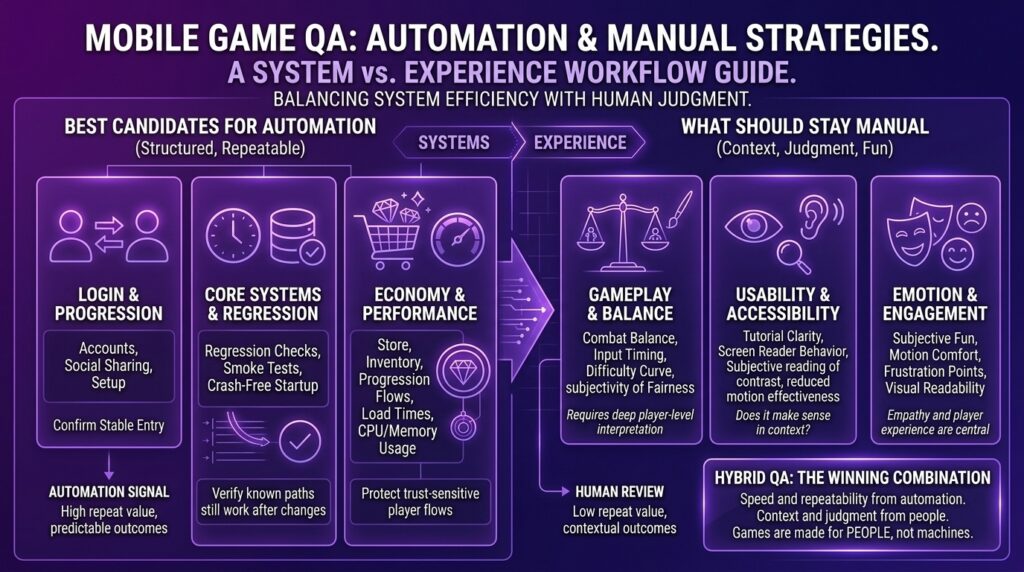
A good rule is: Use automation for stable, repeatable, high-value checks. Use manual testing for exploration, playability, accessibility, balance, and feel.
A practical hybrid approach might look like this:
| Test area | Best approach | Why |
| Login and account creation | Automation | Stable, repeatable, and easy to verify |
| Store and payment flows | Automation plus manual review | High business impact and trust-sensitive |
| Inventory and rewards | Automation | Clear expected results and frequent regression risk |
| Settings | Automation plus manual review | Settings can be checked automatically, but usefulness needs review |
| Accessibility options | Automation plus assistive technology review | Availability can be checked, but usability needs people |
| Gameplay feel | Manual testing | Requires judgment, timing, and player perception |
| Combat balance | Manual testing | Depends on experience, fairness, and player skill |
| Performance across devices | Automation plus manual review | Metrics help, but player impact still matters |
| Tutorials | Manual testing | Understanding and clarity require human review |
| Regression checks | Automation | Needs consistent repeated coverage |
Automation gives teams speed and repeatability. Manual testing gives teams context and judgment.
Mobile games need both.
How to choose what to automate first
When deciding what to automate first, look for tests that are:
- stable
- repeatable
- high-impact
- time-consuming to run manually
- easy to verify
- likely to be repeated across builds
- useful across multiple devices
A good first automation candidate might be:
Launch the app, log in, load the main menu, open inventory, claim a reward, verify the reward appears, change a setting, close the app, reopen it, and confirm the setting and reward persisted.
That test covers several important systems without trying to judge the entire game.
A weaker first candidate might be:
Verify that combat feels fun.
That matters, but it should not be the first automation target. It is too subjective and too dependent on human experience.
Final takeaway
Mobile game automation testing works best when it protects the stable systems that support play.
Automate the static stuff like login, settings, inventory, store flows, rewards, progression, smoke tests, regression checks, and other repeatable paths with clear expected results.
Keep manual testers focused on gameplay feel, balance, accessibility experience, timing, tutorials, performance perception, and player understanding.
The goal is not to automate the soul out of the game. The goal is to give repeatable work to automation so testers can spend more time on the parts of the game that need human judgment.
Automate the systems, then let people test the play. That’s the winning combo.