Mobile test automation has become the baseline for delivering high-quality mobile experiences at scale — if you’ve ever watched your regression suite turn red because one button moved, you already know why manual testing can’t keep up with modern release cycles. But we’re moving past the days of just “scripting tests.” We’re now in the AI era, where automation is shifting from manual execution to intelligent validation.
This guide covers why automation is non-negotiable, how AI-era tooling differs from traditional frameworks, a concrete self-healing setup in Appium, the challenges you’ll actually hit, and a practical strategy to future-proof your suite.
Why Mobile App Automation Testing Is Non-Negotiable
Mobile app automation testing is the practice of using software tools to execute scripted tests on mobile applications instead of running them by hand. The reason it’s now table stakes is arithmetic: a single app that supports the last three iOS versions and the last four Android versions across five popular screen sizes already faces dozens of device/OS permutations — a matrix no manual team can cover on every commit.
By moving toward automated mobile testing, your team gains:
- Faster feedback loops. Engineers get regression results in minutes on every pull request instead of waiting for an end-of-sprint manual pass.
- Broader coverage. Tests run across hundreds of device and OS combinations in parallel, catching fragmentation bugs a local emulator would never surface.
- Consistency. Automated steps execute identically every run, eliminating the human error inherent in repetitive manual testing.
As an illustrative example, consider a mid-market team shipping a consumer app on a two-week cadence: moving their critical-path smoke suite from manual to automated real-device runs typically collapses a multi-day regression pass into a sub-hour gate.
Traditional vs. AI-Powered Mobile Test Automation: A Feature Comparison
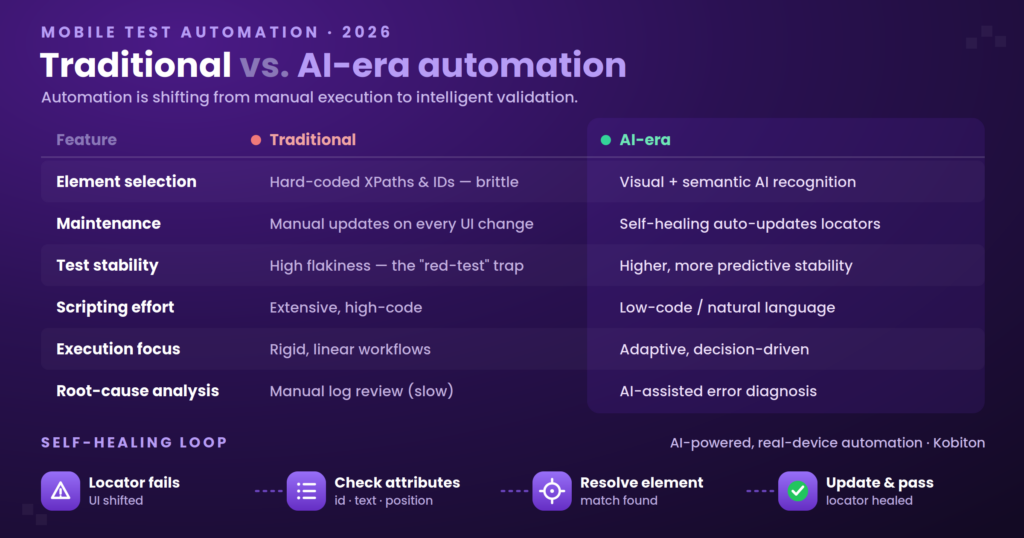
Before adopting AI-powered testing, it’s worth understanding how it differs from the traditional approaches teams have relied on for years.
| Feature | Traditional Automation | AI-Era Automation |
|---|---|---|
| Element selection | Hard-coded XPaths/IDs (brittle) | AI-based visual/semantic recognition |
| Maintenance | Manual updates on every UI change | Self-healing (auto-updates locator logic) |
| Test stability | High flakiness (the “red test” trap) | Higher reliability, predictive stability |
| Scripting effort | Extensive, high-code | Low-code / scriptless & natural language |
| Execution focus | Rigid, linear workflows | Adaptive, decision-driven |
| Root-cause analysis | Manual log review (slow) | AI-assisted error diagnosis |
The “element selection” row is where most of the value sits. Traditional frameworks bind a test step to a precise path in the UI hierarchy — an absolute XPath like //android.widget.LinearLayout[2]/android.widget.Button[1]. The moment a designer wraps that button in a new container, the path breaks. AI-based locators instead identify an element by a bundle of attributes and its visual/semantic role, so a layout shift that would snap a hard-coded path can still resolve to the right target.
Solving the “Maintenance Debt” Bottleneck
In many automation projects, teams spend more time repairing broken XPath locators after each release than writing new test cases. This “maintenance debt” is the biggest single hurdle to scaling a suite: every UI change taxes the whole test base, and the tax compounds as coverage grows.
The shift to AI-powered locators attacks the debt at its source. Instead of a brittle absolute path, a self-healing engine keeps a profile of each element (accessibility ID, text, neighboring elements, on-screen position, visual fingerprint). When one attribute changes, it falls back to the others, resolves the element, and updates the stored locator — so the test passes and the next run starts from the healed definition rather than failing on the change.
A concrete self-healing setup in Appium
Self-healing rides on top of a standard Appium session, so you can adopt it without rewriting existing tests. The core discipline is to give every element a stable accessibility ID in the app itself, then let the locator strategy prefer it:
// Appium (WebdriverIO) — prefer accessibility id, the most stable locator
// In the app: Android contentDescription / iOS accessibilityIdentifier = "login-submit"

const submit = await driver.$('~login-submit');   // '~' = accessibility id selector
await submit.click();

// Anti-pattern to avoid — absolute XPath breaks on any layout change:
// await driver.$('//android.widget.LinearLayout[2]/android.widget.Button[1]').click();On a self-healing platform such as Kobiton, the session records these attributes and, when a run hits an element whose primary locator no longer matches, it resolves via the fallback attributes and logs the healed locator for review — turning what would have been a red build into a passing run plus a maintenance note. See Kobiton’s Appium self-healing capability for how this is wired into a session.
Accessibility IDs are also the locator strategy recommended by the Appium documentation precisely because they’re the most resilient to UI change — a good example of an AI-era practice that’s grounded in long-standing framework guidance rather than replacing it.
3 Pillars of a Successful Automation Strategy
To succeed with mobile test automation in the AI era, make sure your strategy covers three areas.
- Prioritize the critical path. Don’t try to automate 100% of your app. Start with smoke tests and regression suites for your highest-value user journeys — sign-in, checkout, core navigation — where a break costs the most.
- Test on real devices. Emulators miss hardware-specific behavior: sensors, real network conditions, GPU rendering, and OEM skins. Automated mobile app testing should run on real devices to reflect genuine end-user scenarios. (For the emulator-vs-real-device tradeoff, see this Kobiton walkthrough video.)
- Integrate AI-driven self-healing. Adopt tooling that adapts when the UI shifts instead of failing. This keeps the suite green through cosmetic changes and reserves human attention for genuine regressions.
Common Challenges in Mobile Test Automation
Even with the best tools, you’ll hit hurdles. Knowing them in advance is what separates a suite that scales from one that rots.
- Flaky tests. Usually caused by poor wait handling. Prefer explicit waits that block until a specific condition is met over fixed sleep calls that either waste time or fire too early.
- Dynamic locators. Avoid absolute XPaths; prefer accessibility IDs, which survive layout changes. This aligns with the element-location model in the W3C WebDriver specification, the standard Appium builds on.
- Device fragmentation. A one-size-fits-all script doesn’t exist. Account for different screen resolutions, densities, and OS versions — the same reason Google publishes dedicated Android testing guidance for handling device variance.
Explicit vs. fixed waits — the flakiness fix
// Anti-pattern: fixed sleep — wastes time or fires before the element is ready
await driver.pause(3000);
await driver.$('~login-submit').click();

// Better: explicit wait — blocks only until the element is actually interactable
const submit = await driver.$('~login-submit');
await submit.waitForClickable({ timeout: 5000 });
await submit.click();Future-Proofing Mobile Test Automation with AI
As we move deeper into the AI era, test automation of mobile apps is evolving from mere execution to intelligent validation. Modern platforms already do more than run tests: they identify unstable tests, recover from minor UI changes via self-healing, and suggest new test cases based on application updates. The practical payoff is a suite whose maintenance cost grows sub-linearly with coverage — the opposite of the maintenance-debt curve that sinks traditional suites.
Frequently Asked Questions
What is mobile test automation?
It’s the use of software tools to execute scripted tests against a mobile app automatically, across many device and OS combinations, instead of running each test by hand.
Should I test on emulators or real devices?
Use emulators for fast local checks during development, but run your release-gating suite on real devices — emulators can’t reproduce sensor behavior, OEM skins, real network conditions, or GPU rendering that real users experience.
How does AI self-healing reduce test maintenance?
Instead of binding a step to one brittle locator, a self-healing engine tracks several attributes per element and falls back to them when the primary locator breaks, resolving the element and updating the stored definition so the test passes and stays fixed.
What causes flaky mobile tests?
Most often, poor wait handling. Replace fixed sleep/pause calls with explicit waits that block until an element is actually present and interactable.
Conclusion
A robust mobile test automation strategy is now a baseline requirement, not a competitive luxury. By prioritizing critical-path coverage, running on real devices, and adopting AI-driven self-healing on top of standards-based locators, teams cut maintenance debt and ship faster without trading away quality.
Ready to elevate your testing strategy?
If you’re ready to reduce flakiness and increase coverage, Kobiton provides the AI-powered, real-device infrastructure to turn a testing bottleneck into a shipping advantage. Explore how our AI-driven platform can help your team.