Article

Mobile Performance Testing for App Launch Time Optimization

20 min read
Mobile Performance Testing for App Launch Time Optimization

Your app gets exactly one chance to make a first impression, and it happens in the first few seconds after a user taps the icon. If the screen sits frozen, stutters through a splash animation, or greets them with a spinner that never quite resolves, the damage is done before they ever see your best feature. Mobile performance testing ensures that the launch time, the moment your entire engineering effort is silently judged, is optimized, because most of the time you never even hear the verdict the user just leaves.

This guide focuses on one of the most under-invested corners of mobile quality: testing and optimizing app launch time. We’ll cover why launch speed matters more than almost any other metric, what actually happens during those first milliseconds, the developer-side techniques that shave seconds off startup, and most importantly, how to build a repeatable performance testing practice that keeps launch time fast release after release, on real devices and real networks.

Why Mobile Performance Testing Makes Launch Time a Make-or-Break Metric

Mobile users are impatient by design. They live in a world of instant gratification, and their tolerance for delay is measured in seconds, not minutes. The data backs this up in blunt terms:

  • Google’s research found that 53% of mobile visits are abandoned when a page takes longer than three seconds to load, and the same behavioral pattern carries straight over to app launches.
  • Studies on conversion consistently show that every additional second of load time can drop conversion rates by around 20%.
  • Roughly 79% of users will give an app only one chance—if it’s slow or unstable on first use, they uninstall and move to a competitor.

Beyond raw retention, launch performance quietly shapes three business outcomes:

User experience and retention. A fast, responsive first launch sets the tone for the entire relationship. A sluggish one primes users to interpret every later hiccup as further proof the app is bad.

App store visibility. Both Google Play and the App Store factor stability and user sentiment into rankings. Apps that launch quickly earn better reviews and ratings, and those ratings feed directly into app store optimization (ASO). Performance, in other words, isn’t just a UX concern—it’s a discoverability lever.

Competitive advantage. In a category crowded with alternatives, speed is a differentiator. When two apps do roughly the same thing, the one that opens instantly wins the habit.

The uncomfortable truth is that slow launch times cost you users and revenue you never see leaving. There’s no error dialog for “the app felt slow, so I stopped using it.”

Understanding What Actually Happens at Launch

Before you can optimize or test launch time, you need a precise picture of what “launch” means. It isn’t a single event—it’s a sequence, and the type of launch determines what you should expect and measure.

Cold, warm, and hot starts

  • Cold start is the worst case: the app process doesn’t exist yet. The operating system has to spin up the process, initialize the runtime, create the application object, and build the first screen from scratch. This is the launch users notice most, and the one your optimization work should target first.
  • Warm start happens when the process is still alive in the background but the activity or view has to be recreated. Some initialization is already done, so it’s faster than cold.
  • Hot start is the best case—both the process and the UI are largely resident in memory, and the app just brings itself back to the foreground almost instantly.

A healthy target for cold start is generally under two to three seconds on mid-range hardware, with anything approaching five seconds on a cold start treated as a serious problem. Extended startup delays that leave the UI unresponsive can even trip the OS “Application Not Responding” (ANR) threshold, which is a hard failure in the user’s eyes.

The bottlenecks that slow the first screen

Most launch-time problems trace back to a handful of recurring culprits:

Slow load and startup delays. The app tries to do too much before showing anything useful—initializing SDKs, reading large config files, or making blocking network calls on the main thread.

High resource consumption. Memory leaks, inefficient algorithms, and aggressive background processes tax the CPU and memory at exactly the moment the device is busiest. On lower-end phones this is where launches visibly stall.

UI responsiveness lags. Rendering bottlenecks, excessive UI updates, and poorly optimized event handling make the first frame arrive late and the first interactions feel mushy—even if the underlying data is ready.

Understanding which of these is dragging your launch down is the entire point of performance testing, which we’ll get to shortly. First, the fixes.

Mobile Performance Testing for App Launch

Developer-Side Strategies to Optimize Launch Time

Testing tells you where the time is going; these techniques are how you get it back. Think of them as the levers you pull between test runs.

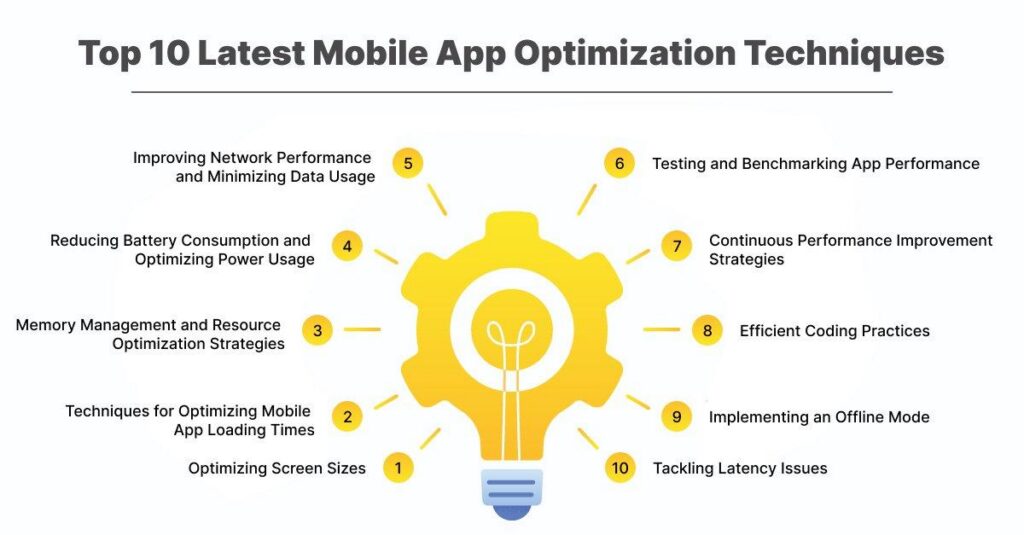
1. Minimize initialization work at startup

The single biggest win is doing less before the first screen appears. Audit everything that runs at launch and ask whether it truly needs to happen now.

  • Load only the essential components needed to render the first meaningful screen.
  • Defer secondary tasks—analytics SDKs, non-critical third-party libraries, feature modules—until after the UI is interactive.
  • Move any blocking work off the main thread so the interface never freezes while something initializes.

2. Use lazy loading

Lazy loading defers the creation of objects, screens, and assets until they’re actually needed rather than loading everything upfront. In a content-heavy app, this means the user can start interacting almost immediately while the rest streams in behind the scenes. For launch specifically, lazy loading is the difference between “render the home screen now” and “render nothing until every tab is ready.”

3. Keep the splash screen honest

A splash screen is a legitimate tool for masking unavoidable initialization, but it’s often abused as a place to hide slowness. Keep it lightweight and ideally under two seconds. A splash screen should cover genuine work, not manufacture a delay or run heavy animations that themselves tax the GPU during the most fragile moment of the session.

4. Prefetch data in the background

Load user-specific data in the background while the UI becomes accessible, so the first screen is populated by the time the user’s eyes land on it. Prioritize critical data first and use asynchronous, deferred loading for everything less important. The perception of speed comes from the core screen being usable, not from every byte being present.

5. Trim dependencies and dead code

Bloated code and unused libraries inflate both app size and startup time.

  • Remove redundant frameworks and dependencies that quietly load at launch.
  • For JavaScript-based apps, use tree shaking to strip unused imports.
  • Keep code modular and reusable, following the single-responsibility principle so modules load and initialize predictably.
  • Don’t load an entire SDK when you use a fraction of it.

6. Optimize images and media

Large, unoptimized assets are a hidden launch tax, especially on the first screen.

  • Use modern formats like WebP or HEIC for smaller files with no visible quality loss.
  • Compress assets with tools such as TinyPNG or ImageOptim.
  • Serve adaptive images lower resolution on slow networks, full resolution on Wi-Fi.
  • Lazy-load anything below the fold so only visible media is fetched at startup.

7. Leverage caching

Caching frequently accessed data locally means the app doesn’t have to hit the network on every launch.

  • Memory cache for the fastest access to hot data.
  • Disk cache for less frequently accessed data that should survive between sessions.

On a returning-user launch, well-designed caching can eliminate the network round trips that dominate cold-start time.

8. Streamline network requests and APIs

Even a perfectly optimized client stalls if it’s waiting on the network at launch.

  • Batch API calls—consolidate multiple requests into one to cut latency and round trips.
  • Trim payloads so responses carry only the data the first screen needs.
  • Prefer lightweight formats like JSON over XML.
  • Use pagination so large datasets load in chunks instead of all at once.
  • Distribute static content through a CDN so assets load from a server near the user.

9. Manage memory and rendering

  • Fix memory leaks and free unused memory to prevent gradual degradation.
  • Limit background processes competing for resources during launch.
  • Leverage hardware acceleration to offload rendering to the GPU and improve frame rates.
  • Favor clean, minimalistic UI over heavy animations and excessive UI updates during startup.

10. Build for offline and poor connectivity

Users don’t launch your app only on fast Wi-Fi. Local storage (SQLite, Room, Realm), intelligent syncing that waits for reconnection, and queued requests all keep the app usable—and its launch fast—when the network is weak or absent.

Why You Can’t Optimize What You Don’t Measure

Every technique above is a hypothesis until you test it. Launch time varies wildly across devices, OS versions, and network conditions, and a change that helps a flagship phone on Wi-Fi can hurt a three-year-old mid-range device on a congested cellular network. This is where mobile performance testing earns its place.

Mobile performance testing evaluates how an app behaves under real-world conditions different traffic loads, devices, and networks—to confirm it meets speed, stability, and responsiveness standards. It differs meaningfully from web performance testing: with mobile, you have to account for device fragmentation, wildly varying hardware, battery constraints, packet loss, latency, and carrier-dependent bandwidth all at once. It’s a non-functional discipline, and it’s the one that separates apps that survive a launch-day traffic spike from those that crash under it.

Types of Mobile Performance Testing

Launch time doesn’t exist in isolation—it degrades under load, over time, and across conditions. A complete launch-performance strategy touches several test types:

Load testing evaluates how the app performs under expected and peak user activity, simulating concurrent usage to observe response times, throughput, and where bottlenecks first appear. It establishes your baseline for acceptable launch performance under normal traffic.

Stress testing pushes the app beyond its limits to see how and when it fails—and whether failures are contained or cascade. It also reveals how gracefully the app recovers once load subsides.

Endurance (soak) testing runs sustained load over prolonged periods to surface memory leaks, creeping resource consumption, and gradual degradation that shorter tests miss. This is how you catch the launch that’s fast on day one but sluggish after a week of use.

Compatibility testing validates performance across different devices, OS versions, and configurations, ensuring hardware and software variation doesn’t introduce launch inconsistencies.

Network testing exercises the app under varying bandwidth, latency, and packet-loss conditions—including throttling to simulate 3G versus 5G—so you know how launch behaves for users who aren’t on a strong connection.

Usability testing looks at how performance actually feels to a user: whether lag, delayed frames, and rendering hitches undermine the experience even when core functionality works.

Capacity and volume testing round things out by measuring how many concurrent users and how much data the app can handle before performance dips below acceptable levels.

The Metrics That Matter for Launch

Performance testing is only useful if you’re tracking the right indicators. Organize your measurement around three parameter groups, then layer launch-specific KPIs on top.

Device performance: app startup time, battery usage, memory consumption, behavior across hardware/software configurations, and interaction with background apps.

Server/API performance: data transfer speeds to and from the server, and the impact of individual API calls on launch and interaction.

Network performance: latency, throughput, and packet loss under varying conditions, with packet-loss checks to confirm data integrity.

For launch-time work specifically, gate your releases on a focused set of KPIs:

  • Cold, warm, and hot start times (measured separately)
  • p95 interaction latency on the first meaningful screen
  • Frame rendering / FPS during the launch animation and first scroll
  • Crash and ANR rates during startup
  • CPU, memory, and battery consumption in the first seconds
  • Error rate, average and peak response times, and peak concurrent users per device and OS

Defining these thresholds is really about answering a single question: how do we measure launch performance in a way that reflects both business goals and real user expectations?

A Step-by-Step Launch-Time Testing Procedure

A repeatable process beats ad-hoc spot checks every time. Here’s a practical sequence adapted for launch-time optimization.

1. Align test intent with business requirements. Decide what “good” means for your app and audience before you write a single test. A news app and a banking app have very different launch expectations. Clear objectives make it obvious which scenarios matter most.

2. Define KPIs and benchmarks. Set concrete thresholds—for example, cold start under three seconds at the 95th percentile on mid-tier devices. Without a benchmark, you can’t tell a passing test from a failing one.

3. Prioritize and outline scenarios. Teams often fail here by not pre-selecting critical flows. Map the launch paths that matter (first install, returning user, launch-into-deep-link, launch on poor network) rather than testing everything equally.

4. Simulate a realistic environment. Emulators and simulators are useful and cost-effective for early, broad checks, but they can’t fully reproduce real device behavior—thermal throttling, real memory pressure, OEM-specific resource handling. Reproduce production conditions as closely as possible.

5. Align testing with your development process. Wire performance checks into CI/CD so regressions surface with the commit that caused them. Continuous integration keeps bug reports and regression data flowing to everyone who needs it.

6. Track network variance. Because mobile devices connect through third-party carriers, latency and bandwidth fluctuate constantly. Test across network profiles and geolocations so launch performance holds up in the conditions users actually face.

Real Devices vs. Emulators for Launch Testing

Emulators are indispensable for fast, cheap, early feedback—but launch time is one of the metrics they’re worst at reproducing. Cold-start behavior depends heavily on real CPU scheduling, storage I/O speed, thermal state, and how a specific OEM’s build of Android manages processes. A launch that clocks in at 1.8 seconds on an emulator can take four seconds on a real budget device with a full memory footprint.

Real devices expose the issues emulators hide:

  • Memory leaks that slow or crash the app only after extended real-world use.
  • Crash-under-load conditions triggered by heavy background activity.
  • Device-specific behavior, since Samsung, Xiaomi, OnePlus, Apple, and others handle resources differently.

The pragmatic approach most mature teams settle on: run lightweight checks on emulators early and on every pull request, then validate launch time and stability on a matrix of real devices—ideally through a cloud device lab so you get broad coverage without maintaining physical hardware. Platforms like Kobiton let teams run these tests remotely on real Samsung, iPhone, and other devices, tracking front-end response times without inserting start-stop timer code, and monitoring device vitals—CPU, memory, network, temperature, and energy consumption—so you can confirm a fast launch isn’t quietly draining the battery.

Tools for Launch-Time Performance Testing

The ecosystem spans lightweight profilers to enterprise load-testing suites. A practical toolkit usually combines several:

  • Kobiton — real-device, end-to-end mobile testing with performance monitoring, device-vitals tracking, and backend load-test integration (K6, JMeter, NeoLoad) via HAR export, all wired into CI/CD.
  • Firebase Performance Monitoring — SDK-based monitoring for iOS, Android, and web that captures performance in specific situations like loading a new screen; pairs with Crashlytics for real-user crash data.
  • New Relic Mobile — deep visibility from backend APIs through to the device, with crash troubleshooting and a unified error inbox.
  • Apache JMeter — open-source load testing that simulates many concurrent users and measures latency and throughput; originally web-focused, now extended to mobile.
  • OpenText LoadRunner — simulates thousands of users and supports mobile protocols like HTTP/HTTPS and WebSocket, capturing network traffic from devices.
  • Digital.ai — scalable real-device testing with deep network and device-vitals data, regression comparison, and rapid root-cause analysis.
  • Apptim — GenAI-assisted performance analysis that surfaces issues pre-launch and integrates client-side checks into CI/CD with KPI alerts.
  • Native profilers — Android Profiler and Xcode Instruments for granular, on-device launch and memory analysis.

The right mix depends on your platform coverage, how much you rely on real devices versus emulators, and your total cost of ownership once you account for licensing, device hours, and script maintenance.

Known Challenges (and How to Work Around Them)

Mobile performance testing is genuinely harder than desktop testing, and it helps to go in with clear eyes.

Device fragmentation. Countless device models are in active use, and your app has to launch acceptably on all of them. Sourcing and maintaining that hardware is expensive—which is exactly why cloud real-device labs exist.

Device-specific features. GPS, cameras, sensors, embedded memory, processors, and OS builds vary from phone to phone and are difficult to emulate accurately, making truly representative results costlier and slower to obtain.

Battery consumption. Battery testing has become critical as users grow intolerant of battery-draining apps. A launch optimization that spins up extra background work can win seconds while quietly burning power—so battery has to be measured alongside speed.

UI variation. Layouts and system fonts differ across operating systems, and failing to meet Google Play or App Store guidelines can delay or block a release entirely.

The common thread: use virtual resources and cloud platforms to cut infrastructure cost, but validate the metrics that matter—launch time, stability, battery—on real devices.

Make It Continuous: Launch Testing in CI/CD

Performance testing isn’t a one-and-done gate before release; it’s an ongoing discipline. The teams that keep launch time fast treat it as an automated, continuous practice:

  • Gate on KPIs. Fail builds only when key thresholds—launch time, p95 latency, crash/ANR rate, FPS—are breached, so the signal stays meaningful.
  • Shift left. Run lightweight synthetic checks on critical flows (launch, login, search) on every pull request.
  • Parallelize with a device cloud. Quick targeted checks on each commit; deeper load and soak tests overnight.
  • Trend over time. Store results so you catch slow drift, not just dramatic spikes—a launch that creeps from 2.1s to 2.9s over ten releases is a regression you want to see coming.
  • Close the loop. Post results back to GitHub, Slack, or your CI dashboard so developers can act within minutes, and keep monitoring in production to catch what test environments can’t reproduce.

Bringing It Together

App launch time is the first and most consequential performance metric your users experience, and it’s the product of dozens of decisions—how much you initialize upfront, how you load assets and data, how you talk to the network, and how well any of it holds up on a real, resource-constrained device in the wild.

Optimizing it is a two-sided effort. On one side are the engineering techniques: deferring work, lazy loading, prefetching, trimming dependencies, caching, and streamlining APIs. On the other is a disciplined testing practice: measuring cold, warm, and hot starts against clear KPIs; running load, stress, endurance, and network tests; validating on real devices across the fragmentation matrix; and folding all of it into CI/CD so launch performance is protected on every release.

Do both, and you turn those fragile first seconds from a liability into a competitive edge—an app that opens fast, feels instant, and earns the second launch.

Ready to see how your app launches on the devices your users actually own? Kobiton lets you run launch-time and full performance tests on real iOS and Android devices, track front-end response and device vitals without instrumenting your code, and wire it all into your CI/CD pipeline. Start a free trial and turn launch speed into a strength.

Frequently Asked Questions

How often should launch-time performance testing be done? 

It should be continuous, not a one-time task. Test before every major release, update, or feature launch, and run continuous real-time monitoring in production so regressions are caught and fixed before they spread across your user base.

How does launch performance affect app store optimization (ASO)?

An app that launches quickly and runs smoothly earns higher user satisfaction, which translates into better ratings and reviews. Because both Google Play and the App Store weight positive user sentiment in their rankings, strong launch performance indirectly improves discoverability.

How do OS updates impact launch time? 

Mobile OS updates can change compatibility, functionality, and UI behavior, any of which can affect startup. Re-test launch performance with each significant OS release to make sure new features or restrictions haven’t introduced a regression.

What’s a good target for cold start time? 

As a general rule, aim for a cold start under two to three seconds on mid-range hardware. Treat launches approaching five seconds as a serious issue, and watch for startup delays long enough to risk an ANR (Application Not Responding) event.

How do you handle launch issues that won’t reproduce in testing? 

Lean on production monitoring. Tools like Firebase Crashlytics and New Relic provide real-time performance and crash data from actual users, helping you diagnose intermittent, device-specific, or network-dependent launch problems that controlled test environments never surface.

Wahaj Ansari
About the Author Wahaj Ansari Technical SEO Expert & Content Strategist at Kobiton Wahaj Ansari is a Technical SEO expert at Kobiton, where he works as a technical content strategist specializing in mobile performance testing. His work focuses on creating clear, practical, and technically accurate content that helps developers, QA teams, and businesses understand app speed, reliability, and user experience. He connects technical insight with useful guidance to support better mobile testing decisions.
Follow LinkedIn