Mobile apps require a very different CI/CD approach compared to web systems. You are not just deploying code to a server. You are building platform-specific binaries, handling strict security requirements, testing across real devices, and preparing releases that must pass store approval. This guide explains how Mobile CI/CD works, highlights the key differences between Android and iOS pipelines, and shows how to set them up in a practical way.
What is Mobile CI/CD?
Mobile CI/CD, or Continuous Integration and Continuous Delivery, is the process of automating how mobile apps are built, tested, signed, and released.
Unlike web pipelines, mobile workflows must account for:
- Native builds for Android and iOS
- Code signing and certificate management
- Testing on both real and virtual devices
- App store submission and review processes
Each of these steps adds complexity that does not exist in typical backend or frontend pipelines.
Why Mobile CI/CD is More Complex
Mobile delivery introduces constraints that make automation harder and more fragile if not handled correctly.
Platform-specific build systems
Android relies on Gradle, which runs on multiple operating systems.
iOS depends on Xcode, which only runs on macOS.
Code signing requirements
Android uses a keystore system that is relatively straightforward.
iOS requires certificates and provisioning profiles that must match exactly, or builds fail.
App store dependency
Releases are not fully under your control. Both Google Play and the Apple App Store must approve updates before users can access them.
Large build artifacts
Mobile builds generate APK, AAB, or IPA files, which are heavier than typical web builds and can slow down pipelines if not optimized.
Android vs iOS Mobile CI/CD: Key Differences
1. Infrastructure Requirements
| Area | Android | iOS |
| Build OS | Linux, Windows, macOS | macOS only |
| CI runners | Easy to scale | Limited and expensive |
| Toolchain | Open ecosystem | Apple controlled |
Android pipelines can run on almost any CI environment, which makes scaling easier. iOS pipelines require macOS machines, which increases cost and limits flexibility.
2. Build and Tooling
| Component | Android | iOS |
| Build tool | Gradle | Xcode |
| Languages | Kotlin, Java | Swift, Objective C |
| Automation tools | Espresso, Appium | XCUITest |
Android integrates well with most CI tools. iOS is more tightly connected to Apple’s tooling, which means fewer workarounds when something breaks.
3. Device and Testing Complexity
| Factor | Android | iOS |
| Device fragmentation | High | Low |
| OS versions | Many active versions | Faster adoption |
| Emulator support | Strong | Limited |
Android requires broader testing because of device variety. iOS is easier to standardize, but Apple enforces stricter rules around execution and compatibility.
4. Code Signing and Security
| Area | Android | iOS |
| Signing | Keystore based | Certificates and profiles |
| Complexity | Moderate | High |
| Failure risk | Lower | Higher |
iOS pipelines often fail due to expired certificates or incorrect provisioning profiles. This is one of the most common bottlenecks teams face.
5. App Distribution
| Step | Android | iOS |
| Store approval | Faster | Strict review |
| Distribution | Play Store and others | App Store only |
| Internal testing | Flexible | Managed via TestFlight |
Apple’s review process adds extra validation steps, which can delay releases if something does not meet their guidelines.
Mobile CI/CD Pipeline Architecture
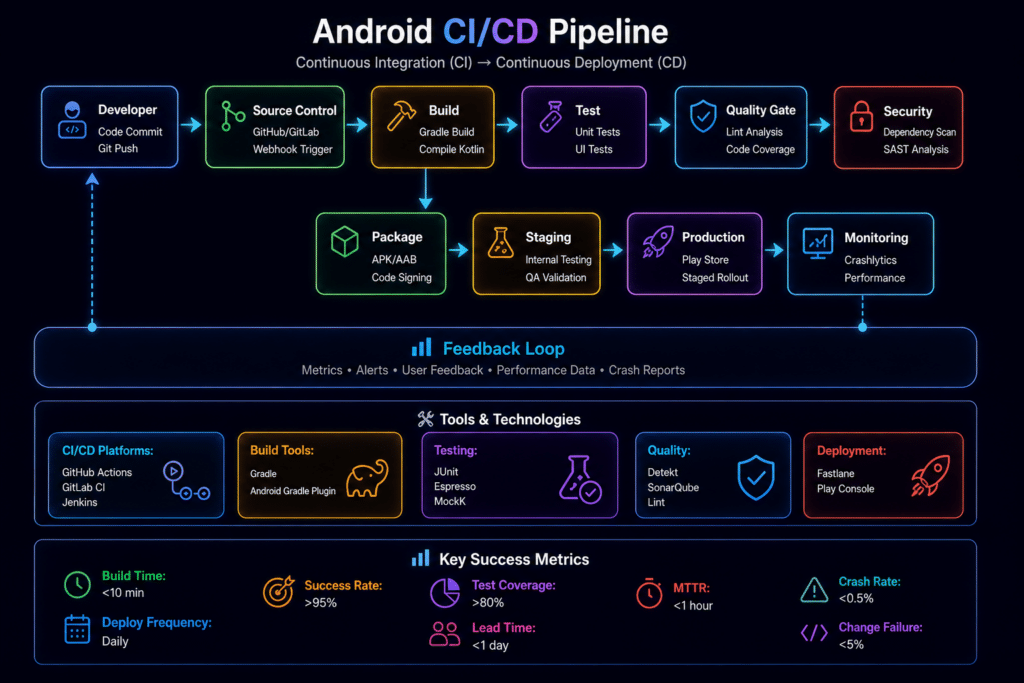
A typical mobile pipeline follows a structured flow:
1. Source Control
Code is stored in platforms like GitHub, GitLab, or Bitbucket.
2. CI Trigger
Pipelines run on pull requests, code merges, or scheduled builds.
3. Build Stage
Android uses Gradle to generate APK or AAB files.
iOS uses Xcode to generate IPA files.
4. Test Stage
Includes unit tests, UI automation, and real device testing.
5. Signing and Packaging
Secrets are injected securely and signed builds are generated.
6. Distribution
Apps are released to internal testers or submitted to app stores.
Setting Up Mobile CI/CD for Android
Step by Step
1. Configure Build Environment
Install JDK and Android SDK. Set up Gradle.
2. Add CI Workflow
Example using GitHub Actions:
./gradlew assembleRelease
3. Manage Signing
Store the keystore securely using CI secrets.
4. Run Tests
Use Espresso or Appium. Include emulator-based tests.
5. Deploy
Upload builds to Google Play using internal testing tracks.
Setting Up Mobile CI/CD for iOS
Step by Step
1. Use macOS Runner
Required for Xcode builds.
2. Configure Build Command
Use xcodebuild with the correct workspace and scheme.
3. Handle Code Signing
Add certificates and configure provisioning profiles correctly.
4. Automate with Fastlane
Fastlane simplifies building, testing, and deployment.
5. Deploy
Release through TestFlight and then submit to the App Store.
Best Practices for Mobile CI/CD
Use Real Device Testing
Simulators are helpful, but they miss real-world issues like performance drops or hardware-specific bugs. Platforms like Kobiton allow teams to run tests on real devices directly within CI pipelines.
Run Pipelines in Parallel
Execute Android and iOS builds at the same time to reduce total build time.
Secure Sensitive Data
Keep keys, certificates, and tokens in encrypted storage within your CI system.
Automate Code Signing
Manual steps increase the risk of failure, especially for iOS.
Improve Build Performance
Cache dependencies and use incremental builds where possible.
Common Challenges and Practical Fixes
Slow pipelines
Use caching and parallel execution to reduce build time.
iOS build failures
Automate certificate handling and monitor expiration dates.
Android fragmentation issues
Use real device clouds such as Kobiton to cover a wider range of devices and OS versions.
Release delays
Automate submission steps and validate builds before store upload.
Role of Mobile Device Cloud in CI/CD
A mobile device cloud plays a key role in modern pipelines. Instead of relying only on emulators, teams can test on real devices at scale.
With Kobiton, teams can:
- Run automated tests on real devices
- Validate performance across multiple OS versions
- Reduce flaky test results caused by unstable environments
This is especially important for Android, where device fragmentation can impact user experience, and for iOS, where strict validation standards must be met.
Android vs iOS: Final Takeaway
Android CI/CD offers flexibility and is easier to scale, but requires more effort in testing due to device diversity.
iOS CI/CD runs in a controlled environment, but depends heavily on macOS infrastructure and strict signing requirements.
Most teams run both pipelines in parallel and manage them through a unified workflow to keep releases consistent and reliable. control because both Google Play and the Apple App Store must approve updates before users can access them.
Mobile builds also produce large artifacts such as APK, AAB, or IPA files. These are heavier than typical web builds and can slow down CI/CD pipelines if not optimized properly.