
In modern mobile QA workflows, testing rarely happens on a single device or within one environment. Execution is spread across real devices, emulators, cloud device farms, multiple OS versions, varying network conditions, and CI pipelines. Without a structured system, Mobile Test Results quickly become scattered across logs, tools, and dashboards. This makes it difficult to assess release readiness or identify recurring issues.
This guide explains how to bring all Mobile Test Results into one structured system so QA, engineering, and product teams can work from a single, reliable source of truth.
Why Mobile Test Results Become Fragmented
Before centralizing results, it helps to understand where fragmentation begins.
Tests are often run across multiple device clouds and local labs. Different frameworks such as Appium, XCTest, and Espresso, generate separate outputs. CI pipelines store logs within isolated builds, while manual testing results are tracked in spreadsheets or tickets. On top of that, teams may rely on different reporting tools for Android and iOS.
In multi-device setups, this creates inconsistent visibility and repeated debugging work. Device fragmentation and environment differences are widely recognized as key reasons for inconsistent test outcomes in mobile QA workflows.
What Centralized Mobile Test Results Mean
Centralization is about bringing all test outputs into one system and structuring them in a way that makes analysis simple and reliable.
All results across devices, OS versions, and environments are collected in one place. They are converted into a consistent format, linked to builds and test cases, and made searchable over time.
Instead of checking separate reports for a Pixel device on Android and an iPhone on iOS, teams get a unified view of Mobile Test Results organized by build, feature, and device coverage.
Core Architecture for Centralizing Mobile Test Results
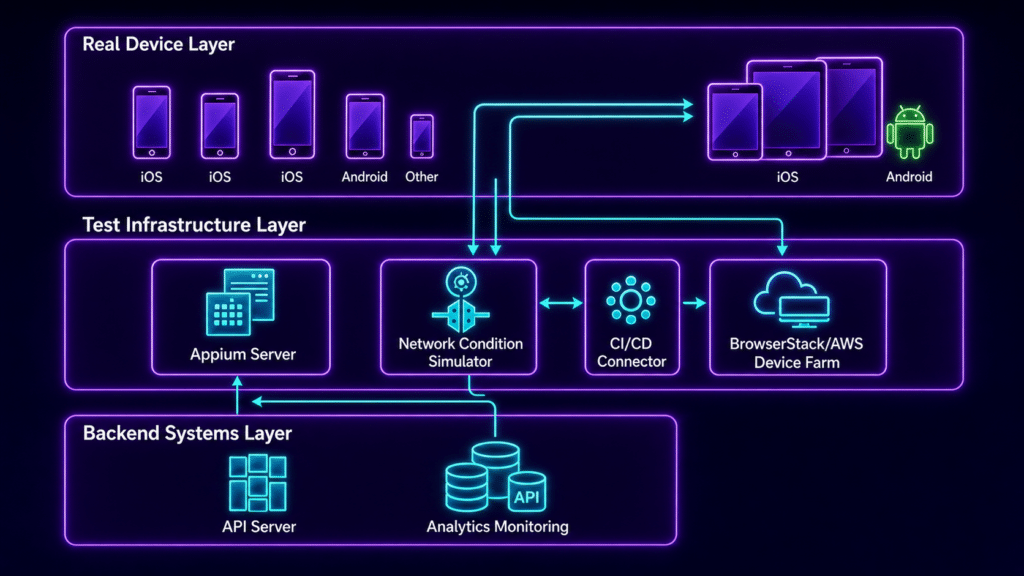
A reliable setup follows a clear structure.
1. Single Test Result Aggregation Layer
All frameworks send their results into one system using APIs, webhooks, or CI plugins. This layer accepts multiple formats, such as JUnit or XCUITest outputs, converts them into a standard structure, and attaches key metadata like device, OS version, environment, and build ID.
Platforms like Kobiton already provide structured outputs from real device testing, which makes aggregation more consistent when combined with other sources.
2. Device and Environment Tagging System
Every test execution must include consistent tags. These typically include device model, OS version, environment type, network condition, and execution type.
Clear tagging is what allows teams to filter results accurately without confusion. Without it, even a centralized system becomes difficult to use.
3. Unified Dashboard for Mobile Test Results
A centralized dashboard should provide a clear, high-level view of testing activity.
Teams should be able to see pass and fail trends across builds, identify which devices are causing the most failures, detect unstable tests, review regression history, and compare behavior across devices.
Instead of digging through logs, teams can focus on patterns and outcomes.
4. CI and CD Integration for Continuous Flow
Centralization only works if results are consistently fed into the system.
A typical workflow starts with a code commit triggering the pipeline. Tests run across multiple devices in parallel, often through platforms like Kobiton. Results are then pushed into the central system, and the dashboard updates in real time.
Parallel execution across different device types improves both coverage and execution speed.
5. Standardized Result Schema
A common schema is one of the most important parts of this setup. Without it, comparing results across devices and environments becomes unreliable.
A typical structure includes fields such as test case ID, build ID, device ID, OS version, status, execution time, logs, screenshots, error details, and environment metadata.
This consistency allows teams to analyze results without needing to interpret different formats from different tools.
How to Implement Centralized Mobile Test Results
Step 1: Connect All Test Sources
Integrate all testing frameworks such as Appium, Espresso, and XCUITest along with CI tools like Jenkins, GitHub Actions, or GitLab CI. Include both cloud device platforms and local labs.
Step 2: Standardize Reporting Output
Convert all framework outputs into a common format. This could be structured JSON events or transformed JUnit XML files. The goal is to make every result consistent regardless of where it comes from.
Step 3: Push Results to Central Storage
Send all results to a central system using APIs, webhooks, or message queues for larger setups. This keeps the flow continuous and avoids manual uploads.
Step 4: Build Device Aware Indexing
Index results based on device, OS version, app version, and feature area. This makes filtering faster and helps teams quickly identify where issues are concentrated.
Step 5: Add Traceability Links
Connect test cases to requirements, results to bug tickets, and builds to release versions. This gives context to every failure and helps teams understand impact instead of just seeing a failed status.
Common Problems Centralization Solves
Centralizing Mobile Test Results directly addresses several recurring issues.
Duplicate debugging happens when the same issue appears on multiple devices but is reported separately. Missing failure patterns occur when device specific issues are not compared side by side. CI noise makes it difficult to identify meaningful failures among large volumes of logs. Release decisions slow down when teams have to manually gather results from different sources.
A structured system removes these bottlenecks by providing a single, consistent view.
Best Practices for Reliable Centralization
Use one system as the source of truth for all test executions. Keep naming conventions consistent across frameworks. Always include device and OS metadata. Separate unstable tests from real failures to avoid misleading signals. Use historical comparisons to track regressions between builds. Attach logs, screenshots, and videos to every test result to make debugging easier.
Research in mobile QA systems shows that centralized result management improves consistency by reducing fragmentation and communication gaps between teams.
Example: Before and After Centralization
Before centralization, Appium results might sit inside Jenkins logs, device cloud results appear in a separate dashboard, and manual testing is tracked in spreadsheets. Bugs are linked manually, which slows down analysis.
After centralization, all Mobile Test Results are visible in one dashboard. Teams can filter by device, OS version, or feature area. Bug linking becomes automatic, and CI visibility is available in real time.
Final Thoughts
Centralizing Mobile Test Results is not just about choosing the right tools. It is about creating a clear structure that connects devices, frameworks, and pipelines into one system.
Once everything feeds into a unified layer with consistent tagging and formatting, teams gain a real time view of application quality across all environments. Platforms like Kobiton play a key role by providing reliable data from real devices, which strengthens the overall accuracy of the system.
The real shift is moving from scattered reports to a single testing intelligence layer that supports faster decisions and more stable releases.