Mobile apps are no longer limited to being fully native or purely web-based. Most modern applications use a hybrid architecture that blends native components with embedded web views. This approach gives teams flexibility in development, but it also adds complexity when it comes to testing.
This is where Appium becomes a practical option. It allows teams to automate tests across both native and web layers within a single framework. In this guide, you will learn how Appium works with hybrid apps, the common challenges teams face in real projects, and practical ways to build stable and scalable automation.
What is Appium and Why It Fits Hybrid Apps
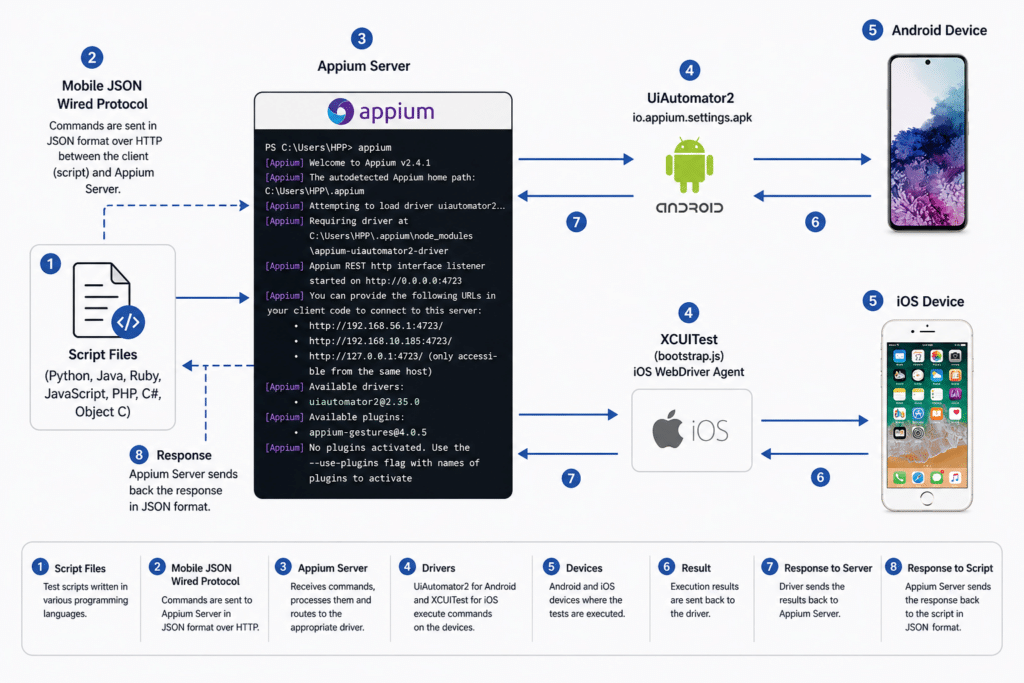
Appium is an open-source test automation framework that supports native, mobile web, and hybrid applications on both Android and iOS. It works using the WebDriver protocol, which means teams can use familiar automation practices across platforms.
Hybrid apps combine two main parts:
- Native user interface components
- Embedded web views built with HTML, CSS, and JavaScript
This dual structure makes testing more demanding. Native elements behave differently from web elements, and each layer requires a different approach. Appium handles this by allowing testers to move between these layers during a single test session.
Key Capability: Context Switching
One of the most important features of Appium for hybrid apps is context switching.
In a hybrid test, Appium allows you to:
- Switch from NATIVE_APP to WEBVIEW
- Execute Selenium-style commands inside the web view
This is done by retrieving the available contexts and switching to the required one at the right time. Without proper context handling, even well-written tests can fail.
How Appium Works for Hybrid Apps
Basic Workflow
A typical hybrid test using Appium follows this sequence:
- Start the Appium session
- Interact with native elements
- Detect available contexts
- Switch to the web view
- Perform web-based actions
- Switch back to native when needed
This flexibility is what makes Appium useful for hybrid apps, but it also introduces several practical challenges that teams need to manage carefully.
Key Challenges in Appium Hybrid App Testing
1. Context Switching Complexity
Hybrid apps require frequent switching between native and web layers.
Common issues:
- Tests fail when the wrong context is active
- Elements are not visible if the context is incorrect
Why does this happen?
Appium treats native and web elements differently. WebDriver commands only work inside the web view, so timing and accuracy are critical.
2. Element Identification and Locator Strategy Issues
Problem:
- Elements in hybrid apps are harder to locate
- Dynamic DOM updates break locators
- XPath becomes unreliable over time
Impact:
- Flaky tests
- High maintenance effort
In real projects, unstable locators are one of the main reasons automation becomes difficult to manage.
3. Device Fragmentation
Problem:
- A wide range of Android devices and iOS versions
- Differences in screen size, OS behavior, and performance
Impact:
- Inconsistent test results
- Gaps in coverage
This is a common challenge in mobile testing and becomes more noticeable in hybrid environments.
4. WebView Debugging Limitations
Problem:
- Web views must be set as debuggable, especially on Android
- Debugging on real devices is more difficult than on emulators
Example:
Android requires enabling
setWebContentsDebuggingEnabled(true)
Without proper setup, interaction with web elements becomes unreliable.
5. Flaky Tests and Synchronization Issues
Problem:
- Timing differences between native and web layers
- Dynamic content loading
Impact:
- Tests pass inconsistently
- Random failures reduce confidence in automation
Typical causes include delayed rendering and UI changes that depend on network responses.
6. Performance and Execution Speed
Problem:
- Appium uses a client-server architecture
- Execution is slower compared to native tools
Impact:
- Longer test cycles
- Slower feedback in CI pipelines
7. Complex Setup and Environment Management
Problem:
- Multiple dependencies, such as drivers, SDKs, and devices
- Platform-specific configurations
Common issues:
- Version mismatches
- Driver compatibility problems
8. Test Maintenance Overhead
Hybrid apps change frequently due to:
- UI updates
- DOM changes
- New feature releases
Impact:
- Frequent updates to test scripts
- Increased workload for QA teams
Proven Solutions to Appium Hybrid Challenges
1. Smart Context Handling
- Log available contexts using the driver contexts
- Switch only after the web view is fully loaded
- Use retry logic when detecting contexts
Best practice:
Create a reusable utility to handle context switching consistently across tests.
2. Use Stable Locator Strategies
Avoid relying on deep XPath.
Prefer:
- Accessibility ID
- ID or CSS selectors for web views
These options are more stable and improve execution reliability.
3. Use Real Devices with Cloud Testing
To handle device fragmentation effectively:
- Test on real devices instead of only emulators
- Use platforms like Kobiton to access a wide range of devices
- Build a device matrix based on real user data
This approach gives more accurate results and better coverage.
4. Enable WebView Debugging Early
For Android:
- Enable WebView debugging during development
For iOS:
- Set up proper WebKit debugging
This makes it easier to interact with and inspect web elements during testing.
5. Improve Test Stability
- Use explicit waits instead of fixed delays
- Synchronize tests based on element visibility and network conditions
This reduces flaky behavior and improves consistency.
6. Parallel Test Execution
- Run tests across multiple devices at the same time
- Use cloud infrastructure or device grids
Using platforms like Kobiton can simplify parallel execution and reduce overall test time.
7. Optimize Test Architecture
- Use the Page Object Model for better structure
- Separate native and web logic
This keeps test code organized and easier to maintain.
8. CI Integration for Mobile Testing
Integrate Appium with tools such as:
- Jenkins
- GitHub Actions
- Azure DevOps
Using container-based environments helps maintain consistency across builds.
Advanced Strategies for Scalable Appium Testing
Hybrid Test Framework Design
A well-structured framework typically includes:
- Base driver setup
- Context management utilities
- Platform specific helpers
- Shared test logic
This structure improves reusability and reduces duplication.
Intelligent Test Coverage
Focus on areas that matter most:
- Critical user journeys
- Cross-platform workflows
- High-risk regression areas
This approach keeps testing efficient without overloading the pipeline.
Observability and Debugging
- Capture Appium and device logs
- Record test sessions as videos
- Take screenshots on failure
These practices make it easier to identify and fix issues quickly.
When to Use Appium for Hybrid Apps
Use Appium when you need:
- Cross-platform automation for Android and iOS
- A single framework for both native and web layers
- Flexibility from an open source solution
Avoid relying only on Appium when:
- Extremely fast execution is required
- Testing is focused entirely on native functionality
Final Thoughts
Appium remains one of the most flexible options for hybrid app testing, but that flexibility comes with added complexity.
The most common challenges teams face include:
- Context switching issues
- Flaky tests
- Device fragmentation
- Locator instability
Teams that achieve consistent results usually:
- Build structured and maintainable frameworks
- Test on real devices at scale
- Focus on stability and reliability
When used correctly, Appium can support reliable hybrid app testing across platforms without the need to maintain separate automation frameworks.