Appium Script Generation Best Practices for Scalable Mobile Test Automation Frameworks

In today’s fast-paced mobile development environment, automation frameworks must be able to scale as product complexity grows. Appium Script Generation plays a pivotal role in creating reliable, reusable, and maintainable test suites for both Android and iOS applications.
Poorly structured scripts can lead to flaky tests, high maintenance costs, and slow CI/CD pipelines. A strong approach to script generation emphasizes clean architecture, stable locators, and reusable patterns that are built to scale over time.
1. Foundation of Appium Script Generation
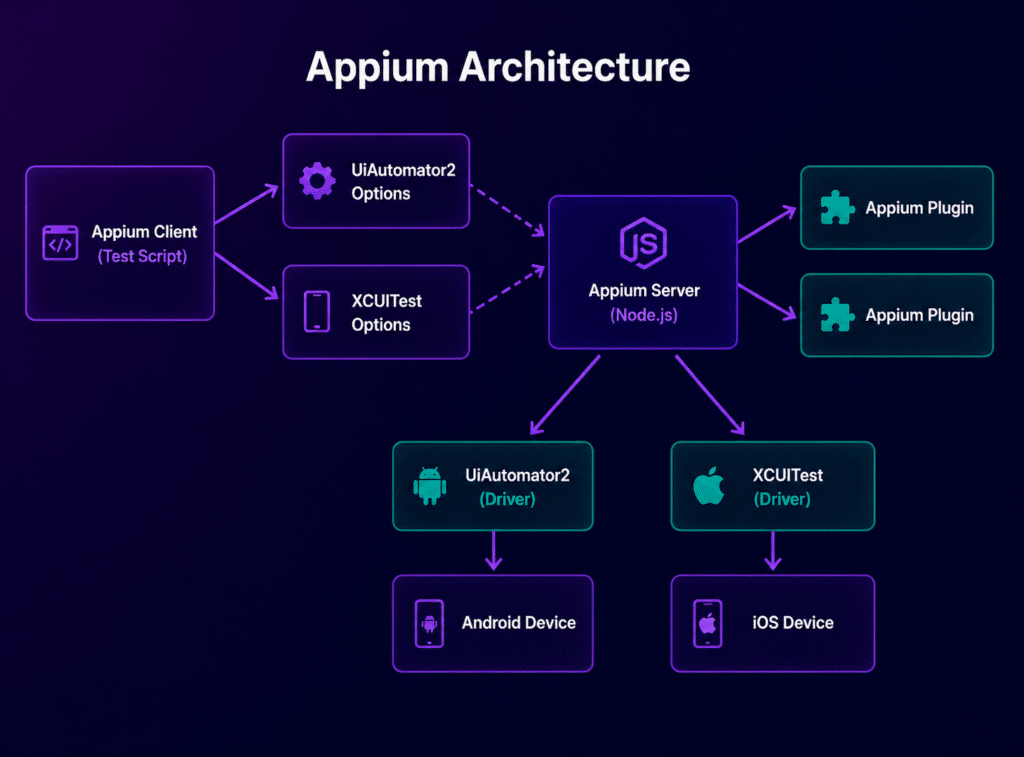
Before diving into scalable scripts, it’s essential to understand how Appium interacts with mobile applications.
Appium operates by identifying UI elements and performing actions such as tapping, swiping, or entering text. The quality of script generation is highly influenced by the following factors:
- Locator strategy
- Test architecture design
- Synchronization handling
- Reusability of components
- Device execution strategy
According to industry best practices, unstable locators and poor script structure are the primary causes of automation failures, rather than Appium itself.
2. Core Principles for Appium Script Generation
2.1 Use a Stable Locator Strategy First
Locator design is the backbone of any successful Appium script.
Here is the recommended priority for selecting locators:
- Accessibility ID
- Resource ID (Android)
- Class Name (use sparingly)
- XPath (use as a last resort)
Avoid overusing XPath, as it can increase execution time and is prone to breaking with UI changes.
Best Practice Rule: If a locator cannot withstand a UI redesign, it should not be used in core automation scripts.
2.2 Build Scripts Using Page Object Model (POM)
The Page Object Model (POM) is a design pattern that separates test logic from UI structure.
Structure:
- Pages: Contains UI locators and actions.
- Tests: Contains business flow logic.
- Utilities: Reusable helper functions.
Benefits:
- Reduced duplication
- Easier updates to locators
- Cleaner, more readable tests
- Faster onboarding for new engineers
The common practice is to keep UI interaction logic within page classes, rather than embedding it in the test cases.
2.3 Keep Script Generation Modular
To build scalable frameworks, avoid creating monolithic scripts.
Recommended modular breakdown:
- Driver Factory: Manages session initialization
- Page Objects: Represent the UI layer
- Action Layer: Encapsulates reusable UI interactions
- Test Layer: Contains business logic scenarios
- Data Layer: Manages test inputs
This structure allows independent updates without affecting the entire test suite.
3. Designing a Scalable Script Generation Strategy
3.1 Separate Business Logic from UI Logic
A scalable Appium script should clearly separate business logic from UI interactions.
Bad approach:
- Hardcoded login steps across multiple tests
Good approach:
- LoginPage.login() – This method is reusable across all test cases.
3.2 Standardize Naming Conventions
Consistency in naming makes the code easier to read and maintain.
Recommended naming patterns:
- loginButton
- submitOrderButton
- enterEmailField
- ProductPage.selectItem()
Avoid using generic names such as button1 or textFieldA.
3.3 Use Data-Driven Script Generation
Data-driven design helps separate test logic from input data.
Examples:
- JSON-based test inputs
- CSV-driven test execution
- External configuration files
Benefits:
- Fewer duplicate scripts
- Easier to expand test coverage
- Better integration with CI/CD pipelines
4. Reducing Flaky Behavior in Generated Scripts
Flaky tests are a significant challenge in Appium automation.
4.1 Use Smart Wait Strategies
Avoid using fixed waits (e.g., Thread.sleep()).
Recommended approaches:
- Explicit Waits
- Fluent Waits
- Element visibility checks
These strategies improve test stability across different devices and performance levels.
4.2 Avoid Over-reliance on XPath
Use XPath only when other, more stable locators are not available.
Problems with XPath:
- Slow execution
- Breaks easily with UI changes
- Difficult to maintain in large test suites
4.3 Handle Device Variability
Appium scripts should support:
- Different screen sizes
- Various OS versions
- Device performance differences
Conditional logic should be used sparingly, not as a default design approach.
5. Parallel Execution Strategy for Scalability
Scalable Appium script generation must support parallel execution.
Key techniques:
- TestNG or JUnit parallel runners
- Device farm integration
- Cloud execution platforms like Kobiton
Benefits:
- Faster regression cycles
- Early identification of device-specific issues
- More efficient CI/CD pipelines
6. Reusable Component-Based Script Design
Instead of duplicating common workflows, create reusable components:
Examples:
- Login Component
- Checkout Component
- Navigation Component
Each component should:
- Encapsulate UI interactions
- Expose simple, clear methods
- Hide locator details
This reduces duplication across a large automation suite.
7. Integrating Appium Script Generation with CI/CD
A scalable framework needs to integrate with CI/CD pipelines seamlessly.
Recommended setup:
- Trigger tests on code commits
- Run a smoke suite on pull requests
- Execute a full regression suite nightly
- Automatically publish logs and reports
This setup ensures rapid feedback loops and stable releases.
8. Common Mistakes in Appium Script Generation
Avoid these practices:
- Hardcoded waits (Thread.sleep)
- Mixing UI and business logic
- Overuse of XPath
- Duplicate locator definitions
- Lack of central driver management
- Failure to reuse page objects
These issues directly contribute to increased maintenance costs and instability.
9. Recommended Framework Architecture
A scalable Appium framework structure might look like this:
/base
  DriverFactory
/pages
  LoginPage
  HomePage
/tests
  LoginTest
  CheckoutTest
/utils
  WaitHelper
/data
  testData.json
/config
capabilities.jsonThis structure supports clean, efficient script generation and promotes long-term scalability.
10. Final Thoughts
Effective Appium script generation is about more than just writing automation tests—it’s about building a system that adapts as your mobile application evolves.
A robust framework is based on:
- Reliable locator strategies
- A well-structured Page Object Model
- Modular design
- Data-driven test generation
- Readiness for parallel execution
When applied consistently, these principles make mobile automation predictable, scalable, and easier to manage, even across large teams.