
Apr 2, 2026
Real Devices vs Emulators: Why Mobile App Testing Still Needs Physical Devices
Tiffany Smith
Read More
You’ve decided to build a mobile device testing lab. You finally have a fleet of devices dedicated to testing your app across different environments.
Then the next challenge appears: Which specific devices should you test first?
Modern mobile ecosystems contain thousands of device models, operating system versions, and hardware configurations. Even well-equipped device labs cannot realistically run every test across every device for every build, so teams must carefully evaluate multiple devices to optimize coverage.
So the question becomes not just what to test, but what to prioritize.
In this guide, we’ll explore how mobile teams prioritize devices for testing and how a thoughtful approach helps balance coverage, efficiency, and real-world reliability.
By focusing on the devices most likely to expose issues, teams can uncover critical problems earlier without dramatically increasing testing time.
In our previous article on choosing devices for mobile testing, we discussed how teams build a balanced set of devices for their testing environments. But even with the right devices in place, it’s not practical to test everything on all of them all the time.
This is where deciding how to prioritize devices will save your team hours of guesswork.
Testing is always constrained by time, resources, and release schedules; teams need to decide where to focus their efforts, especially as applications grow and testing requirements expand.
As discussed in our article on mobile device fragmentation, apps can behave very differently across device configurations, even within the same brand or generation. Not all devices carry the same testing value.
Without prioritization, testing becomes scattered and frankly exhausting to keep track of. With it, teams can focus on development and on identifying the areas where issues are most likely to arise.
With thousands of possible device combinations, prioritization can feel overwhelming. Fortunately, most teams rely on a few proven strategies to guide their approach.
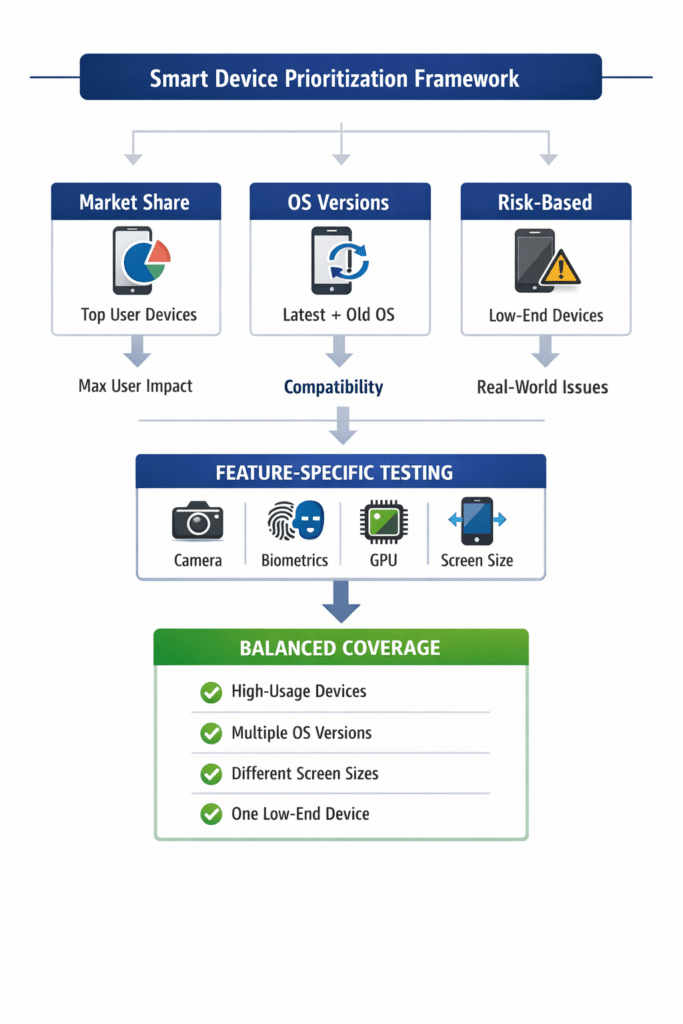
Start with the devices your users actually use.
Testing high-usage devices first ensures that the majority of your user base has a stable experience. It’s the fastest way to reduce real-world risk.
Usage data from analytics platforms or market reports can help identify which devices are most common. In many cases, this means prioritizing popular iPhone models alongside widely used Android devices.
If your app works well on the devices people use most, you’ve already covered a large portion of your risk surface.
Devices alone are only part of the picture. Operating system versions introduce another layer of variability.
Newer OS versions can introduce breaking changes. Older versions remain relevant because many users delay updates or rely on legacy behavior.
Prioritizing both ends of this spectrum helps teams catch compatibility issues early.
This is especially important in Android environments, where OS fragmentation is more pronounced due to manufacturer customization and slower adoption cycles. iOS tends to be more uniform, but version-specific issues can still appear, particularly around permissions and system behaviors.
Some devices are more likely to expose issues than others.
Lower-performance devices, older hardware, and uncommon screen sizes tend to operate closer to real-world constraints. Because of this, they often surface problems earlier than newer, high-end devices.
These devices can reveal:
● performance bottlenecks
● layout issues
● edge-case failures
Testing against these constraints helps teams identify weaknesses before users encounter them.
Some features depend heavily on hardware, which means not all devices will test them equally.
When validating these features, it’s important to test across variations, not just the most advanced devices.
For example:
● camera functionality can vary across different camera systems
● biometric authentication differs between fingerprint and facial recognition
● graphics performance depends on GPU capability
● screen resolution affects layout and rendering
Testing across these differences ensures features behave consistently across real-world devices.
No single strategy is enough on its own.
Most teams combine multiple approaches to build a balanced testing strategy.
A typical approach includes:
● devices with high market share
● multiple operating system versions
● a range of screen sizes and form factors
● at least one lower-performance device
The goal is not to test every single configuration. It is to cover the most meaningful parts of the device landscape.
Teams focus on representative coverage and expand testing as needed, instead of chasing possible edge cases too early.
Device labs make it easier to apply these strategies in practice.
Instead of relying on a limited set of local devices, teams can adjust their testing coverage as needs change. Devices can be added, removed, or deprioritized based on user trends, release risk, or feature requirements.
Teams can:
● run automated tests across selected devices
● test on multiple devices simultaneously
● access both real devices and virtual environments
● collect logs and performance data for troubleshooting
This flexibility allows teams to scale testing without losing focus.
Platforms like Kobiton provide access to real devices alongside virtual environments, making it easier to maintain a targeted, adaptable testing strategy.
Device prioritization is not about testing every possible device. It is about focusing on the devices that provide the most insight.
By selecting devices based on usage, risk, and technical variation, teams can identify issues earlier, reduce unnecessary testing effort, and deliver more reliable mobile experiences.
A strong prioritization strategy turns a large device pool into a focused, effective testing system.