Regression testing is where manual QA hits its ceiling first. Every release re-checks the same critical flows, on more devices, under tighter deadlines , and manual effort simply doesn’t scale to match. This guide walks through a practical mobile app automation testing flow for moving your regression suite from manual to automated, without breaking the coverage you already trust.
It’s written for QA engineers and mobile teams who have a working manual regression process and want to automate it deliberately ,not rip it out and start over.
Why Manual Regression Breaks Down
Manual regression works fine early on. A tester runs through login, checkout, search, and settings before each release, and that’s enough. The trouble starts as the app and its audience grow.
- It doesn’t scale with the device matrix. One tester can realistically cover a handful of devices. Your users run dozens of OS versions, screen sizes, and manufacturer skins. The gap between “what we tested” and “what users have” widens every release.
- It’s slow and repetitive. Running the same 80-case regression pass by hand takes hours or days. That time is spent re-verifying things that didn’t change, instead of exploring what did.
- It’s inconsistent. Humans skip steps, misread results, and tire near the end of a long pass. The same test run twice can produce different outcomes.
- It becomes the release bottleneck. When regression is manual, “are we done testing?” gates every release , and the answer is always “not yet.”
Automation doesn’t replace testers. It takes the repetitive, high-frequency checks off their plate so they can focus on exploratory testing, usability, and the genuinely new risk in each release.
What to Automate First (and What to Keep Manual)
The biggest mistake teams make is trying to automate everything at once. Automated regression testing pays off when you target the right cases in the right order.
Automate first:
- Business-critical flows : login, registration, checkout, subscription, anything that blocks revenue or activation.
- High-frequency checks : cases you run every single release.
- Stable UI : screens that don’t change much, so the tests don’t need constant rework.
Keep manual (for now):
- Volatile, early-stage features where the UI is still shifting : automating them means rewriting tests weekly.
- Exploratory and usability testing : judgment-based work automation can’t replace.
- One-off or rarely-run checks where the maintenance cost outweighs the benefit.
A test that runs hundreds of times across builds and devices quickly justifies the effort to automate it. A feature experiment that might be gone next sprint does not.
The Mobile App Automation Testing Flow (Step by Step)
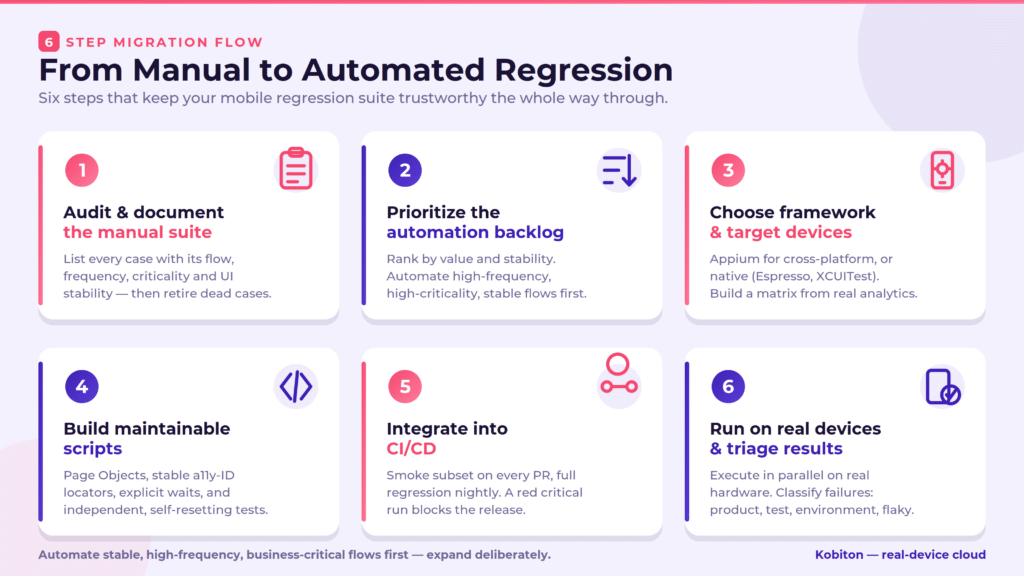
Here’s the step-by-step migration flow. Each step builds on the last, so the suite stays trustworthy the whole way through.
Step 1 : Audit and document the manual suite
Start with what you already have. List every case in your manual regression pass, and for each one capture: the flow it covers, how often it runs, how business-critical it is, and how stable the UI is. This inventory is your automation backlog ,and it usually reveals redundant or obsolete cases you can retire before writing a single line of code.
Step 2 : Prioritize the automation backlog
Rank the audited cases by value and stability. High-frequency, high-criticality, stable flows go to the top. Automate those first to get fast wins and build confidence. Defer volatile or low-value cases. Resist the urge to automate in the order the cases happen to be written , automate in the order that returns the most risk reduction per hour of effort.
Step 3 : Choose your framework and target devices
Pick the mobile app automation testing framework that fits your platforms and team ownership — Appium for cross-platform (Android + iOS) coverage, or native frameworks (Espresso, XCUITest) when developers own the tests. Then define a prioritized device matrix based on your real user analytics: the devices and OS versions your customers actually run, plus your minimum supported versions. You don’t need every device , you need the ones that represent real risk.
Step 4 : Build maintainable scripts
This is where regression suites live or die. Automated tests that are hard to maintain get abandoned. Build in maintainability from the start:
- Use the Page Object pattern so tests read as intent (login_page.sign_in(user)) and locators live in one place.
- Prefer stable locators : accessibility IDs over brittle XPath. Ask developers to add them; it improves accessibility too.
- Use explicit waits, never hard-coded sleeps. Timing-based flakiness is the number-one reason teams stop trusting their regression suite.
- Keep tests independent. Each test resets its own state; no test depends on data another test created.
Step 5 : Integrate into CI/CD
Automation only pays off when it runs automatically. Wire the suite into your continuous integration / continuous delivery (CI/CD) pipeline: a fast smoke subset on every pull request, the broader regression suite nightly or before release. Define what happens when a critical test fails — a red regression run should block the release, not get waved through.
Step 6 : Run on real devices and triage results
Run the regression suite against your real-device matrix, in parallel to keep feedback fast. Real hardware surfaces gesture, sensor, biometric, and OS-specific bugs that emulators miss. When a test fails, capture enough to act , device model, OS version, app build, logs, screenshots, video , and classify each failure as a product defect, a test defect, an environment issue, or a known flaky test. Without triage discipline, teams stop trusting the results and quietly drift back to manual.
Manual vs Automated Mobile Regression Testing at a Glance
| Dimension | Manual regression | Automated regression |
|---|---|---|
| Speed | Hours to days per pass | Minutes to hours, in parallel |
| Device coverage | A few devices | Dozens, across a real-device matrix |
| Consistency | Varies by tester and fatigue | Identical every run |
| Cost over time | Grows with every release | High upfront, low per-run |
| Best used for | Exploratory, usability, new features | Repetitive, stable, high-frequency flows |
| Release impact | Bottleneck | CI-gated safety net |
The goal isn’t to eliminate manual testing , it’s to move the repetitive regression load to automation so human testers do higher-value work.
Common Pitfalls to Avoid
- Automating everything at once. Start with high-value, stable flows; expand deliberately.
- Ignoring flakiness. A flaky suite is worse than no suite , people stop trusting it. Fix timing with explicit waits, isolate tests, and quarantine (with an owner and fix date) rather than ignore.
- Testing only on emulators. Fast for development, but release confidence needs real hardware.
- Skipping CI integration. Tests that only run when someone remembers won’t protect the release.
- Treating test code as second-class. Review it, refactor it, and version it like product code , because that’s what it is.
Measuring Mobile App Automation Testing Success
Track a few metrics to know the migration is working and to decide where to invest next:
- Regression cycle time : how long a full regression pass takes now vs. before automation.
- Automated coverage : the percentage of your regression suite that runs without manual effort.
- Escaped defects : bugs that reach production despite regression; the number that matters most.
- Flaky rate : the percentage of failures that aren’t real defects. Keep it low or the suite loses credibility.
- Device coverage : how much of your prioritized matrix each regression run actually exercises.
Scale Regression Beyond Your Local Machine
The hardest part of automated regression isn’t writing the tests , it’s running them across the device and OS matrix your users actually hold, on every build, fast enough to matter. Maintaining a physical device lab to do that (buying, charging, updating, and replacing hardware) quickly becomes a project of its own.
Kobiton provides a real-device cloud so you can run your automated regression suite across many real Android and iOS devices in parallel, straight from CI , no hardware to manage. You keep your existing test scripts, point them at the cloud, and expand coverage on demand as your device matrix grows.
Frequently Asked Questions
Do you need to automate 100% of your regression suite?
No. Automate the stable, high-frequency, business-critical flows where the payoff is highest, and keep exploratory testing, usability checks, and volatile early-stage features manual. Chasing 100% automation usually means maintaining brittle tests that cost more than they save.
How long does a manual-to-automated migration take?
It’s incremental, not a big-bang rewrite. Start with your highest-value cases and expand the automated regression suite each release. Most teams get meaningful coverage of their top flows within the first few cycles and grow from there.
Should mobile regression run on emulators or real devices?
Use emulators and simulators for fast local development, but run release-gating regression on real devices. Gestures, sensors, biometrics, and manufacturer- and OS-specific bugs only surface reliably on real hardware.
What should you automate first?
The flows that run every release, block revenue or activation, and have a stable UI , login, registration, checkout, and core navigation are typical starting points.
Conclusion
Moving from manual regression to mobile app automation testing is a migration, not a rewrite. Audit what you have, prioritize the high-value stable flows, build maintainable scripts on the right framework and devices, wire them into CI, and run them on real hardware with disciplined triage. Done in that order, you keep the coverage you trust while freeing your team from repetitive regression toil , and every release gets a faster, more consistent safety net.