AI-assisted development is changing how quickly teams can create and update mobile apps. Developers can use tools like Claude Code to generate code, refine logic, explain errors, and work through implementation details inside the same environment where they are already building.
That speed creates a testing challenge. If code moves faster but validation still depends on disconnected tools, delayed handoffs, or limited device access, quality becomes the bottleneck. A team may generate new code quickly, but still need to prove that the app works on real iOS and Android devices, across real screens, system behaviors, permissions, network conditions, and performance limits.
That is where AI mobile test automation becomes useful.
Claude can help teams express test intent, generate or refine automation steps, inspect failures, and stay closer to the feedback loop. Kobiton connects that AI-assisted workflow to real mobile devices, so teams can move from “the agent thinks this should work” to “the test ran, here is the evidence, and here is what happened on the device.”
What test intent means
In AI mobile test automation, test intent is the behavior the user wants to validate.
It is not the same as asking AI to “test the app” or “make sure everything works.” Good test intent gives Claude a clear task, a defined testing path, and a result the team can review.
For example, a vague request might be:
“Test checkout.”
A stronger request would be:
“Run a smoke test on an available Android device. Log in with a test account, add one item to the cart, complete checkout with the test payment method, and confirm that the receipt screen appears.”
That second request gives Claude something specific to work with. It identifies the flow, the device type, the expected behavior, and the result the team wants to inspect.
Test intent can also be operational. A user may ask Claude to check device availability, reserve a device, upload a build, run an existing automation test, review session artifacts, or summarize a failed result. The key is that the request should describe a task that can produce evidence.
The more specific the intent, the easier it is to turn a natural language request into a real-device testing action.
What Claude can help mobile teams do
Claude can support mobile testing by helping teams turn a clear testing goal into a concrete action.
Instead of starting from a blank script or switching between disconnected systems for every step, a developer or tester can keep more of the testing conversation inside the AI workspace where development work is already happening.
This does not mean Claude becomes the complete testing strategy. It means Claude can help reduce friction around common testing tasks.
AI can help teams:
- generate draft test steps from a goal
- create or refine Appium automation
- execute tests on real devices through Kobiton
- inspect screenshots, logs, and session results
- summarize failures
- identify likely next steps
- send results or issues into connected systems
These capabilities are most useful when the task is specific and reviewable. “Test the whole app” is too broad. “Run this smoke test on an available Android device and summarize the result” is much easier to verify.
What Kobiton adds to the Claude workflow
Kobiton connects Claude Code to the Kobiton mobile testing platform through Model Context Protocol, or MCP. With that connection, teams can use natural language commands to manage devices, upload app builds, run tests, and review results without switching between Claude, the Kobiton Portal, and local test scripts.
That workflow matters because mobile testing often requires several separate actions before a team can validate anything. A tester or developer may need to find an available device, upload a build, start a test, wait for execution, review logs, inspect screenshots, and decide what happened. Kobiton makes those actions available through the testing environment the team already depends on, including real devices, app builds, automation execution, session artifacts, and test results.
For example, a user may ask Claude Code to find available Android devices, upload an app build, run an Appium-based smoke test, or summarize the results from a session.
Claude and Kobiton play different roles in this workflow.
Claude is the AI workspace where the user expresses the testing task in natural language. Kobiton is the mobile testing platform that carries out the task on real devices and returns the session results, logs, screenshots, and artifacts.
A user may ask Claude Code to find available Android devices, upload an app build, run an Appium-based smoke test, or summarize the results from a session. Claude helps translate that request into action. Kobiton provides the real-device execution environment and the evidence the team can inspect afterward.
That distinction matters because a prompt is not a test result. A generated test is not proof that the app works. The workflow still has to run against a real app build on a real iOS or Android device.
That is what turns an AI-assisted request into mobile testing evidence.
AI mobile testing workflow: from hypothesis to evidence
Use this workflow to understand how a natural language testing request becomes reviewable mobile test evidence.
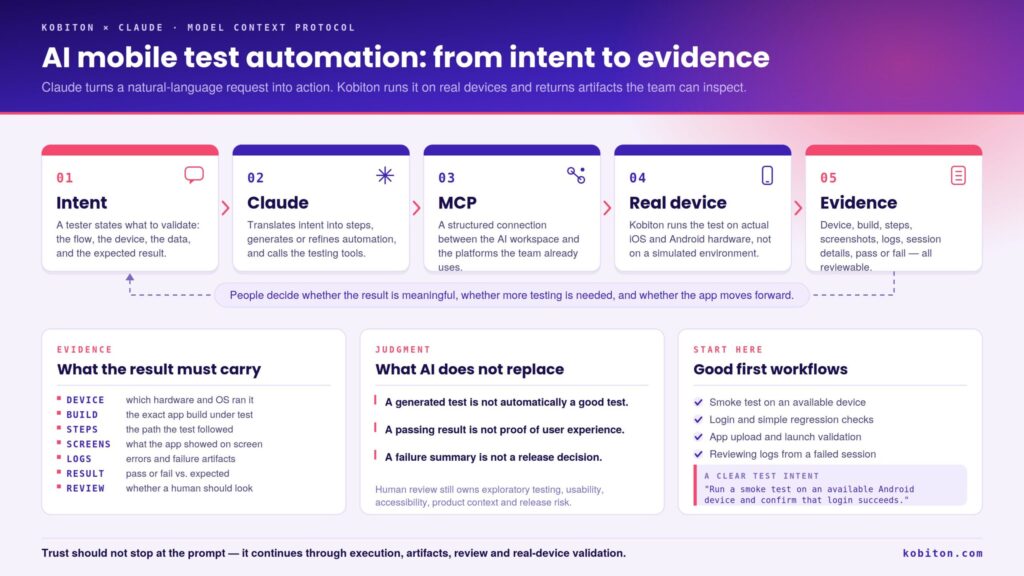
Start with a test hypothesis: the behavior the app should complete under specific conditions. Claude helps translate that intent into test steps or automation logic. Kobiton runs the workflow on a real device. The team reviews the artifacts, results, and context before deciding what to do next.
From test execution to quality evidence
The value of AI mobile test automation is not only that Claude can start or guide a test. The larger value is that the workflow can produce evidence the team can inspect.
That evidence may include the device used, the app build, the test steps, screenshots, logs, session details, pass/fail status, and failure artifacts. Those details matter because mobile quality cannot be judged from a generated answer alone.
A test result should help the team answer practical questions:
- What device did the test run on?
- What build was tested?
- What path did the test follow?
- What did the app show on screen?
- What logs or errors appeared?
- Did the result match the expected behavior?
- Does a human need to review the outcome?
That is where AI-assisted testing becomes more trustworthy. Claude can help move from intent to action, but the team still needs evidence from execution before treating the result as useful.
Why MCP matters for enterprise testing workflows
MCP, or Model Context Protocol, gives AI coding assistants a structured way to connect with external tools. Kobiton uses MCP to connect AI coding assistants such as Claude Code, Claude Desktop, the GitHub Copilot CLI, the Gemini CLI, and the Codex CLI to the Kobiton platform.
For mobile testing, that connection can include device management, app uploads, test execution, and session review. Instead of treating the AI workspace as a separate chat window, MCP allows the assistant to interact with testing tools that are part of the team’s existing workflow.
That matters because enterprise testing rarely lives in one tool. A team may use one set of tools for AI-assisted development, another for test management, another for CI/CD, and another for mobile device access. That environment may include Claude Code, GitHub Copilot, Gemini, Jira, qTest, CI/CD pipelines, Appium frameworks, manual testing workflows, and real-device clouds. Some teams are also experimenting with proprietary AI tools, script migration assistants, or early agentic workflows.
In one enterprise customer conversation, the testing tools owner described a familiar problem: mobile results, web results, automated pipeline results, and manual test results often live in different systems. QA managers then have to collect that information manually before making release decisions.
An MCP-based workflow opens up a different path. A team can use natural language to run mobile tests, inspect results, and send evidence into connected systems when those tools are available through MCP.
This is especially useful for organizations that do not want another isolated testing workspace. The value is in connecting the systems teams already use, so mobile quality evidence can move through the workflow with less manual assembly.
What AI should not replace
AI-assisted testing can reduce repetitive work, but it should not become the final judgment layer.
Claude can help generate steps, run tests, summarize failures, and suggest next actions. Kobiton can provide real-device execution and artifacts. But teams still need people to decide what should be tested, what a good result looks like, whether the test covered the right risk, and whether the outcome is trustworthy.
A generated test is not automatically a good test. A passing result is not automatically proof of user experience. A failure summary is not automatically a release decision.
This boundary matters in shift-left workflows. Engineers may use Claude, Copilot, Gemini, or another AI workspace to run simple regression checks before handing work to QA. That can make early validation easier, but it does not remove the need for testers to review edge cases, usability, accessibility, product context, and release risk.
Final takeaway
AI mobile test automation becomes more useful when it connects intent to evidence. Claude can help teams describe what they want to test, generate or refine automation, inspect results, and keep testing closer to the development workflow. Kobiton connects that work to real mobile devices, so teams can validate app behavior where it actually happens.
That connection is the point. Kobiton’s Claude workflow is not designed to make AI the sole judge of mobile quality. It is designed to keep people, devices, automation, and evidence in the same loop.
A tester or developer can express intent in natural language. Claude can help translate that intent into action. Kobiton can run the workflow on a real device and return artifacts the team can inspect. From there, people decide whether the result is meaningful, whether more testing is needed, and whether the app is ready to move forward.
Trust should not stop at the prompt. It should continue through execution, artifacts, review, and real-device validation.
That is how AI-assisted mobile testing becomes practical: not as a detached agent making quality decisions alone, but as a connected workflow where Claude helps teams work faster, Kobiton provides real-device evidence, and people decide what quality looks like.
FAQ
What is AI mobile test automation with Claude?
AI mobile test automation with Claude uses Claude or Claude Code to help teams describe testing intent, generate or refine automation steps, run tests, inspect results, and continue working closer to the development workflow. With Kobiton, that workflow can connect to real mobile devices so teams can validate behavior on actual iOS and Android hardware.
How does Kobiton connect Claude to mobile testing?
Kobiton connects Claude Code to the Kobiton mobile testing platform through MCP. This allows teams to use natural language commands to manage devices, upload apps, run automation tests, and review results without switching between Claude, the Kobiton Portal, and local test scripts.
What can teams do with Kobiton and Claude?
Teams can use Claude with Kobiton to check device availability, reserve devices, upload app builds, run automation or scriptless tests, and review session results and artifacts. These tasks help teams move from a natural language testing request to real-device execution and reviewable evidence.
What does test intent mean in AI mobile test automation?
Test intent is the behavior the team wants to validate. A good test intent includes the flow, device or device type, test data, expected result, and any important conditions. For example, “Run a smoke test on an available Android device and confirm that login succeeds” is easier to verify than “test the app.”
What is MCP?
MCP, or Model Context Protocol, is a standard way for AI tools to connect with external systems through MCP servers. In mobile testing, MCP can help an AI workspace interact with testing platforms, issue trackers, reporting tools, or other systems in the team’s workflow.
Does Claude replace Appium?
No. Claude does not replace Appium. Claude can help teams create, refine, or interact with Appium-based workflows, but Appium still provides the automation framework and execution model for many mobile testing teams. AI is most useful when it reduces friction inside the existing workflow instead of forcing teams to abandon it.
Why do real devices matter for AI mobile test automation?
Real devices matter because mobile apps behave differently across hardware, operating systems, screen sizes, permissions, network conditions, sensors, keyboards, performance limits, and accessibility settings. AI can help create or run a test, but real-device execution shows whether the app actually behaves correctly under mobile conditions.
Does AI mobile test automation replace manual testing?
No. AI mobile test automation can reduce repetitive work and make some testing tasks easier to start, run, or review. But manual testing and human review are still needed for exploratory testing, usability, accessibility, product context, edge cases, and release judgment.
What are good first workflows to try with Claude and Kobiton?
Good first workflows include smoke tests, login checks, simple regression tests, app upload and launch validation, device availability checks, and reviewing logs or screenshots from a failed session. Teams should start with a specific, bounded task that produces results they can verify.
How should teams evaluate AI-generated mobile test results?
Teams should evaluate AI-generated mobile test results by checking the task scope, input context, execution evidence, device results, logs, screenshots, assertions, and user impact. Treat AI output as a lead until it is supported by reviewable test evidence.