Mobile app performance testing is a set of testing approaches that answer different questions about speed, stability, responsiveness, scalability, and resource use. A single type of test cannot offer the full picture of mobile app performance.
That distinction matters because mobile performance problems can come from many places. A slow checkout flow may be caused by backend latency. A freezing screen may be caused by main-thread work on the device. A poor streaming experience may come from network variability. A crash may only appear on an older device with limited memory. A release may technically work, but still feel slower than the build before it.
Different performance risks require different tests.
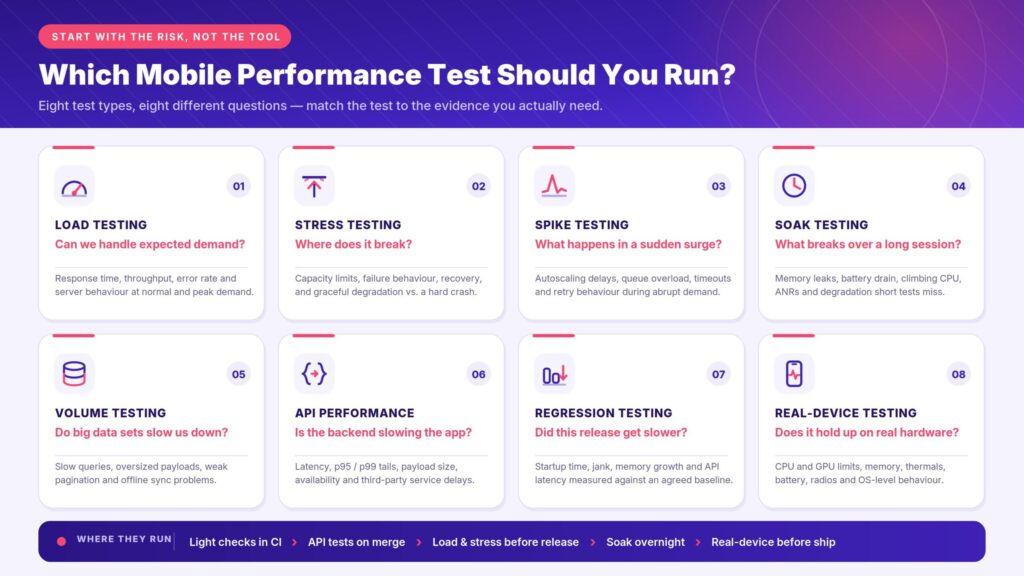
Load testing shows whether the app and its supporting services can handle expected demand. Stress testing finds the breaking point. Spike testing measures sudden traffic surges. Soak testing reveals problems that appear over time. Volume testing checks whether large data sets affect performance. API performance testing shows whether backend calls are slowing the mobile experience. Performance regression testing catches slowdowns between releases. Real-device testing shows whether performance holds up under the hardware, operating systems, networks, battery states, and resource limits users actually experience.
The best way to select a performance test is to choose the test type that can answer the performance question honestly. And sometimes multiple types of tests may be needed to create a holistic picture.
Why mobile performance testing needs more than one approach
Functional testing asks whether a feature works. Performance testing asks whether the feature keeps working quickly, smoothly, and reliably under the conditions users are likely to experience.
For mobile apps, those conditions are complicated. The app does not run in one clean environment. It runs across device models, operating system versions, screen sizes, chipsets, battery states, memory limits, network conditions, and user behaviors. A flow that feels fast on a newer flagship device over office Wi-Fi may feel slow, unstable, or unusable on an older phone over a congested cellular network.
Performance also has more than one signal. Android vitals, for example, tracks app quality metrics related to stability, performance, battery use, and permission issues, with core vitals such as user-perceived crash rate, user-perceived ANR rate, and excessive partial wake locks.
Those signals are not theoretical. Android ANR documentation explains that ANRs happen when the app’s main thread cannot process user input events or draw the UI, which creates user frustration. Android also tracks slow rendering and frozen frames because missed frame deadlines can cause skipped frames, visible stutter, and moments where the app appears stuck or unresponsive.
Apple’s performance guidance makes a similar point from the iOS side. MetricKit collects performance data from real devices running an app, including CPU usage, memory consumption, network activity, launch time, disk I/O, and other metrics that show how the app behaves outside the developer’s controlled environment.
A complete mobile performance testing strategy needs to account for that whole system: the app, the device, the network, the backend, and the release process around them.
Start with the performance risk, not the tool
A common mistake is to start with the tool or the test type before defining the risk.
That leads to vague plans like “we need performance testing” or “we need load testing,” even when the real question is more specific:
- Can the backend handle peak demand?
- Where does the app break?
- What happens if traffic spikes suddenly?
- Does the app degrade during long sessions?
- Did the latest release make startup slower?
- Are API calls causing slow screen transitions?
- Does the app behave differently on older devices?
- Can performance checks run often enough to catch regressions before release?
Each question points to a different testing approach.
Grafana’s k6 documentation frames performance testing automation as a repeatable and consistent process that checks reliability issues at different stages of the development and release cycle. It also notes that not all performance tests belong only in CI/CD or only as pass/fail release gates. Some tests may run in CI/CD, some may run on a schedule, and some may still be triggered manually as part of a release process.
That is a useful mindset for mobile performance testing strategy. The first step is not choosing a tool; the true first step is defining what the test needs to prove.
Quick guide: which mobile performance test should you run?
| If you need to know… | Use this test type | What it helps reveal |
| Whether the app can handle expected traffic | Load testing | Response time, throughput, error rate, and backend behavior under normal or peak demand |
| Where the app breaks | Stress testing | Capacity limits, failure behavior, recovery, and graceful degradation |
| What happens during sudden traffic surges | Spike testing | Whether the app absorbs abrupt demand without instability |
| What happens over a long session | Soak testing | Memory leaks, battery drain, gradual slowdowns, crashes, and resource exhaustion |
| Whether large data sets slow the app down | Volume testing | Database, API, storage, and processing bottlenecks |
| Whether backend calls are hurting app performance | API performance testing | Latency, response time, throughput, availability, and error rates |
| Whether a release made performance worse | Performance regression testing | Slower startup, jank, memory growth, battery drain, or API delays compared with a baseline |
| Whether performance holds up on real mobile hardware | Real-device performance testing | Device-specific behavior across OS versions, memory, battery, network, rendering, and thermal conditions |
| Whether performance checks should block or warn on builds | CI/CD performance testing | Regressions, trend changes, threshold violations, and slow drift across releases |
Use this table is a helpful starting point for choosing the right test for the risk in front of you.
Choose the Test by the Question
Use this handy widget to determine the best testing strategy for your needs.
Start with the performance risk, then choose the test type that can produce the right evidence.
Choose the test by the question
Select the question your team needs to answer. Each card shows the matching test type, the load profile it runs, and the evidence it produces.
No questions in this group. Pick another filter.
Pair it with
Load testing: can the app handle expected demand?
Load testing measures how an app and its supporting services behave under expected traffic or peak traffic. It is useful when the team needs to know whether the app can support normal user activity, a planned launch, a seasonal peak, or a known business event.
For mobile apps, load testing often focuses on the backend and API layer. The mobile client may only have one user on one device, but that user’s actions depend on services that may be handling thousands or millions of requests. A login flow, search screen, payment step, content feed, or booking path can all slow down if the backend cannot keep up.
Load testing helps teams measure signals such as:
- response time
- request throughput
- error rate
- API latency
- server resource use
- transaction success rate
- behavior under expected peak demand
Load testing is not the same as testing every part of mobile performance. A load test can show that an API handles expected traffic, but it does not prove that the app feels responsive on a mid-range Android device, preserves battery life during a long session, or scrolls smoothly while rendering a complex screen. That is why load testing is useful, but not sufficient on its own.
In one customer conversation, a team described running weekly performance tests with JMeter while continuing to build out automation coverage for a frequently used sanity suite. CI/CD integration was a future goal, but the team first needed enough stable automation and test data to make continuous performance checks useful. That pattern is common. Load testing may begin as a separate performance practice before it becomes part of a broader automated pipeline.
Stress testing: where does the app break?
Stress testing pushes the system beyond normal operating conditions to find its breaking point.
Load testing asks, “Can the app handle the demand we expect?” Stress testing asks, “How far can the app go, what fails first, and how well does it recover?”
Grafana k6 stress testing documentation describes stress testing as assessing how the system performs when loads are heavier than usual.
For mobile apps, stress testing may involve both the backend and the device. A backend service may reach a throughput limit. A database may become the bottleneck. A third-party service may time out. The mobile app may also encounter memory pressure, ANRs, freezes, battery drain, or network recovery problems during sustained strain.
Stress testing is especially useful before events that may push usage beyond normal patterns, such as:
- major product launches
- flash sales
- ticket drops
- seasonal traffic peaks
- marketing campaigns
- viral moments
- high-volume onboarding periods
- major app updates
The goal is to understand how the app fails and whether that failure is controlled. A good stress test helps the team find the difference between graceful degradation and a hard crash. There should not exist the expectation that the app will never fail. Everything has a limit.
Graceful degradation might mean the app queues non-essential work, shows a fallback state, slows down non-critical features, retries safely, or recovers when load returns to normal. A hard crash means the system stops responding, corrupts state, loses user progress, or requires manual intervention to recover.
For some mobile teams, stress testing is not limited to backend traffic. In one testing conversation, a team described scenarios involving automated calls, SMS, MMS, browser tabs, downloads, and email activity on real devices. Their goal was to stress the device and network behavior directly, then measure which events completed successfully. That kind of scenario shows why mobile stress testing sometimes needs to exercise the device, operating system, and network conditions, not only the app’s API layer.
Spike testing: what happens during sudden traffic surges?
Spike testing measures how the system behaves when demand rises suddenly.
A spike test is different from an ordinary load test because the change is abrupt. Instead of gradually increasing traffic to a known peak, the test simulates a sudden surge. Grafana k6 spike testing documentation describes spike testing as verifying whether a system survives and performs under sudden and massive rushes of utilization.
Spike testing is useful when the app may experience rapid, short-lived demand, such as:
- push notification campaigns
- flash sales
- ticketing windows
- streaming premieres
- food delivery rushes
- breaking news events
- live sports moments
- viral social traffic
The performance question becomes whether the app can handle the speed of the change.
Spike testing can reveal problems such as:
- sudden API latency increases
- queue overload
- autoscaling delays
- timeouts
- failed transactions
- overloaded third-party services
- poor retry behavior
- degraded mobile client responsiveness
For mobile teams, spike testing should also consider what users see when the backend is strained. Does the app show a useful loading or retry state? Does it prevent duplicate actions? Does it preserve user input? Does it recover when the system stabilizes?
A spike test that only measures server metrics may miss the part the user experiences.
Soak testing: what happens during long sessions?
Soak testing, also called endurance testing, measures how the app behaves over an extended period.
Some performance problems do not appear in a short test. Memory leaks, gradual battery drain, increasing CPU use, accumulating network retries, growing local storage, and slow degradation often need time to surface.
Grafana k6 soak testing documentation describes soak testing as focusing on extended periods to analyze performance degradation, resource consumption, availability, and stability over time.
Soak testing is useful for apps where users may stay active for long periods or return repeatedly during a session, such as:
- streaming apps
- gaming apps
- navigation apps
- communication apps
- retail or delivery apps during busy periods
- enterprise field apps
- health, fitness, or monitoring apps
- apps with background activity or sync behavior
Mobile soak testing should watch more than response time. It should also track device-side resource behavior, including memory, CPU, battery, crashes, ANRs, and rendering smoothness.
A long session that starts smoothly can still become a poor user experience if memory climbs steadily, the device heats up, battery drains quickly, or the app becomes less responsive over time.
Volume testing: can the app handle large data sets?
Volume testing measures how the app and backend behave when they process large amounts of data.
This may include large databases, long lists, large media libraries, high message counts, extensive transaction histories, large search results, or high data volumes moving through the API. For mobile apps, volume testing matters because large data sets can affect both backend performance and client-side behavior.
Volume testing can reveal issues such as:
- slow database queries
- large payloads
- inefficient pagination
- oversized responses
- slow screen rendering
- memory pressure
- app freezes during parsing or rendering
- poor offline sync behavior
- storage growth on the device
A backend may be able to return a large response, but the mobile app may still struggle to parse it, render it, cache it, or keep the UI responsive while processing it. That is why volume testing should consider both service behavior and the mobile client experience.
Volume testing is especially important for apps that handle content libraries, catalogs, transaction histories, messages, maps, analytics, user-generated media, or offline data.
API performance testing: is the backend slowing the app down?
Many mobile performance issues are really API performance issue.
A user taps a button and waits. The screen may be blocked by a slow request, a large payload, a third-party dependency, or multiple API calls that have to complete before the next view becomes usable. From the user’s perspective, the app is slow. The cause may live in the backend.
API performance testing measures whether the app’s service layer responds quickly, reliably, and consistently under realistic conditions.
Useful API performance metrics include:
- response time
- latency
- throughput
- error rate
- availability
- time to first byte
- payload size
- retry behavior
- third-party service delays
- percentile latency, such as p95 or p99
Percentiles matter because averages can hide painful outliers. An average response time may look acceptable even when a meaningful share of users experience long delays. For critical mobile flows, p95 and p99 values often show the real risk more clearly than the average.
API performance testing is useful for flows such as:
- login
- checkout
- search
- payment
- account loading
- content feeds
- booking
- messaging
- media playback setup
- data sync
API testing should not be separated completely from the mobile experience. A backend test can show whether an endpoint handles load, but a mobile test can show whether the user journey remains responsive while those calls happen.
Performance regression testing: did the latest release make the app slower?
Performance regression testing checks whether a new release made the app slower, less stable, or more resource-intensive than before.
This is important because performance regressions are often quiet. The app still works. The screen still loads. The checkout still completes. But startup is slower, scrolling is less smooth, memory use climbs, battery drains faster, or an API call takes longer than it did in the previous build.
A functional test may pass while a performance regression slips through.
Performance regression testing depends on two things:
- A baseline that shows how the app performed before.
- A threshold or budget that defines how much change is acceptable.
Android benchmarking in CI documentation says teams can run benchmarks in CI to track performance over time and recognize performance regressions or improvements before an app releases. It also strongly recommends running benchmarks on physical Android devices because emulators do not represent a realistic user experience and can produce numbers tied to the host machine rather than the device users actually hold.
Regression testing is useful for monitoring changes to:
- app startup time
- screen load time
- frame rendering and jank
- memory use
- CPU use
- battery drain
- crash rate
- ANR rate
- API latency
- network behavior
- long-session stability
Performance thresholds can also turn regressions into pass/fail signals. Grafana k6 describes thresholds as the pass/fail criteria defined for test metrics.
Not every threshold should automatically block every build. Some may send a warning, fail a release candidate, or run nightly. Some may even only apply to critical flows. The important part is that the team agrees on what “slower” means before the release is already under pressure.
Real-device performance testing: does the app hold up under mobile conditions?
Real-device performance testing measures how the app behaves on physical mobile devices, not only emulators, simulators, or local development machines.
This is significant because many mobile performance problems are tied to hardware and operating-system behavior:
- memory limits
- CPU and GPU differences
- screen rendering behavior
- battery state
- thermal behavior
- OS background restrictions
- device-specific firmware
- network radios
- touch responsiveness
- camera, GPS, Bluetooth, biometrics, and other hardware integrations
Apple’s guidance on analyzing responsiveness issues notes that Apple operating systems support many devices with different hardware capabilities and performance characteristics, and that code performing well on one hardware model can hang on another.
Android’s benchmarking guidance also recommends real devices for performance benchmarks because emulators do not represent a realistic user experience.
Real-device testing should assuredly be included, but teams do not need to test every single device in existence. They merely need a device matrix that reflects real risk.
That may include:
- high-traffic devices from analytics
- older devices still used by customers
- lower-memory devices
- devices with known crash or ANR patterns
- important OS versions
- different screen sizes
- popular Android OEMs
- current and previous iOS generations
- devices tied to critical markets
In one gaming customer conversation, the team described keeping popular devices and “most problematic” devices in house, including devices associated with ANRs and crashes in their monitoring data. They also wanted broader coverage across lower- to mid-spec devices, better iOS automation, improved parallelization, and more visibility into device setup so false positives did not hide the real performance signal.
That is the practical version of real-device strategy: choose devices because they answer a risk, not because they happen to be flashy or new.
CI/CD performance testing: when should performance checks run automatically?
Performance testing becomes more valuable when it happens often enough to catch regressions while the change is still fresh. However, this does not mean every performance test belongs in every pull request.
Mobile performance checks can be layered across the delivery process:
- lightweight startup or smoke checks in CI
- targeted performance checks on critical flows
- API performance tests on merge or release candidates
- load and stress tests before major releases or planned traffic events
- soak tests in nightly or scheduled runs
- real-device regression checks before release
- production monitoring after release
Grafana k6 automated performance testing documentation notes that automation can include CI/CD pipelines, nightly jobs, scheduled runs, manual triggers, and release checklist steps. It also emphasizes that teams should determine the purpose of each test before deciding how often and where to run it.
That is especially important for mobile teams because performance tests can take longer than functional checks and may require controlled devices, networks, and baselines. A practical strategy often separates fast checks from heavier suites.
One customer conversation reflected that reality. The team was running regular performance tests with JMeter and wanted to reach CI/CD eventually, but first needed to finish automating a frequently used sanity suite. CI/CD was the goal, but not the first step. The immediate need was stable automation, better test data, and enough repeatable coverage to make continuous checks useful.
Another customer conversation showed a different CI/CD pressure: turnaround time. A streaming-app team described a previous automation platform that took up to 40 hours to run a regression suite. Their target was closer to a few hours, with parallel execution, real-device support, and device-level metrics such as battery usage and performance data. For that team, the testing strategy had to account for automation speed and result quality, not only test type.
That is a critical performance-testing lesson: a test that returns too late may be technically correct, but operationally useless.
How to combine mobile performance testing approaches
The strongest mobile performance testing strategies combine test types instead of treating them as interchangeable.
A common pattern looks like this:
- Define the critical user journeys.
- Identify the performance risks for each journey.
- Choose the test type that answers each risk.
- Set baseline metrics and thresholds.
- Run lightweight checks early and often.
- Use deeper tests for release candidates, high-risk changes, and scheduled validation.
- Validate critical results on real devices.
- Monitor trends across builds and releases.
- Keep production monitoring in the loop.
- Add regression coverage when performance issues escape.
For example, an ecommerce app might use:
- load testing for expected checkout traffic
- spike testing before a flash sale
- API performance testing for cart and payment calls
- real-device testing for checkout on older Android devices
- performance regression testing for startup and checkout latency
- soak testing for long browsing sessions
- CI/CD checks to catch slowdowns before release
A streaming app might use:
- API performance testing for catalog and playback setup
- real-device testing for playback behavior
- soak testing for long viewing sessions
- network testing for weak or changing connections
- battery and memory checks on older devices
- parallel regression runs to keep feedback time practical
A banking app might use:
- performance regression testing for login and account loading
- API performance testing for transaction history
- real-device testing for biometric and OS-level flows
- spike testing during predictable traffic windows
- CI/CD gates for critical path response times
The right combination depends on the product, the audience, the risk, and the release process.
How Kobiton supports mobile performance testing strategy
A mobile performance testing strategy needs more than a list of test types. Teams also need a way to run tests on the right devices, collect useful evidence, compare results, and repeat checks often enough to catch regressions.
Kobiton supports that strategy by giving teams access to real iOS and Android devices for manual and automated testing. Teams can run tests across device models and operating system versions, review session artifacts, and inspect performance-related data to understand how an app behaves under real mobile conditions.
That matters because different performance tests expose different parts of the system. A backend load test may show whether an API can handle demand, but a real-device session can show whether the mobile experience remains responsive while the app handles that demand. A performance regression check may show that startup time increased, but session details, logs, videos, and device data help teams understand what happened during the run.
Kobiton also supports teams moving performance checks into more repeatable workflows. For teams using Appium or other automation frameworks, automated runs on real devices can help turn performance checks into part of a broader regression and release process. For teams that are still maturing their automation coverage, manual and automated testing can coexist while the team builds toward more continuous validation.
Customer conversations show why that flexibility matters. Some teams are still moving from weekly or manual performance practices toward CI/CD. Others are trying to reduce long regression cycles through parallel execution. Others need better device coverage because their most important performance problems appear on specific device models, older OS versions, or lower-spec hardware. In each case, the testing approach has to match the team’s current maturity and the performance risk they are trying to reduce.
Final takeaway
Performance testing for mobile apps works best when teams choose the test type based on the question they need to answer.
Load testing answers whether the app can handle expected demand. Stress testing finds the breaking point. Spike testing tests sudden surges. Soak testing reveals long-session problems. Volume testing checks data-heavy behavior. API performance testing shows whether backend calls are slowing the app down. Performance regression testing catches slowdowns between releases. Real-device testing shows whether the app holds up under actual mobile hardware, operating system, network, memory, battery, and rendering conditions.
No single test type gives the full picture.
A strong mobile performance testing strategy connects the risks, metrics, test types, devices, and release process into one practical workflow. The point is not to run more tests for the sake of it. The point is to run the test that can expose the failure before users do.
Frequently Asked Questions
What is mobile performance testing?
Mobile performance testing measures how a mobile app behaves under different conditions, including expected traffic, heavy demand, long sessions, large data sets, changing networks, and different devices. It helps teams evaluate whether the app stays fast, stable, responsive, and usable before performance issues reach users.
What is the difference between performance testing and load testing?
Performance testing is the broader category. It includes any testing that measures speed, stability, scalability, responsiveness, resource use, or reliability.
Load testing is one type of performance testing. It checks whether an app and its supporting systems can handle expected user activity or peak traffic.
What are the main types of mobile performance testing?
Common types of mobile performance testing include load testing, stress testing, spike testing, soak testing, volume testing, API performance testing, performance regression testing, and real-device performance testing. Each type answers a different question about how the app behaves under demand, over time, across releases, or on actual mobile devices.
How do I choose the right mobile performance test?
Start with the risk you need to understand. Use load testing for expected demand, stress testing for breaking points, spike testing for sudden traffic surges, soak testing for long-session problems, volume testing for large data sets, API performance testing for backend latency, regression testing for release-over-release slowdowns, and real-device testing for device-specific behavior.
When should I use load testing for a mobile app?
Use load testing when you need to know whether the app and backend can support normal or expected peak usage. It is especially useful before launches, campaigns, seasonal traffic windows, or any event where user volume may increase in a predictable way.
When should I use stress testing?
Use stress testing when you need to find the point where the app or system starts to fail. Stress testing pushes beyond expected demand to reveal capacity limits, failure behavior, recovery patterns, and whether the app degrades gracefully instead of crashing or becoming unusable.
What is spike testing used for?
Spike testing is used to see how the app handles sudden traffic increases. It is useful for apps that may experience abrupt demand from push notifications, flash sales, ticket drops, breaking news, livestreams, viral moments, or other short bursts of activity.
What is soak testing used for?
Soak testing, also called endurance testing, is used to find problems that appear over time. It can reveal memory leaks, battery drain, gradual slowdowns, resource exhaustion, crashes, ANRs, and stability issues that may not appear during a short test.
What is volume testing for mobile apps?
Volume testing checks how the app and backend handle large amounts of data. It can help reveal slow database queries, oversized API responses, storage problems, memory pressure, slow rendering, or sync issues caused by large data sets.
Why is API performance testing important for mobile apps?
Many mobile performance problems begin in the API layer. Slow API calls, high latency, large payloads, failed requests, or unreliable third-party services can make the mobile app feel slow even when the client-side code works correctly. API performance testing helps teams find and fix those bottlenecks.
What is performance regression testing?
Performance regression testing checks whether a new release made the app slower, less stable, or more resource-intensive than a previous version. It compares current results against a baseline and can track startup time, screen load time, frame rate, memory use, CPU use, battery drain, crash rate, ANRs, and API latency.
Why does mobile performance testing need real devices?
Real devices show performance conditions that emulators and simulators cannot fully reproduce, including actual CPU and GPU behavior, memory limits, battery use, thermal behavior, touch responsiveness, network radios, OS behavior, and device-specific issues. Real-device testing is especially important when performance results need to reflect what users actually experience.
Should mobile performance testing be automated?
Some mobile performance testing should be automated, especially repeatable checks for critical flows, release regressions, API performance, startup time, and performance thresholds. Not every performance test needs to run in every CI/CD pipeline. Longer tests, stress tests, and soak tests may run on schedules, before major releases, or when specific risks require deeper validation.
How does performance testing fit into CI/CD?
Performance testing can fit into CI/CD as layered checks. Lightweight tests can run early to catch obvious regressions, while deeper performance suites can run before release, overnight, or on a schedule. Teams can use thresholds or performance budgets to warn, flag, or block builds when key metrics cross agreed limits.
What is the best mobile performance testing strategy?
The best strategy is to match each performance risk to the test type that can answer it. A strong mobile performance testing strategy usually combines load, stress, spike, soak, volume, API, regression, real-device, and CI/CD checks rather than relying on one test type or one tool.