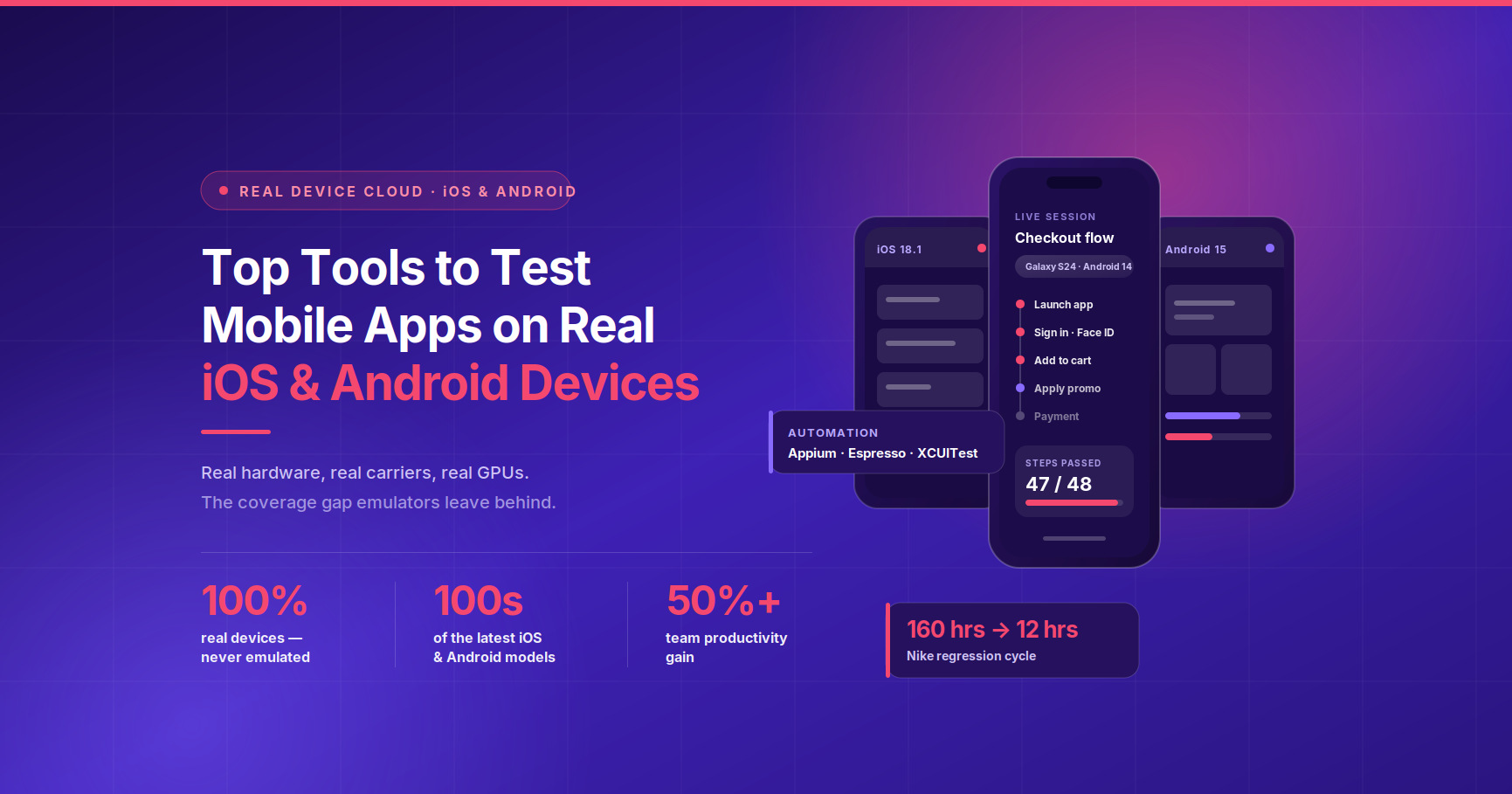
Test your native mobile applications on real iOS and Android devices with Kobiton’s mobile testing platform. Faster device access, AI-assisted test creation, and genuine real-device coverage that emulators can’t replicate.

100% Real devices | 100s of the latest iOS and Android devices | 50%+ team productivity gain
What “real device cloud” means (and why it matters for iOS and Android)
A real device cloud gives your team remote access to physical iOS and Android handsets and tablets that live in a managed data center. You connect through a browser or API, upload your app build, and run manual or automated test sessions on actual hardware, not a software-rendered replica.
That distinction matters more than most teams realize until a production incident proves it. Emulators and simulators are useful for rapid development feedback, but they can’t replicate what a physical device does. They miss GPU rendering differences that cause UI corruption on specific chipsets. They don’t exercise the Secure Enclave required for Face ID and fingerprint flows. They can’t reproduce how a real carrier network degrades during a session, how a physical GPS module responds to location-based features, or how a device behaves when a push notification interrupts an active transaction.
The result is coverage exposure: a gap between what your tests cover and what users actually experience. For teams shipping to a fragmented iOS and Android ecosystem, that gap compounds with every release. An app that passes emulator tests can still fail on the Samsung Galaxy model that represents a significant share of your Android user base, or behave differently on iOS 17.5 versus 18.1 on the same iPhone hardware.
The other pressure is the release grind. AI writes code faster than QA teams can test it. Regression cycles that once took days need to compress to hours. A real device cloud doesn’t just solve the coverage problem; it’s the infrastructure layer that makes compressed, continuous mobile testing possible.
The tools that let you test mobile apps on real iOS and Android devices in the cloud
Several platforms offer real-device cloud access for iOS and Android. They differ significantly in device pool strategy, automation depth, debugging capability, and how well they support enterprise workflows. Here’s a factual comparison to help you shortlist.
| Platform | Device pool model | Automation frameworks | CI/CD integration | Standout capability | Best for |
|---|---|---|---|---|---|
| Kobiton | Public cloud + private/on-prem options | Appium (Java, Python, Node.js, C#), scriptless, AI-assisted script generation | Jenkins, and other major CI/CD tools | AI-powered Appium script generation from manual sessions; no-code replay across devices; Session Explorer for defect diagnosis | Enterprise teams who need real-device coverage AND fast, governed test automation |
| Sauce Labs | Public shared pools + private device pools | Appium, Espresso, XCUITest | Broad CI/CD support | Real Device Access API for programmatic device provisioning; enterprise-grade private pools | Enterprises prioritizing programmable, API-driven device access at scale |
| BrowserStack | Public shared pool (30,000+ devices, 19 data centers) | Appium, Espresso, XCUITest | Broad CI/CD support | Large public device catalog; BrowserStack App Live for manual testing | Teams needing the broadest public device catalog with fast onboarding |
| AWS Device Farm | AWS-hosted real device pool | Appium, Espresso, XCUITest, Calabash | Native AWS CodePipeline integration | Deep AWS-native integration; pay-per-minute model | Teams running AWS-native pipelines who want infrastructure proximity |
| Firebase Test Lab | Google-managed real Android and iOS devices | Robo Test, Espresso, XCUITest | Google Cloud Build integration | Automated Robo crawl without writing tests; tight Firebase/GCP integration | Android-primary teams already in the Google ecosystem |
| LambdaTest | Real device cloud with AI-assisted testing | Appium, Espresso, XCUITest | Broad CI/CD support | HyperExecute for fast parallel execution; AI-generated test cases | Teams looking for parallel execution speed with budget flexibility |
| Perfecto | Enterprise real device cloud | Appium, Espresso, XCUITest, Calabash | Enterprise CI/CD toolchain support | Strong compliance and reporting features; enterprise SLA focus | Regulated industries (finance, healthcare) with strict compliance requirements |
| HeadSpin | Global real device network across multiple countries | Appium | Integrates with CI/CD platforms | Network performance analytics and real-world condition simulation | Teams testing global network performance and latency-sensitive apps |
Every platform in this table provides real iOS and Android devices. Where they diverge is in how much they help you actually get to test coverage fast, diagnose failures clearly, and keep automation running without constant maintenance.
How to choose a real-device cloud tool: a practical checklist
Picking the wrong platform costs more than the subscription fee. A mismatch in device coverage, automation fit, or workflow integration creates friction your team absorbs every sprint.
Device coverage requirements
Start with your user analytics. Which iOS versions, Android OS versions, and specific device models make up 80% of your active user base? Confirm the provider covers those models and that they’re actually available during your primary testing windows, not perpetually reserved by other tenants on a shared pool. Ask specifically about the newest iPhone and Pixel releases, since these are often in highest demand.
Automation framework fit
If your team already writes Appium tests, confirm full Appium support on real devices (not just simulators). If test authoring is the real bottleneck because your QA team can’t keep up with development velocity, look for platforms that offer scriptless replay or AI-assisted script generation. Writing Appium from scratch for every new feature is the fastest path to the manual trap: where testers spend more time maintaining tests than finding defects.
Workflow fit: CI/CD and parallelism
Your test execution needs to fit inside your pipeline, not outside it. Confirm the platform has a documented integration path for your CI/CD toolchain (Jenkins, GitHub Actions, GitLab CI, etc.), supports parallel execution across multiple devices simultaneously, and returns machine-readable results that your pipeline can act on. A platform that requires manual session management defeats the purpose of mobile CI/CD.
Debugging depth
When a test fails on a specific device, the critical question is: “Is it my app, or the test rig?” A platform that gives you video replay, device logs, network traffic capture (HAR export), and CPU/memory metrics during the failed session answers that question in minutes. A platform that gives you a pass/fail result makes it a detective job. Look for session replay with step-by-step navigation and the ability to log defects directly to Jira from the failure context.
Security and compliance
For enterprise teams in regulated industries, ask each provider directly about their data handling practices, deployment options (public cloud vs private cloud vs on-premises), and relevant certifications. Public pools mean your app binary and test data share infrastructure with other tenants. Private pools or on-prem deployments eliminate that exposure. Get specifics in writing before committing.
Operational fit
How long does it take to run your first automated test? A platform that requires weeks of configuration before returning value creates organizational risk. Prioritize providers with clear onboarding documentation, a documented device pool strategy (so you understand what happens when a device is unavailable), and support that engages technically rather than just ticketing issues.
What to do first: run your first real-device test on day one
Getting started on a real-device cloud platform shouldn’t require a professional services engagement. Here’s the high-level flow for your first test:
1. Upload your app build Most platforms accept .ipa (iOS) or .apk/.aab (Android) files directly through a web interface or API. You don’t need a production build; a staging or feature-branch build works for initial validation.
2. Select your target devices For your first session, pick two or three devices that represent your most critical user segments: typically the latest iPhone, one mid-range Android, and one device running an older OS version that still has meaningful traffic.
3. Run a manual session first Before touching automation, run a manual session on each device. Navigate your core user flows. This does two things: it confirms the platform connection is working and your app installs correctly, and it generates a recorded session you can convert to automation later.
4. Export results and log defects Any failures you find during the manual session should go directly to your defect tracker. Platforms with Jira integration and test result collaboration let you file a bug with device details, logs, and session video attached in one click, rather than manually copying context.
5. Replay the session for automation This is where authoring speed changes entirely. Instead of writing Appium scripts from scratch, platforms like Kobiton let you generate Appium scripts directly from a recorded manual session. The manual session becomes the test. You review, adjust assertions, and run it across your device set in parallel.
Common gotchas on day one: flaky automation caused by hardcoded wait times that don’t account for real-device variability; test data that works in your local environment but breaks in the cloud; and app builds that require VPN access to backend services the cloud platform can’t reach. Resolve these in the first week and your pipeline integration will go much smoother.
Why Kobiton for enterprise iOS and Android teams
Test on the devices your users actually hold. That’s the starting point, and it’s also the bar that everything else on this page needs to clear.
For enterprise teams, device access is table stakes. The real differentiation is what happens after you have the device. Most teams discover three friction points that slow them down regardless of which real-device cloud they pick:
The manual trap. Teams that rely on hand-written Appium scripts spend more time maintaining those scripts than running tests. Every UI change breaks locators. Every new feature requires new scripts. The test suite becomes a second codebase that QA owns and developers ignore. Kobiton’s AI-powered Appium script generation converts recorded manual sessions into ready-to-run scripts, cutting the authoring burden significantly and keeping automation current with the product.
The authoring bottleneck. AI writes code faster than QA teams can test it. If your development velocity has increased because of AI-assisted coding tools, your test authoring pipeline needs to match that pace. Scriptless automation lets non-automation engineers contribute to test coverage, and the Kobiton Claude Code plugin lets developers write tests, upload builds, reserve devices, run sessions, and analyze results directly from their IDE without context-switching.
Diagnosis clarity. When a test fails on a Samsung Galaxy S24 running Android 14 but passes on an iPhone 15 running iOS 17, you need to know whether the failure is in your app code, your test script, or the test environment. Kobiton’s Session Explorer gives you step-by-step session replay, device metrics (CPU, memory, network, battery, temperature), and HAR file export so the answer is visible in the session data, not buried in a support ticket.
For teams shipping mission-critical mobile apps in financial services, retail, gaming, or travel, the combination of real-device coverage, fast test authoring, and clear failure diagnosis is what “mobile app testing for the AI era” means in practice.

Mobile First | Accelerate Quality Delivery


Accelerate Quality Delivery

Mobile First | Collaborative Approach


Mobile First | Mobile Gaming

Mobile First | Accelerate Quality Delivery

Frequently asked questions
Can I run Appium tests on real iPhones and Android phones in the cloud?
Yes. Kobiton supports Appium in Java, Python, Node.js, and C#, executed against real physical devices. You connect via standard Appium desired capabilities with a Kobiton endpoint, and your existing scripts run on real hardware without modification in most cases. See the Appium on Kobiton documentation for setup details.
Do real device clouds support CI/CD pipelines?
They do. Kobiton integrates with Jenkins and other major CI/CD platforms, so tests execute automatically on every build without manual session management. Results return in machine-readable format so your pipeline can gate deployments on test outcomes. The mobile CI/CD documentation covers the integration patterns in detail.
How do I transition from emulators to real devices?
The practical path is additive rather than replacement. Start by running your highest-priority regression tests on real devices while keeping emulator tests for fast unit-level feedback. As you find real-device-specific failures (and you will), the business case for expanding real-device coverage builds itself. Kobiton’s real devices vs emulators guide walks through where each approach fits.
What’s the difference between public device pools and private/dedicated pools?
Public pools are shared infrastructure: your tests run on devices that other tenants also use, which lowers cost but means your app binary and test data share the environment. Private or dedicated pools isolate your devices entirely, which matters for regulated industries where data residency and app binary exposure are compliance concerns. On-premises deployment takes isolation further by keeping devices inside your own network. Kobiton supports all three deployment models.
What security considerations should I ask about?
At minimum, ask about data retention policies (how long are session recordings, logs, and app binaries stored?), network isolation (can your devices be isolated from other tenants?), and compliance certifications relevant to your industry. For teams in financial services, healthcare, or government, the answer to these questions should come from the provider’s security documentation, not just a sales conversation.
How does visual testing fit into real-device cloud testing?
Visual testing validates that your app’s UI renders correctly across different device sizes, OS versions, and screen densities. On a real-device cloud, you can run mobile app visual testing as part of your automated regression suite, catching layout regressions that pass functional checks but break the user experience on specific hardware.
What is mobile app testing and why does it matter?
Mobile applications are how your customers navigate, transact, and engage with your product. Testing validates that those flows work correctly across the device fragmentation your users bring to the experience. One in four mobile apps is abandoned after a single poor experience. Real-device testing catches failures that reach users as crashes, broken flows, and incorrect renders before those users make the decision to leave.
Is there a free trial available?
Yes. New teams can start testing for free. Start a free trial to access real iOS and Android devices without a full platform commitment.
Ready to accelerate delivery of your mobile apps?
Test on the devices your users actually hold. From days to hours.